1. Introduktion
Thank you for choosing the electrosmart Android 13 Car Radio. This manual provides detailed instructions for the installation, operation, and maintenance of your new car stereo system. Please read this manual thoroughly before installation and use to ensure proper functionality and to maximize your user experience.
2. Produktet er slutview
The electrosmart Android 13 Car Radio is a 9-inch IPS touch screen car stereo designed for Ford F150 models from 2009 to 2014. It features an Android 13 operating system with 4GB RAM and 64GB ROM, offering smooth performance and ample storage for applications. Key features include wireless Apple CarPlay and Android Auto, GPS navigation, Wi-Fi connectivity, Bluetooth 5.2, steering wheel control support, and backup camera input.
Pakkeindhold:
- 9-inch IPS Touch Screen Car Stereo Unit
- Power Cable (A)
- RCA Cable (B)
- USB-kabel (C)
- Radio Antenna (D)
- GPS Antenna (E)
- Reversing Line (F)
- Mikrofon
- Camera (Optional, if included in package)
- Brugervejledning (dette dokument)

Billede: Overview of the car stereo unit dimensions, included accessories (microphone, camera, power cable, RCA cable, USB cable, radio antenna, GPS antenna, reversing line), and a detailed rear wiring diagram.
3. Kompatibilitet
This car radio is specifically designed for Ford F150 models manufactured between 2009 and 2014. It is compatible with F-150 (STX, XLT, XL) trims.
Vigtig: Denne enhed er ikke kompatibel with original factory navigation systems. It is also ikke kompatibel with F-150 Lariat, FX4, Platinum, or SVT Raptor trims. Please verify your vehicle's trim and existing features before installation.
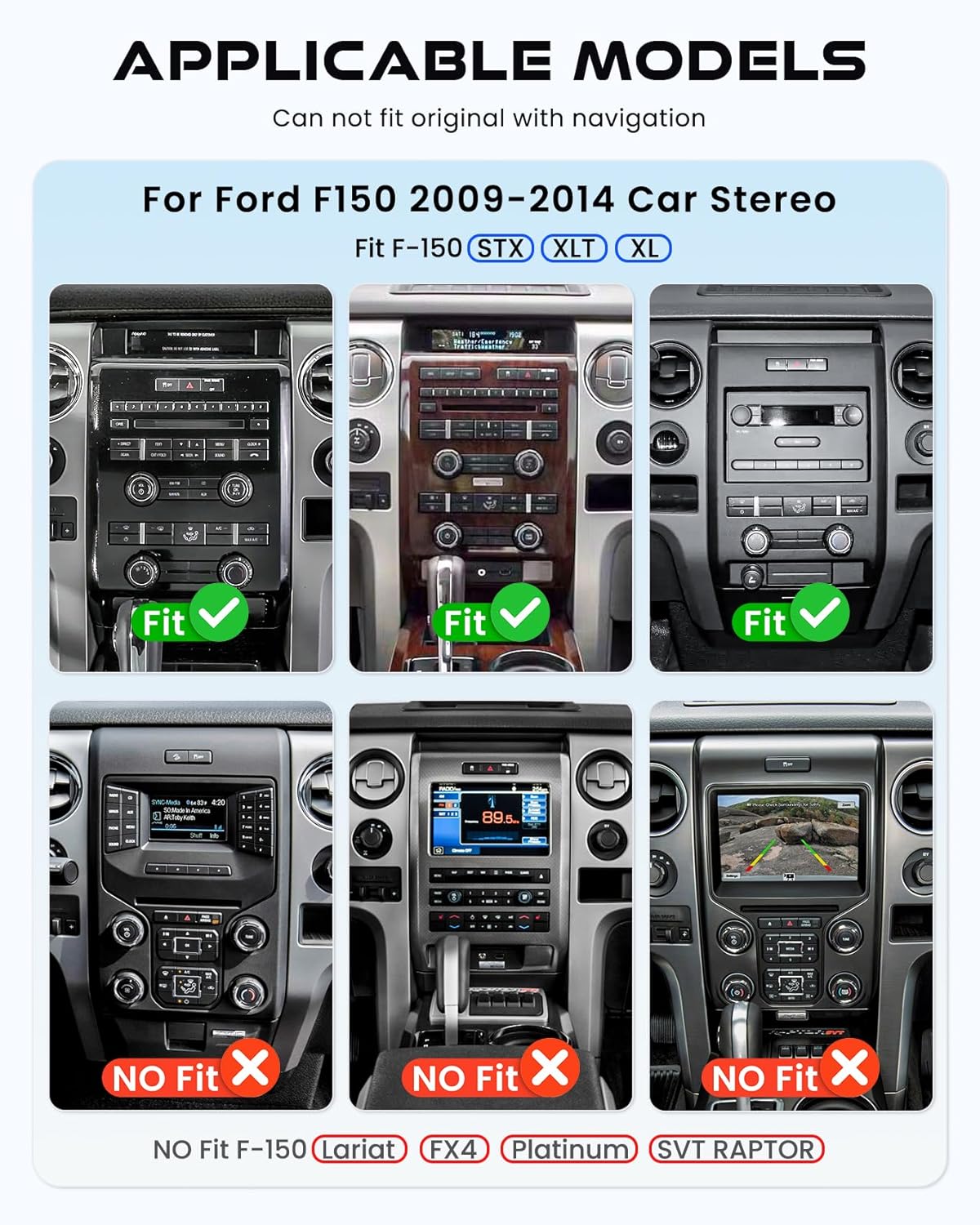
Image: Visual guide indicating compatible (STX, XLT, XL) and incompatible (Lariat, FX4, Platinum, SVT Raptor) Ford F150 dashboard configurations for the 2009-2014 model years.
4. Installation (Opsætning)
Professionel installation anbefales. Sørg for, at køretøjets batteri er frakoblet, inden installationen påbegyndes, for at forhindre elektrisk skade.
Ledningsforbindelser:
- Strømkabel (A): Connect the main power harness to the vehicle's wiring. Ensure all connections are secure and match the vehicle's electrical system.
- RCA Cable (B): Use for external audio/video input/output connections (e.g., amplifiers, external monitors).
- USB Cable (C): Connect for USB devices, such as flash drives or for wired CarPlay/Android Auto.
- Radio Antenna (D): Tilslut køretøjets radioantenne til enheden.
- GPS Antenna (E): Monter GPS-antennen på et sted med frit view af himlen (f.eks. instrumentbrættet, under forruden) og tilslut den til enheden.
- Reversing Line (F): Connect this cable to the vehicle's reverse light trigger and the backup camera input.
- Mikrofon: Tilslut den eksterne mikrofon for forbedret opkaldskvalitet.
- Kamera: If installing a backup camera, connect its video output to the designated camera input on the unit.
After all connections are made, carefully mount the head unit into the dashboard. Reconnect the vehicle's battery and test all functions.
5. Betjeningsvejledning
5.1. Basic System Navigation
The unit operates on Android 13. Navigate through menus and applications using the 9-inch IPS touch screen. Swipe gestures and taps are used for interaction.
5.2. Trådløs Apple CarPlay og Android Auto
Connect your smartphone wirelessly or via USB to access Apple CarPlay or Android Auto. This allows for safe, hands-free access to navigation, music, calls, and messages through voice commands (Siri or Google Assistant).

Image: Displays the car stereo screen showing both Apple CarPlay and Android Auto interfaces, highlighting their integration with smartphone features and voice assistants.
5.3. GPS-navigation
The unit supports both offline and online GPS navigation. It comes with pre-installed offline map files. For online navigation, connect to Wi-Fi and use applications like Google Maps. The GPS antenna ensures accurate positioning.
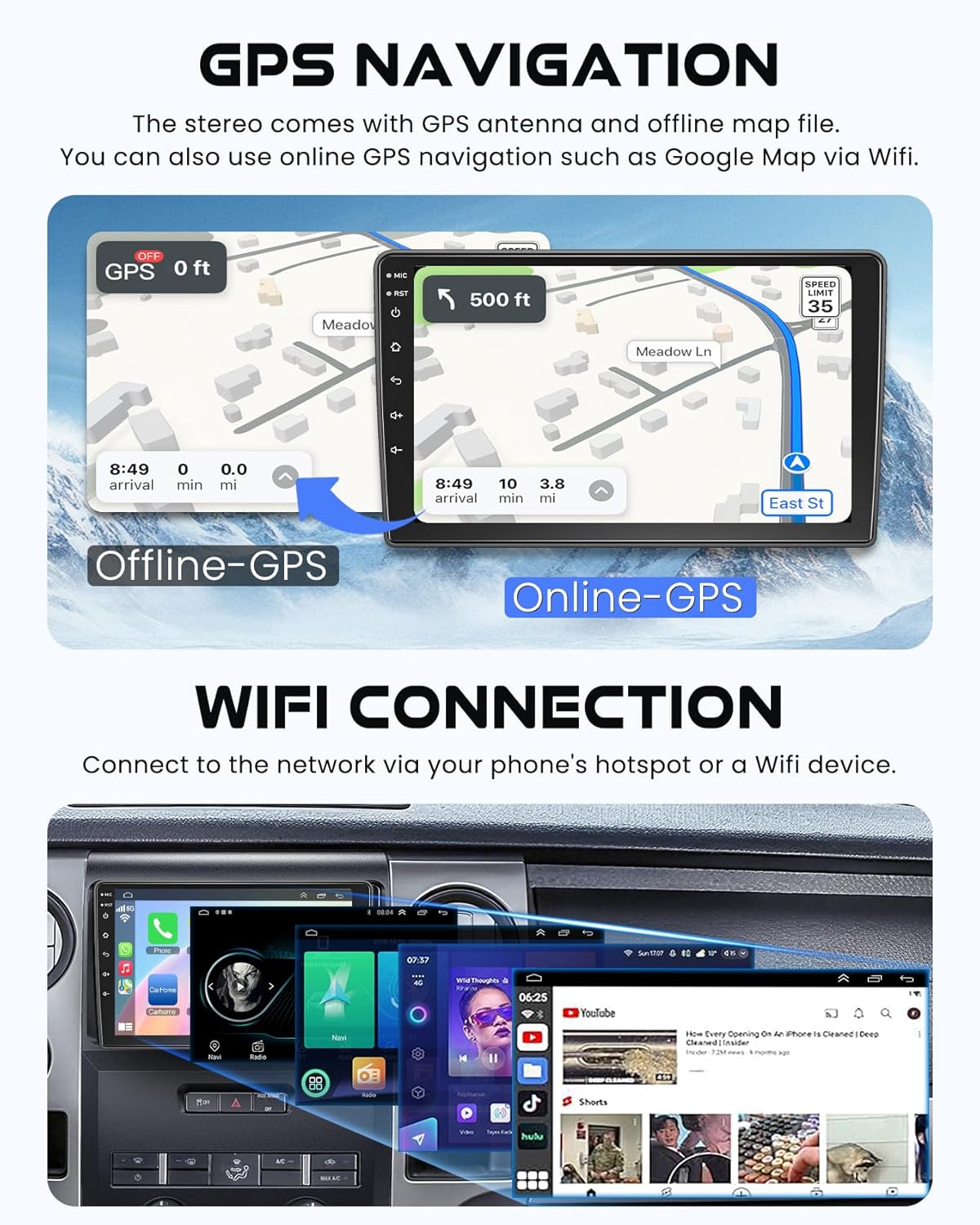
Image: Illustrates the GPS navigation feature, showing both offline map functionality and online map usage via Wi-Fi, along with the Wi-Fi connection screen.
5.4. Bluetooth 5.2
Pair your smartphone via Bluetooth for hands-free calling and wireless audio streaming. Access phone contacts and call history directly from the car stereo.
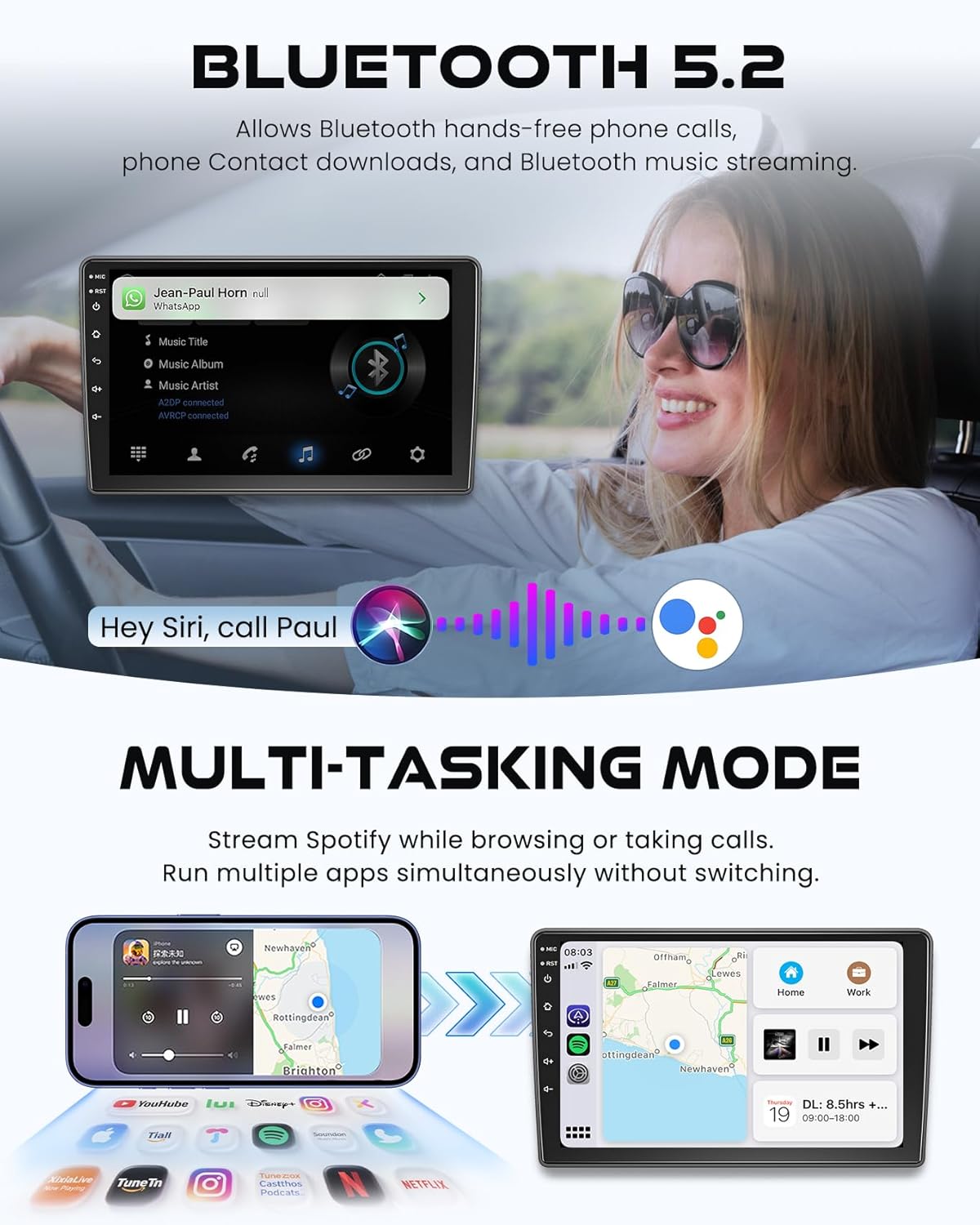
Image: Depicts the Bluetooth 5.2 connectivity for hands-free phone calls and music streaming, alongside a demonstration of the multi-tasking split-screen mode running Spotify and a navigation app simultaneously.
5.5. Multi-Tasking Mode (Split-Screen)
The unit supports split-screen functionality, allowing you to run two applications simultaneously. For example, you can use navigation on one side while playing music or making a call on the other.
5.6. Ratbetjening
The system supports integration with your vehicle's existing steering wheel controls. This allows for convenient and safe operation of audio functions without taking your hands off the wheel. Refer to the system settings for programming steering wheel buttons.

Image: Shows the clear night vision display from a backup camera and the on-screen interface for configuring steering wheel controls.
5.7. Bakkamera
When connected, the backup camera automatically displays a clear, bright image on the screen when the vehicle is shifted into reverse, aiding in safer parking and maneuvering.
5.8. Wi-Fi-forbindelse
Connect the car stereo to a Wi-Fi network or your mobile phone's hotspot to access online features, download apps, stream videos, and use online navigation.
5.9. EQ Settings & FM/RDS Radio
Customize your audio experience with multiple preset EQ settings. Adjust volume, fader, balance, treble, and bass controls. The built-in FM/RDS radio provides clear reception for local stations.
6. Vedligeholdelse
- Rengøring af skærm: Brug en blød, fnugfri klud til at rengøre berøringsskærmen. Brug ikke slibende rengøringsmidler eller opløsningsmidler.
- Softwareopdateringer: Periodically check for system software updates to ensure optimal performance and access to new features. Updates can typically be found through the system settings or the manufacturer's webwebsted.
- Generel pleje: Undgå at udsætte enheden for ekstreme temperaturer, direkte sollys i længere perioder eller for høj fugtighed.
7. Fejlfinding
| Problem | Mulig årsag | Løsning |
|---|---|---|
| Enheden tænder ikke. | Forkert ledningsføring; Sprunget sikring; Bilens batteri afbrudt. | Check power cable connections. Inspect vehicle fuses. Ensure battery is connected. |
| Ingen lyd. | Lydstyrken er for lav; Mute aktiveret; Problem med højttalerledningerne. | Increase volume. Check mute setting. Verify speaker connections. |
| GPS-signal mistet eller unøjagtigt. | GPS-antennen er blokeret eller forkert tilsluttet. | Sørg for, at GPS-antennen har en fri view af himlen og er sikkert forbundet. |
| Bluetooth opretter ikke forbindelse. | Bluetooth off on unit or phone; Pairing mode not active. | Enable Bluetooth on both devices. Put unit in pairing mode and search from phone. |
| Bakkameraet viser ikke. | Camera wiring issue; Reverse trigger not connected. | Check camera video input and reversing line connection. Ensure camera is powered. |
| Touch screen unresponsive or laggy. | System overload; Software glitch. | Restart the unit. If issue persists, perform a factory reset (note: this will erase data). |
If you encounter issues not listed here or require further assistance, please contact electrosmart customer support.
8. Specifikationer
| Feature | Detalje |
|---|---|
| Model | B0FPFK43P2 |
| Operativsystem | Android 13 |
| Hukommelse (RAM) | 4 GB |
| Lager (ROM) | 64 GB |
| Skærmstørrelse | 9 tommer |
| Display Type | IPS berøringsskærm |
| Opløsning | 720*1280 (HD) |
| Forbindelse | Bluetooth 5.2, Wi-Fi |
| Særlige funktioner | Wireless Apple CarPlay, Android Auto, GPS Navigation, EQ, FM Tuner, Hands-Free Calling, Split-Screen Mode, Steering Wheel Control Support, Backup Camera Input, OBD2/DVR/DPS Support |
| Lydudgangstilstand | Stereoanlæg |
| Konfiguration af højttalerens surroundlydkanal | 5.1 |
| Amplifikation | 4*50W |
| Kompatible enheder | Smartphone |
| Varens vægt | 1.93 kilo |
| Pakkedimensioner | 41.71 x 32.28 x 14.5 cm |
9. Garanti og support
This product comes with a standard manufacturer's warranty. For details regarding warranty coverage, duration, and claims, please refer to the warranty card included in your package or contact electrosmart customer support.
For technical support, installation queries, or any other assistance, please contact electrosmart customer service through the contact information provided with your purchase or on the official electrosmart webwebsted.
Returpolitik: Dette produkt er underlagt en 30-dages returret med mulighed for refusion eller ombytning i henhold til sælgers vilkår.