
1. Introduktion
This manual provides detailed instructions for the setup, operation, and maintenance of your Bikevee GPS Wireless Cycling Computer, model BKV300B. Please read this manual thoroughly before using the device to ensure proper function and to maximize your cycling experience.
The Bikevee BKV300B is a 2.4-inch LCD display cycling computer designed to accurately track various cycling data, including speed, distance, and trip time. It features automatic start/stop functionality, an auto-backlight for visibility in varying light conditions, and an IPX7 waterproof rating for reliable performance in diverse weather.
2. Pakkens indhold
Bekræft, at alle nedenstående varer er inkluderet i din pakke:
- Bike Computer (Main Unit)
- USB-C ladekabel
- Out Front Extended Mount
- Sekskantsskrue
- Sekskantnøgle
- Sponge Pads

Image: Contents of the Bikevee GPS Cycling Computer package, including the main unit, charging cable, mount, screw, wrench, and sponge pads.
3. Produktet er slutview
The Bikevee BKV300B is designed for ease of use and comprehensive data tracking. Key features include:
- 2.4 tommer LCD-skærm: Provides clear visibility of cycling data.
- GPS aktiveret: Accurate speed and distance measurement without external sensors.
- Automatisk start/stop: Automatically records ride data when in motion and pauses when stopped.
- Auto baggrundslys: Adjusts display brightness automatically for optimal viewdag eller nat.
- IPX7 Vandtæt: Beskyttet mod midlertidig nedsænkning i vand.
- Lang batterilevetid: Op til 28 timers kontinuerlig brug på en enkelt opladning.

Image: The Bikevee GPS Cycling Computer main unit shown alongside its out-front extended mount.

Image: The Bikevee cycling computer display illustrating various data types such as ride time, distance, speed, ascent, gradient, altitude, and clock.

Image: A visual representation of the Bikevee cycling computer's compact dimensions (70mm x 45mm) and lightweight design (50g).
4. Opsætning
4.1 Montering af enheden
The Bikevee BKV300B uses a wireless GPS system, eliminating the need for magnets or wires. Installation is straightforward:
- Attach the Out Front Extended Mount to your bicycle's handlebar using the provided hexagon socket screw and wrench. Ensure it is securely fastened.
- Insert the Bikevee computer into the mount. It should click into place.
- Power on the device. The computer will automatically search for GPS signals to calibrate time and begin tracking.

Image: A comparison showing the complex installation of a wired bike computer versus the simple, wireless installation of the Bikevee GPS computer on a handlebar mount.
4.2 Indledende indstillinger
Ved første brug eller efter en nulstilling skal du muligvis konfigurere grundlæggende indstillinger:
- Unit Selection (MPH/KM/H): Use the device buttons to navigate to the settings menu and select your preferred speed and distance units.
- Tidszone: Set your local time zone. The device will automatically synchronize time via GPS.
5. Betjeningsvejledning
5.1 Tænd/sluk
Press and hold the power button (usually located at the bottom left) to turn the device on or off.
5.2 Auto start/stop
The computer automatically detects movement. When you start cycling, it begins recording data. When you stop for a period, it automatically pauses the recording. This feature conserves battery and simplifies operation.
5.3 Automatisk baggrundslys
The device features an automatic backlight that adjusts based on ambient light conditions. This ensures readability in both bright daylight and low-light environments. To manually control the backlight:
- Press two specific buttons simultaneously (refer to device interface for exact buttons, often power and mode) to toggle the backlight on or off.
- Turning off the backlight during the day can help extend battery life.
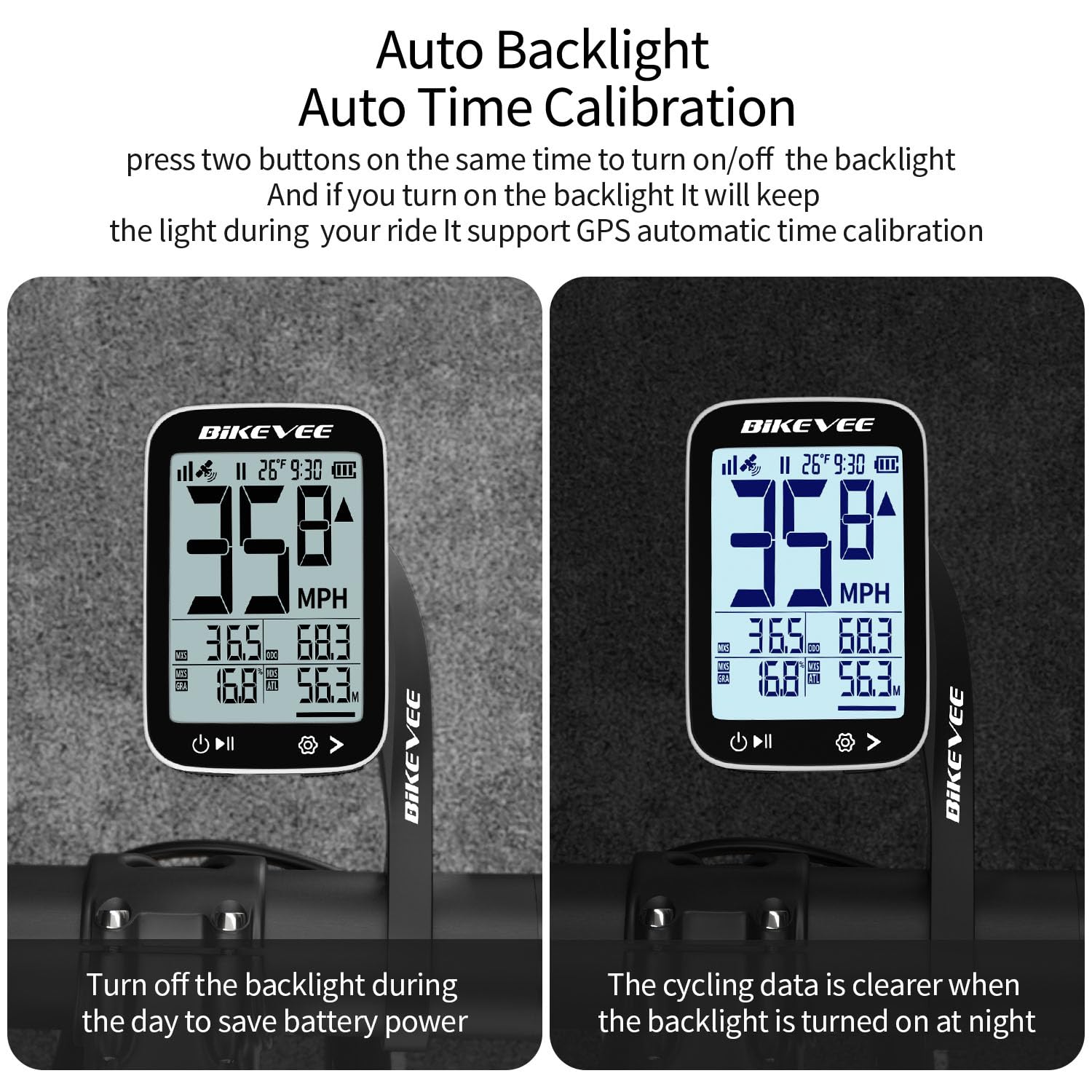
Image: The Bikevee cycling computer display showing the difference in visibility with the auto backlight off (left) and on (right), demonstrating improved clarity in low light.
5.4 Datavisning
The 2.4-inch LCD displays various cycling metrics. Use the mode button (usually bottom right) to cycle through different data screens or views. Data points typically include:
- Current Speed (MPH/KM/H)
- Gennemsnitshastighed
- Maksimal hastighed
- Køretid
- Ride Distance
- Samlet afstand (kilometertæller)
- Højde
- Gradient
- Temperatur
- Ur
6. Vedligeholdelse
6.1 Opladning af batteriet
The Bikevee BKV300B is equipped with a 650mAh rechargeable Lithium-Ion battery, providing up to 28 hours of use. When the battery indicator is low:
- Connect the device to a USB power source using the provided USB-C charging cable.
- A charging indicator on the screen will confirm the device is charging.
- Sørg for, at dækslet til opladningsporten er forsvarligt lukket efter opladning for at opretholde vandtætheden.
6.2 Vandtætning
The device has an IPX7 international protection rating, meaning it is protected against temporary immersion in water (up to 1 meter for 30 minutes). While it is suitable for use in rain, avoid prolonged immersion or high-pressure water jets.

Image: The Bikevee cycling computer shown with water droplets, illustrating its IPX7 waterproof capability. A note advises against prolonged immersion.
6.3 Rengøring
Tør enheden af med en blød, damp klæde. Brug ikke slibende rengøringsmidler eller opløsningsmidler.
7. Fejlfinding
- Enheden tænder ikke:
Sørg for, at batteriet er opladet. Tilslut til en strømkilde, og prøv igen.
- Intet GPS-signal:
Sørg for at du er i et åbent område med klar view of the sky. Initial GPS lock may take a few minutes. Avoid using indoors or under heavy tree cover.
- Unøjagtig hastighed/afstand:
Verify that the device has a stable GPS signal. Ensure unit settings (MPH/KM/H) are correct.
- Baggrundsbelysningen virker ikke:
Check if the auto-backlight feature is enabled or if it has been manually turned off. Try toggling it using the designated button combination.
- Problemer med skærm:
If the display is frozen or unresponsive, try performing a soft reset by pressing and holding the power button for an extended period (e.g., 10-15 seconds) until the device restarts.
8. Specifikationer
| Mærke | Bikevee |
| Modelnummer | BKV300B |
| Farve | Sort & hvid |
| Produktdimensioner | 70L x 45B x 16H Millimeter |
| Varens vægt | 100 Grams (50g for main unit) |
| Skærmstørrelse | 2.4 tommer |
| Display Type | LCD |
| Batterilevetid | Op til 28 timer |
| Batteritype | 650mAh Lithium Ion |
| Vandtæt vurdering | IPX7 |
| Monteringstype | Handlebar Mount (Out Front Extended Mount) |
| Human Interface Input | Knapper |
9. Garanti og support
For warranty information and technical support, please refer to the documentation provided with your purchase or visit the official Bikevee webwebsted. Gem din købsbevis til garantikrav.
For further assistance, you may contact Bikevee customer service through their official channels.