Indledning
This manual provides detailed instructions for the setup, operation, and maintenance of your Generic G96 Max Android Smart TV Box. This device is designed to transform your television into a smart entertainment hub, offering 4K Ultra HD streaming with HDR10 support, powered by Android 13. Please read this manual thoroughly before using the product to ensure optimal performance and longevity.
Pakkens indhold
Bekræft at alle varer er til stede i pakken:
- 1 x Generic G96 Max Smart TV Box
- 1 x Voice Remote Control
- 1 x HDMI kabel
- 1 x strømadapter
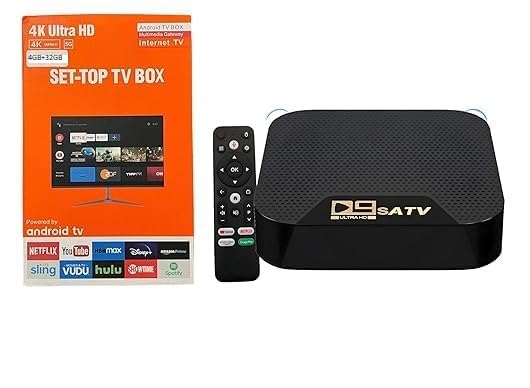
Image: The Generic G96 Max Smart TV Box, its voice remote control, HDMI cable, and power adapter, along with the product packaging.
Opsætningsinstruktioner
- Connect the TV Box to your Television: Use the provided HDMI cable to connect the HDMI OUT port on the Smart TV Box to an available HDMI IN port on your television.
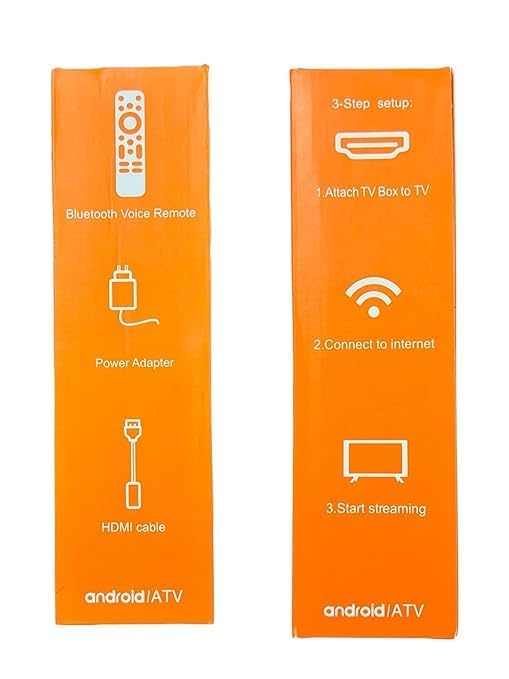
Image: A visual guide illustrating the three-step setup process: connecting the TV box to the television, establishing an internet connection, and initiating streaming.
- Tilslut strøm: Plug the power adapter into the DC IN port on the Smart TV Box, then plug the adapter into a wall outlet. The device will automatically power on.
- Vælg inputkilde: On your television, select the correct HDMI input source that corresponds to the port where the TV Box is connected.
- Initial Setup Wizard: Følg instruktionerne på skærmen for at fuldføre den indledende opsætning, herunder valg af sprog, netværksforbindelse (Wi-Fi eller Ethernet) og login til Google-konto.
- Opret forbindelse til internettet: During the setup wizard, select your Wi-Fi network and enter the password, or connect an Ethernet cable to the LAN port for a wired connection. The device supports WiFi 2.4G.
Betjeningsvejledning
Using the Voice Remote Control
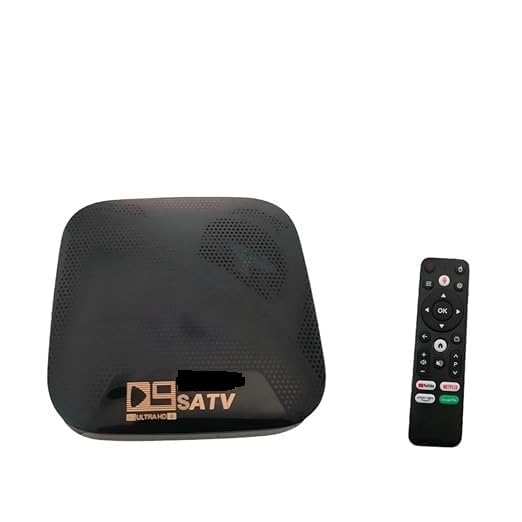
Image: The Generic G96 Max Smart TV Box positioned next to its voice-enabled remote control.
- Power knap: Press to turn the device on or off, or to put it into standby mode.
- Navigationsplade: Use the directional buttons to navigate through menus and select items.
- OK knap: Bekræfter valg.
- Tilbage knap: Vender tilbage til den forrige skærm.
- Hjemknappen: Vender tilbage til hovedskærmen.
- Knap til stemmeassistent: Press and hold to activate the voice assistant for search and commands.
- Lydstyrkeknapper: Juster lydstyrken.
- App-genvejsknapper: Dedicated buttons for popular streaming applications (e.g., Netflix, YouTube).
Navigating the Android TV Interface
The G96 Max runs on Android 13, providing a user-friendly interface.
- Startskærm: Displays recommended content, installed apps, and system settings.
- Apps: Access all installed applications. You can download more apps from the Google Play Store.
- Indstillinger: Configure network, display, sound, applications, device preferences, and more.
Opretholdelse
- Rensning: Brug en blød, tør klud til at rengøre enheden. Brug ikke flydende rengøringsmidler eller slibende materialer.
- Ventilation: Sørg for, at TV-boksen er placeret et godt ventileret område for at forhindre overophedning. Dæk ikke ventilationsåbningerne til.
- Softwareopdateringer: Periodically check for system updates in the settings menu to ensure optimal performance and security.
- Lagerstyring: Regularly clear cache from applications to free up storage space and improve performance.
Fejlfinding
| Problem | Mulig løsning |
|---|---|
| Ingen strøm |
|
| Intet billede på tv'et |
|
| Ingen internetforbindelse |
|
| Fjernbetjeningen reagerer ikke |
|
| Langsom ydeevne eller frysning |
|
Specifikationer
- Model: G96 Max (G96-4k)
- Operativsystem: Android 13
- VÆDDER: 4 GB
- Opbevaring: 32 GB
- Opløsning: 4K Ultra HD (HDR10 support)
- Forbindelse: WiFi 2.4G, HDMI
- Video Codec: H.265
- Dimensioner: 12 cm x 8 cm x 2 cm
- Vægt: 300 gram
- Fabrikant: Adam Enterprises
- Oprindelsesland: Indien
Garanti og support
The Generic G96 Max Android Smart TV Box comes with a 6 måneders garanti from the date of purchase. This warranty covers manufacturing defects. For warranty claims or technical support, please contact your retailer or the manufacturer, Adam Enterprises.
Gem venligst din købskvittering som købsbevis af garantiårsager.


