
Indledning
This manual provides essential information for the safe and efficient use of your Google Pixel 9 Pro 5G smartphone. Please read these instructions carefully before operating your device.

Figur 1: Forside view of the Google Pixel 9 Pro 5G.
Hvad er der i æsken
Kontroller, at alle varer er til stede i emballagen:
- Google Pixel 9 Pro-smartphone
- USB-C til USB-C-kabel (1 m, USB 2.0)
- SIM-bakkeudkasterværktøj
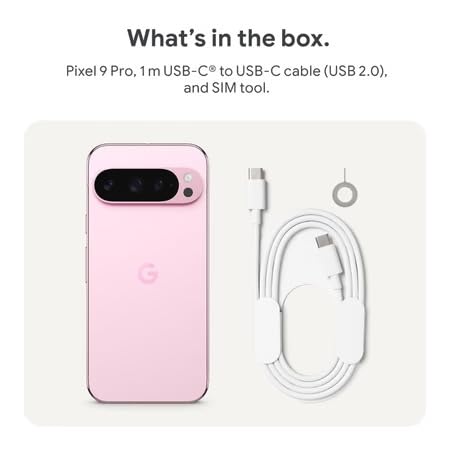
Figure 2: Included items in the Pixel 9 Pro packaging.
Opsætning
1. Indsættelse af SIM-kort
- Locate the SIM tray on the side of your Pixel 9 Pro.
- Sæt det medfølgende SIM-udkasterværktøj i det lille hul på SIM-bakken, og tryk forsigtigt, indtil bakken springer ud.
- Placer dit Nano-SIM-kort i bakken med guldkontakterne nedad. Sørg for, at det sidder korrekt.
- Carefully push the SIM tray back into the device until it is flush.
2. Første opladning
Før første brug anbefales det at oplade din enhed fuldt ud.
- Tilslut USB-C-kablet til opladningsporten i bunden af din telefon.
- Connect the other end of the cable to a compatible USB power adapter (sold separately) and plug it into a power outlet.
- Batteriikonet på skærmen viser opladningsstatus.
3. Tænd/sluk
- For at tænde: Press and hold the Power button (located on the right side) until the Google logo appears on the screen.
- For at slukke: Tryk på tænd/sluk-knappen og hold den nede, og tryk derefter på 'Sluk' på skærmen.
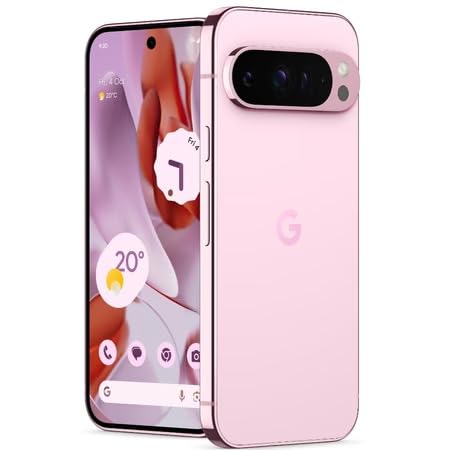
Figure 3: Power and volume buttons on the side of the device.
4. Guide til førstegangsopsætning
Upon powering on for the first time, follow the on-screen instructions to:
- Vælg dit sprog og område.
- Opret forbindelse til et Wi-Fi-netværk.
- Log ind med din Google-konto, eller opret en ny.
- Set up security features such as fingerprint unlock, face unlock, PIN, pattern, or password.
- Overfør data fra en gammel enhed (valgfrit).
Betjeningsvejledning
Grundlæggende navigation
- Berøringsskærmbevægelser: Interact with the device using taps, swipes, pinches (for zoom), and long presses.
- Startskærm: Access your applications, widgets, and customize your layout.
- Meddelelser: Stryg ned fra toppen af skærmen til view meddelelser.
- Hurtige indstillinger: Swipe down twice from the top of the screen to access quick settings toggles (Wi-Fi, Bluetooth, etc.).
Kamerabetjening
The Pixel 9 Pro features a powerful triple rear camera system.
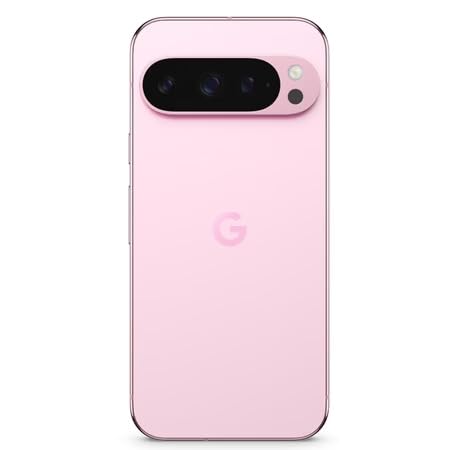
Figure 4: Rear camera system of the Pixel 9 Pro.
- Åbning af kameraet: Tryk på ikonet for Kamera-appen på din startskærm eller låseskærm.
- Skift af linser: Tap the icons on the viewfinder to switch between wide, ultrawide, and 5x telephoto lenses.
- Optagetilstande: Select from various modes such as Night Sight for low-light conditions, Astrofotografering for capturing stars, Makro for close-up shots, Lang eksponeringstid for creative effects, and Portræt for depth-of-field effects.
- Superopløsningszoom: Pinch the screen to digitally zoom up to 30x. For video, Super Res Zoom supports up to 20x.
- Pro Controls: Access advanced camera settings like shutter speed and manual focus for greater creative control.
Batteristyring
- Kontrol af batteriniveau: View batteriprocententage in the status bar or in Settings > Battery.
- Ekstrem batteribesparelse: Enable this mode in Settings > Battery > Extreme Battery Saver to significantly extend battery life.
- Opladning: Use the provided USB-C cable and a compatible power adapter for optimal charging speed.
Sikkerhedsfunktioner
Your Pixel 9 Pro incorporates multiple hardware security layers to protect your data.
- Lås op med fingeraftryk: Register your fingerprints in Settings > Security & privacy > Device unlock.
- Ansigtslås: Konfigurer ansigtsgenkendelse for nem oplåsning.
- PIN/Mønster/Adgangskode: Always set a strong screen lock method.
- Softwareopdateringer: Regularly install system updates to ensure your device has the latest security patches.
Temperatursensor
The Pixel 9 Pro includes a thermometer for measuring temperature.
- Open the dedicated Thermometer app.
- Follow the on-screen instructions to measure body temperature or the temperature of objects.
- Temperature data can be saved and tracked within the Fitbit application.
Opretholdelse
Rengøring af din enhed
- Use a soft, lint-free cloth to clean the screen and body of your phone.
- Avoid using abrasive materials, harsh chemicals, or aerosol sprays.
- Do not submerge the device in water, despite its water-resistant rating.
Softwareopdateringer
Google regularly releases software updates to improve performance, add features, and enhance security.
- To check for updates, go to Settings > System > System update.
- Ensure your device is connected to Wi-Fi and has sufficient battery charge before installing updates.
Fysisk pleje
The Pixel 9 Pro is built with Corning Gorilla Glass Victus 2 and is water-resistant, offering durability against everyday drops and spills.
- While durable, avoid excessive impacts or drops to prevent damage.
- Consider using a screen protector and a protective case for additional safeguarding.
Fejlfinding
Enheden reagerer ikke
If your phone becomes unresponsive, perform a force restart:
- Tryk på tænd/sluk-knappen og hold den nede i cirka 10-15 sekunder, indtil enheden genstarter.
Apps der går ned eller fryser
- Luk den problematiske app, og åbn den igen.
- Clear the app's cache: Go to Settings > Apps > See all apps > [App Name] > Storage & cache > Clear cache.
- Sørg for, at appen er opdateret til den seneste version fra Google Play Butik.
- Genstart din telefon.
Problemer med netværksforbindelse (Wi-Fi/mobil)
- Toggle Wi-Fi or cellular data off and then back on.
- Genstart din telefon.
- Kontroller, at dit SIM-kort er isat korrekt.
- Nulstil netværksindstillinger: Gå til Indstillinger > System > Nulstil indstillinger > Nulstil Wi-Fi, mobil og Bluetooth.
Batteriet aflades hurtigt
- Check battery usage in Settings > Battery to identify power-consuming apps.
- Reducer skærmens lysstyrke og varigheden af skærmens timeout.
- Disable unnecessary features like GPS, Bluetooth, and Wi-Fi when not in use.
- Enable Extreme Battery Saver mode.
Fabriksnulstilling (sidste udvej)
Warning: A factory reset will erase all data from your phone. Back up all important data before proceeding.
- Gå til Indstillinger > System > Nulstillingsindstillinger > Slet alle data (fabriksnulstilling).
- Confirm your decision when prompted.
Specifikationer
| Feature | Detalje |
|---|---|
| Mærke | |
| Model | Pixel 9 Pro |
| Operativsystem | Android 15 |
| Processor | Google Tensor G4 (3.1 GHz) |
| VÆDDER | 16 GB |
| Intern opbevaring | 256 GB |
| Vise | 6.3 Inches LTPO OLED (Actua), 1280 x 2856 Pixels, 120 Hz Refresh Rate |
| Bagkamera | 50 MP wide + 48 MP ultrawide (Macro) + 48 MP 5x telephoto |
| Forreste kamera | 42 MP |
| Batterikapacitet | 4700 mioamp Hours (up to 24 hours average life) |
| Forbindelse | 5G, Wi-Fi 7, Bluetooth 5.3, NFC, UWB, USB-C |
| SIM-kort | Enkelt nano-SIM-kort |
| Vandmodstand | Vandtæt |
| Dimensioner | 8 x 72 x 153 millimeter |
| Vægt | 198 gram |
Garanti og support
Garantioplysninger
Your Google Pixel 9 Pro 5G comes with a 1 års fabriksgaranti fra købsdatoen. Denne garanti dækker fabrikationsfejl ved normal brug. Gem venligst din købsbevis i tilfælde af garantikrav.
Kundesupport
For technical assistance, warranty claims, or other support inquiries, please contact Google customer service:
- Fabrikant: Google LLC, 1600 Amphitheatre Parkway, Bjerg View, CA 94043, USA
- Phone Support (India): +91 7718892303
- Importer Contact (India): Nexora Axis Private Limited (+91 7718892303)
For the most up-to-date support information, please visit the official Google Pixel support webwebsted.