
1. Introduktion
The Xiaomi Redmi Pad 2 is an 11-inch tablet designed for versatile use, offering powerful performance in a lightweight and durable unibody metal design. It features a sharp 2.5K (2560 x 1600 px) display with 10-bit color depth and 600 nits peak brightness, enhanced by a 90 Hz AdaptiveSync refresh rate and TÜV Rheinland blue light certification for comfortable viewing.
Equipped with a MediaTek G100-Ultra processor, the tablet ensures fluid multitasking. Its audio experience is enriched by four stereo speakers supporting Hi-Res Audio and Dolby Atmos. The device boasts a 9000 mAh battery with 18W fast charging via USB-C, providing extended autonomy. Running on Xiaomi HyperOS, it offers smart productivity and connectivity with Wi-Fi 5 and Bluetooth 5.3, alongside expandable storage up to 2 TB.

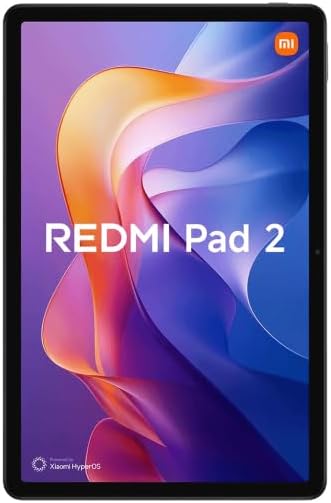
Figur 1.1: Forside view of the Xiaomi Redmi Pad 2 tablet.
2. Hvad er der i æsken
Upon unboxing your Xiaomi Redmi Pad 2, please verify that all the following items are included:
- Xiaomi Redmi Pad 2 Tablet
- Instruktionsmanual (dette dokument)
- USB-C Charging Cable or Connector
3. Opsætning
3.1. Opladning af enheden
Before initial use, fully charge your Redmi Pad 2. Connect the provided USB-C cable to the tablet's USB-C port and the other end to a compatible power adapter (not always included) or a computer's USB port. The tablet supports 18W fast charging.
3.2. Tænd/sluk
- For at tænde: Press and hold the Power button located on the side of the tablet until the Xiaomi logo appears on the screen.
- For at slukke: Press and hold the Power button until the power options appear. Select "Power off" from the menu.
- For at genstarte: Press and hold the Power button until the power options appear. Select "Restart" from the menu.
3.3. Indledende opsætning
Når tabletten tændes første gang, vil den guide dig gennem den indledende opsætningsproces. Dette omfatter:
- Sprogvalg: Vælg dit foretrukne sprog.
- Wi-Fi-forbindelse: Connect to a Wi-Fi network to access the internet and complete the setup.
- Google-konto: Log ind med din Google-konto, eller opret en ny. Dette er vigtigt for at downloade apps fra Google Play Butik og synkronisere data.
- Xiaomi Account: You may be prompted to sign in or create a Xiaomi account for additional services and cloud backup.
- Sikkerhedsindstillinger: Set up a screen lock (PIN, pattern, password, or facial recognition).
3.4. Udvidelig lagerplads
The Redmi Pad 2 supports expandable storage up to 2 TB via a microSD card. Locate the microSD card slot on the side of the tablet, insert your card carefully until it clicks into place. You can then use this storage for photos, videos, and other files.
4. Betjeningsvejledning
4.1. Display og navigation
The 11-inch 2.5K display offers a vibrant visual experience. Navigate the tablet using touch gestures:
- Tryk på: Vælg et element, eller åbn en app.
- Stryg: Rul gennem sider, startskærme eller menuer.
- Knib-for-at-zoome: Zoom ind eller ud på fotos, kort og web sider.
- Langt tryk: Få adgang til kontekstmenuer eller flyt appikoner.
The 90 Hz AdaptiveSync refresh rate provides smooth scrolling and responsiveness. The TÜV Rheinland blue light certification helps reduce eye strain during prolonged use.
4.2. Lydfunktioner
The Redmi Pad 2 is equipped with four stereo speakers, providing an immersive audio experience. It supports Hi-Res Audio and Dolby Atmos for enhanced sound quality when watching movies, listening to music, or playing games.
4.3. Ydeevne og multitasking
Powered by the MediaTek G100-Ultra processor, the tablet delivers efficient performance for daily tasks and multitasking. Xiaomi HyperOS optimizes system resources for a smooth user experience.
4.4. Forbindelse
- Wi-Fi 5: Opret forbindelse til trådløse netværk for at få internetadgang. Gå til Indstillinger > Wi-Fi for at administrere forbindelser.
- Bluetooth 5.3: Pair with Bluetooth devices such as headphones, speakers, or keyboards. Go to Settings > Bluetooth to manage pairings.
- USB-C: Use the USB-C port for charging, data transfer, and connecting to other peripherals.
Figur 4.1: Tilbage view of the Xiaomi Redmi Pad 2 tablet.
5. Vedligeholdelse
5.1. Rengøring af tabletten
For at rengøre din tablet skal du slukke den og frakoble alle kabler. Brug en blød, fnugfri klud, der er let tørret.ampened with water or a screen cleaner specifically designed for electronics. Avoid using harsh chemicals, abrasive materials, or excessive moisture.
5.2. Batteripleje
The Redmi Pad 2 features a 9000 mAh battery with an average life of 12 hours. To prolong battery lifespan:
- Undgå ekstreme temperaturer.
- Lad ikke batteriet aflades helt for ofte.
- Use the original charging cable or a certified compatible one.
- Tag stikket ud af opladeren, når batteriet er fuldt opladet.
5.3. Softwareopdateringer
Regularly check for and install software updates to ensure optimal performance, security, and access to new features. Go to Settings > About tablet > System update to check for available updates.
6. Fejlfinding
If you encounter issues with your Redmi Pad 2, try the following steps:
- Enheden reagerer ikke: Tryk og hold tænd/sluk-knappen nede i cirka 10-15 sekunder for at fremtvinge en genstart.
- Forbindelsesproblemer (Wi-Fi/Bluetooth): Turn Wi-Fi or Bluetooth off and then on again. If the issue persists, restart the tablet and your router/Bluetooth device.
- Apps der går ned/fryser: Close the app and reopen it. If the problem continues, clear the app's cache (Settings > Apps > [App Name] > Storage > Clear cache) or uninstall and reinstall the app.
- Batteriet aflades hurtigt: Check background app usage (Settings > Battery). Reduce screen brightness, disable unnecessary features like GPS or Bluetooth when not in use.
- Langsom ydeevne: Close unused apps, clear cache, and ensure sufficient storage space. Consider a factory reset as a last resort (backup your data first).
For mere komplekse problemer, se den officielle Xiaomi-support webwebsted eller kontakt kundeservice.
7. Specifikationer
| Feature | Detalje |
|---|---|
| Modelnummer | VHU5973EU |
| Skærmstørrelse | 11 tommer |
| Skærmopløsning | 2560 x 1600 pixels (2.5K) |
| Opdateringshastighed | 90 Hz AdaptiveSync |
| Processor | MediaTek G100-Ultra (3.4 GHz max clock speed) |
| VÆDDER | 8 GB |
| Intern opbevaring | 256 GB |
| Udvidelig opbevaring | Op til 2 TB (microSD) |
| Operativsystem | Xiaomi HyperOS (based on Android) |
| Batterikapacitet | 9000 mAh (typisk) |
| Batterilevetid (gennemsnitlig) | 12 timer |
| Opladning | 18W hurtigopladning (USB-C) |
| Forbindelse | Wi-Fi 5 (802.11ac), Bluetooth 5.3 |
| Dimensioner (L x B x H) | 15 x 15 x 20 cm (omtrentligt) |
| Vægt | 890 gram (omtrentlig) |
| Lyd | Quad Stereo Speakers, Hi-Res Audio, Dolby Atmos |
| Camera Resolution (Digital Zoom) | 7 Mpx |
| Hovedtelefonstik | 3.5 mm |
8. Garanti og support
8.1. Garantioplysninger
The Xiaomi Redmi Pad 2 comes with a tre års garanti mod fabrikationsfejlDenne garanti dækker materiale- og fabrikationsfejl ved normal brug. Gem venligst din købsbevis i tilfælde af garantikrav.
8.2. Kundesupport
For yderligere assistance, teknisk support eller garantikrav, besøg venligst den officielle Xiaomi-supportside. website or contact their customer service. You can usually find contact information and FAQs on the official Xiaomi webwebsted for din region.
Online ressourcer: Xiaomis officielle support