
Indledning
Thank you for choosing the EUQQ YYK-Q10 AI Translator Earbuds. These earbuds are designed to provide seamless real-time language translation, high-quality audio, and effective noise cancellation, making them ideal for communication across language barriers, business meetings, and everyday use. This manual will guide you through the setup, operation, and maintenance of your new device to ensure optimal performance and user experience. Please read this manual thoroughly before using the product.
Pakkens indhold
Tjek venligst pakken for følgende varer:
- EUQQ YYK-Q10 AI Translator Earbuds (L/R)
- Opladningsetui
- USB opladningskabel
- Flere størrelser af ørepropper
- Brugermanual
Hvis der mangler eller er beskadigede varer, bedes du kontakte kundesupport.
Produkt overview
The EUQQ YYK-Q10 features a compact design with intuitive controls and a smart charging case. Familiarize yourself with the components below.
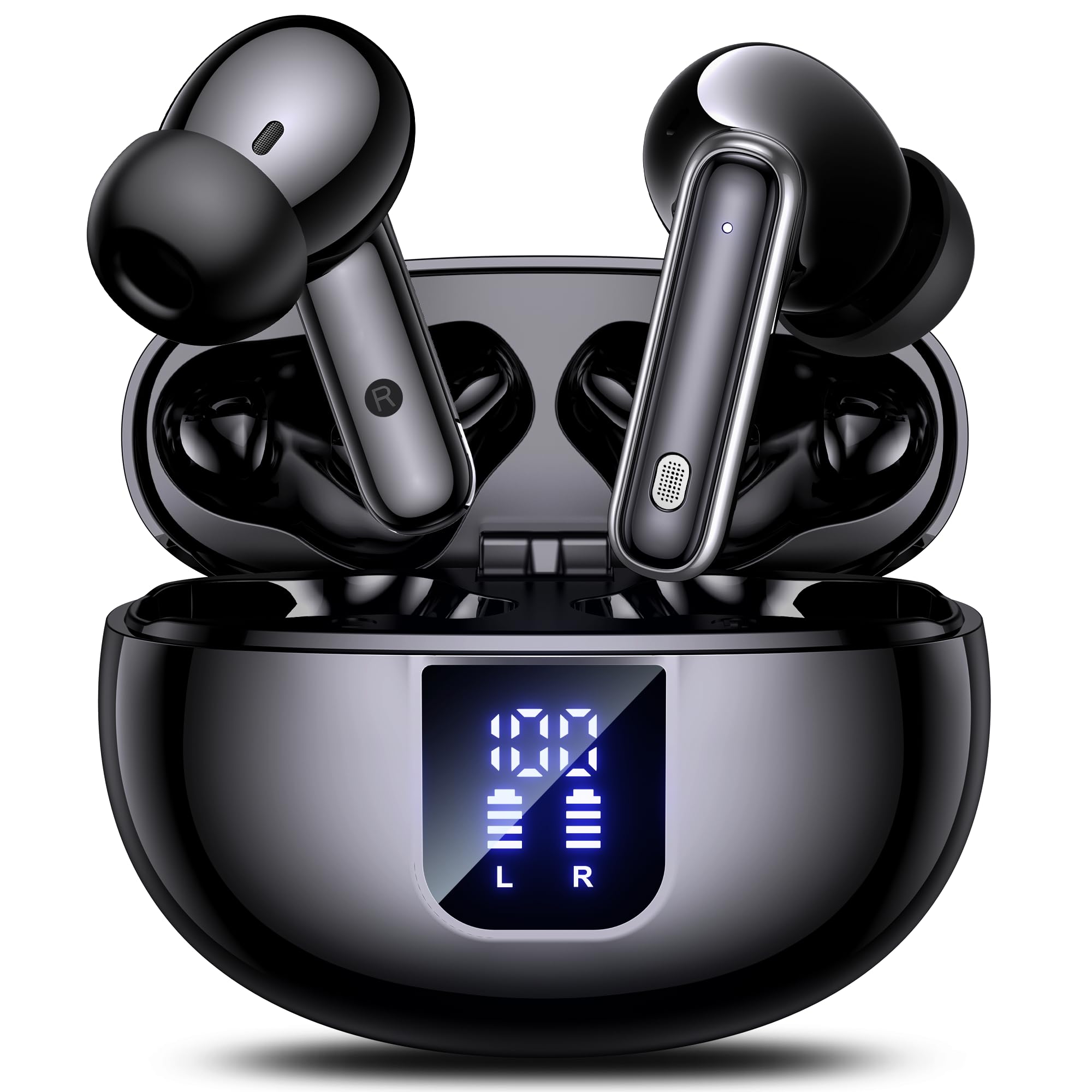
Image: The EUQQ YYK-Q10 AI Translator Earbuds are shown inside their open charging case. The case is black and features a digital display on the front, indicating battery levels for both the case and individual earbuds (L and R). The earbuds themselves are black with silver accents.
Nøglekomponenter:
- høretelefoner Left (L) and Right (R) earbuds with touch control areas and microphones.
- Opladningsetui: Stores and charges the earbuds. Features a digital display for battery status.
- Opladningsport: USB-C port on the charging case for power input.
- LED-indikatorer: På ørepropper og etuiet for at vise opladningsstatus og forbindelse.
Opsætning
1. Første opladning
- Placer begge ørepropper i opladningsetuiet.
- Tilslut USB-opladerkablet til opladningsporten på etuiet og en strømkilde.
- The digital display on the case will show the charging status. Ensure both earbuds and the case are fully charged before first use (approximately 1-2 hours).
2. Bluetooth-parring
- Åbn opladningsetuiet. Ørepropperne går automatisk i parringstilstand, hvilket indikeres af blinkende LED-lys.
- Aktiver Bluetooth på din smartphone eller enhed, og søg efter tilgængelige enheder.
- Select "EUQQ YYK-Q10" from the list of devices.
- Once connected, the earbud LEDs will stop flashing, and a voice prompt will confirm the connection.
3. Appinstallation (til oversættelsesfunktioner)
To utilize the real-time translation features, download the dedicated EUQQ translation app from your device's app store (iOS App Store or Google Play Store). Follow the in-app instructions to connect your earbuds and configure language settings.
Betjeningsvejledning
Tænd/sluk
- Tænd: Åbn opladningsetuiet, eller tag ørepropperne ud af etuiet. De tænder automatisk.
- Sluk: Sæt ørepropperne tilbage i opladningsetuiet, og luk låget. De slukker automatisk.
Music Playback Controls (Touch Controls)
- Afspil/pause: Et enkelt tryk på begge øretelefoner.
- Næste nummer: Dobbelttryk på den højre øreprop.
- Forrige nummer: Dobbelttryk på den venstre øreprop.
- Lydstyrke op: Tryk tre gange på den højre øreprop.
- Skrue ned for lyden: Tryk tre gange på den venstre øreprop.
Opkaldsstyring (berøringsknapper)
- Besvar/afslut opkald: Et enkelt tryk på begge øretelefoner.
- Afvis opkald: Tryk på en af øretelefonerne, og hold den nede i 2 sekunder.
Translation Mode
Activate translation mode through the dedicated EUQQ app. The app will guide you through selecting source and target languages. Depending on the app's features, you may use different modes:
- Samtaletilstand: Speak into your earbud's microphone, and the translation will be played through the other person's earbud or your phone's speaker.
- Interpreter Mode: One person wears an earbud, the other speaks into the phone.
- Touch-to-Speak Mode: Tryk på en øretelefon for at tale, slip for at oversætte.
Refer to the EUQQ app's help section for detailed instructions on specific translation modes and features.
Støjreduktion
The earbuds feature dual-mic noise cancelling. This feature is typically active by default or can be toggled via the companion app. It helps reduce ambient noise during calls and translation sessions for clearer communication.
Opretholdelse
- Rensning: Rengør regelmæssigt ørepropperne og opladningsetuiet med en blød, tør og fnugfri klud. Brug ikke skrappe kemikalier eller slibende materialer.
- Ørespidser: Fjern og rengør ørepropperne med jævne mellemrum med vand og mild sæbe. Sørg for, at de er helt tørre, før de sættes på igen.
- Opladningskontakter: Rengør forsigtigt opladningskontakterne på både ørepropperne og etuiet med en tør vatpind for at sikre korrekt opladning.
- Opbevaring: Når ørepropperne ikke er i brug, skal de opbevares i deres opladningsetui for at beskytte dem og holde dem opladede. Undgå ekstreme temperaturer og fugtighed.
Fejlfinding
| Problem | Løsning |
|---|---|
| Øretelefoner parrer ikke |
|
| Ingen lyd eller lav lydstyrke |
|
| Opladningsproblemer |
|
| Oversættelsen virker ikke |
|
Specifikationer
| Feature | Detalje |
|---|---|
| Mærke | EUQQ |
| Modelnavn | YYK-Q10 |
| Forbindelsesteknologi | Trådløs |
| Hovedtelefonens formfaktor | In-Ear |
| Farve | Sort |
| Inkluderede komponenter | Instruction Manual (and other standard accessories like earbuds, case, cable, ear tips) |
| Antal genstande | 1 (product unit) |
| Batterier påkrævet | Nej (indbygget genopladelig) |
| Producentens modelnummer | YYK-Q10 |
| Pakkedimensioner | 0.1 x 0.1 x 0.1 cm; 45.36 g |
| ASIN | B0FN3WC8LW |
Garantioplysninger
The EUQQ YYK-Q10 AI Translator Earbuds come with a standard manufacturer's warranty. For detailed information regarding warranty coverage, terms, and conditions, please refer to the warranty card included in your package or visit the official EUQQ webwebsted. Gem venligst din købsbevis til garantikrav.
Kundesupport
If you encounter any issues or have questions regarding your EUQQ YYK-Q10 AI Translator Earbuds, please do not hesitate to contact our customer support team. You can find contact information on the official EUQQ website or through the support section of the EUQQ translation app.
Online ressourcer:
- Official EUQQ Webwebsted: Visit EUQQ Store on Amazon
- EUQQ Translation App (for in-app support)