
1. Introduktion
This manual provides essential instructions for the safe and efficient use of your AGM M10 Basic Flip Phone. Please read this manual thoroughly before operating the device and retain it for future reference.
The AGM M10 is a rugged 4G LTE flip phone designed for durability and essential communication. It features IP68/IP69K water and dust resistance, MIL-STD-810G drop protection, large buttons, and a loud speaker.
2. Pakkens indhold
Bekræft at alle varer er til stede i din pakke:
- 1 x AGM M10 Phone
- 1 x oplader
- 2 x batteri
- 1 x snor
- 1 x Brugermanual (dette dokument)
Video: Unboxing the AGM M10 Basic Flip Phone and its accessories. This video demonstrates the contents of the package and provides a first look at the device.
3. Enhed overview
Familiarize yourself with the physical components of your AGM M10 phone.

Billede: Forside, side og bagside views of the AGM M10 Basic Flip Phone. This image shows the phone in its closed and open states, highlighting its robust design.
Nøglefunktioner:
- Large Buttons & Font: Designed for ease of use, especially for users who prefer larger interfaces.
- 98dB Speaker: Ensures clear audio even in noisy environments.
- Eksternt display: Shows incoming calls, messages, and battery status without opening the phone.
- SOS knap: Til nødkontakter.
- Lommelygte: Integreret for nemheds skyld.
4. Opsætning
4.1 Batteriinstallation
The AGM M10 comes with two replaceable batteries. Before first use, ensure the battery is properly installed and any protective stickers are removed from the battery contacts.
- Fjern bagcoveret på telefonen.
- Find batterirummet.
- If present, peel off the yellow protective sticker from the battery's metal contacts.
- Sæt batteriet i batterirummet, og juster kontakterne.
- Replace the back cover, ensuring it clicks securely into place to maintain water and dust resistance.

Image: The AGM M10 phone with its back cover removed, revealing the battery compartment and slots for SIM and SD cards. This illustrates where to insert the battery and cards.
4.2 Installation af SIM-kort og SD-kort
The AGM M10 supports dual Nano SIM cards and expandable memory via an SD card (up to 128GB, sold separately).
- With the back cover and battery removed, locate the SIM card slots. The phone supports two Nano SIM cards.
- Insert your Nano SIM card(s) into the designated slot(s) with the gold contacts facing down.
- If using an SD card for additional storage, insert it into the dedicated SD card slot.
- Sæt batteriet og bagdækslet på igen.

Image: A close-up of the AGM M10's internal components, specifically highlighting the dual Nano SIM card slots. This image helps users identify where to insert their SIM cards.
4.3 Opladning af telefonen
Charge your phone using the provided USB Type-C charger or a compatible charging dock (available separately).
- Tilslut USB Type-C-kablet til telefonens opladningsport.
- Tilslut den anden ende af kablet til strømadapteren, og sæt derefter adapteren i en stikkontakt.
- Alternatively, place the phone into a compatible charging dock.
- The phone will indicate charging status on its display.

Image: The AGM M10 Basic Flip Phone placed in its charging dock. This image demonstrates how to charge the phone using the optional dock.
5. Betjeningsvejledning
5.1 Tænd/sluk
- Sådan tænder du: Tryk på tænd/sluk-knappen og hold den nede, indtil skærmen lyser.
- Sådan slukker du: Tryk på tænd/sluk-knappen og hold den nede, og vælg derefter "Sluk" fra indstillingerne.
5.2 Foretage og modtage opkald
- Sådan foretager du et opkald: Indtast telefonnummeret ved hjælp af tastaturet, og tryk på den grønne opkaldsknap.
- Sådan modtager du et opkald: Når telefonen ringer, skal du trykke på den grønne opkaldsknap for at besvare.
- Sådan afslutter du et opkald: Tryk på den røde Afslut opkald-knap.

Image: The AGM M10 Basic Flip Phone open, showcasing its large, easy-to-read buttons and clear display. This highlights the user-friendly interface for dialing and texting.
5.3 Afsendelse og modtagelse af tekstbeskeder
- Naviger til menuen "Beskeder".
- Vælg "Ny besked" eller "Opret besked".
- Indtast modtagerens nummer, og skriv din besked ved hjælp af tastaturet.
- Tryk på "Send"-funktionen.
5.4 SOS-nødknap
The dedicated SOS button can be configured to dial emergency contacts in critical situations.
- Access the phone's settings to set up emergency contacts for the SOS function.
- In an emergency, press and hold the SOS button (typically located on the back or side of the phone) to activate.
- The phone will automatically dial the pre-set emergency numbers.
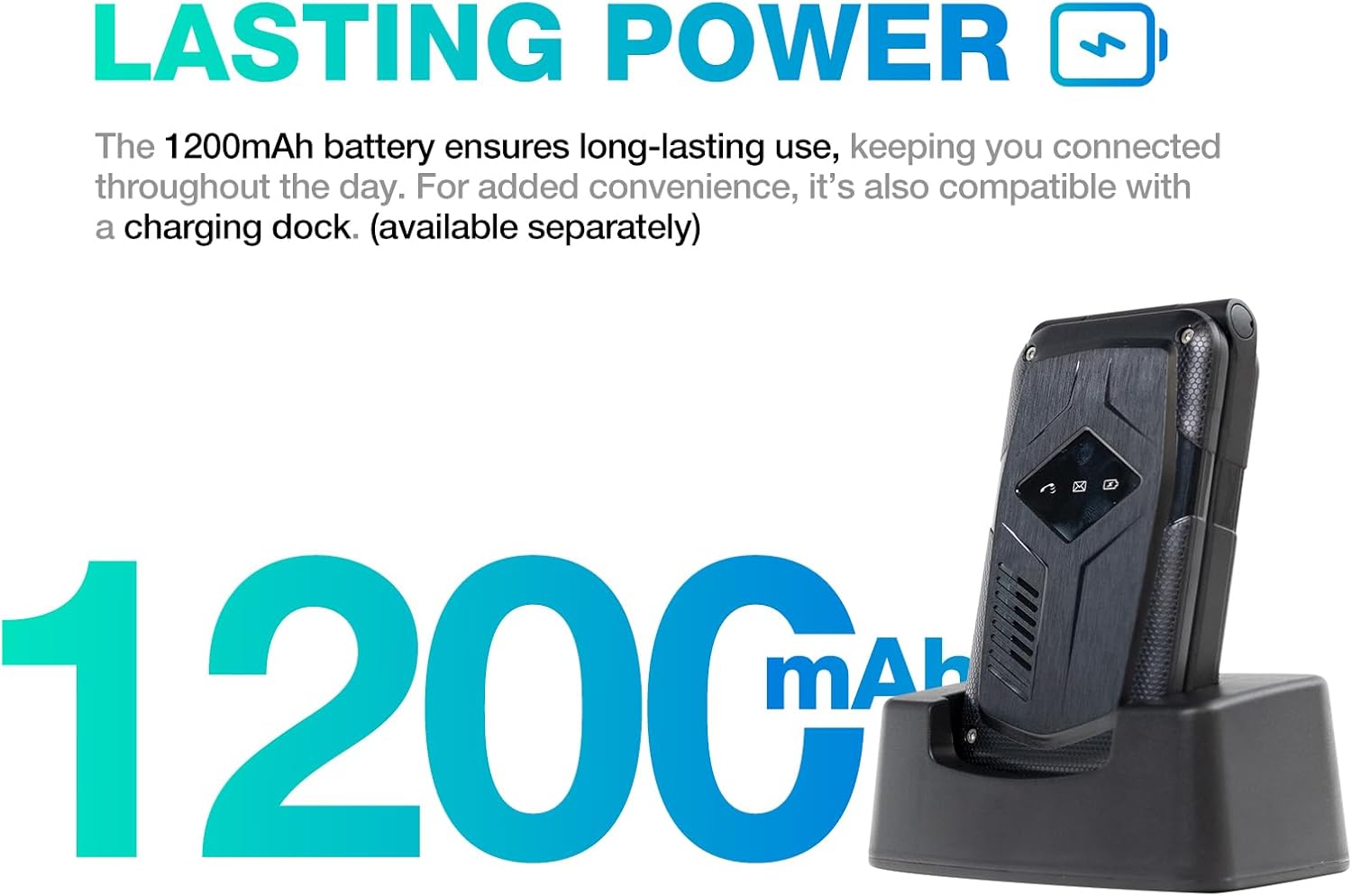
Image: A close-up of the AGM M10's keypad, with visual indicators pointing to the SOS button, FM radio function, and flashlight. This helps users locate these essential features.
5.5 Lommelygte
To activate the built-in flashlight, locate the dedicated flashlight button or access it through the phone's menu, as indicated in the device overview.
5.6 FM radio
The AGM M10 includes an FM radio function. Access it through the main menu. Headphones may be required to act as an antenna for optimal reception (if the phone has a 3.5mm jack, otherwise it might use internal antenna).
5.7 Bluetooth-forbindelse
The phone supports Bluetooth 5.0 for connecting to compatible wireless accessories such as headsets or car kits.
- Gå til "Indstillinger" og derefter "Bluetooth".
- Slå Bluetooth til.
- Søg efter available devices and select the device you wish to pair with.
- Følg anvisningerne på skærmen for at fuldføre parringen.
6. Vedligeholdelse og pleje
6.1 Holdbarhedsfunktioner
The AGM M10 is engineered for rugged use with IP68/IP69K water and dust resistance and MIL-STD-810G drop protection. This means it can withstand:
- Vandnedsænkning: Up to 1.5 meters for 30 minutes.
- Dust Ingress: Fully protected against dust.
- Dråber: Resistant to drops from a certain height onto hard surfaces.
To maintain these protections, ensure all port covers are securely closed and the back cover is properly sealed after battery or SIM card installation.

Image: The AGM M10 Basic Flip Phone partially submerged in water, demonstrating its waterproof capability.
6.2 Generel pleje
- Rengør telefonen med en blød kludamp klæde. Undgå skrappe kemikalier.
- Do not expose the phone to extreme temperatures for prolonged periods.
- Avoid disassembling the phone, as this may void the warranty and compromise its rugged features.
7. Fejlfinding
7.1 Problemer med netværksforbindelse
The AGM M10 is designed to be T-Mobile compatible in the US. However, some users may experience limited network access, reduced coverage, or slower data speeds depending on specific network configurations or regional variations.
- Sørg for, at dit SIM-kort er korrekt isat og aktiveret.
- Check your network settings to confirm the correct network is selected.
- If issues persist, contact your network provider for assistance.
7.2 Phone Not Powering On
- Sørg for, at batteriet er korrekt installeret og fuldt opladet.
- Verify that the protective sticker has been removed from the battery contacts.
- Attempt to charge the phone for at least 30 minutes before trying to power it on again.
7.3 Andre spørgsmål
For other operational difficulties, refer to the detailed user manual included in your package or contact AGM customer support.
8. Specifikationer
| Feature | Detalje |
|---|---|
| Mærke | generalforsamling |
| Modelnavn | M10A |
| Operativsystem | RTOS |
| Installeret RAM-hukommelsesstørrelse | 48 MB |
| Hukommelseslagringskapacitet | 0.12 GB (Expandable up to 128GB via SD card) |
| Skærmstørrelse | 4.33 tommer |
| Trådløs bærer | T-Mobile (US), Global (outside US) |
| Cellulær teknologi | 4G LTE |
| Farve | Sort |
| Antal SIM-kortpladser | Dual SIM (Nano) |
| Connector Type | USB Type C |
| Formfaktor | Foldbart etui (fliptelefon) |
| Vandmodstandsniveau | Waterproof (IP68/IP69K) |
| Hovedtelefonstik | Intet hovedtelefonstik |
| Yderligere funktioner | Basic Phone, Dual SIM, Expandable Memory, Rugged Body, SOS Button, Flashlight, FM Radio, Bluetooth 5.0 |
| Batteristrøm | 1200 mioamp Timer |
| Display Type | LCD |
| Dimensioner | 4.33 × 2.22 × 0.98 tommer |
| Vægt | 4.9 ounce |
9. Garanti og support
9.1 Garantioplysninger
The AGM M10 Basic Flip Phone comes with a 2 års garanti fra købsdatoen. Denne garanti dækker fabrikationsfejl ved normal brug. Gem venligst din købsbevis i tilfælde af garantikrav.
Note: Some third-party retailers may state a 1-year warranty; however, the manufacturer's stated warranty is 2 years.
9.2 Kundesupport
For technical assistance, troubleshooting, or warranty claims, please contact AGM customer support. AGM is committed to providing dedicated after-sales support and a straightforward replacement process for quality issues.
Besøg den officielle generalforsamling webwebstedet eller se kontaktoplysningerne på produktemballagen for supportoplysninger.