
idoooz X2
idoooz X2 Mini MP3 Music Player User Manual
Model: X2 | Brand: idoooz
1. Introduktion
Thank you for choosing the idoooz X2 Mini MP3 Music Player. This compact and lightweight device is designed for portability and ease of use, perfect for sports, gym, jogging, and other activities. It features a clip-on design, LED indicators, and 8GB of built-in storage for your music.
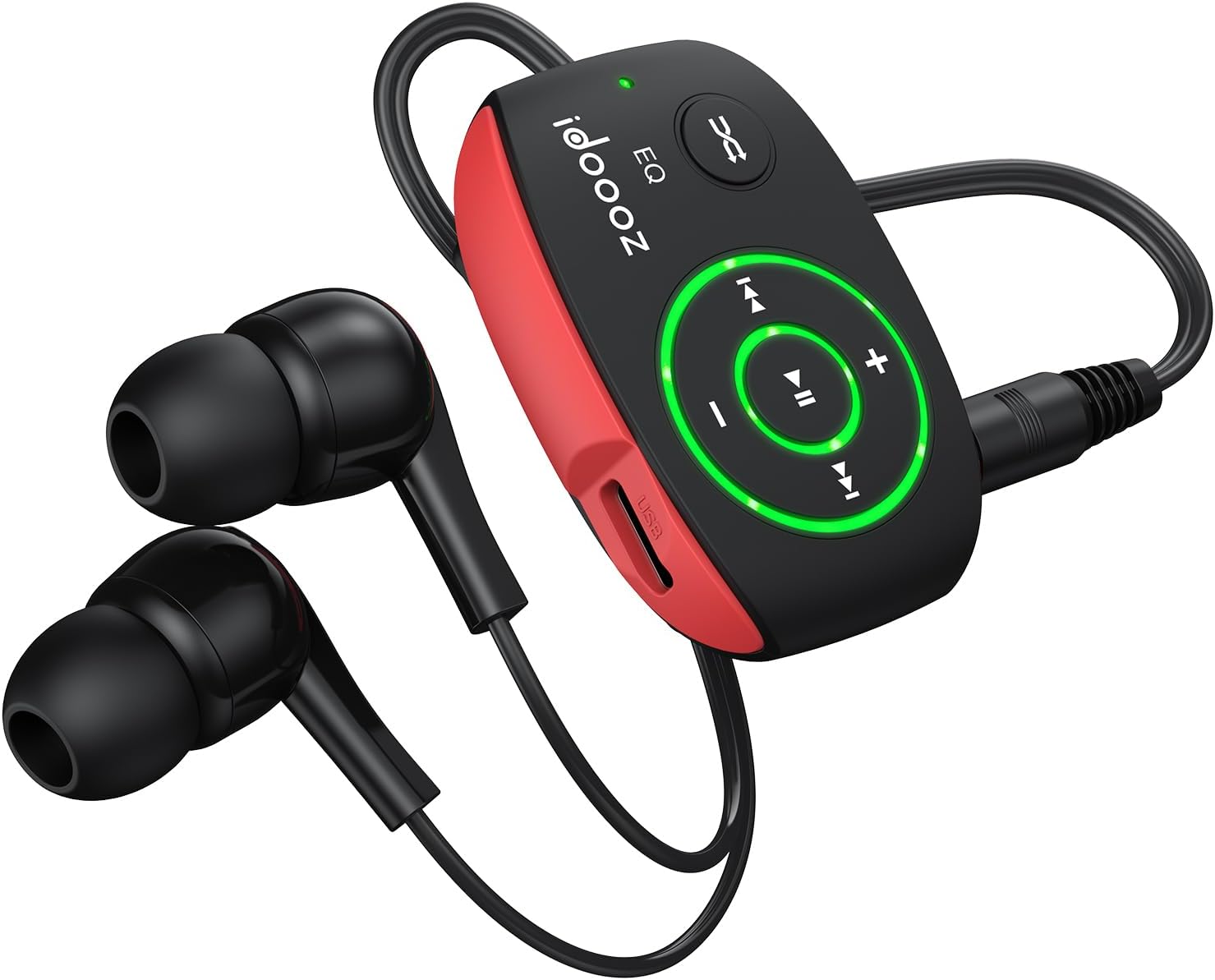
Image 1.1: The idoooz X2 Mini MP3 Player with wired earphones.
2. Hvad er der i æsken
Kontroller venligst pakkens indhold for at sikre, at alle varer er til stede:
- idoooz X2 Mini MP3 Player
- High-quality Earphones
- USB-C ladekabel
- Brugervejledning (dette dokument)

Image 2.1: Package contents of the idoooz X2 Mini MP3 Player.
3. Produktet er slutview og komponenter
Familiarize yourself with the various parts and controls of your idoooz X2 MP3 Player.

Image 3.1: Labeled diagram of the idoooz X2 MP3 Player components.
- USB-C Charging Port / Data Transfer: Used for charging the device and transferring music files.
- LED-opladningsindikatorlampe: Angiver opladningsstatus.
- LED Playback Status Light: Indicates device status (play/pause/power).
- Volume - / +: Justerer afspilningslydstyrken.
- Previous Track / Fast Backward: Navigates to the previous track or fast backward.
- Næste nummer / Spol frem: Navigates to the next track or fast forward.
- EQ / Shuffle / Standard Playback: Toggles between equalizer modes, shuffle, and standard playback.
- On / Off / Play / Pause: Powers the device on/off and controls music playback.
- 3.5 mm Earphone Jack: Connects your wired earphones.
- NULSTIL: Small button for resetting the device if needed.
- Klip: Integrated clip for attaching the player to clothing or accessories.
4. Opsætning
4.1 Opladning af enheden
Before first use, fully charge your MP3 player. The built-in 110mAh rechargeable battery provides approximately 15 hours of continuous music playback at medium volume and takes about 2.5 hours to fully charge.
- Connect the provided USB-C cable to the charging port on the MP3 player.
- Tilslut den anden ende af USB-C-kablet til en USB-strømadapter (medfølger ikke) eller en computers USB-port.
- The LED Charging Indicator Light will illuminate during charging. It will change or turn off once charging is complete.
4.2 Overførsel af musik Files
The idoooz X2 has 8GB of built-in flash memory, capable of storing over 2,000 songs. It supports MP3, WMA, APE, and FLAC formats with lossless audio quality.
- Tilslut MP3-afspilleren til din computer med det medfølgende USB-C-kabel.
- Computeren vil genkende MP3-afspilleren som et flytbart diskdrev.
- Open the drive folder. You can drag and drop your music files (MP3, WMA, APE, FLAC) directly into this folder.
- En gang alle files are transferred, safely eject the MP3 player from your computer before disconnecting the cable.

Image 4.1: Transferring music files from a computer to the MP3 player.
OTG Function (Optional): You can also transfer music from your smartphone to the MP3 player using an OTG adapter (not included) and a compatible cable. Connect the OTG adapter to your phone, then connect the MP3 player via its USB-C cable to the adapter.

Image 4.2: Using the OTG function to transfer music from a smartphone.
5. Betjeningsvejledning
5.1 Power On/Off and Playback
- Tænd: Tryk og hold på Til/Fra/Afspil/Pause button until the LED Playback Status Light illuminates.
- Afspil/pause: Tryk kort på Til/Fra/Afspil/Pause button to play or pause the current track. The LED light will flash to indicate playback status.
- Sluk: Tryk og hold på Til/Fra/Afspil/Pause button until the LED Playback Status Light turns off.
5.2 Lydstyrkejustering
- Tryk på Volumen + knappen for at øge lydstyrken.
- Tryk på Volumen - knappen for at sænke lydstyrken.
5.3 Spornavigation
- Næste nummer: Tryk kort på Næste nummer / Hurtigt frem knap.
- Forrige nummer: Tryk kort på Previous Track / Fast Backward knap.
- Spol frem: Tryk og hold på Næste nummer / Hurtigt frem knap.
- Hurtigt tilbage: Tryk og hold på Previous Track / Fast Backward knap.
5.4 EQ / Shuffle / Standard Playback
Tryk på EQ / Shuffle / Standard Playback button to cycle through different playback modes, including equalizer settings and shuffle mode.

Image 5.1: The idoooz X2 MP3 Player in use during exercise.
6. Vedligeholdelse
- Hold enheden tør. Undgå udsættelse for fugt eller væsker.
- Rengør enheden med en blød, tør klud. Brug ikke skrappe kemikalier eller slibende rengøringsmidler.
- Undgå ekstreme temperaturer. Opbevar ikke i meget varme eller kolde omgivelser.
- Protect the USB-C port and earphone jack from dust and debris.
- If the device becomes unresponsive, use a thin object (like a paperclip) to press the NULSTIL knap.
7. Fejlfinding
| Problem | Mulig løsning |
|---|---|
| Enheden tænder ikke. | Ensure the device is fully charged. Press and hold the Power button for a few seconds. If unresponsive, try the RESET button. |
| Kan ikke overføre files til enheden. | Ensure the USB-C cable is securely connected to both the player and the computer. Try a different USB port or cable. Ensure the device is powered on when connected. |
| Ingen lyd fra høretelefoner. | Check if earphones are properly plugged into the 3.5mm jack. Ensure volume is not set to minimum. Test with different earphones if available. |
| LED-indikatoren virker ikke. | Se "Produkt overview and Components" section for expected LED behavior. If the device functions otherwise, this may not indicate a critical issue. |
| Enheden fryser eller reagerer ikke. | Press the RESET button using a thin, pointed object. This will restart the device without deleting data. |
8. Specifikationer
| Feature | Detalje |
|---|---|
| Modelnavn | X2 |
| Mærke | idoooz |
| Hukommelseslagringskapacitet | 8 GB |
| Produktdimensioner | 1.81 x 1.18 x 0.7 tommer |
| Varens vægt | 0.52 ounce |
| Forbindelsesteknologi | USB-C |
| Understøttede lydformater | MP3, WMA, APE, FLAC |
| Batterilevetid | Ca. 15 timer (medium volumen) |
| Opladningstid | Ca. 2.5 timer |
| Særlige funktioner | Built-In Clip, Equalizer, LED light |
9. Garanti og support
The idoooz X2 Mini MP3 Music Player comes with a 365-day warranty. If you encounter any problems or have questions regarding your device, please contact idoooz customer service directly for assistance.
For support, please refer to the contact information provided with your purchase or visit the official idoooz webwebsted.
Ask a question about this manual
Ask about setup, troubleshooting, compatibility, parts, safety, or missing instructions. Manuals+ will review the question and use this page’s manual context to help answer it.