
Indledning
The ZOMBIES CAT MGALL X22 Clip On Wireless Headphones offer a unique open-ear listening experience combined with a fashionable design. These headphones feature Bluetooth 6.0 connectivity, an LED HD display for battery status, and a comfortable clip-on fit. This manual provides essential information for setting up, operating, and maintaining your headphones.
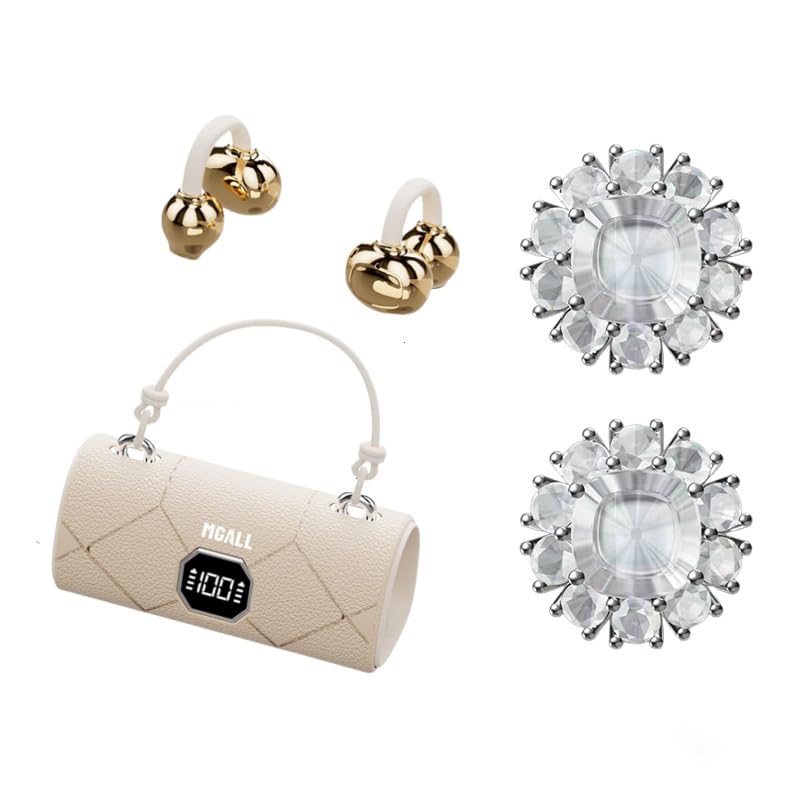
MGALL X22 Clip On Wireless Headphones in their charging case, showcasing the unique handbag-style design and open-ear earbuds.
Nøglefunktioner
- Design med åbent øre: Provides a comfortable and pleasant listening experience without blocking the ear canal.
- Bluetooth 6.0: Ensures fast pairing, seamless audio, and ultra-low latency.
- Dual AI Noise-Canceling Mics: Enhances voice clarity by suppressing ambient noise during calls.
- Fordybende stereolyd: Delivers crisp highs, rich bass, and a wider soundstage with advanced directional audio.
- Forlænget batterilevetid: Up to 6 hours of listening per charge, with a total of 40 hours using the charging case.
- LED HD-skærm: Shows real-time battery levels for both the charging case and earbuds.
- Moderigtigt design: Features a unique handbag-style charging case with a smooth leather finish and graceful handle.

Diagram illustrating the open listening experience and key features of the MGALL X22 headphones, including comfort, battery display, lossless HiFi sound, luxury leather texture, Dual-mode Bluetooth 6.0, and open ear clip design.
Opsætning
Opladning af hovedtelefoner
Oplad hovedtelefonerne og opladningsetuiet helt inden første brug.
- Tilslut det medfølgende USB-C-kabel til opladningsporten på bagsiden af opladningsetuiet.
- Plug the other end of the USB-C cable into a compatible USB power source.
- The LED HD display on the case will show the charging progress. A green indicator light on the case signifies it is charging or fully charged.
- Place the earbuds into their respective slots inside the charging case. They will begin charging automatically.

Close-up of the MGALL X22 charging case with earbuds inside, showing the green indicator light, indicating charging or readiness.

Image showing the LED dynamic power HD digital display on the charging case, indicating the battery level of the charging case and earphones.
Parring med en enhed
- Sørg for, at ørepropperne er opladet og i opladningsetuiet.
- Åbn opladningsetuiet. Ørepropperne går automatisk i parringstilstand.
- Aktiver Bluetooth på din enhed (smartphone, tablet osv.).
- Søg efter available Bluetooth devices and select "MGALL X22" from the list.
- Når der er forbindelse, hører du en lydmeddelelse, og ørepropperne er klar til brug.
Official product video demonstrating the charging case and earbuds, highlighting the handbag-style design and LED display.
Betjening af hovedtelefonerne
Iført hovedtelefoner
The MGALL X22 headphones feature an open-ear clip-on design for comfort and awareness of your surroundings.
- Identificer venstre (L) og højre (R) øretelefon.
- Gently clip each earbud onto your ear, ensuring the speaker portion is positioned just outside your ear canal.
- Adjust for a secure and comfortable fit. The flexible design allows for slight adjustments.

Image showing a person wearing the MGALL X22 clip-on headphones, demonstrating the secure and comfortable fit.
Tryk på kontrolelementer
The earbuds feature touch-sensitive controls for easy management of audio and calls.
- Afspil/pause: Et enkelt tryk på begge øretelefoner.
- Næste nummer: Dobbelttryk på den højre øreprop.
- Forrige nummer: Dobbelttryk på den venstre øreprop.
- Besvar/afslut opkald: Enkelt tryk på begge øretelefoner under et indgående opkald.
- Afvis opkald: Langt tryk på en af øretelefonerne under et indgående opkald.
- Aktiver stemmeassistent: Tryk tre gange på en af øretelefonerne.
Removable Earring Charms
The headphones come with optional removable earring charms for customization.
- To attach a charm, open the clasp on the charm.
- Carefully attach the clasp to the designated loop on the earbud.
- Close the clasp securely.
- To remove, simply open the clasp and detach.
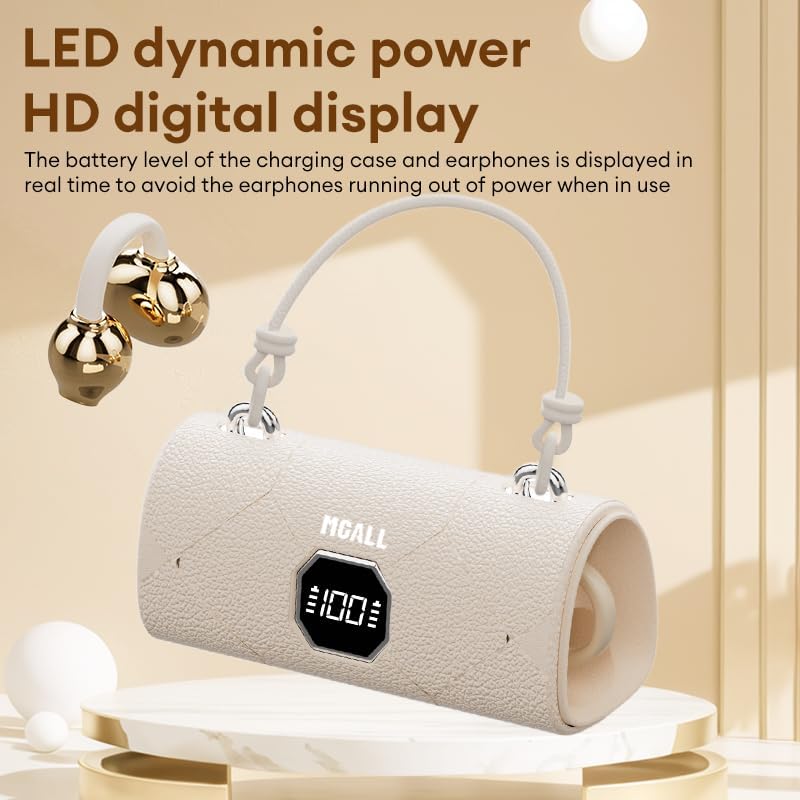
Image showing the removable earring charms that can be attached to the headphones for a personalized look.
Officiel produktvideopræsentationasing the MGALL X22 clip-on earbuds, demonstrating how they are worn and the optional earring attachments.
Opretholdelse
Rensning
- Tør ørepropperne og opladningsetuiet af med en blød, tør og fnugfri klud.
- Brug ikke slibende rengøringsmidler, opløsningsmidler eller aerosolspray.
- Undgå at fugt kommer ind i åbninger.
Opbevaring
- Opbevar hovedtelefonerne i deres opladningsetui, når de ikke er i brug, for at beskytte dem og holde dem opladede.
- Keep the device in a cool, dry place away from extreme temperatures and direct sunlight.
Fejlfinding
Fælles problemer og løsninger
- Ingen lyd:
- Sørg for, at ørepropperne er korrekt parret med din enhed.
- Kontroller lydstyrkeniveauet på både din enhed og ørepropperne.
- Sørg for, at ørepropperne er opladet.
- Parringsproblemer:
- Sluk Bluetooth på din enhed, og tænd den igen.
- Sæt ørepropperne tilbage i etuiet, luk dem, og åbn dem derefter igen for at aktivere parringstilstand igen.
- Forget/delete "MGALL X22" from your device's Bluetooth list and try pairing again.
- Opladningsproblemer:
- Sørg for, at opladningskablet er korrekt tilsluttet til både etuiet og strømkilden.
- Kontroller, om opladningsporten er ren og fri for snavs.
- Prøv et andet USB-C-kabel eller strømadapter.
Specifikationer
| Feature | Detalje |
|---|---|
| Modelnavn | X2202+TYEJPS06 |
| Mærke | ZOMBIER KAT |
| Forbindelsesteknologi | Trådløs, Bluetooth 6.0 |
| Bluetooth rækkevidde | 10 meter |
| Støjkontrol | Hybrid Noise Cancellation (for mics) |
| Ørestykke form | Åbent øre |
| Kontrolmetode | Røre |
| Impedans | 32 Ohm |
| Materiale | Plast |
| Batterilevetid (ørepropper) | Op til 6 timer |
| Samlet batterilevetid (med etui) | Op til 40 timer |
Hvad er der i æsken
- MGALL X22 Clip On Wireless Headphones
- Opladningsetui
- USB-C ladekabel
- Brugermanual
- Removable Earring Charms
Garanti og support
Your ZOMBIES CAT MGALL X22 Clip On Wireless Headphones are covered by a standard manufacturer's warranty against defects in materials and workmanship. Please refer to the product packaging or contact customer support for specific warranty details and duration.
For technical support, troubleshooting assistance, or warranty claims, please contact ZOMBIES CAT customer service through the retailer where the product was purchased or visit the official ZOMBIES CAT webwebsted for kontaktoplysninger.


