
Indledning
This manual provides essential instructions for the setup, operation, and maintenance of your Subsonic Superdrive 270 GT-5 Racing Wheel. Designed for a realistic racing experience, this wheel is compatible with PlayStation 5 (PS5) and PC. Please read this manual thoroughly before use to ensure optimal performance and longevity of your device.
Pakkens indhold
Bekræft at alle varer er til stede i din pakke:
- Superdrive 270 GT-5 Racing Wheel
- Pedal Set (Brake and Accelerator)
- Justerbar montering Clamp
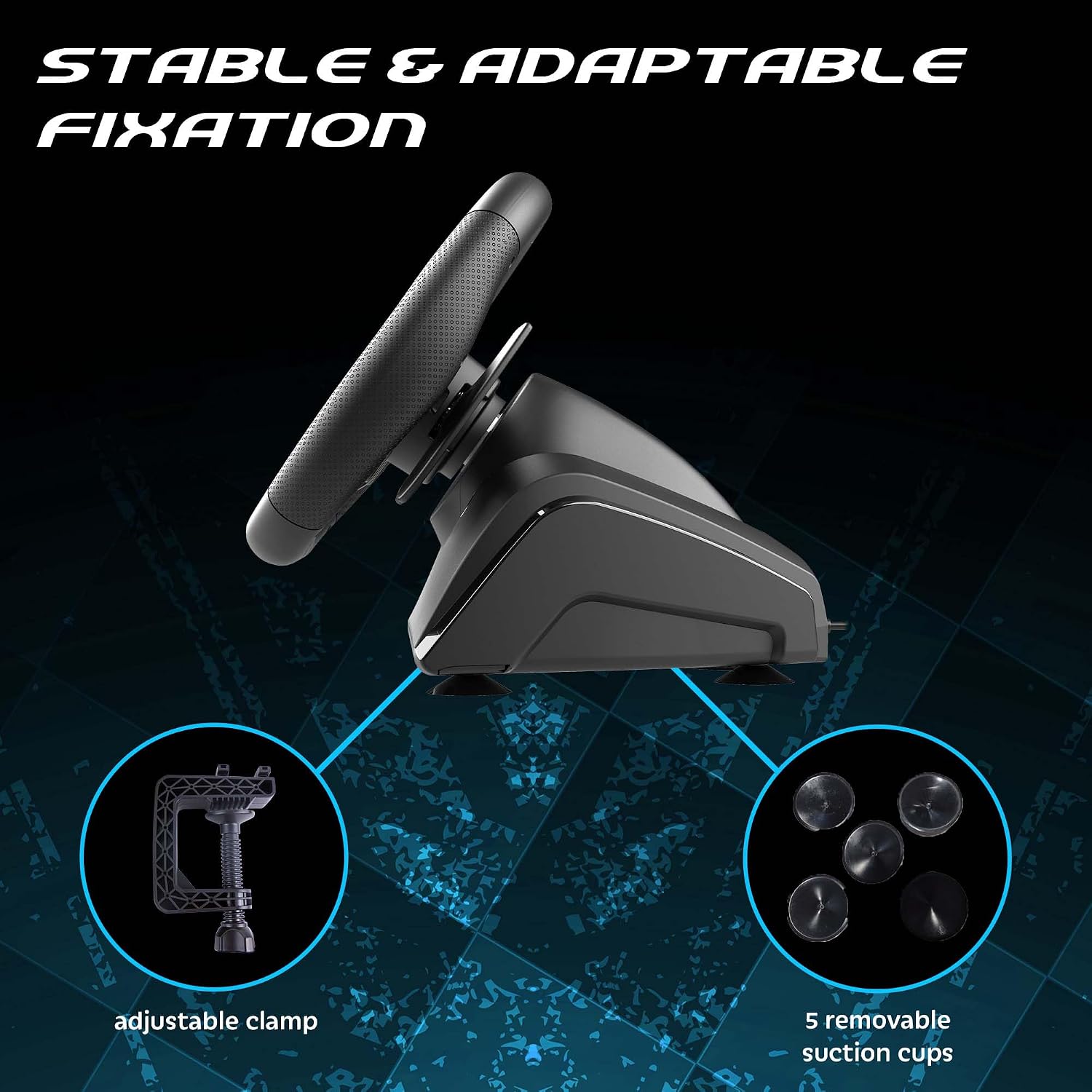
- Removable Suction Cups (5 units)
- USB -tilslutningskabel
Opsætningsinstruktioner
Follow these steps to connect your racing wheel to your console or PC.
Fysisk installation
1. Montering af hjulet: Place the racing wheel on a stable surface such as a desk or table. Use the adjustable clamp to secure it firmly. Alternatively, attach the five removable suction cups to the bottom of the wheel for additional stability on smooth surfaces.

Den justerbare clamp and suction cups provide stable fixation for the racing wheel.
2. Tilslutning af pedalerne: Connect the pedal set cable to the designated port on the rear of the racing wheel base.
3. Connecting to Console/PC: Plug the USB connection cable from the racing wheel into an available USB port on your PlayStation 5 or PC.

The Superdrive 270 GT-5 Racing Wheel is designed for use with PS5 and PC.
PS5 Specific Setup
For optimal performance on PlayStation 5, ensure your console settings are configured correctly:
- Adgangsindstillinger: From the PS5 home screen, navigate to the Indstillinger icon (gear icon).
- Navigate to Accessories: In the Settings menu, select Tilbehør.
- Select Controller (General): Under Accessories, choose Controller (General).
- Choose Communication Method: Vælge Kommunikationsmetode.
- Select Use USB Cable: From the Communication Method options, select Brug USB-kabel.
- Activate Wheel: After connecting the USB cable, press the HJEM button on the racing wheel to activate it.

Navigate to the Settings menu on your PS5 console.

Follow the menu path to 'Communication Method'.

Ensure 'Use USB Cable' is selected for controller communication.

Connect the USB cable and press the HOME button on the wheel.
Betjeningsvejledning
The Superdrive 270 GT-5 Racing Wheel offers various features for an immersive gaming experience.
Steering and Pedals
- 270-graders rotation: The steering wheel provides a 270-degree rotation for precise control in racing games.
- Analog Pedals: The included pedal set features analog brake and accelerator pedals for responsive input.
- Skiftegreb: Use the integrated paddle shifters on the wheel for quick and intuitive gear changes.

The racing wheel offers a 270-degree rotation for enhanced control.
Dual Joysticks and Programmable LEDs
The racing wheel includes dual joysticks, replicating full controller functionality, and programmable RGB LEDs.
- Dual Joysticks: The right and left joysticks provide access to all standard controller functions, conveniently located on the wheel.
- Programmable RGB LEDs: The LEDs around the joysticks can be customized to fix colors, display a rainbow effect, or show breathing colors. Refer to the programming section for detailed instructions on customization.

The dual joysticks feature programmable RGB LEDs with various display options.
Progressive LEDs
LEDs located on the top of the steering wheel provide visual feedback for acceleration and braking, enhancing immersion.

Progressive LEDs on the wheel indicate acceleration and braking.
Programmable Keys and Sensitivity Levels
The wheel features programmable buttons and adjustable sensitivity to suit different racing styles and game types.
- Programmerbare knapper: Specific buttons on the wheel can be programmed for custom functions. Refer to the dedicated programming section in the full manual for detailed instructions.
- Følsomhedsniveauer: Choose from three sensitivity levels:
- Lav følsomhed: Suitable for most racing games, offering stable control.
- Middel følsomhed: Ideal for games with many curves, providing a balance of responsiveness and control.
- Høj følsomhed: Best for linking tight turns, offering maximum responsiveness.
Adjustable sensitivity levels allow customization for various racing scenarios.
Opretholdelse
To ensure the longevity and proper functioning of your racing wheel:
- Rensning: Use a soft, dry cloth to clean the surfaces of the wheel and pedals. Avoid abrasive cleaners or solvents.
- Opbevaring: Opbevar enheden et køligt, tørt sted væk fra direkte sollys og ekstreme temperaturer.
- Kabelpleje: Undgå at bøje eller vride kablerne for meget. Frakobl kablerne ved at trække i stikket, ikke i selve kablet.
Fejlfinding
If you encounter issues with your Superdrive 270 GT-5 Racing Wheel, refer to the following common solutions:
- Hjulet reagerer ikke:
- Ensure all cables are securely connected to the wheel, pedals, and console/PC.
- For PS5, verify that the console's communication method is set to 'Use USB Cable' as described in the setup section.
- Prøv at tilslutte rattet til en anden USB-port på din konsol eller pc.
- Genstart din konsol eller pc.
- Disconnections During Gameplay (PS5):
- This issue may occur if the PS5 perceives the wheel as a DualShock 4 controller and disconnects it. Ensure the 'Use USB Cable' setting is correctly applied and remains active.
- Ensure your PS5 system software is up to date.
- Avoid using USB hubs; connect the wheel directly to the console.
- Pedaler reagerer ikke:
- Check the connection cable between the pedals and the wheel base.
- Test the wheel and pedals with a different game or on a different platform (if available) to isolate the issue.
- LED'er virker ikke:
- Ensure the wheel is powered on and properly connected.
- Refer to the programming section (in the full manual) for LED customization and ensure settings are correct.
If problems persist after attempting these solutions, please contact Subsonic customer support.
Specifikationer
| Feature | Detalje |
|---|---|
| Modelnummer | SA5721-2 |
| Kompatibilitet | PlayStation 5, PC |
| Styringsrotation | 270 grader |
| Hjul diameter | 270 mm |
| Greb materiale | Micro-perforated synthetic leather |
| Feedback om vibrationer | Dobbelt vibrationsmotorer |
| Kontrolelementer | Dual joysticks, paddle shifters, programmable buttons |
| LED'er | Programmable RGB LEDs (joysticks), progressive LEDs (acceleration/braking) |
| Følsomhedsniveauer | 3 (Lav, Medium, Høj) |
| Montering | Justerbar clamp, removable suction cups |
| Pedaler | Analog brake and accelerator with footrest |
| Dimensioner (pakke) | 32 x 29.21 x 27.94 cm |
| Vægt (pakke) | 2.5 kg |
| Oprindelse | Kina |
Garanti og support
The Subsonic Superdrive 270 GT-5 Racing Wheel comes with a 2 års producentgaranti. Denne garanti dækker fejl i materialer og udførelse ved normal brug.
For technical support, warranty claims, or further assistance, please visit the official Subsonic webwebstedet eller kontakt deres kundeserviceafdeling. Gem din købsbevis for at validere garantien.