
1. Introduktion
This manual provides detailed instructions for the proper setup, operation, and maintenance of your Facmogu AK-50 Bluetooth Stereo Audio Amplifier. Please read this manual thoroughly before using the device to ensure optimal performance and safety. The AK-50 is designed to deliver clear, powerful stereo sound with versatile connectivity options for various audio sources.
2. Sikkerhedsinstruktioner
- Sørg for, at strømforsyningen voltage opfylder de krav, der er angivet på enheden.
- Udsæt ikke enheden for regn, fugt eller ekstreme temperaturer.
- Undgå at placere enheden i nærheden af varmekilder eller i direkte sollys.
- Åbn ikke c'enasing; overlad al service til kvalificeret personale.
- Hold enheden væk fra børn.
- Afbryd strømmen under tordenvejr eller når den ikke bruges i længere perioder.
3. Pakkens indhold
Bekræft at alle varer er til stede i pakken:
- AK50 Audio Amplifier x1
- Fjernbetjening x1
- FM-antenne x1
- Brugervejledning x1
- Power Cord (1 Meter) x1
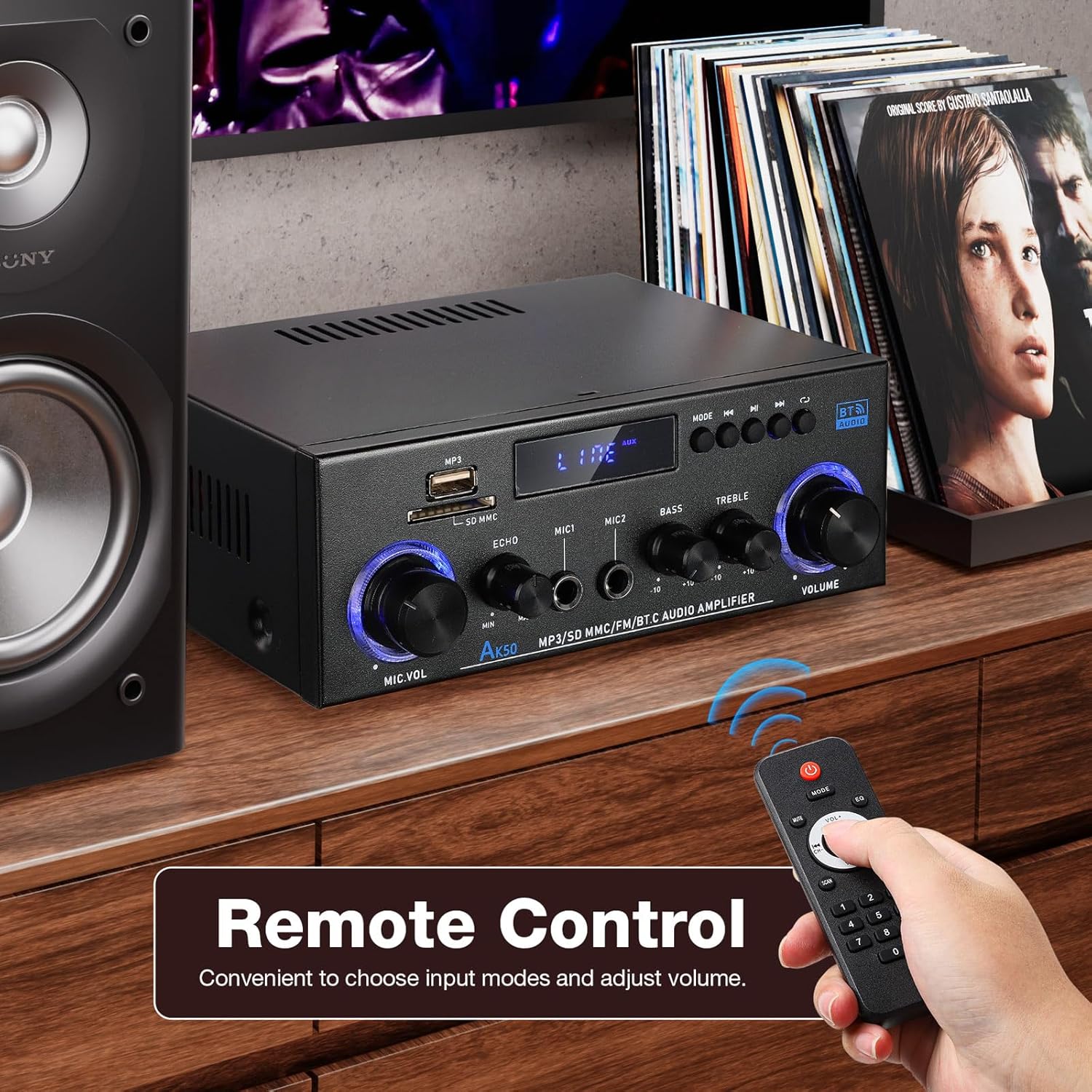
Figure 3.1: Package contents of the AK-50 amplivligere.
4. Produktet er slutview
4.1 Frontpanel

Figur 4.1: Betjeningselementer og indgange på frontpanelet.
- USB-port: Til afspilning fra USB-drev.
- SD/MMC-kortslot: For SD/MMC card playback.
- Function Display Window: Viser den aktuelle tilstand og indstillinger.
- MP3/FM Control Buttons: Afspil/pause, næste/forrige nummer, valg af tilstand.
- MIC VOL (Mikrofonlydstyrke): Justerer lydstyrken på tilsluttede mikrofoner.
- EKKO: Justerer ekkoeffekten for mikrofoner.
- MIC1/MIC2-indgang: 6.35 mm jack-indgange til mikrofoner.
- BAS: Justerer lavfrekvent lydudgang.
- DISKANT: Justerer højfrekvent lydudgang.
- BIND: Hovedlydstyrkekontrol for al lydudgang.
4.2 Bagpanel

Figur 4.2: Tilslutninger på bagpanelet.
- AUX Audio Input (RCA L/R): Connect external audio devices via RCA cables.
- Line Audio Signal Output (RCA L/R): Output audio signal to another amplivligere eller optageenhed.
- FM ANT: Tilslutning til FM-antennen.
- Speaker System 4Ω-16Ω (Left/Right Channel Output): Connect passive speakers using speaker wire. Observe polarity.
- DC Input 12V/5A: Power input for 12V DC power supply.
- AC strømindgang: Connect the AC power cord (90-240V, 50-60Hz).
- Afbryderen: Drejer amplifier ON/OFF.
5. Opsætning
5.1 Højttalertilslutning
- Sørg for ampkøleren er slukket.
- Connect your passive speakers to the "Speaker System 4Ω-16Ω" terminals on the rear panel.
- Match the positive (+) terminal of the amplifier to the positive (+) terminal of the speaker, and the negative (-) to the negative (-). Use appropriate speaker wire.
5.2 Strømtilslutning
- Connect the supplied AC power cord to the "AC Power Input" on the rear panel.
- Sæt den anden ende af netledningen i en passende stikkontakt.
5.3 FM-antennetilslutning
- Connect the FM antenna to the "FM ANT" port on the rear panel.
- Forlæng antennen for bedre modtagelse.
5.4 Audio Source Connection (AUX)
- To connect an external audio device (e.g., CD player, TV, computer) via RCA, use an RCA cable.
- Connect one end of the RCA cable to the audio output of your device and the other end to the "AUX Audio Input" (L/R) on the ampliferens bagpanel.
6. Betjeningsvejledning
6.1 Tænd/sluk
Flip the "POWER ON/I" switch on the rear panel to turn the amplifier on or off. The front display will illuminate when powered on.
6.2 Volume, Bass, and Treble Control
- BIND: Rotate the large knob on the right of the front panel to adjust the master volume.
- BAS: Rotate the "BASS" knob to increase or decrease low-frequency sounds.
- DISKANT: Rotate the "TREBLE" knob to increase or decrease high-frequency sounds.
6.3 Indgangsvalg
Press the "MODE" button on the front panel or the remote control to cycle through available input sources: Bluetooth (BT), USB, SD, FM, and AUX.
7. Forbindelse
7.1 Bluetooth-forbindelse
- Skift til amplifier to Bluetooth mode using the "MODE" button. The display will show "BT".
- Aktiver Bluetooth på din mobilenhed, og søg efter tilgængelige enheder.
- Select "AK-50" from the list of devices to pair.
- Når den er parret, kan du streame lyd fra din enhed til amplivligere.

Figure 7.1: Bluetooth connectivity with a smartphone. Maintain a distance of 16.4ft/5m without obstructions for optimal connection.
Video 7.1: A demonstration of the Facmogu AK-50 Bluetooth Stereo Audio Ampløfter, showcasindens design og funktioner.
7.2 USB/SD-kortafspilning
- Indsæt et USB-drev eller et SD/MMC-kort i den respektive plads på frontpanelet.
- Skift til amplifier to USB or SD mode using the "MODE" button. The ampLifier registrerer og afspiller automatisk lyd files.
- Use the MP3/FM control buttons to navigate tracks (Next/Previous) and Play/Pause.
7.3 AUX-indgang
After connecting an external audio source to the rear AUX input (as described in Section 5.4), switch the amplifier to AUX mode using the "MODE" button. Play audio from your connected device.
7.4 FM radio
- Sørg for, at FM-antennen er korrekt tilsluttet.
- Skift til amplifier to FM mode using the "MODE" button.
- Use the MP3/FM control buttons to scan for and select radio stations.
8. Karaoke-funktion
The AK-50 amplifier features two microphone inputs for karaoke use.
- Connect up to two microphones to the MIC1 and MIC2 inputs on the front panel.
- Adjust the microphone volume using the "MIC VOL" knob.
- Use the "ECHO" knob to add a reverberation effect to the microphone audio.

Figur 8.1: Brug af amplifier for karaoke with dual microphone inputs.
9. Fjernbetjening
Den medfølgende fjernbetjening muliggør bekvem betjening af amplifier på afstand.
- Magt: Drejer amplifter tænd/sluk.
- Mode: Cycles through input sources (BT, USB, SD, FM, AUX).
- Volumen +/-: Justerer masterlydstyrken.
- Afspil/Pause, Næste/Forrige: Controls media playback in USB/SD/Bluetooth modes.
- EQ: Vælger forudindstillinger for equalizer (hvis tilgængelige).
- Nummerplade: Direct track selection for USB/SD.

Figure 9.1: Remote control for the AK-50 amplivligere.
10. Fejlfinding
| Problem | Mulig årsag | Løsning |
|---|---|---|
| Ingen strøm | Power cord not connected; Power switch off; Outlet malfunction. | Check power cord connection; Turn power switch ON; Test outlet with another device. |
| Ingen lydudgang | Incorrect input selected; Volume too low; Speaker wires loose/incorrectly connected; Faulty audio source. | Select correct input mode; Increase volume; Check speaker wire connections and polarity; Test with a different audio source. |
| Bluetooth forbinder ikke | Amplifier not in BT mode; Device Bluetooth off; Device too far; Interference. | Skifte amplifier to BT mode; Enable Bluetooth on your device; Move device closer to amplifier (within 5m); Reduce interference. |
| USB/SD-kort afspiller ikke | Forkert tilstand; Ikke understøttet file format; Corrupted media; Card/drive not inserted correctly. | Skift til USB/SD-tilstand; Sørg for files are MP3 or supported format; Try a different USB/SD card; Reinsert media. |
| Dårlig FM -modtagelse | Antenne ikke tilsluttet eller trukket ud; Svagt signal. | Tilslut og forlæng FM-antennen; Flyt antennen for bedre signal. |
11. Specifikationer
| Feature | Specifikation |
|---|---|
| Modelnummer | A50803-MG-US |
| Mærke | Facmogu |
| Forbindelsesteknologi | Bluetooth |
| Trådløs kommunikation | Bluetooth |
| Lydudgangstilstand | Stereoanlæg |
| Højttalerimpedans | 4-16Ω |
| Strømindgang | AC 90-240V, 50-60Hz / DC 12V/5A |
| Materiale | Metal |
| Varens vægt | 1.98 pund (0.9 kg) |
| Pakkedimensioner | 8.5 x 8.11 x 3.82 tommer (21.6 x 20.6 x 9.7 cm) |
| Inkluderede komponenter | AK50 Audio Amplivligere |
| Monteringstype | Bordplademontering |
12. Vedligeholdelse
- Rensning: Brug en blød, tør klud til at rengøre ydersiden af ampBrug ikke flydende rengøringsmidler eller aerosoler.
- Opbevaring: Når den ikke er i brug i længere perioder, skal den opbevares amplifier in a cool, dry place, away from direct sunlight and moisture.
- Ventilation: Ensure proper ventilation around the unit to prevent overheating. Do not block the ventilation openings.
13. Garanti og support
For warranty information or technical support, please refer to the contact details provided with your purchase or visit the official Facmogu webwebsted. Gem din købskvittering som købsbevis i tilfælde af garantikrav.