
1. Introduktion
Thank you for choosing the COTOE G7 Bluetooth Headset. This manual provides detailed instructions for setting up, operating, and maintaining your headset. Please read this manual carefully before use to ensure optimal performance and longevity of your device.
The COTOE G7 is a wireless Bluetooth headset designed for clear communication and audio playback. It features an LED digital display for battery status, extended standby time, and Active Noise Cancellation (ANC) for an enhanced audio experience.
2. Pakkens indhold
Tjek venligst pakken for følgende varer:
- COTOE G7 Bluetooth Headset (Gray)
- Opladningsetui
- USB opladningskabel
- Ørespidser (forskellige størrelser)
- Brugermanual
3. Produktet er slutview
Familiarize yourself with the components of your COTOE G7 Bluetooth Headset.
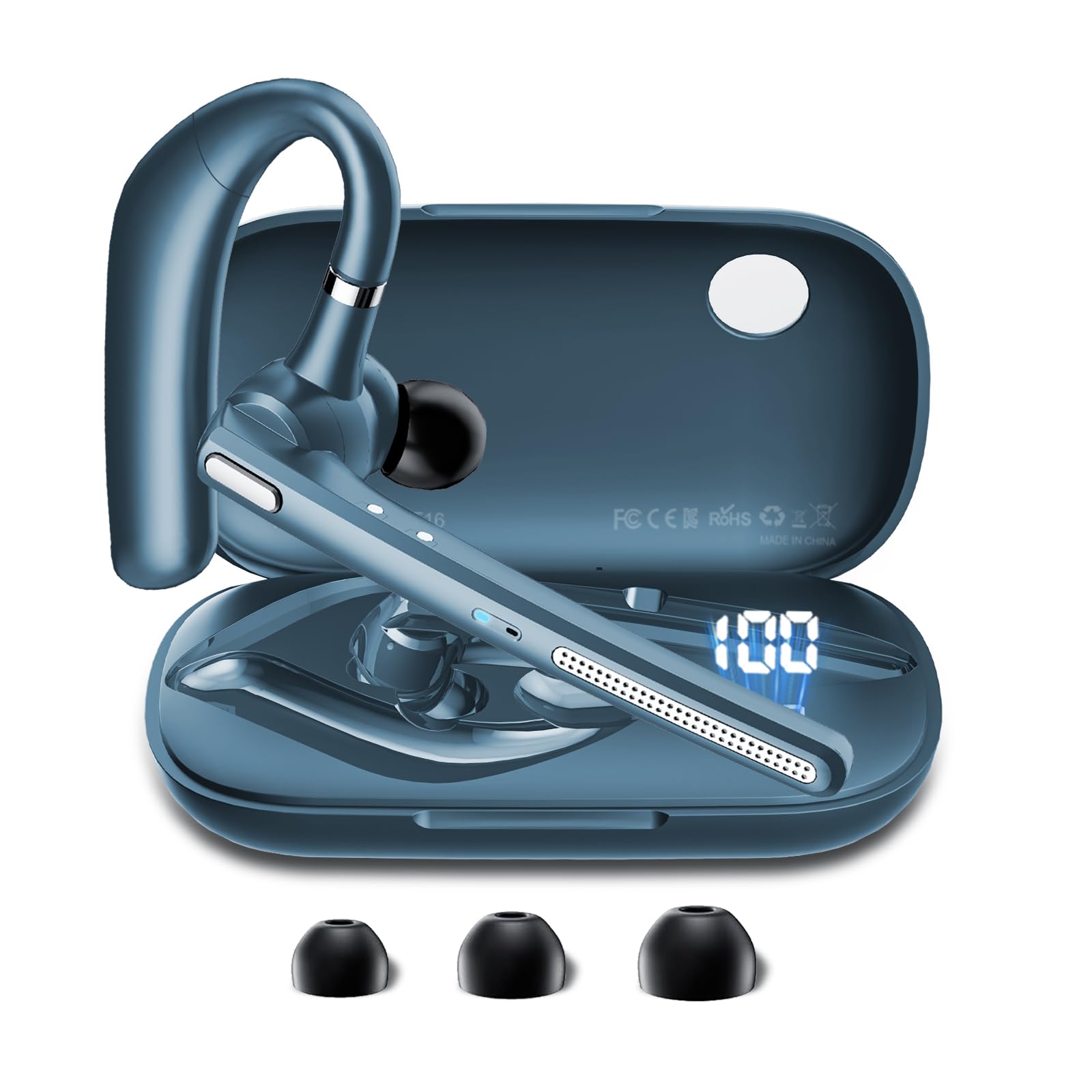
Image: The COTOE G7 Bluetooth Headset (gray) shown with its charging case. The headset features an ergonomic in-ear design, and the charging case is compact.
Nøglekomponenter:
- Højttaler: The main unit worn in the ear, containing the speaker, microphone, and control buttons.
- Opladningsetui: Used to store and charge the headset. Features an LED digital display.
- LED digitalt display: Located on the charging case, indicates the charging status of the headset and the power level of the case.
4. Opsætning
4.1 Opladning af headsettet og etuiet
- Tilslut USB-opladerkablet til opladningsporten på etuiet og til en strømkilde (f.eks. USB-vægadapter, computerens USB-port).
- The LED digital display on the charging case will show the current battery level and charging status.
- Place the headset into the charging case. Ensure proper alignment for charging. The headset's indicator light will show charging status.
- A full charge typically takes approximately 1-2 hours for the headset and 2-3 hours for the charging case.
Note: The headset offers up to 12 hours of music playback and the charging case provides 120 hours of standby time.
4.2 Parring med en Bluetooth-enhed
- Sørg for, at headsettet er opladet.
- Take the headset out of the charging case. It will automatically enter pairing mode, indicated by a flashing LED light (usually blue and red).
- Gå til Bluetooth-indstillingerne på din mobiltelefon eller anden Bluetooth-aktiveret enhed.
- Søg efter available devices. You should see "COTOE G7" in the list.
- Select "COTOE G7" to connect. Once connected, the headset's LED light will stop flashing and may turn solid blue or turn off.
- Hvis du bliver bedt om en adgangskode, skal du indtaste "0000" (fire nuller).
- Headsettet genopretter automatisk forbindelsen til den sidst parrede enhed, når det tændes og er inden for rækkevidde.
5. Betjeningsvejledning
5.1 Tænd/sluk
- Tænd: Take the headset out of the charging case, or press and hold the Multi-function Button for approximately 3 seconds.
- Sluk: Place the headset back into the charging case, or press and hold the Multi-function Button for approximately 5 seconds.
5.2 Opkaldshåndtering
- Besvar opkald: Tryk én gang på multifunktionsknappen.
- Afslut opkald: Tryk én gang på multifunktionsknappen under et opkald.
- Afvis opkald: Tryk og hold multifunktionsknappen nede i cirka 2 sekunder.
- Genopkald sidste nummer: Dobbelttryk på multifunktionsknappen.
5.3 Musikafspilning
- Afspil/pause: Tryk én gang på multifunktionsknappen.
- Næste nummer: Tryk og hold på lydstyrke op-knappen.
- Forrige nummer: Tryk og hold lydstyrke ned-knappen.
5.4 Lydstyrkekontrol
- Forøg lydstyrke: Tryk på knappen Lydstyrke op.
- Skru ned for lydstyrken: Tryk på knappen Lydstyrke ned.
5.5 Aktiv støjreduktion (ANC)
The COTOE G7 features Active Noise Cancellation to reduce ambient noise. To activate or deactivate ANC, locate the dedicated ANC button (if present) or refer to the specific button combination in your quick start guide. Typically, a long press on a designated button toggles ANC.
6. Vedligeholdelse
- Rensning: Use a soft, dry, lint-free cloth to clean the headset and charging case. Do not use harsh chemicals or abrasive materials.
- Opbevaring: Store the headset in its charging case when not in use to protect it from dust and damage. Avoid extreme temperatures.
- Batteripleje: To prolong battery life, avoid fully discharging the headset frequently. Charge it regularly, even if not used for extended periods.
- Vandtæthed: The headset is not waterproof. Avoid exposure to liquids and moisture.
7. Fejlfinding
| Problem | Løsning |
|---|---|
| Headsettet tænder ikke. | Ensure the headset is charged. Place it in the charging case to confirm charging. |
| Kan ikke parres med enheden. | Make sure Bluetooth is enabled on your device. Ensure the headset is in pairing mode. Try restarting both the headset and your device. Clear previous Bluetooth connections on your device. |
| Ingen lyd eller lav lydstyrke. | Check the volume levels on both the headset and your connected device. Ensure the headset is properly connected. Try playing different audio sources. |
| Intermitterende forbindelse. | Ensure the headset is within the effective range of your Bluetooth device (typically 10 meters/33 feet). Avoid obstacles between the headset and device. |
8. Specifikationer
- Mærke: COTOE
- Model: G7
- Farve: Grå
- Øreplacering: In Ear
- Formfaktor: In Ear
- Støjkontrol: Aktiv støjreduktion
- Standby tid: Op til 120 timer (med opladningsetui)
- Musikafspilningstid: Op til 12 timer (med opladningsetui)
9. Garanti og support
The COTOE G7 Bluetooth Headset comes with a standard manufacturer's warranty. Please refer to the warranty card included in your package for specific terms and conditions.
For technical support, troubleshooting assistance, or warranty claims, please contact COTOE customer service through the retailer where you purchased the product or visit the official COTOE webwebsted for kontaktoplysninger.