
1. Introduktion
This manual provides essential instructions for the safe and efficient operation of your ASHATA Portable Multiband AM/FM/WB Radio. Please read this manual thoroughly before using the device and retain it for future reference. This radio is designed for reliable reception across multiple frequency bands, making it suitable for everyday listening and emergency situations.
2. Sikkerhedsoplysninger
- Udsæt ikke radioen for ekstreme temperaturer, direkte sollys eller høj luftfugtighed.
- Undgå at tabe enheden eller udsætte den for kraftige stød.
- Forsøg ikke at skille radioen ad eller ændre den. Dette vil ugyldiggøre garantien og kan forårsage skade.
- Use only specified battery types (2 x AA dry batteries). Ensure correct polarity when inserting batteries.
- Fjern batterierne, hvis radioen ikke skal bruges i længere tid, for at forhindre lækage.
- Hold enheden væk fra vand og andre væsker.
- Bortskaf batterier og enheden i henhold til lokale regler.
3. Pakkens indhold
Tjek venligst pakken for følgende varer:
- 1 x ASHATA Portable Multiband Radio
- 1 x Brugermanual (dette dokument)
Bemærk: AA-batterier er ikke inkluderet og skal købes separat.
4. Produktet er slutview
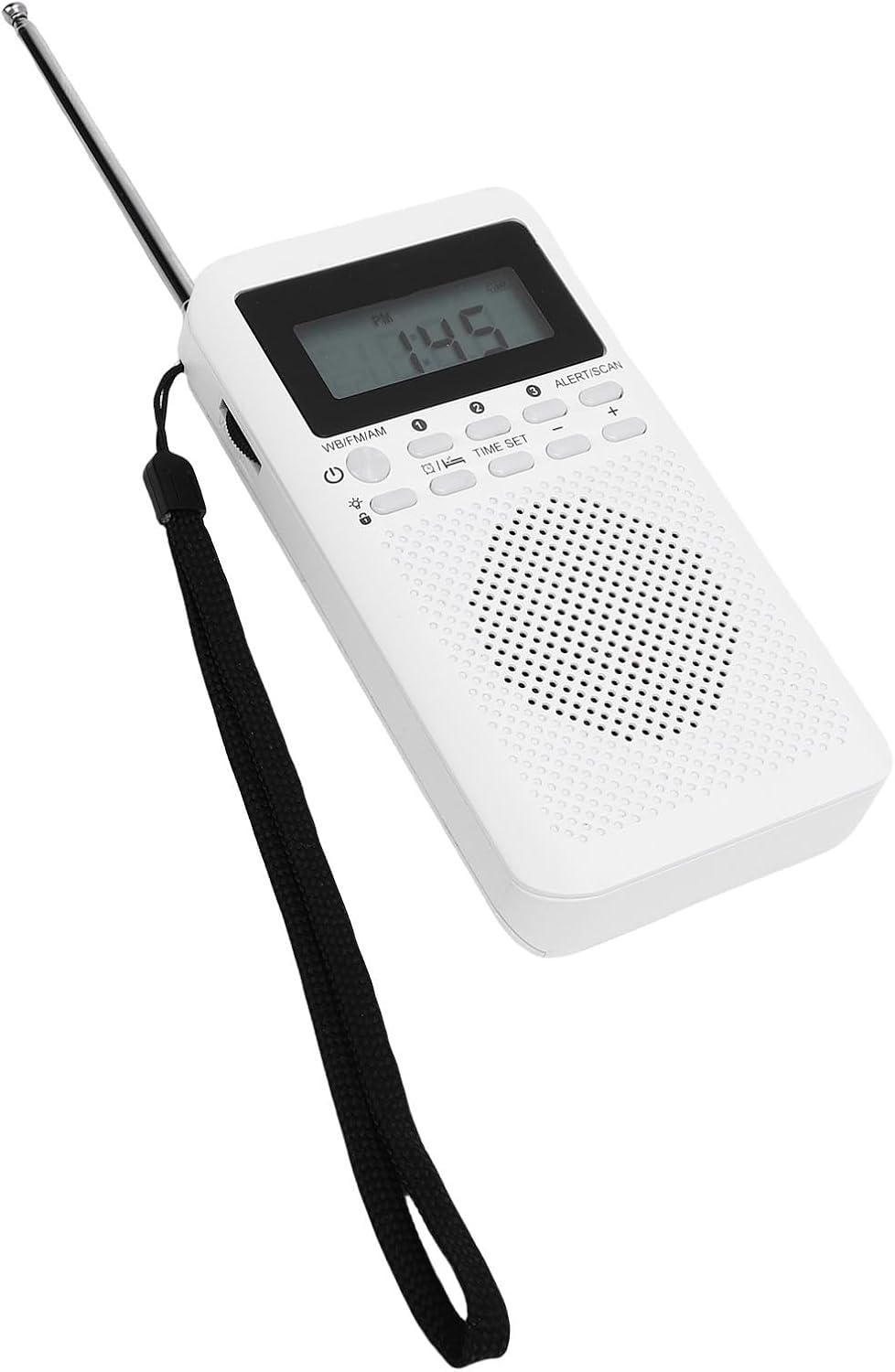
The ASHATA Portable Multiband Radio features a compact design with a clear display and intuitive controls. It supports FM, AM, and Weather Band (WB) frequencies, equipped with a 16.5-inch telescopic antenna for enhanced signal reception and a 3.5mm headphone jack for private listening.

Figur 4.1: Forside View of the Radio. This image displays the front of the ASHATA portable radio, highlighting the digital display, control buttons for power, band selection, time setting, alert/scan, and volume, as well as the integrated speaker grille. A wrist strap is visible on the left side, and the telescopic antenna is extended upwards.

Figur 4.2: Forside View with Retracted Antenna. This image shows the ASHATA portable radio from the front, similar to Figure 4.1, but with the telescopic antenna fully retracted. The display shows 'PM 1:43', and the control buttons and speaker are clearly visible.
Figur 4.3: Tilbage View of the Radio. This image presents the rear side of the ASHATA portable radio. It clearly shows the battery compartment cover at the bottom and a product label near the top, detailing model information, frequency ranges, sensitivity, output, battery type, and manufacturing origin.

Figur 4.4: Side View with Extended Antenna. This image captures a side view of the ASHATA portable radio, with its telescopic antenna fully extended. The 3.5mm headphone jack is visible on the side, indicating connectivity options for private listening.
Nøglefunktioner:
- Multibåndsmodtagelse: Supports FM (87-108MHz), AM (520-1710KHz), and WB (162.400-162.550MHz) frequencies.
- Klar lyd: Equipped with built-in magnetic stereo speakers for bright and clear audio.
- Hovedtelefonstik: Includes a 3.5mm audio interface for private listening.
- Teleskopantenne: A 16.5-inch, 6-section, 360-degree rotatable telescopic antenna ensures strong signal reception.
- Nem betjening: Features dedicated AM, FM, WB switch and a large channel tuner for simple use.
- Bærbart design: Compact and lightweight, ideal for outdoor use and emergency kits.
5. Opsætning
5.1 Batteriinstallation
- Locate the battery compartment cover on the back of the radio (refer to Figure 4.3).
- Skub eller løft dækslet for at åbne rummet.
- Insert two (2) AA dry batteries, ensuring the correct polarity (+/-) as indicated inside the compartment.
- Luk batterirummets dæksel forsvarligt.
Vigtig: Always use fresh batteries and replace both batteries at the same time. Do not mix old and new batteries or different types of batteries.
5.2 Antenneforlængelse
For optimal reception, especially for FM and WB bands, fully extend the telescopic antenna. The antenna can be rotated 360 degrees to find the best signal direction.
- Gently pull the telescopic antenna upwards until it is fully extended.
- Rotate the antenna to achieve the clearest reception.
- When not in use, retract the antenna to prevent damage.
6. Betjeningsvejledning
6.1 Tænd/sluk
- At tænde radioen ON, press the power button (usually marked with a circle and a vertical line).
- At tænde radioen SLUKKET, tryk på tænd/sluk-knappen igen.
6.2 Selecting a Frequency Band
The radio supports three frequency bands: FM, AM, and WB (Weather Band).
- Find WB/FM/AM switch on the radio's control panel.
- Slide the switch to select your desired band:
- FM: For local music and talk radio stations (87-108MHz).
- ER: For long-distance broadcasts and news (520-1710KHz).
- WB: For weather alerts and information (162.400-162.550MHz).
6.3 Indstilling på en station
Use the large channel tuner knob to scan for stations within the selected band.
- Once a band is selected, slowly rotate the tuning knob to search for stations.
- Frekvensen vil blive vist på skærmen.
- Adjust the antenna position for better reception if needed.
6.4 Lydstyrkekontrol
Adjust the volume using the dedicated volume control buttons, typically marked with '+' and '-' symbols.
- Tryk på '+' button to increase the volume.
- Tryk på '-' button to decrease the volume.
6.5 Brug af hovedtelefoner
For private listening, connect standard 3.5mm headphones to the headphone jack located on the side of the radio.
- Insert the 3.5mm plug of your headphones into the headphone jack.
- Den interne højttaler vil automatisk slå lyden fra, når der tilsluttes hovedtelefoner.
- Adjust the volume to a comfortable level to protect your hearing.
6.6 Time Setting and Alert Function
The radio may include functions for setting the time and an alert/scan feature. Refer to the specific buttons labeled "TIME SET" and "ALERT/SCAN" on your device.
- Tid indstillet: Press the "TIME SET" button to enter time adjustment mode. Use the '+' and '-' buttons to set the hour and minute, then press "TIME SET" again to confirm.
- Alert/Scan: This button may initiate an automatic scan for available stations or activate a weather alert function. Consult the on-screen indicators for specific functionality.
7. Vedligeholdelse
7.1 Rengøring
- Tør radioen af med en blød, tør klud.
- Brug ikke slibende rengøringsmidler, opløsningsmidler eller stærke kemikalier, da disse kan beskadige overfladen.
- Undgå at fugt kommer ind i åbninger.
7.2 Pleje af batterier
- If the radio will not be used for an extended period, remove the batteries to prevent leakage and corrosion.
- Replace batteries promptly when the low battery indicator appears on the display or when performance degrades.
8. Fejlfinding
| Problem | Mulig årsag | Løsning |
|---|---|---|
| Ingen strøm / Radioen tænder ikke. |
|
|
| Poor reception / Static sound. |
|
|
| Ingen lyd fra højttaleren. |
|
|
Hvis problemet fortsætter efter at have prøvet disse løsninger, henvises der til supportafsnittet.
9. Specifikationer
| Feature | Detalje |
|---|---|
| Modelnummer | ASHATA2tiwy8zqgg |
| Modtagelsesfrekvens |
|
| Lydgrænseflade | 3.5 mm hovedtelefonstik |
| Batteritype | 2 x AA Dry Batteries (500mAh) |
| Antenne størrelse | 41.9 cm (16.5 tommer) |
| Produktmål (L x B x H) | 14 x 11 x 3 cm |
| Produktets vægt | 158 g |
| Fabrikant | ASHATA |
10. Garantioplysninger
This ASHATA product is covered by a manufacturer's warranty for 90 days from the date of sale. This warranty covers defects in materials and workmanship under normal use. It does not cover damage caused by misuse, accident, unauthorized modification, or improper installation.
Gem venligst dit købsbevis for garantikrav.
11. Support
If you encounter any issues or have questions regarding your ASHATA Portable Multiband Radio that are not addressed in this manual, please contact ASHATA customer support.
For the most up-to-date support information, please visit the official ASHATA webwebstedet eller se de kontaktoplysninger, der blev oplyst ved dit køb.