
1. Introduktion
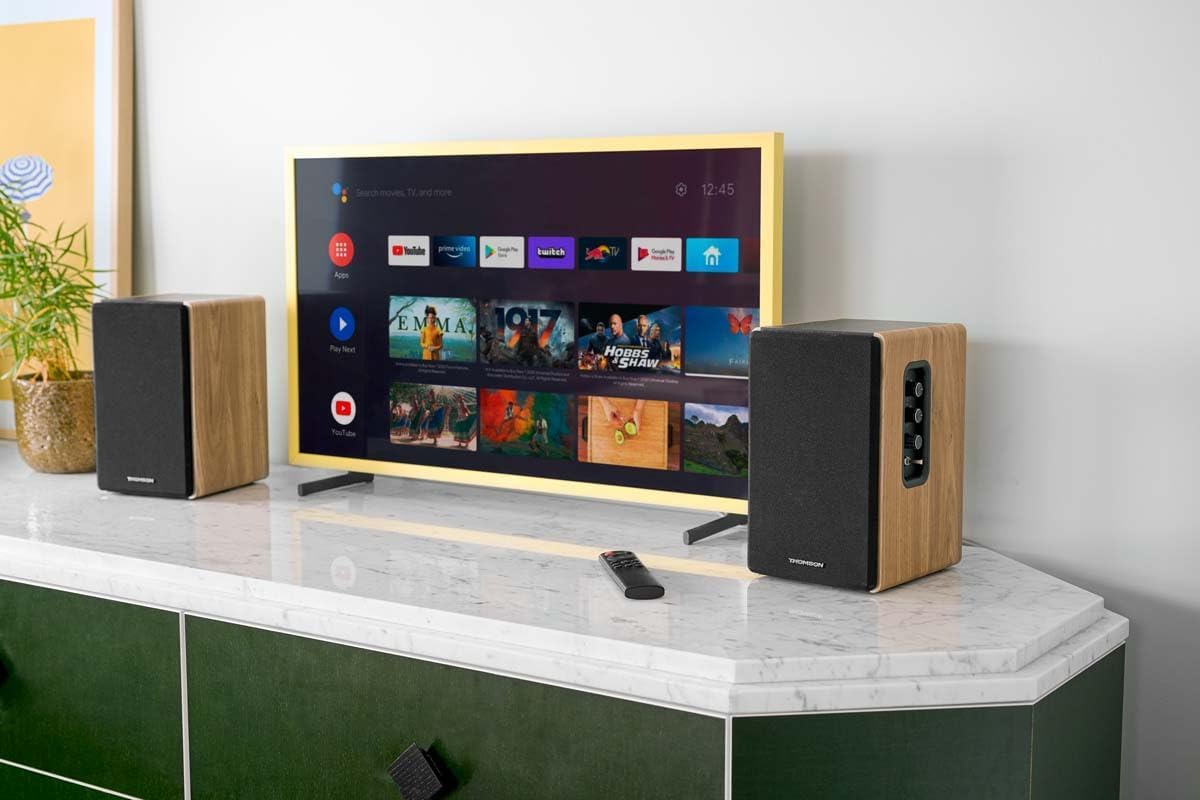
Thank you for choosing the THOMSON WS902DUO Cosy Bookshelf Speakers. These active stereo speakers deliver a powerful 150W audio experience with deep bass from two 10 cm woofers. They offer versatile connectivity options including Bluetooth 5.3, Optical, HDMI (ARC), RCA, and USB playback. The included remote control and side panel adjustments provide precise control over your audio. Please read this manual carefully before use to ensure proper operation and to maximize your listening experience.

Image 1.1: THOMSON WS902DUO Bookshelf Speakers in a living space, showcasing their elegant wood finish.
2. Vigtige sikkerhedsinstruktioner
- Læs disse instruktioner grundigt, inden du bruger produktet.
- Gem disse instruktioner til fremtidig reference.
- Overhold alle advarsler på produktet og i betjeningsvejledningen.
- Følg alle instruktioner.
- Brug ikke dette apparat i nærheden af vand.
- Rengør kun med en tør klud.
- Bloker ikke ventilationsåbninger. Installer i overensstemmelse med producentens anvisninger.
- Må ikke installeres i nærheden af varmekilder såsom radiatorer, varmeapparater, komfurer eller andre apparater (inklusive ampløftere), der producerer varme.
- Undgå at omgå sikkerhedsformålet med det polariserede stik eller stik med jordforbindelse. Et polariseret stik har to knive, hvor den ene er bredere end den anden. Et stik med jordforbindelse har to knive og et tredje jordstik. Det brede blad eller det tredje ben er tilvejebragt for din sikkerhed. Hvis det medfølgende stik ikke passer i din stikkontakt, skal du kontakte en elektriker for at få udskiftet den forældede stikkontakt.
- Beskyt netledningen mod at blive trådt på eller klemt, især ved stik, stikkontakter og det sted, hvor de kommer ud af apparatet.
- Brug kun tilbehør/tilbehør specificeret af producenten.
- Brug kun den vogn, stativ, stativ, beslag eller bord, der er specificeret af producenten eller solgt sammen med apparatet. Når en vogn bruges, skal du være forsigtig, når du flytter kombinationen af vognen/apparatet for at undgå skader ved at vælte.
- Træk stikket ud af dette apparat under tordenvejr, eller når det ikke skal bruges i længere perioder.
- Overlad al service til kvalificeret servicepersonale. Service er påkrævet, når apparatet er blevet beskadiget på nogen måde, såsom strømforsyningsledning eller stik er beskadiget, væske er blevet spildt, eller genstande er faldet ind i apparatet, apparatet har været udsat for regn eller fugt, ikke fungerer normalt , eller er blevet droppet.
3. Pakkens indhold
Kontroller venligst, at alle nedenstående varer er inkluderet i din pakke:
- THOMSON WS902DUO Bookshelf Speakers (2 units)
- Fjernbetjening
- Strømkabel
- Højttalerforbindelseskabel
- 3.5mm Jack to RCA Adapter Cable
- Brugervejledning (dette dokument)

Image 3.1: Packaging of the THOMSON WS902DUO Bookshelf Speakers.
4. Produktet er slutview
4.1. Side Control Panel (Active Speaker)
The active speaker features a side control panel for easy access to essential functions.

Image 4.1: Side control panel.
- Baskontrol: Justerer lavfrekvensudgangen.
- Diskantkontrol: Justerer højfrekvent udgang.
- Lydstyrkekontrol: Justerer den samlede lydstyrke.
- Afbryderen: Tænder eller slukker for højttalerne.
- LED-indikator: Shows the current status or selected input.
4.2. Bagpanel (aktiv højttaler)
The rear panel of the active speaker provides all necessary input and output connections.
Billede 4.2: Tilslutninger på bagpanel.
- Optisk indgang: For connecting digital audio sources like TVs, game consoles, or Blu-ray players.
- Aux-indgang (RCA): For connecting analog audio sources such as turntables, CD players, or PCs. A 3.5mm jack adapter is provided.
- TV Audio (HDMI ARC): For connecting to a TV's HDMI ARC port, allowing TV remote control of the speaker volume.
- USB-afspilning: Til afspilning af MP3 files direkte fra et USB-flashdrev.
- Sub Out: For connecting an external active subwoofer for enhanced bass.
- Højttaler output: Tilsluttes den passive højttaler.
- Strømindgang: Tilsluttes til hovedstrømforsyningen.
4.3. Fjernbetjening
The remote control provides convenient access to all speaker functions from a distance.

Image 4.3: Remote control.
- Power knap: Turns the speakers on/off.
- Mute-knap: Slår lyden fra/til.
- Volumen +/-: Justerer lydstyrken.
- Afspilningskontroller (Afspil/Pause, Spring over): Til USB-afspilning.
- Source Selection Buttons (OPT, BT, ARC, USB, LINE): Vælger lydindgangskilden.
- EQ Mode Buttons (MOVIE, MUSIC, DIALOG): Selects preset equalization modes.
5. Opsætning
5.1. Højttalerplacering
Place the speakers on a stable, flat surface such as a bookshelf, desk, or speaker stands. For optimal stereo imaging, position the speakers equidistant from your listening position and at ear level. Ensure there is adequate space around the speakers for ventilation.
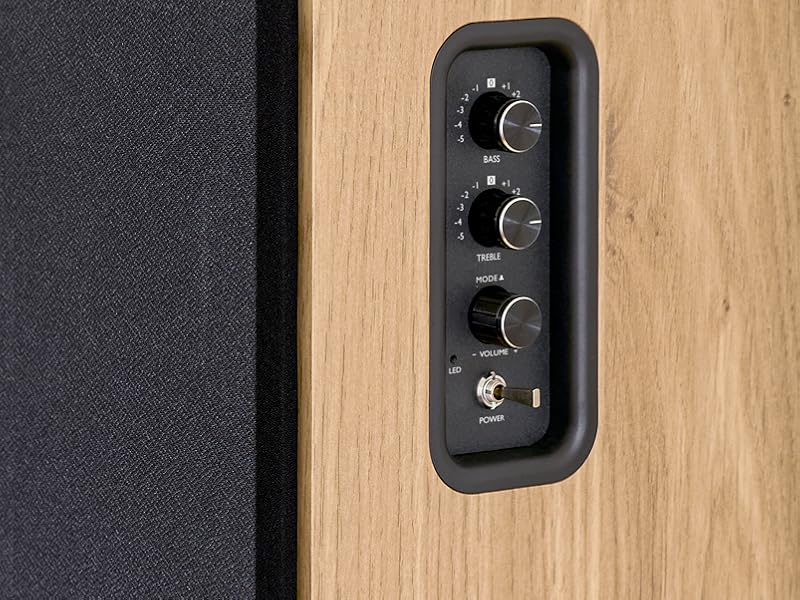
Image 5.1: Recommended speaker placement on a desk.
5.2. Tilslutning af højttalerne
- Identify the active speaker (with controls and inputs) and the passive speaker.
- Connect the included speaker cable from the speaker output terminals on the active speaker to the input terminals on the passive speaker. Ensure correct polarity (+ to + and - to -).
5.3. Tilslutning af lydkilder
Connect your desired audio sources to the active speaker using the appropriate cables.
- Optisk indgang: Use an optical cable to connect your TV, game console, or Blu-ray player to the OPTICAL IN port.
- HDMI (ARC) indgang: Use an HDMI cable to connect your TV's HDMI ARC port to the TV AUDIO (HDMI) port on the speaker. This allows your TV remote to control the speaker volume.
- RCA (AUX) indgang: Use an RCA cable (or the provided 3.5mm jack to RCA adapter) to connect devices like a turntable, CD player, or PC to the AUX IN (RCA) ports.
- USB-indgang: Indsæt et USB-flashdrev, der indeholder MP3 files into the USB PLAY port.

Image 5.2: Speakers connected to a television via HDMI ARC.
5.4. Bluetooth-parring
- Sørg for, at højttalerne er tændt.
- Press the 'BT' button on the remote control or the side panel to select Bluetooth input. The LED indicator will flash, indicating pairing mode.
- Aktiver Bluetooth på din smartphone, tablet eller computer, og søg efter tilgængelige enheder.
- Select "THOMSON WS902DUO" from the list of devices.
- Once paired, the LED indicator will stop flashing and remain solid. You can now stream audio wirelessly.
5.5. Subwoofer-tilslutning (valgfrit)
If you wish to enhance bass further, connect an active subwoofer to the 'Sub Out' port on the rear panel of the active speaker using an RCA cable.
6. Betjeningsvejledning
6.1. Tænd/sluk
Use the power switch on the side control panel or the power button on the remote control to turn the speakers on or off.
6.2. Kildevalg
Press the corresponding source button on the remote control (OPT, BT, ARC, USB, LINE) to switch between connected audio inputs. The LED indicator will change to reflect the selected source.
6.3. Lydstyrkekontrol
Adjust the volume using the 'Volume' knob on the side control panel or the 'VOL+/-' buttons on the remote control.
6.4. Lydjusteringer
Fine-tune the sound to your preference:
- Bas/diskant: Use the 'Bass' and 'Treble' knobs on the side control panel to adjust the low and high frequencies.
- EQ-tilstande: Press the 'MOVIE', 'MUSIC', or 'DIALOG' buttons on the remote control to select preset equalization settings optimized for different content types.
6.5. USB-afspilning
When a USB flash drive with MP3 files is inserted and USB source is selected, the speakers will automatically begin playing. Use the playback control buttons on the remote control (Play/Pause, Skip) to manage your music.
6.6. Bluetooth-betjening
After successful pairing (see Section 5.4), you can stream audio from your Bluetooth device. Use your device's controls or the speaker's remote control for playback and volume adjustments.
7. Vedligeholdelse
Korrekt vedligeholdelse sikrer dine højttaleres levetid og ydeevne.
- Rensning: Wipe the speaker surfaces with a soft, dry cloth. Do not use liquid cleaners or abrasive materials.
- Ventilation: Sørg for, at ventilationsåbningerne ikke er blokeret for at forhindre overophedning.
- Opbevaring: Hvis du opbevarer højttalerne i længere tid, skal du tage stikket ud af stikkontakten og opbevare dem et køligt og tørt sted.
- Undgå fugt: Keep the speakers away from water and high humidity.
8. Fejlfinding
Hvis du støder på problemer, skal du se følgende fejlfindingsvejledning:
| Problem | Mulig årsag | Løsning |
|---|---|---|
| Ingen strøm | Power cable not connected; Power switch off; Wall outlet not working. | Ensure power cable is securely connected. Turn on the power switch. Test the wall outlet with another device. |
| Ingen lyd | Incorrect input source selected; Volume too low; Mute function active; Audio cable not connected properly. | Select the correct input source. Increase volume. Press Mute button on remote. Check all audio cable connections. |
| Bluetooth-parring mislykkes | Speakers not in pairing mode; Device too far; Bluetooth disabled on source device. | Ensure speakers are in Bluetooth pairing mode (flashing LED). Move device closer to speakers. Enable Bluetooth on your source device. |
| USB-afspilning virker ikke | USB drive not formatted correctly; Files not MP3; USB drive not inserted properly. | Ensure USB drive is FAT32 formatted. Verify files are in MP3 format. Re-insert USB drive firmly. |
| Lydforvrængning | Volume too high; Source audio quality poor; Bass/Treble settings too extreme. | Lower the volume. Test with a different audio source. Adjust Bass and Treble controls. |
9. Specifikationer
| Feature | Specifikation |
|---|---|
| Mærke | THOMSON |
| Modelnummer | WS902DUO |
| Maksimal højttalerudgangseffekt | 150 watt |
| Frekvensrespons | 60 Hz |
| Forbindelsesteknologi | Bluetooth, HDMI (ARC), Optical, RCA, USB |
| Bluetooth version | 5.3 |
| Lydudgangstilstand | Stereo (2.0 channels) |
| Input bindtage | 230 volt (AC) |
| Monteringstype | Hyldemontering |
| Højttaler type | Multimedia Bookshelf |
| Særlige funktioner | Stereo Pairing, USB Port, Sub-Out, Remote Control, EQ Modes |
| Anbefalede anvendelser | Smartphone, Tablet, PC, TV, Game Console, DVD Player, Turntable |
| Farve | Naturlig træfinish |
| Kontrolmetode | Remote Control, Side Panel Knobs |
| Woofer størrelse | 10 centimeter |
| Dimensioner (H x B x D) | 28 cm x 24 cm x 47 cm (omtrentligt, pr. højttaler) |
| Vægt | 5048 Grams (total for pair) |
| Antal genstande | 2 |
| Oprindelsesland | Kina |
10. Garantioplysninger
This THOMSON WS902DUO product comes with a 1 års begrænset garanti fra købsdatoen. Denne garanti dækker fabrikationsfejl og udførelse under normal brug. Den dækker ikke skader forårsaget af misbrug, ulykker, uautoriserede ændringer eller normal slitage. Gem venligst din købsbevis i tilfælde af garantikrav.
11. Kundesupport
For technical assistance, warranty claims, or any questions regarding your THOMSON WS902DUO speakers, please contact your retailer or visit the official THOMSON support website. Please have your model number (WS902DUO) and proof of purchase ready when contacting support.
Online support: www.thomsonconsumer.com (Se venligst for regionale supportkontakter)