
Indledning
Thank you for choosing the VANSING D2 MP3 Player. This device is designed to provide a portable and versatile music experience, featuring Bluetooth 5.2 connectivity, a 1.8-inch display, and multiple functions including FM radio and voice recording. This manual will guide you through the setup, operation, and maintenance of your new MP3 player.
Hvad er der i æsken
Carefully unpack your VANSING D2 MP3 Player and ensure all items are present. If any items are missing or damaged, please contact customer support.
- VANSING D2 MP3 Player (1)
- Screen Protector Case (1)
- Brugervejledning (1)
- Screen Protector Film (2, one pre-applied)
- MP3 Lanyard (1)
- Wired Headphones (1)
- Ladekabel (1)
- 32GB Storage Card (1)

Produkt overview
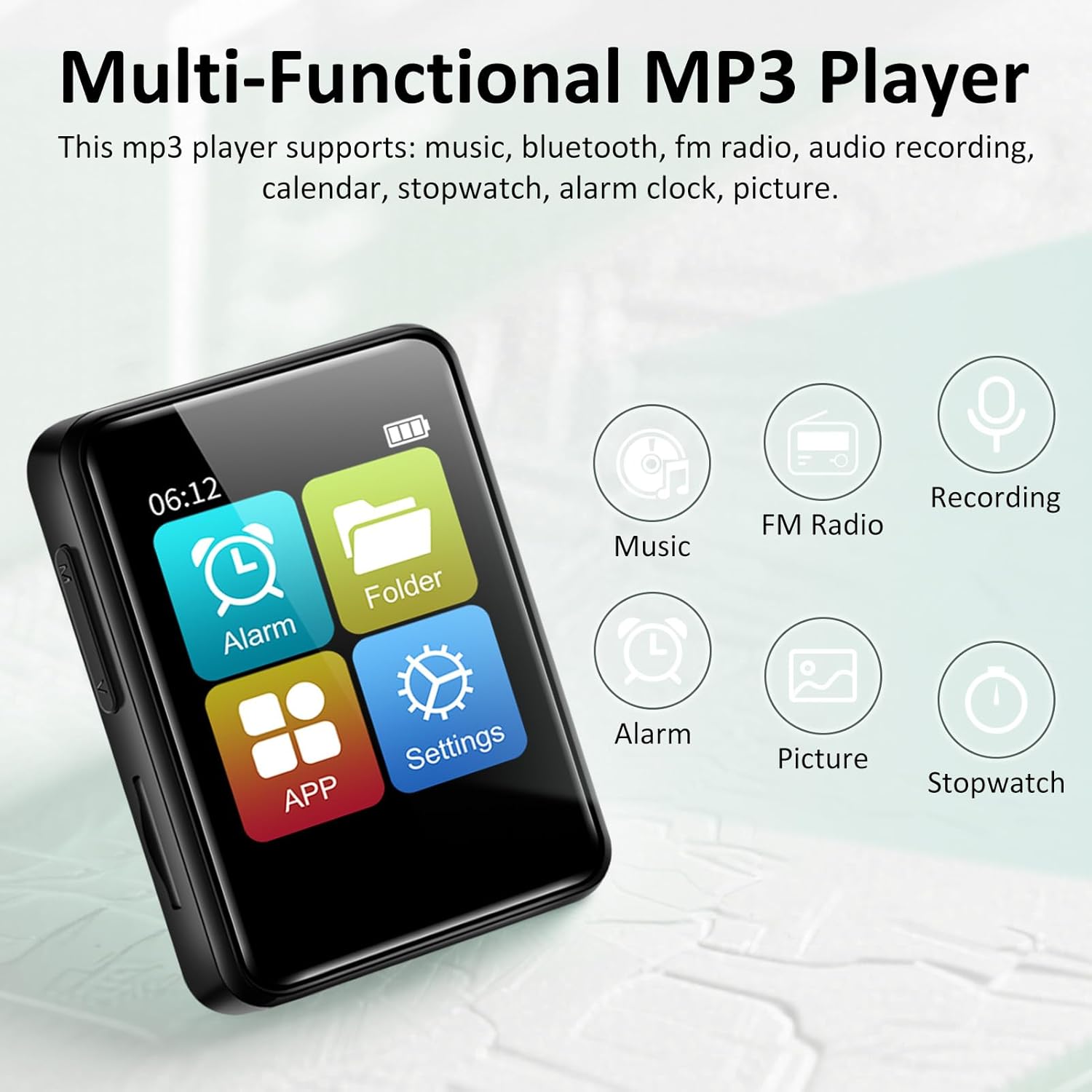
The VANSING D2 MP3 Player is a compact and feature-rich device designed for audio playback and more. It features a clear 1.8-inch display for easy navigation and supports various audio formats.
Nøglefunktioner:
- Bluetooth 5.2: For stable and efficient wireless connection to headphones or speakers.
- Langtidsholdbart batteri: Up to 20 hours with headphones, 4 hours with speaker on a 1.5-hour charge.
- Udvidelig lagerplads: Supports up to 512GB TF card (32GB card included).
- Multifunktionel: Includes music playback, FM radio, voice recorder, alarm clock, stopwatch, and calendar.
- Lossless Sound: Compatible with MP3/OGG/FLAC/AAC/WMA/WAV/APE formats.


Opsætning
1. Opladning af enheden
Before first use, fully charge your MP3 player. Connect the provided USB charging cable to the device's Mini USB port and the other end to a USB power adapter (not included) or a computer's USB port. The battery indicator on the screen will show charging status. A full charge typically takes about 1.5 hours.
2. Indsættelse af et TF-kort
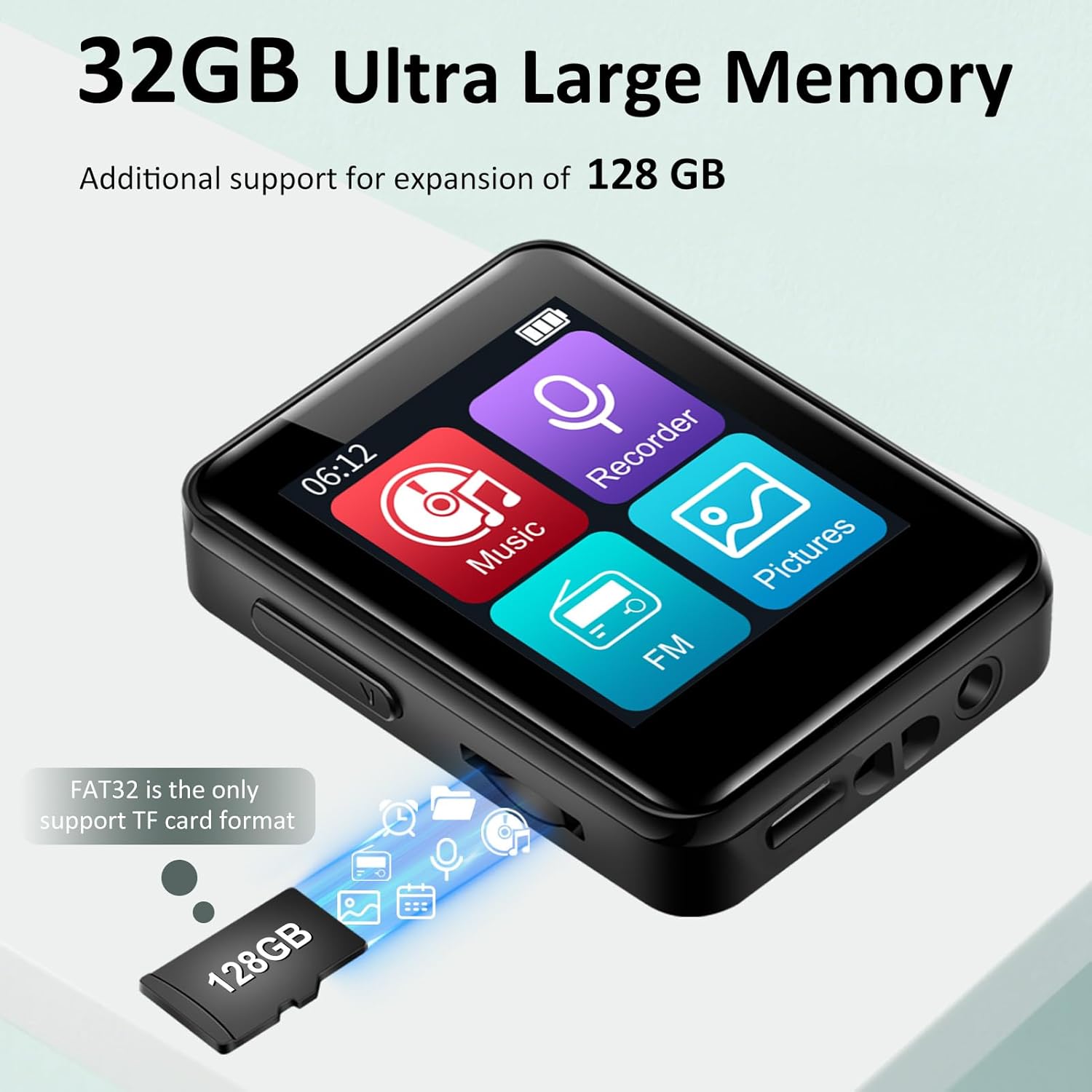
The VANSING D2 MP3 Player requires a TF (Micro SD) card for storage. A 32GB card is included. The device supports cards up to 512GB. Ensure the card is formatted to FAT32 for optimal compatibility.
- Find TF-kortstikket på siden af MP3-afspilleren.
- Sæt forsigtigt TF-kortet i stikket, indtil det klikker på plads.
- For at fjerne det skal du skubbe kortet let ind, indtil det springer ud.
3. Tænd/sluk
For at tænde enheden skal du trykke på tænd/sluk-knappen på siden og holde den nede, indtil skærmen lyser. For at slukke enheden skal du trykke på tænd/sluk-knappen igen og holde den nede, indtil enheden slukker.
Grundlæggende betjening
1. Navigering i grænsefladen
The VANSING D2 features a touch-sensitive screen for navigation. Swipe left or right to browse through menu options and tap to select. Use the physical buttons on the side for volume control and power.
2. Musikafspilning
Sådan afspiller du musik:
- From the main menu, tap the "Music" icon.
- Gennemse dit musikbibliotek efter kunstner, album, genre eller mappe.
- Tryk på en sang for at starte afspilningen.
- Brug skærmknapperne til at afspille/pause, springe numre over og justere lydstyrken.
The player supports MP3, OGG, FLAC, AAC, WMA, WAV, and APE audio formats.

3. Bluetooth-forbindelse
Sådan tilslutter du Bluetooth-hovedtelefoner eller -højttalere:
- From the main menu, tap the "Settings" icon.
- Vælg "Bluetooth".
- Turn Bluetooth ON. The player will scan for nearby devices.
- Vælg den ønskede enhed fra listen for at parre.
4. FM Radio
To use the FM radio function, wired headphones must be connected as they act as the antenna.
- Connect the wired headphones to the 3.5mm audio port.
- From the main menu, tap the "FM" icon.
- Brug skærmknapperne til at søge efter stationer eller indstille manuelt.
5. Stemmeoptager
Sådan optager du lyd:
- From the main menu, tap the "Recorder" icon.
- Tryk på optageknappen for at starte optagelsen.
- Tap the stop button to end and save the recording.
6. Andre funktioner
The VANSING D2 also includes:
- Vækkeur: Indstil alarmer for påmindelser.
- Stopur: Til tidsstyringsaktiviteter.
- Kalender: View datoer og administrere tidsplaner.
Sprog- og tidsindstillinger
You can easily adjust the device's language, time, and date settings through the menu.
Ændring af sprog:
- Go to "Settings" (the gear icon).
- Select "Language Set".
- Choose "English" from the list.

Ændring af tiden:
- Go to "Settings".
- Select "Time & Date".
- Choose "Set the time".
- Adjust the hour, minute, and second selections.

Changing the Date:
- Go to "Settings".
- Select "Time & Date".
- Choose "Set the date".
- Adjust the year, month, and day selections.

File Overførsel
You can transfer music and other files to your MP3 player using a computer or an OTG connection.
1. Tilslutning til en computer
Connect the MP3 player to your computer using the provided USB data cable. The device should appear as a removable disk. You can then drag and drop files directly to the TF card. Ensure the TF card is inserted for file transfer functionality.
2. OTG (On-The-Go) Transfer
The device supports OTG for direct file transfer from compatible smartphones or other devices. An OTG adapter (not included) may be required. Ensure the TF card is inserted for this function.

Fejlfinding
- Enheden tænder ikke: Ensure the battery is charged. Connect to a power source and try again. If unresponsive, perform a hard reset by pressing and holding the power button for 10-15 seconds.
- Kan ikke oprette forbindelse til Bluetooth: Ensure Bluetooth is enabled on both the MP3 player and the target device. Make sure both devices are within range and not paired with other devices. Try restarting both devices.
- Files not appearing on the player: Verify that the TF card is properly inserted and formatted to FAT32. Ensure the audio files are in a supported format (MP3/OGG/FLAC/AAC/WMA/WAV/APE). Try re-transferring the files.
- Langsom file overførselshastighed: Transfer speeds can vary depending on the computer's USB port and the TF card's speed. Ensure you are using the provided USB cable.
- FM-radioen virker ikke: Ensure wired headphones are securely plugged into the 3.5mm audio jack, as they function as the antenna.
- Skærmen reagerer ikke: If the screen is unresponsive, try restarting the device. If the issue persists, ensure the screen protector is applied correctly and not interfering with touch sensitivity.
Specifikationer
| Produktdimensioner | 2.13 x 1.65 x 0.5 tommer |
| Varens vægt | 1.23 ounce |
| Mærke | VANSING |
| Modelnavn | D2 |
| Forbindelsesteknologi | USB, Bluetooth 5.2 |
| Hukommelseslagringskapacitet | 32 GB (kan udvides op til 512 GB via Micro SD) |
| Skærmstørrelse | 1.8 tommer |
| Kompatible enheder | Hovedtelefoner, Bluetooth-højttalere |
| Medietype | Micro SD |
| Speciel funktion | FM Radio, Voice Recorder, Built-in Speaker |
| Batterier | 1 A batteri påkrævet (medfølger) |
Opretholdelse
To ensure the longevity and optimal performance of your VANSING D2 MP3 Player, follow these maintenance guidelines:
- Rensning: Brug en blød, tør klud til at rengøre enheden. Undgå at bruge flydende rengøringsmidler eller slibende materialer.
- Opbevaring: Opbevar afspilleren et køligt, tørt sted væk fra direkte sollys og ekstreme temperaturer.
- Beskyttelse: Use the provided protective case and screen protector film to prevent scratches and minor damage.
- Batteripleje: Undgå at aflade batteriet helt for ofte. Oplad enheden regelmæssigt, selvom den ikke er i brug i længere perioder, for at opretholde batteriets tilstand.
- Vandeksponering: Denne enhed er ikke vandtæt. Undgå udsættelse for vand eller høj luftfugtighed.
Garanti og support
For warranty information or technical support, please refer to the documentation included with your purchase or contact VANSING customer service directly. Keep your purchase receipt as proof of purchase.