
1. Produktet er slutview
The Antonki Digital Room Thermometer and Hygrometer is designed to monitor the temperature and humidity levels in your indoor environment. It features a clear display, records maximum and minimum values, and includes an auto-calibration function for accurate readings.
- Real-time monitoring of temperature and humidity.
- Humidity level indicator icons for quick assessment.
- Records Max/Min values over 24 hours.
- Auto-calibration for consistent accuracy.
- Compact design with a durable kickstand.
Video: En overview of the Antonki Room Thermometer and Hygrometer, highlighting its features and compact design.
2. Hvad er der i æsken
- 1 x Antonki Indoor Hygrometer Thermometer
- 1 x AAA batteri
3. Opsætning og første brug
The Antonki Room Thermometer comes ready to use with an included AAA battery. Follow these steps for initial setup:
- Indsæt batteri: Open the battery compartment on the back of the device and insert the provided AAA battery, ensuring correct polarity.
- Tænd: Press the On/Off button located on the back of the device to turn it on.
- Enhedsvalg: After powering on, you can choose between Fahrenheit (°F) or Celsius (°C) by pressing the temperature unit switch button (often combined with the power button or a separate small button).
- Auto-kalibrering: The device will automatically calibrate for approximately 3 minutes upon first use or after a battery change. During this time, the "CALIBRATED" label may flash. Once stable, it will display accurate readings.
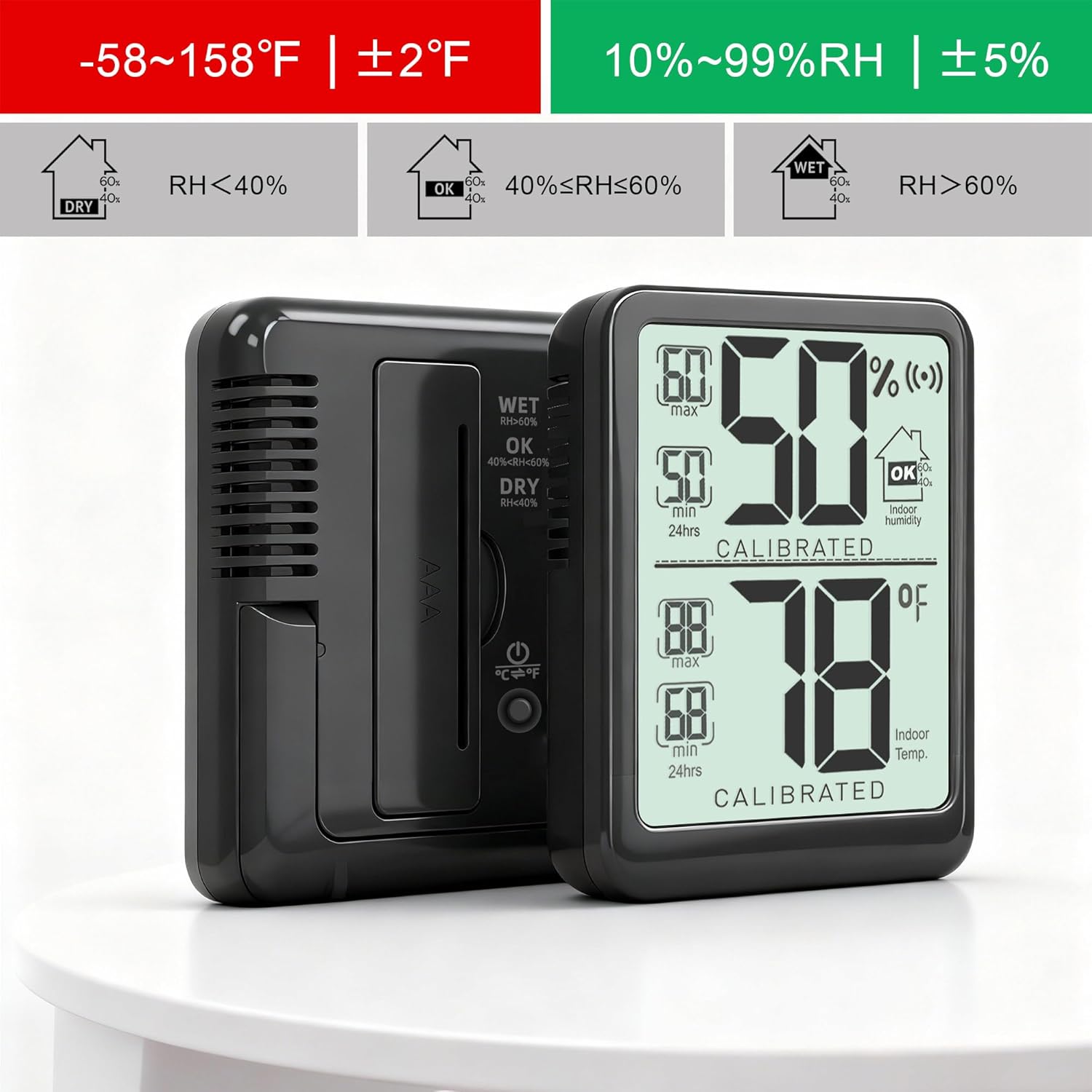
Billede: Bagside view of the Antonki thermometer, highlighting the battery compartment and the Fahrenheit/Celsius switch button.
Video: Demonstrates turning on the device and switching between Fahrenheit and Celsius temperature units.
4. Betjeningsvejledning
The device continuously monitors and displays current temperature and humidity. It also tracks maximum and minimum values over a 24-hour period.
4.1 Aflæsning af displayet
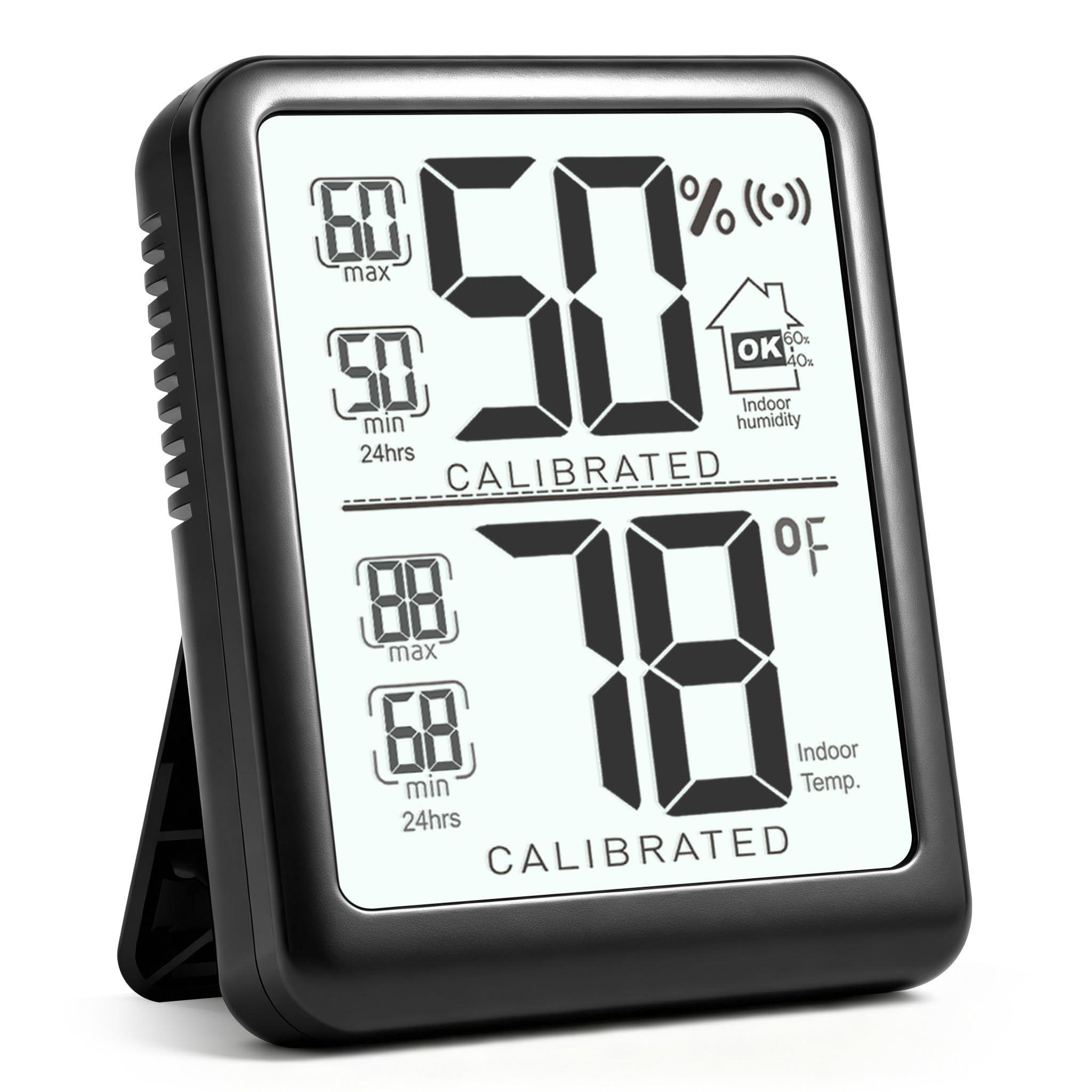
The large digital display shows:
- Øverste sektion: Current humidity percentage (%).
- Mellemsektion: Current temperature in selected unit (°F or °C).
- Side Indicators: Max/Min records for both temperature and humidity over the last 24 hours.
- Humidity Level Icons: Indicates whether humidity is DRY (<40% RH), OK (40%-60% RH), or WET (>60% RH).

Image: Close-up of the Antonki thermometer display, showing humidity, temperature, and max/min values clearly.
4.2 Placering
The thermometer features a durable kickstand for easy placement on any flat surface. It can be used in various indoor environments such as bedrooms, nurseries, offices, closets, incubators, greenhouses, wine cellars, and reptile terrariums.

Image: The Antonki thermometer demonstrating its integrated kickstand for stable placement.

Image: Multiple examples of the Antonki thermometer placed in different indoor environments, including a bedroom, living room, reptile enclosure, incubator, greenhouse, and wine cellar.
5. Specifikationer
| Mærke | Antonki |
| Modelnummer | Termómetro interior |
| Speciel funktion | Fast Reading System, High Accuracy, Large Display, Ultra Clear Screen |
| Farve | Sort |
| Display Type | Digital |
| Strømkilde | Battery Powered (1 x AAA battery included) |
| Temperaturområde | -58 ° F ~ 158 ° F (-50 ° C ~ 70 ° C) |
| Fugtighedsområde | 10 % ~ 99 % RH |
| Temperatur nøjagtighed | ±1.8°F (reading 50-104°F), ±3.6°F (other reading) |
| Fugtighedsnøjagtighed | ±5 % |
| Svartid | 5 sekunder |
| Varens vægt | 1.06 ounce |
| Dimensioner | Approximately 2 inches (Item Length) |
| Indendørs/Udendørs brug | Indendørs |
6. Vedligeholdelse
To ensure the longevity and accuracy of your Antonki Room Thermometer, follow these maintenance guidelines:
- Rensning: Tør enheden af med en blød, tør klud. Brug ikke slibende rengøringsmidler, og enheden må ikke nedsænkes i vand.
- Udskiftning af batteri: Replace the AAA battery when the display indicates low power. Ensure correct polarity when inserting a new battery.
- Opbevaring: Opbevar enheden et køligt, tørt sted væk fra direkte sollys og ekstreme temperaturer, når den ikke er i brug i længere perioder.
- Undgå ekstreme forhold: Do not expose the device to excessive moisture, dust, or direct heat sources, as this may affect its performance and lifespan.
7. Fejlfinding
If you encounter any issues with your Antonki Room Thermometer, refer to the following common troubleshooting tips:
- Intet display/svagt display:
- Check if the AAA battery is inserted correctly.
- Udskift AAA-batteriet med et nyt.
- Upræcise læsninger:
- Ensure the device has completed its auto-calibration process (approximately 3 minutes).
- Avoid placing the device near direct heat sources (e.g., vents, windows with direct sunlight) or sources of high humidity (e.g., humidifiers, open water).
- Allow the device to stabilize for at least 30 minutes after moving it to a new environment.
- Temperature Unit Not Switching:
- Press the °F/°C button firmly. If the button is combined with the power button, a quick press usually switches units, while a long press turns the device off.
8. Garanti og support
For warranty information or technical support, please refer to the product packaging or contact Antonki customer service directly. Keep your purchase receipt for warranty claims.
You can visit the official Antonki store for more information: Antonki Store