
1. Introduktion
Thank you for choosing the Schneider 43A1 4K UHD LED TV. This television combines advanced display technology with smart features to provide an immersive viewing experience. Featuring a 4K Ultra High Definition display, QLED-LCD technology with Direct LED backlighting, and the VIDAA Smart TV platform, your new TV offers vibrant colors, deep blacks, and access to a wide range of entertainment.
This manual provides essential information for the safe and efficient use of your television. Please read it thoroughly before operating the device and retain it for future reference.
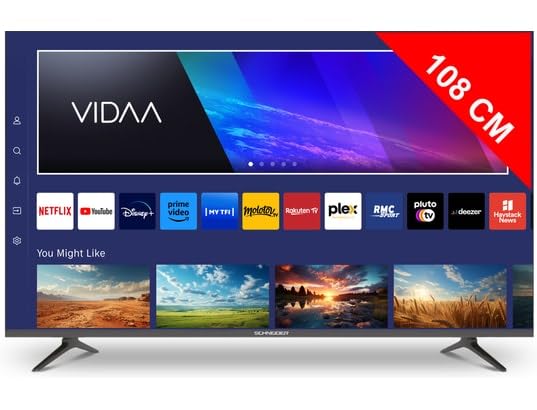
Billede 1.1: Forside view of the Schneider 43A1 TV with VIDAA interface.
2. Sikkerhedsoplysninger
For at sikre sikker drift og forhindre skader, bedes du overholde følgende sikkerhedsforanstaltninger:
- Placering: Position the TV on a stable, level surface. Avoid placing it in direct sunlight, near heat sources, or in environments with high humidity or dust.
- Ventilation: Ensure adequate ventilation around the TV. Do not block ventilation openings. Maintain a minimum distance of 10 cm from walls or other objects.
- Strømforsyning: Brug kun den specificerede strømforsyning voltage. Ensure the power cord is not pinched or walked on. Disconnect the power plug during lightning storms or when unused for extended periods.
- Rensning: Tag stikket ud af tv'et før rengøring. Brug en blød, tør klud. Brug ikke flydende rengøringsmidler eller rengøringsmidler på sprayform.
- Væsker: Do not expose the TV to dripping or splashing liquids. Do not place objects filled with liquids, such as vases, on the TV.
- Børn: Hold øje med børn for at sikre, at de ikke klatrer op på tv'et eller møblerne.
- Vægmontering: If wall-mounting, use a VESA compatible bracket (200 x 200 mm) and ensure proper installation by qualified personnel to prevent injury.
3. Pakkens indhold
Kontroller venligst, at alle varer er til stede og i god stand:
- Schneider 43A1 4K UHD LED TV
- Fjernbetjening
- Strømkabel
- TV-bord (2 stk.)
- Skruer til TV-stativ
- Brugervejledning (dette dokument)
4. Opsætning
4.1 Udpakning
Carefully remove the TV from its packaging. It is recommended to keep the original packaging for potential future transport or service needs.
4.2 Montering af stativ
If you are not wall-mounting the TV, attach the included stand pieces to the bottom of the TV using the provided screws. Ensure the stand is securely fastened before placing the TV upright.
4.3 Vægmontering (valgfrit)
The Schneider 43A1 is compatible with VESA 200 x 200 mm wall mounts. For safe installation, it is highly recommended to use a professional installer. Refer to your wall mount's instructions for specific details.
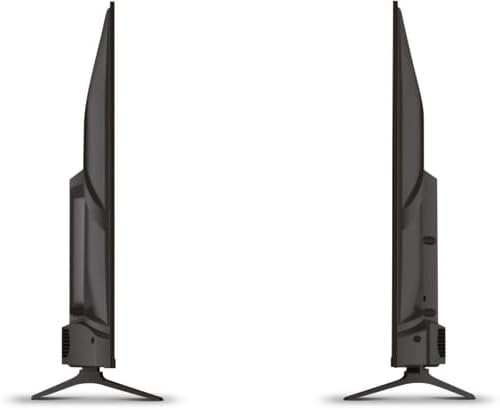
Billede 4.1: Side view of the Schneider 43A1 TV, illustrating its profile for placement or wall mounting.
4.4 Tilslutning af eksterne enheder
Dit TV tilbyder forskellige tilslutningsmuligheder:
- HDMI: Tilslut op til tre HDMI 2.0-enheder (f.eks. Blu-ray-afspiller, spillekonsol, set-top-boks) til HDMI-portene.
- USB: Two USB ports are available for connecting USB storage devices to play media.
- AV/Audio Input: For older devices requiring composite video and stereo audio.
- Koaksial udgang: Til tilslutning til et eksternt lydsystem.
- Antenne-/kabelindgang: Connect your antenna or cable TV signal for DVB-T/T2/C/S2 reception.
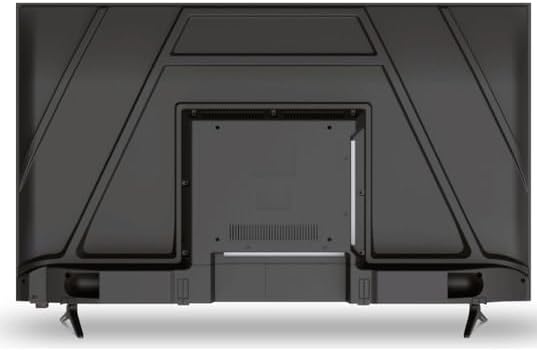
Billede 4.2: Bagside view of the Schneider 43A1 TV, highlighting connection ports.
4.5 Tilslutning af strøm
Plug the power cable into the TV's power input, then into a suitable wall outlet.
4.6 Guide til indledende opsætning
Upon first power-on, the TV will guide you through an initial setup process. This includes selecting your language, connecting to a Wi-Fi network, and scanning for available channels (DVB-T/T2/C/S2).
5. Betjening
5.1 Fjernbetjeningsfunktioner
Fjernbetjeningen giver dig mulighed for at navigere i tv'ets funktioner:
- Power knap: Tænder eller slukker for tv'et.
- Lydstyrke op/ned: Justerer lydniveauet.
- Kanal op/ned: Skifter tv-kanaler.
- Input/kilde: Selects the input source (HDMI, USB, TV Tuner).
- Navigationsknapper: Til menu navigation.
- Smart TV-knapper: Direct access to popular apps like Netflix, Prime Video, YouTube.
5.2 Smart TV (VIDAA)
The integrated VIDAA Smart TV platform provides access to a variety of applications and streaming services. Connect your TV to the internet via Wi-Fi to enjoy features like Netflix, Prime Video, and YouTube. Bluetooth connectivity allows for wireless connection to compatible audio devices.

Billede 5.1: Vinklet front view of the Schneider 43A1 TV, displaying the VIDAA Smart TV interface.
5.3 Indgangsvalg
Press the 'Input' or 'Source' button on your remote control to switch between connected devices (HDMI 1, HDMI 2, HDMI 3, USB, AV, TV Tuner).
5.4 Billed- og lydindstillinger
Access the TV's menu to adjust picture and sound settings. The 4K UHD resolution, QLED-LCD technology, and Direct LED backlighting ensure a high-quality visual experience. The TV also features upscaling to enhance lower-resolution content. Audio is delivered via 2 x 8 W RMS stereo speakers with Dolby Audio support.
5.5 PC Monitor Mode
The TV can be used as a PC monitor by connecting your computer via an HDMI cable. This mode optimizes the display for computer use.
6. Vedligeholdelse
6.1 Rengøring af tv'et
Before cleaning, ensure the TV is unplugged from the power outlet.
- Skærm: Tør forsigtigt skærmen af med en blød, fnugfri klud. Tør forsigtigt genstridige mærker afampRengør kluden med vand eller en specialiseret skærmrens (spray ikke direkte på skærmen).
- Ydre: Brug en blød, tør klud til at tørre tv'et afasing. Undgå slibende rengøringsmidler eller opløsningsmidler.
6.2 Softwareopdateringer
Dit tv modtager muligvis softwareopdateringer for at forbedre ydeevnen og tilføje nye funktioner. Sørg for, at dit tv har internetforbindelse for at modtage disse opdateringer automatisk, eller tjek manuelt efter dem via indstillingsmenuen.
7. Fejlfinding
Hvis du støder på problemer med dit tv, kan du se følgende almindelige problemer og løsninger:
- Ingen strøm:
- Kontroller, om strømkablet er korrekt tilsluttet tv'et og stikkontakten.
- Sørg for, at stikkontakten fungerer (test med en anden enhed).
- Tryk på tænd/sluk-knappen på fjernbetjeningen eller på selve tv'et.
- Intet billede/lyd:
- Kontroller, at den korrekte inputkilde er valgt (f.eks. HDMI 1, TV).
- Kontrollér alle kabelforbindelser mellem tv'et og eksterne enheder.
- Sørg for, at lydstyrken ikke er slået fra eller indstillet til minimum.
- If using an antenna, check the antenna connection and perform a channel scan.
- Fjernbetjeningen virker ikke:
- Udskift batterierne i fjernbetjeningen.
- Sørg for, at der ikke er nogen forhindringer mellem fjernbetjeningen og tv'ets IR-sensor.
- Problemer med Smart TV/netværk:
- Tjek din Wi-Fi-router og internetforbindelse.
- Go to the TV's network settings to re-connect to your Wi-Fi network.
- Genstart tv'et og din router.
Hvis problemet fortsætter efter at have prøvet disse løsninger, bedes du kontakte kundesupport.
8. Specifikationer
| Feature | Specifikation |
|---|---|
| Model | Schneider 43A1 |
| Skærmstørrelse | 109 cm (43 tommer) |
| Opløsning | 4K Ultra HD (3840 x 2160 pixels) |
| Displayteknologi | QLED-LCD with Direct LED Backlight |
| Kontrastforhold | 1100:1 |
| Lysstyrke | 200 cd/m² |
| Lydudgang | 2 x 8 W RMS Stereo |
| Lydteknologi | Dolby Audio |
| HDMI porte | 3 (HDMI 2.0) |
| USB-porte | 2 |
| Andre input | AV/Audio Input |
| Udgange | Koaksial output |
| Tuner | DVB-T/T2/C/S2 |
| Smart TV platform | VIDAA (Netflix, Prime Video, YouTube) |
| Trådløs forbindelse | Wi-Fi, Bluetooth |
| VESA-kompatibilitet | 200 x 200 mm |
| Vægt | 7.5 kilo |