
1. Introduktion
Thank you for choosing the LEOTEC Portable AM FM Radio. This compact and lightweight radio is designed for convenient listening on the go, offering clear AM and FM reception. This manual provides essential information for safe and effective use of your device. Please read it thoroughly before operation and retain it for future reference.
2. Sikkerhedsoplysninger
- Udsæt ikke enheden for ekstreme temperaturer, direkte sollys eller høj luftfugtighed.
- Undgå at tabe radioen eller udsætte den for kraftige stød.
- Hold enheden væk fra vand og andre væsker.
- Brug kun den angivne batteritype (2 AAA-batterier).
- Forsøg ikke at skille radioen ad eller ændre den. Dette vil ugyldiggøre garantien.
- Rengør enheden med en blød, tør klud. Brug ikke slibende rengøringsmidler eller opløsningsmidler.
- Listening at high volume levels for extended periods can cause permanent hearing damage.
3. Pakkens indhold
- LEOTEC Portable AM FM Radio
- Wired Earphones (3.5mm jack)
- Brugermanual
4. Produktet er slutview
The LEOTEC Portable AM FM Radio is designed for simplicity and portability. It features an intuitive interface and a compact form factor, making it ideal for various activities.

Billede: Forside view of the LEOTEC Portable AM FM Radio, showing the display, controls, and connected earphones.

Image: Diagram illustrating the AM (530-1700KHz) and FM (88-108MHz) frequency ranges supported by the radio, with radio waves emanating from the device.

Billede: Nærbillede view highlighting the radio's controls: Function Switch (OFF/AM/FM), Volume Control, and Tuning Control. A belt clip is also visible on the side.

Image: A size comparison of the LEOTEC Portable AM FM Radio next to a smartphone, illustrating its compact dimensions (1.85 x 0.63 x 3.54 inches).
5. Opsætning
5.1 Batteriinstallation
The radio requires 2 AAA batteries (not included) for operation.
- Find batteridækslet på bagsiden af radioen.
- Skub dækslet åbent.
- Isæt 2 AAA-batterier, og sørg for at polerne vender korrekt (+ og -).
- Luk batterirummets dæksel forsvarligt.
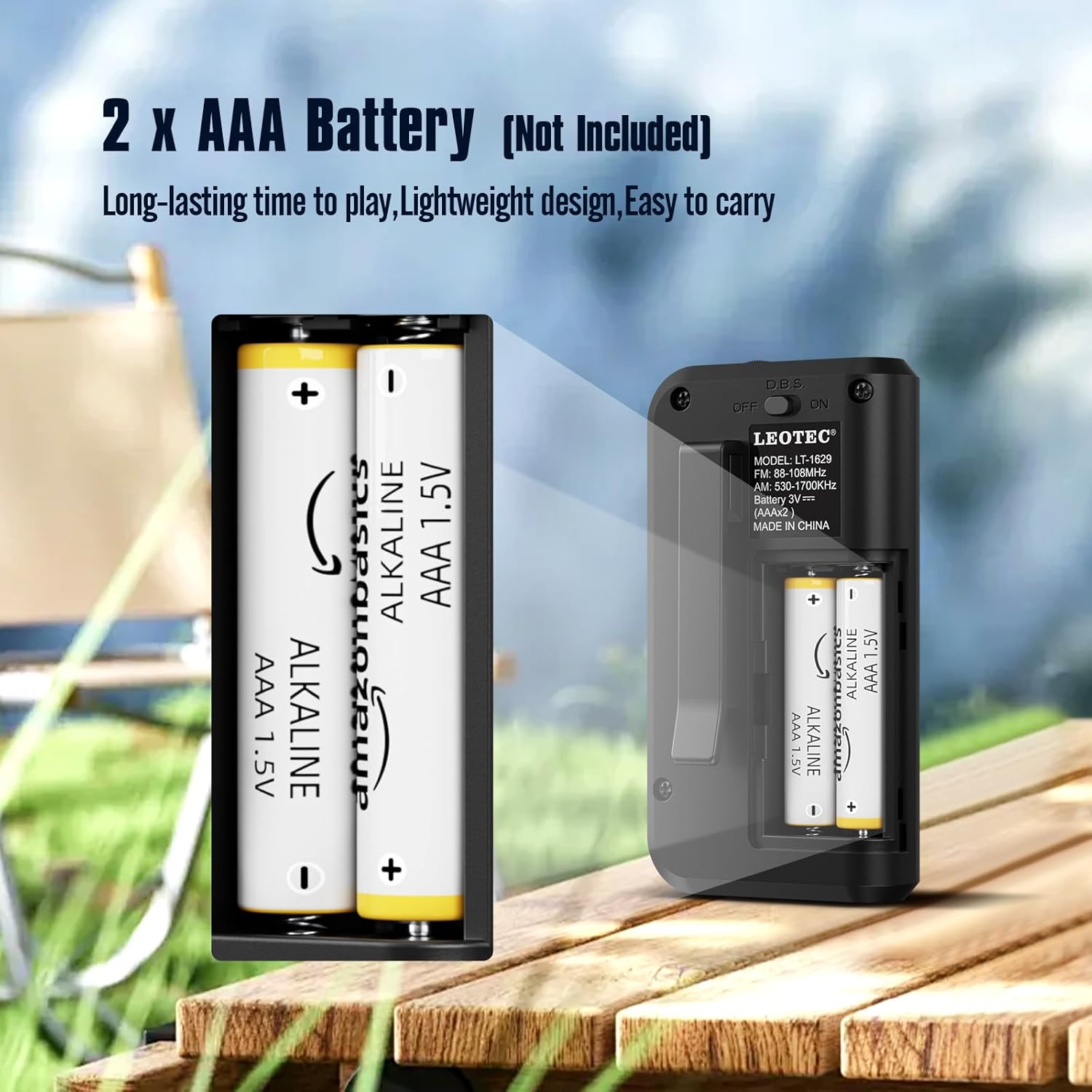
Image: The open battery compartment of the radio, clearly showing the slots for two AAA batteries and their polarity markings.
5.2 Tilslutning af hovedtelefoner
The radio operates with earphones, which also function as the antenna for optimal reception.
- Locate the 3.5mm earphone jack on the top of the radio.
- Insert the earphones firmly into the jack.

Billede: Et nærbillede view of the radio's top, showing the 3.5mm earphone jack where headphones are to be connected. The earphones serve as the antenna.
6. Betjeningsvejledning
6.1 Tænd/sluk
To power on the radio, long press the 'Power' button. The display will show the time and enter standby status. Short press the 'Power' button again to enter radio mode.
Video: This video demonstrates how to long press the power button to turn on the radio and enter standby mode, then short press it again to activate radio mode. It also shows switching between FM, AM, and MP3 modes.
6.2 Switching AM/FM/MP3 Modes
In radio mode, short press the 'MODE' button to cycle through FM, AM, and MP3 modes. Ensure earphones are plugged in for FM reception.
6.3 Indstillingsstationer
Manuel indstilling: In FM or AM mode, short press the 'TUNER' key to adjust frequencies by 0.1 stepping.
Automatisk scanning: Long press the 'M+/SCAN' button to automatically search for and store available stations.
6.4 Lydstyrkekontrol
Use the 'VOLUME +/-' buttons to adjust the listening volume. The volume level ranges from U00 to U32.
6.5 Indstilling af dvaletimer
The radio features a sleep timer function. Press the 'SLEEP' button to set the radio to turn off automatically after a set period (e.g., 60, 30 minutes, or OFF).
Video: This video demonstrates various functions including inserting a TF card to use the radio as an MP3 player, setting the sleep timer, adjusting the time, and using the button lock function.
6.6 Tidsindstilling
To set the time, long press the 'TIME' button. Use the 'TUNER' buttons to adjust hours and minutes, and the 'MODE' button to switch between 12H and 24H format.
6.7 Button Lock Function
To prevent accidental button presses, long press the 'LOCK' button to activate or deactivate the button lock function.
6.8 Using as MP3 Player
Insert a TF (MicroSD) card (not included) into the designated slot. The radio can then be switched to MP3 mode to play audio files fra kortet.
7. Vedligeholdelse
- Rensning: Wipe the radio with a soft, lint-free cloth. Do not use liquid or aerosol cleaners.
- Opbevaring: When not in use for extended periods, remove the batteries to prevent leakage and store the radio in a cool, dry place.
8. Fejlfinding
| Problem | Mulig årsag | Løsning |
|---|---|---|
| Ingen strøm | Batterierne er døde eller isat forkert. | Udskift batterierne eller kontroller polariteten. |
| Dårlig modtagelse | Earphones not fully plugged in or weak signal. | Ensure earphones are securely connected. Try adjusting your position or the earphone cable. |
| Ingen lyd | Volume is too low or earphones are faulty. | Increase volume. Try different earphones. |
| Knapperne reagerer ikke | Button lock function is active. | Long press the 'LOCK' button to deactivate. |
9. Specifikationer
| Feature | Detalje |
|---|---|
| Mærke | LEOTEC |
| Modelnummer | ccb5cd8d-9570-4ebc-83c2-baec0349bbd0 |
| Produktdimensioner | 2.02 x 1.02 x 3.66 tommer |
| Varens vægt | 1.6 ounce |
| Strømkilde | 2 AAA batterier (medfølger ikke) |
| Radiobånd understøttet | AM/FM |
| AM-frekvensområde | 530-1700KHz |
| FM frekvensområde | 88-108 MHz |
| Forbindelsesteknologi | Hjælpestik (3.5 mm hovedtelefonstik) |
| Speciel funktion | Letvægts, kompakt |
10. Garanti og support
For warranty information or technical support, please refer to the contact details provided with your purchase or visit the official LEOTEC webwebsted. Gem din købskvittering som købsbevis i tilfælde af garantikrav.