
1. Introduktion
This manual provides detailed instructions for the safe and effective use of your OLIGHT Olantern Classic 2 Pro Camping Lantern and OLIGHT Sphere C Smart Night Light. Please read this manual thoroughly before operation and retain it for future reference.
2. Sikkerhedsinstruktioner
- Do not look directly into the light source when the device is active to avoid eye injury.
- Keep the devices away from water and moisture, unless specified otherwise (e.g., IPX5 rating for Olantern Classic 2 Pro).
- Do not disassemble, modify, or attempt to repair the devices. This may void the warranty and pose safety risks.
- Use only the recommended charging cables and adapters.
- Opbevares utilgængeligt for børn.
- Undgå at udsætte enhederne for ekstreme temperaturer eller direkte sollys i længere perioder.
3. Pakkens indhold
Please check the contents of your package. If any items are missing or damaged, contact your retailer or OLIGHT customer service.
- OLIGHT Olantern Classic 2 Pro Campi Lanterne
- OLIGHT Sphere C Smart Natlampe
- USB-C Charging Cable (for Olantern Classic 2 Pro)
- Brugermanual
Note: A 18W power adapter and MCC (Magnetic Charging Cable) are not included for the Olantern Classic 2 Pro. A USB-C charging cable is not included for the Sphere C Smart Night Light.
4. Produktet er slutview
4.1 OLIGHT Olantern Classic 2 Pro Campi Lanterne
The Olantern Classic 2 Pro is a rechargeable camping lantern featuring a vintage design with modern functionality. It offers dual light sources (warm orange and white light) and stepless dimming.
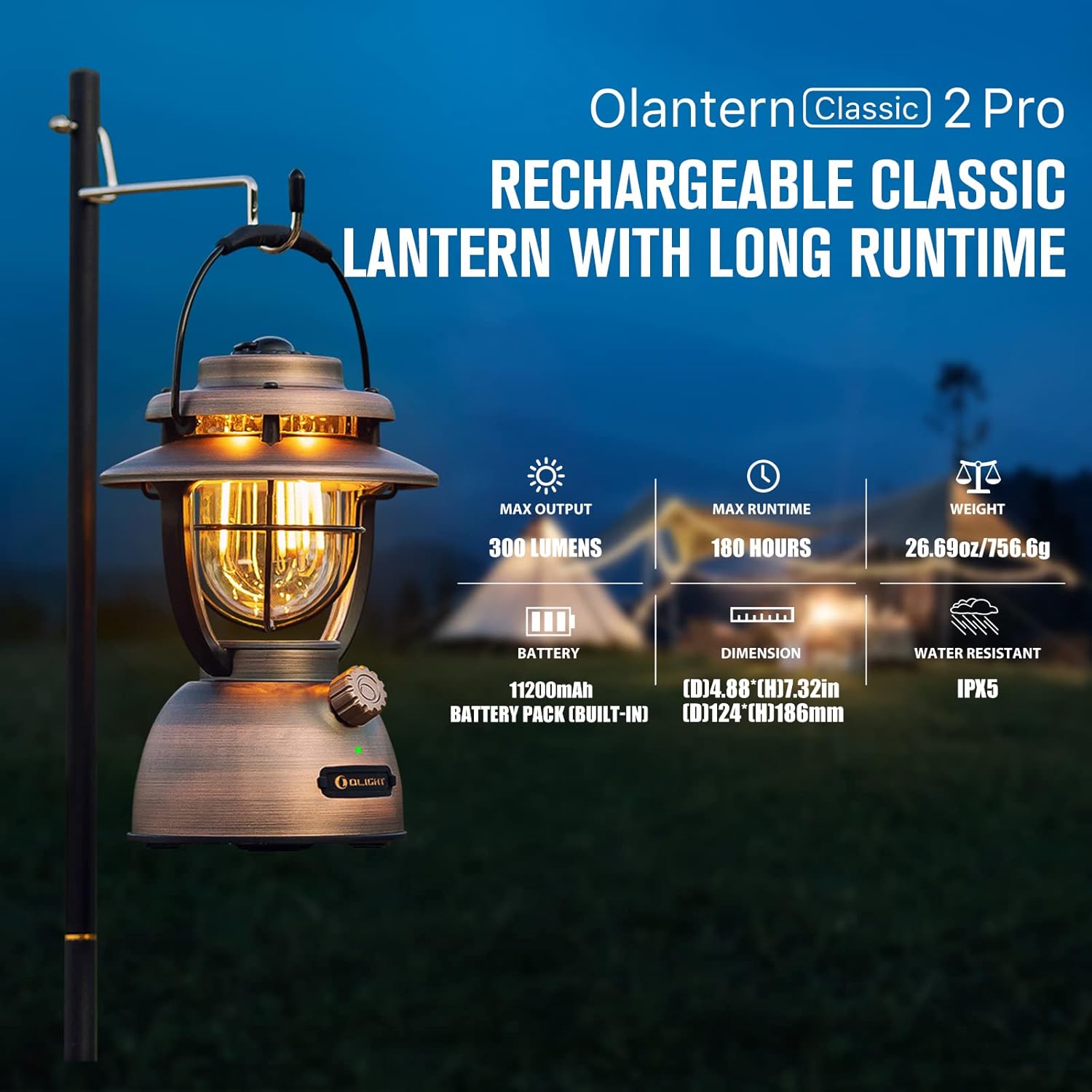
Image: OLIGHT Olantern Classic 2 Pro Camping Lantern displaying its maximum output of 300 lumens, maximum runtime of 180 hours, weight of 26.69 oz (756.6g), 11200mAh built-in battery, dimensions of 4.88 inches (D) by 7.32 inches (H), and IPX5 water resistance rating.
4.2 OLIGHT Sphere C Smart Natlampe
The Sphere C is a portable, USB-C rechargeable smart night light with APP control, offering various lighting modes and ambient illumination.

Image: OLIGHT Sphere C Smart Night Light with icons indicating 20+ lighting modes, brightness adjustment, countdown timer, music rhythm, up to 40 hours of continuous use at low brightness, magnetic bottom, and USB-C charging.
5. Opsætning
5.1 Indledende opladning
Before first use, fully charge both devices.
- Olantern Classic 2 Pro: Connect the included USB-C charging cable to the lantern's USB-C port and to a compatible USB power source (e.g., 18W adapter, not included). The lantern also supports magnetic charging with an optional MCC cable. A full charge takes approximately 4 hours with a high-powered adapter.
- Sphere C Smart Night Light: Connect a USB-C charging cable (not included) to the Sphere C's USB-C port and to a USB power source.
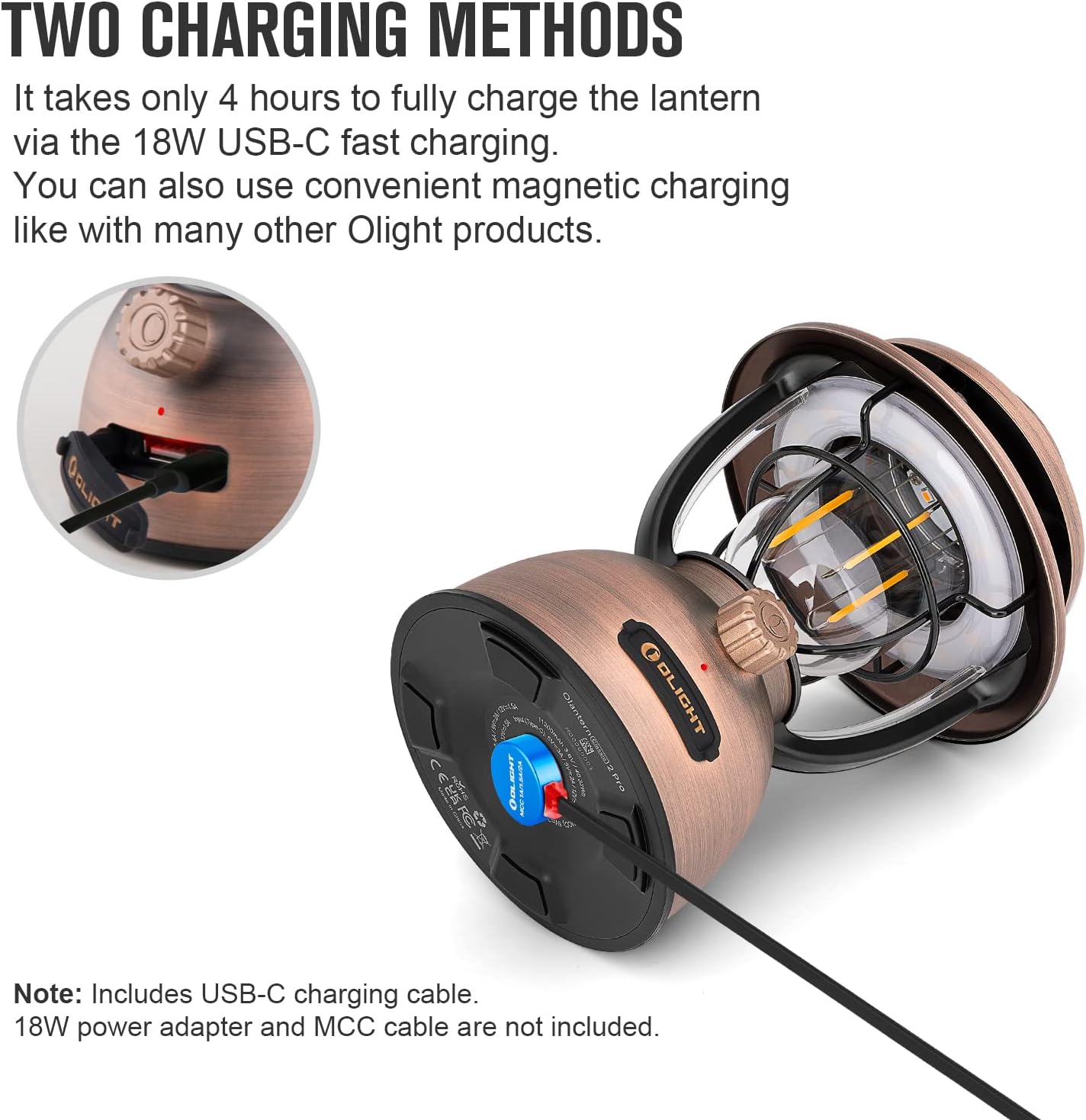
Image: OLIGHT Olantern Classic 2 Pro demonstrating its two charging methods: USB-C port and magnetic charging base.

Image: A hand plugging a USB-C cable into the OLIGHT Sphere C Smart Night Light for charging.
5.2 Sphere C App Pairing
To utilize the smart features of the Sphere C, download the OLIGHT app from your device's app store and follow the in-app instructions to pair your Sphere C.
6. Betjeningsvejledning
6.1 OLIGHT Olantern Classic 2 Pro
- Tænd/sluk: Press and hold the rotary switch for approximately 1 second.
- Trinløs dæmpning: Rotate the switch clockwise to increase brightness and counter-clockwise to decrease brightness. The lantern offers 10-300 lumens.
- Switch Light Source: Double-press the rotary switch to toggle between warm orange light and white light.
- Nødstrømbank: The Olantern Classic 2 Pro can charge other devices via its dual USB ports (one USB-A and one USB-C). Connect your device to the appropriate port. It supports 18W fast reverse charging.
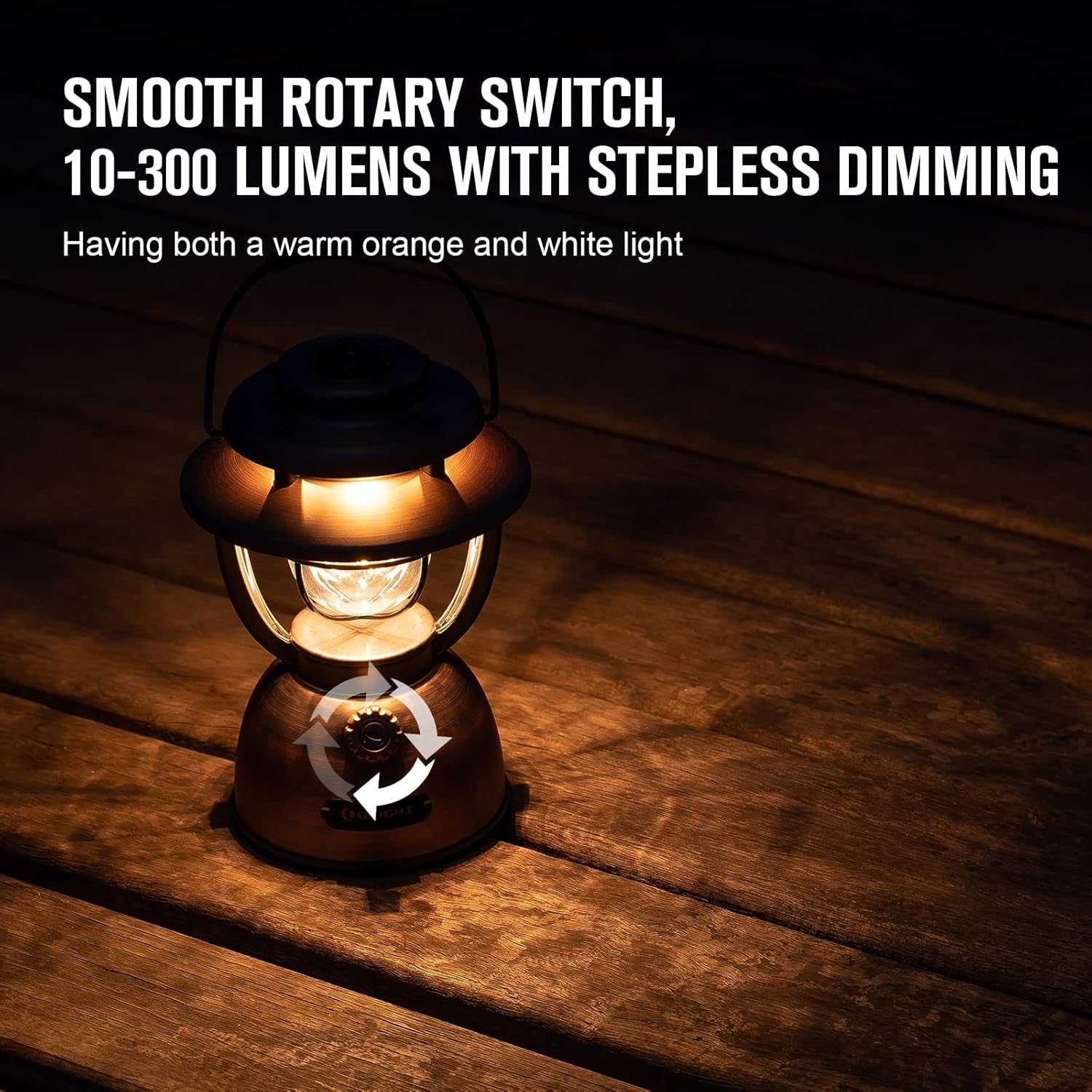
Image: OLIGHT Olantern Classic 2 Pro with arrows indicating the rotary switch for stepless dimming, offering both warm orange and white light.

Image: OLIGHT Olantern Classic 2 Pro acting as an emergency power bank, simultaneously charging a Sphere C night light and a smartphone via its USB-A and USB-C ports.
6.2 OLIGHT Sphere C Smart Natlampe
- Manuel kontrol: A button on the Sphere C allows for basic power on/off and cycling through preset modes.
- App kontrol: Use the OLIGHT app to access advanced features:
- Adjust brightness and choose from 20+ lighting modes.
- Set countdown timers and auto-off timers.
- Engage music rhythm mode for dynamic lighting.
- Utilize group control for multiple Sphere C devices.
- Overvåg batteriniveauet.
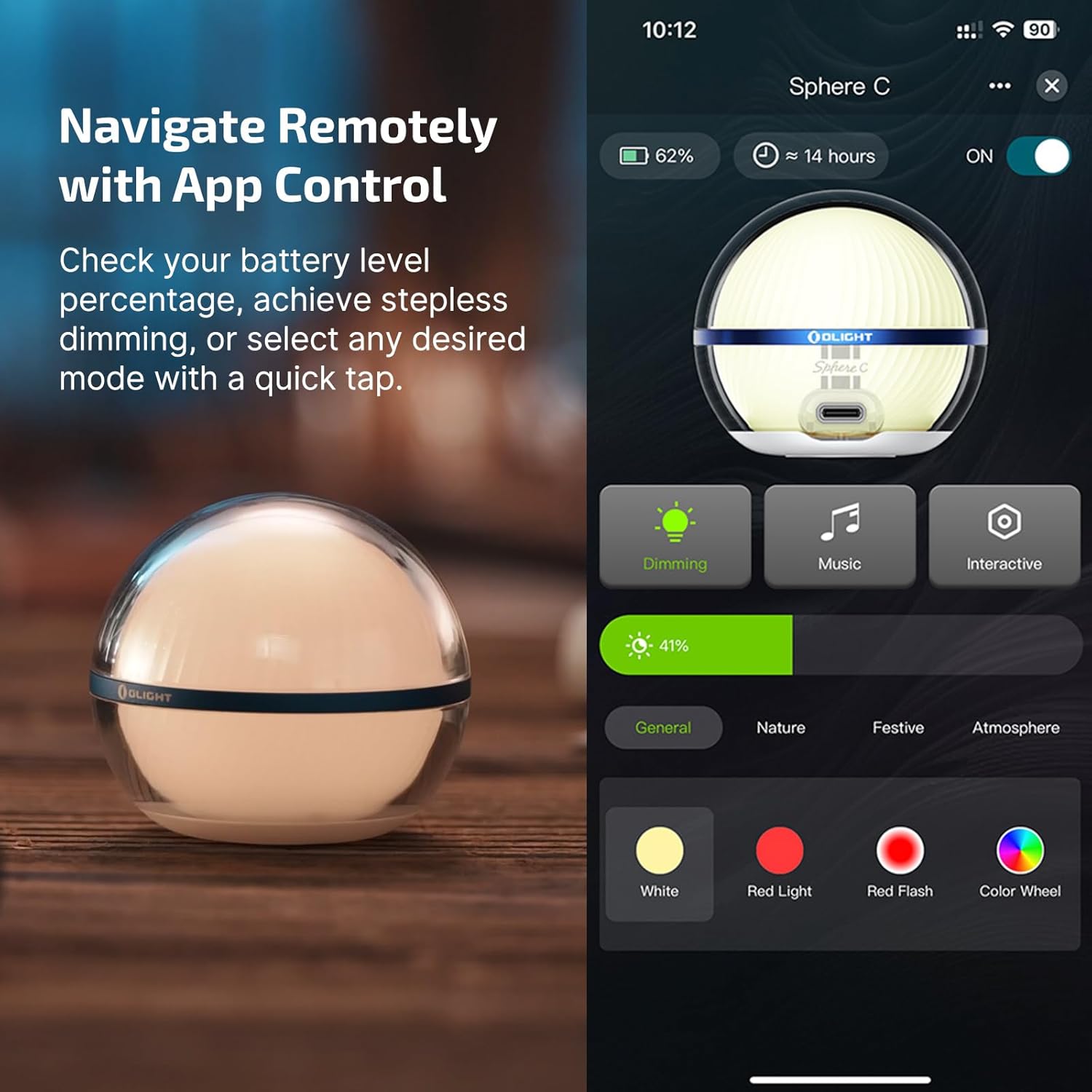
Image: OLIGHT Sphere C Smart Night Light displayed next to a smartphone screen showing the OLIGHT app interface for controlling the light, including dimming, music, interactive modes, and color selection.
7. Vedligeholdelse
- Rensning: Tør enhederne af med en blød kludamp klæde. Brug ikke slibende rengøringsmidler eller opløsningsmidler.
- Opbevaring: Store the devices in a cool, dry place when not in use. For long-term storage, charge the batteries to approximately 50% every 3-6 months to maintain battery health.
- Batteripleje: Avoid fully discharging the batteries frequently. Recharge promptly when the battery indicator shows low power.
8. Fejlfinding
- Enheden tænder ikke: Ensure the battery is charged. If the battery is low, connect to a power source and charge.
- Oplader ikke: Check the charging cable and adapter for damage. Ensure connections are secure. Try a different cable or power source.
- Sphere C App connectivity issues: Ensure Bluetooth is enabled on your smartphone. Restart the Sphere C and the app. Try re-pairing the device through the app settings.
- Lysudbyttet er svagt: The battery might be low, or the brightness setting is too low. Adjust brightness via the rotary switch (Olantern) or app (Sphere C).
9. Specifikationer
9.1 OLIGHT Olantern Classic 2 Pro
| Feature | Specifikation |
|---|---|
| Max output | 300 lumen |
| Max køretid | 180 timer (7.5 dage) |
| Vægt | 26.69 oz / 756.6 g |
| Batteri | 11200mAh (indbygget) |
| Dimensioner (D x H) | 4.88 tommer x 7.32 tommer (124 mm x 186 mm) |
| Vandmodstand | IPX5 |
| Opladningsmetoder | USB-C, Magnetic Charging |
| Omvendt opladning | 18W Fast Reverse Charging (USB-A, USB-C) |
9.2 OLIGHT Sphere C Smart Natlampe
| Feature | Specifikation |
|---|---|
| Max output | 75 lumen |
| Max køretid | Up to 40 Hours (at low brightness) |
| Opladning | USB-C genopladelig |
| Kontrollere | APP Control, Manual Button |
| Særlige funktioner | 20+ Lighting Modes, Brightness Adjustment, Countdown Timer, Music Rhythm, Magnetic Bottom |
10. Garanti
OLIGHT offers a lifetime warranty on its products, ensuring quality and customer satisfaction. For specific terms and conditions, please refer to the official OLIGHT webwebsted eller kontakt kundesupport.

Image: Graphic indicating OLIGHT's Lifetime Warranty and recognition with a Design Award 2024.
11. Support
For further assistance, product information, or warranty claims, please visit the official OLIGHT webwebsted eller kontakt deres kundesupportteam.
Officiel Webwebsted: www.olightworld.com