1. Introduktion
This manual provides detailed instructions for the installation, operation, and maintenance of the Generic Desktop Motherboard LA-A061P. Please read this manual thoroughly before proceeding with installation to ensure proper setup and to prevent damage to the product or other components. This motherboard is designed for compatibility with systems such as C560, C540, C320, B4030, and B5030.
2. Sikkerhedsoplysninger
Overhold følgende sikkerhedsforanstaltninger for at forhindre skader og sikre sikker drift:
- Afbryd altid strømforsyningen til din computer, før du installerer eller fjerner komponenter.
- Wear an anti-static wrist strap or frequently touch a grounded metal object to discharge static electricity before handling the motherboard or other components. Static discharge can damage electronic components.
- Hold bundkortet i kanterne for at undgå at berøre følsomme komponenter.
- Sørg for ordentlig ventilation i computerens kabinet for at forhindre overophedning.
- Hold bundkortet væk fra væsker og ekstreme temperaturer.
3. Pakkens indhold
Verify that all items are present in your package. If any items are missing or damaged, contact your vendor immediately.
- Generic Desktop Motherboard LA-A061P
- Brugervejledning (dette dokument)
- Driver CD/DVD (may be included, or drivers available online)
4. Produktet er slutview
The Generic Desktop Motherboard LA-A061P is a replacement or upgrade component for compatible desktop systems. It features various ports and slots for essential computer components.

Figur 4.1: Overview of the Generic Desktop Motherboard LA-A061P. This image displays the entire motherboard, highlighting the CPU socket, RAM slots, various expansion slots, and I/O ports.
Nøglekomponenter omfatter:
- CPU-stik: The central processing unit (CPU) is installed here.
- RAM-pladser: For installing DDR3 or DDR4 memory modules (check specific model for compatibility).
- PCIe-slots: Til grafikkort og andre udvidelseskort.
- SATA-porte: For connecting storage devices like HDDs and SSDs.
- I/O panel: Includes USB ports, Ethernet port, audio jacks, and video outputs (VGA, HDMI, DisplayPort, depending on model).

Figur 4.2: Nærbillede view of the motherboard's model identification label. This label clearly shows 'LA-A061P', confirming the specific model of the motherboard.
5. Opsætning og installation
Follow these steps carefully to install your new motherboard.
5.1 Forberedelse
- Sørg for, at din computer er slukket, og at stikket er taget ud af stikkontakten.
- Open your computer case and remove any existing motherboard if you are replacing one.
- Place the new motherboard on an anti-static mat or in its anti-static bag on a flat, stable surface.
5.2 CPU installation
- Find CPU-stikket på bundkortet.
- Løft forsigtigt belastningshåndtaget, og åbn CPU-sokkeldækslet.
- Align the CPU with the socket, matching the golden triangle or notch on the CPU with the corresponding mark on the socket. Do not force the CPU into place.
- Sænk CPU'en ned i soklen.
- Close the socket cover and push down the load lever until it clicks into place.
- Apply thermal paste to the top of the CPU and install the CPU cooler according to its instructions.
5.3 RAM-installation
- Locate the RAM slots.
- Open the clips at both ends of the RAM slot.
- Align the notch on the RAM module with the notch in the slot.
- Tryk godt ned i begge ender af RAM-modulet, indtil klipsene klikker på plads.
5.4 Tilslutning af periferiudstyr og strøm
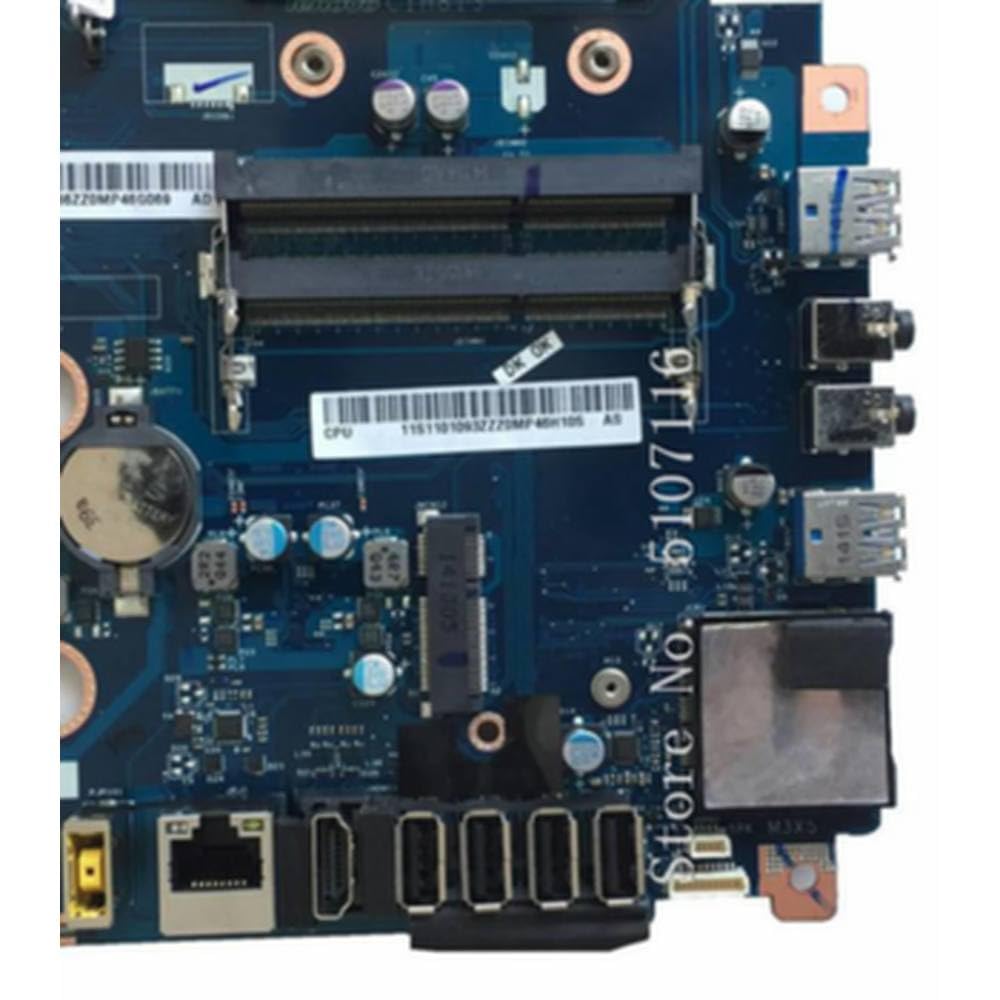
Figur 5.1: Detaljeret view of the motherboard's I/O panel and CPU socket area. This image shows the various external ports (USB, Ethernet, audio) and the CPU socket with RAM slots nearby, crucial for connecting components.
- Strømforbindelser: Connect the 24-pin ATX power connector and the 4-pin or 8-pin CPU power connector from your power supply to the motherboard.
- SATA-enheder: Connect your storage drives (HDD/SSD) to the SATA ports using SATA data cables. Connect power from the PSU to these drives.
- Frontpanelstik: Tilslut tænd/sluk-knappen, nulstillingsknappen, harddisk-LED'en, strøm-LED'en og USB/lyd-stikkene på frontpanelet fra dit kabinet til de tilsvarende headere på bundkortet. Se kabinetmanualen for specifikke pin-tildelinger.
- Udvidelseskort: Install any graphics cards or other PCIe expansion cards into the appropriate slots.
5.5 Mounting the Motherboard
- Carefully place the motherboard into your computer case, aligning the screw holes with the standoffs.
- Secure the motherboard with screws. Do not overtighten.
- Ensure the I/O shield is properly seated in the case opening and aligns with the motherboard's I/O ports.
6. Betjeningsvejledning
6.1 Første opstart
- After all components are installed and connected, close your computer case.
- Connect your monitor, keyboard, mouse, and power cable.
- Turn on the power supply and press the power button on your computer case.
- The system should power on and display the BIOS/UEFI screen or begin booting into your operating system.
6.2 Adgang til BIOS/UEFI
To access the BIOS/UEFI setup utility, press the designated key (commonly DEL, F2, F10, eller F12) repeatedly during the initial boot sequence. The exact key may vary; refer to the on-screen prompts during startup.
7. Vedligeholdelse
7.1 Rengøring
- Regularly clean dust from inside your computer case using compressed air.
- Ensure the computer is powered off and unplugged before cleaning.
- Undgå at bruge flydende rengøringsmidler direkte på komponenterne.
7.2 BIOS/UEFI-opdateringer
Kontroller jævnligt producentens website (if available) for BIOS/UEFI updates. Updates can improve system stability, add support for new hardware, or fix bugs. Follow the update instructions provided by the manufacturer carefully to avoid damaging the motherboard.
8. Fejlfinding
Hvis du støder på problemer, kan du se følgende almindelige fejlfindingstrin:
- Ingen strøm: Ensure all power cables (24-pin ATX, 4/8-pin CPU) are securely connected. Check the power supply unit (PSU) switch and wall outlet.
- Ingen visning: Verify that the monitor is connected to the correct video output (either integrated graphics or a dedicated graphics card). Reseat the graphics card and RAM modules.
- Systemet kan ikke starte op: Check all component connections. Try booting with only essential components (CPU, one RAM stick, graphics card if no integrated graphics). Listen for beep codes, which can indicate specific errors.
- Periferiudstyr ikke fundet: Ensure USB devices are connected to working ports. Check drivers for specific devices.
- Overophedning: Ensure CPU cooler is properly installed and fans are spinning. Check for adequate airflow in the case.
9. Specifikationer
| Feature | Beskrivelse |
|---|---|
| Modelnummer | LA-A061P, CIH81S |
| Kompatibilitet | C560, C540, C320, B4030, B5030 Desktop Systems |
| Fabrikant | Generisk |
| ASIN | B0FGKJPH7 |
| Dato først tilgængelig | 3. juli 2025 |
10. Garanti og support
This product is manufactured by Generic. For specific warranty terms and technical support, please refer to the documentation provided with your purchase or contact your retailer. Keep your proof of purchase for warranty claims.


