
1. Introduktion
Thank you for choosing the BIGASUO BGP23 Portable Projector. This device integrates an Android 9.0 operating system, offering a versatile entertainment and presentation solution. It supports HD resolution (1280x720P) and features multiple connectivity options including HDMI, USB, VGA, and AV. This manual provides essential information for setting up, operating, maintaining, and troubleshooting your projector to ensure optimal performance.
2. Sikkerhedsoplysninger
- Strømforsyning: Brug kun den angivne strømadapter. Sørg for, at lydstyrkentage stemmer overens med din lokale strømforsyning (220 volt).
- Ventilation: Bloker ikke ventilationsåbningerne. Sørg for tilstrækkelig plads omkring projektoren for korrekt luftgennemstrømning og for at forhindre overophedning.
- Placering: Placer projektoren på en stabil, plan overflade. Undgå at placere den i direkte sollys, i nærheden af varmekilder eller i omgivelser med høj luftfugtighed eller støv.
- Øjenbeskyttelse: Se ikke direkte ind i projektorlinsen, når lamp er tændt, da det skarpe lys kan forårsage øjenskader.
- Rensning: Disconnect the power before cleaning. Use a soft, dry cloth for the exterior and a lens cleaning kit for the lens.
- Demontering: Forsøg ikke selv at skille projektoren ad eller reparere den. Overlad al service til kvalificeret personale.
3. Pakkens indhold
Bekræft at alle varer er til stede i din pakke:
- BIGASUO BGP23 Projector
- Fjernbetjening
- Strømadapter
- HDMI kabel
- AV-kabel
- Brugermanual
- Tripod (may vary by package)
4. Produktet er slutview
Gør dig bekendt med projektorens komponenter og grænseflader.
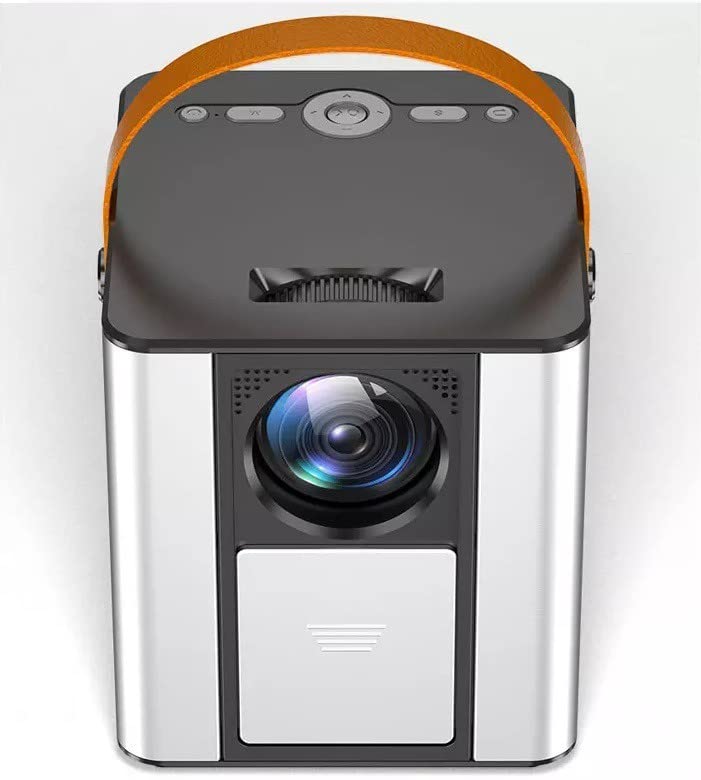
Figur 4.1: Forside view of the BIGASUO BGP23 Portable Projector with its lens and carrying handle.
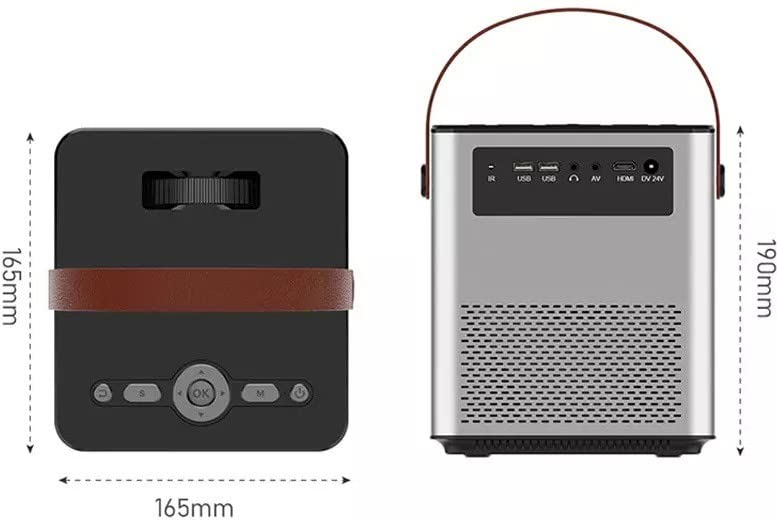
Figure 4.2: Dimensions of the BIGASUO BGP23 Projector and a view of its rear panel, showing various input/output ports.
4.1. Grænseflader og kontroller
- Linse: Projicerer billedet på skærmen.
- Fokusring: Justerer billedets klarhed.
- Keystone Correction Knob: Korrigerer trapezformet billedforvrængning.
- IR-modtager: Til fjernbetjeningssignaler.
- USB-porte: For connecting USB storage devices (e.g., flash drives) for media playback.
- HDMI-port: For connecting external devices like laptops, gaming consoles, or media players.
- VGA port: For connecting older computers or devices.
- AV-port: For connecting legacy audio/video devices.
- Lydudgang (3.5 mm): Til tilslutning af eksterne højttalere eller hovedtelefoner.
- Strømindgang: Tilsluttes strømadapteren.
- Kontrolpanel: On-device buttons for basic navigation and settings.
5. Opsætning
5.1. Indledende placering
- Placer projektoren på en stabil overflade, eller monter den sikkert.
- Position the projector at an appropriate distance from the projection surface (wall or screen) to achieve the desired image size.
5.2. Strømtilslutning
- Tilslut strømadapteren til projektorens strømindgang.
- Sæt strømadapteren i en passende stikkontakt.
- Tryk på tænd/sluk-knappen på projektoren eller fjernbetjeningen for at tænde for enheden.
5.3. Billedjustering
- Fokus: Drej fokusringen på projektorlinsen, indtil det projicerede billede fremstår skarpt og klart.
- Keystone-korrektion: If the image appears trapezoidal (wider at the top or bottom), adjust the keystone correction knob until the image is rectangular.
6. Betjeningsvejledning
6.1. Fjernbetjening
The included remote control allows for convenient operation of the projector. Ensure AAA batteries are installed (not included).
6.2. Android-operativsystem
The projector runs on Android 9.0, providing access to various applications and features.
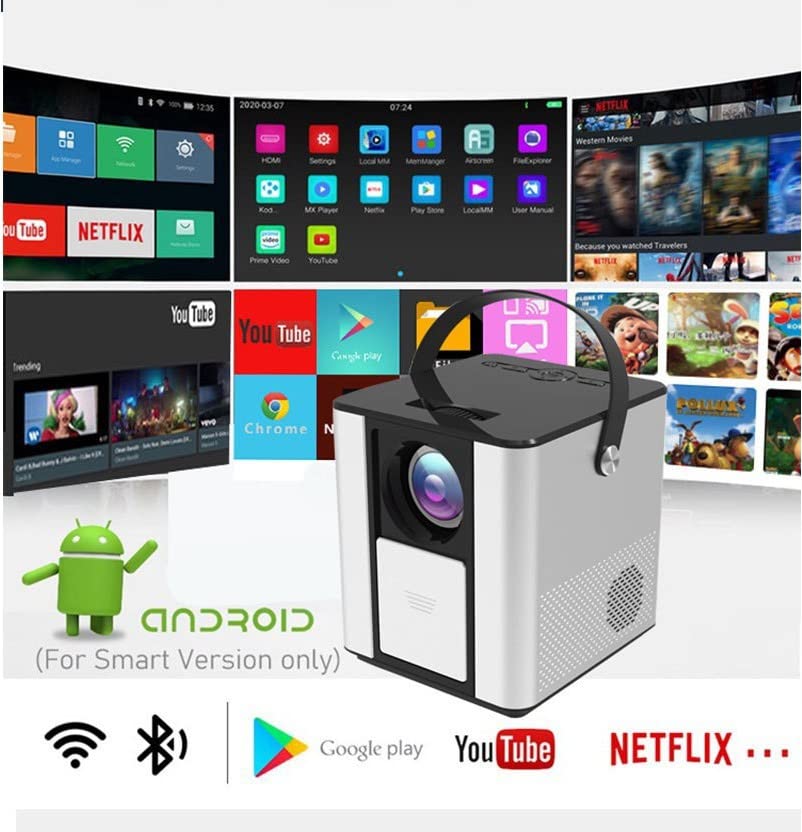
Figure 6.1: The Android interface of the BIGASUO BGP23 Projector, showing various pre-installed application icons.
- Navigation: Use the arrow keys on the remote to navigate through the Android interface. The 'OK' button selects items.
- Startskærm: Access pre-installed apps like YouTube, Netflix, and the Google Play Store.
- Indstillinger: Access system settings for Wi-Fi, Bluetooth, display, sound, and more.
- App installation: Download og installer yderligere apps fra Google Play Store.
6.3. Systemopdateringer
To ensure compatibility and optimal performance, regularly check for and install system updates. Navigate to the system settings to find the update option. If you encounter software incompatibility issues, updating the system is recommended.
7. Forbindelse
7.1. HDMI-forbindelse
Connect external devices such as laptops, Blu-ray players, or gaming consoles using an HDMI cable. Select the HDMI input source from the projector's input menu.
7.2. USB-medieafspilning
Insert a USB flash drive into one of the USB ports. The projector's file manager will typically detect the drive, allowing you to browse and play supported media files (videoer, fotos, musik).
7.3. Trådløs projektion (skærmspejling)
The projector supports wireless screen mirroring from compatible smartphones and tablets. Refer to the projector's on-screen instructions for specific steps to connect your device via Wi-Fi.
7.4. Bluetooth Audio
Connect external Bluetooth speakers or headphones to the projector for enhanced audio. Navigate to the Bluetooth settings in the Android OS, enable Bluetooth, and pair with your desired audio device.
8. Vedligeholdelse
- Rengøring af linser: Use a professional lens cleaning cloth and solution to gently clean the projector lens. Avoid touching the lens with bare hands.
- Udvendig rengøring: Tør projektorens yderside af med en blød, tør klud. Brug ikke slibende rengøringsmidler eller opløsningsmidler.
- Vedligeholdelse af ventilation: Kontroller og rengør ventilationsgitrene regelmæssigt for at forhindre støvophobning, som kan hæmme luftstrømmen og forårsage overophedning.
- Opbevaring: When not in use for extended periods, store the projector in a cool, dry, dust-free environment, preferably in its original packaging or a protective case.
9. Fejlfinding
Hvis du støder på problemer med din projektor, kan du se følgende almindelige problemer og løsninger:
| Problem | Mulig løsning |
|---|---|
| Ingen strøm | Ensure the power adapter is securely connected to both the projector and a working power outlet. Check the power button. |
| Intet billede / Intet signal | Verify the input source is correctly selected (e.g., HDMI 1, USB). Check cable connections (HDMI, VGA, AV) for looseness or damage. Try a different cable or device. |
| Sløret billede | Adjust the focus ring on the lens. Ensure the projection distance is within the recommended range. Clean the lens if it is dirty. |
| Trapezoidal Image | Adjust the keystone correction knob until the image is rectangular. Ensure the projector is placed perpendicular to the screen. |
| Fjernbetjeningen reagerer ikke | Check and replace the batteries in the remote control. Ensure there are no obstructions between the remote and the projector's IR receiver. |
| Applications Not Working / Software Issues | Check for and install any available system updates. Clear the cache of the problematic application. If the issue persists, consider a factory reset (backup data first) or contact customer support. |
| Ingen lyd | Check the volume settings on both the projector and the connected source device. If using external speakers, ensure they are properly connected and powered on. Verify Bluetooth pairing if using wireless audio. |
10. Specifikationer
The following are the technical specifications for the BIGASUO BGP23 Projector:
- Mærke: BIGASUO
- Model: BGP23
- Operativsystem: Android 9.0
- Skærmtype: LCD
- Native opløsning: 1280 x 720 pixel
- Understøttet opløsning: 1920 pixels (Full HD)
- Aspektforhold: 16:9
- Forbindelse teknologi: Bluetooth, HDMI, USB, VGA, AV
- Bluetooth version: 5.0
- Voltage: 220 volt
- Wattage: 50 watt
- Opdateringshastighed: 60 Hz
- Produktdimensioner: 10 x 25 x 10 cm
- Varens vægt: 2.5 kg
- Formfaktor: Transportabel
- Monteringstype: Bordplademontering
11. Garanti og support
For warranty information and technical support, please refer to the warranty card included with your product or visit the official BIGASUO support website. Contact information for Bigasuo Support Team is typically provided with the product documentation.