
1. Introduktion
Thank you for choosing the roborock Q10 S5 Robot Vacuum and Mop Cleaner. This manual provides essential information for setting up, operating, and maintaining your device to ensure optimal performance and longevity. Please read this manual thoroughly before using the product and keep it for future reference.
2. Sikkerhedsoplysninger
To reduce the risk of injury, electric shock, fire, or damage, please observe the following safety precautions:
- Dette apparat kan bruges af børn i alderen 8 år og derover og personer med nedsatte fysiske, sensoriske eller mentale evner eller mangel på erfaring og viden, hvis de har fået opsyn eller instruktion i brugen af apparatet på en sikker måde og forstår de involverede farer. .
- Børn skal være under opsyn for at sikre, at de ikke leger med apparatet.
- Rengøring og brugervedligeholdelse må ikke udføres af børn uden opsyn.
- Do not use the robot in areas with open flames or fragile objects.
- Sørg for, at opladningsdokken er placeret på en plan overflade mod en væg.
- Brug kun den originale strømadapter, der fulgte med enheden.
- Do not expose the robot to direct sunlight or moisture.
- Before cleaning, remove power cords, small objects, and fragile items from the floor.
3. Produktet er slutview
Familiarize yourself with the components of your roborock Q10 S5 robot vacuum.
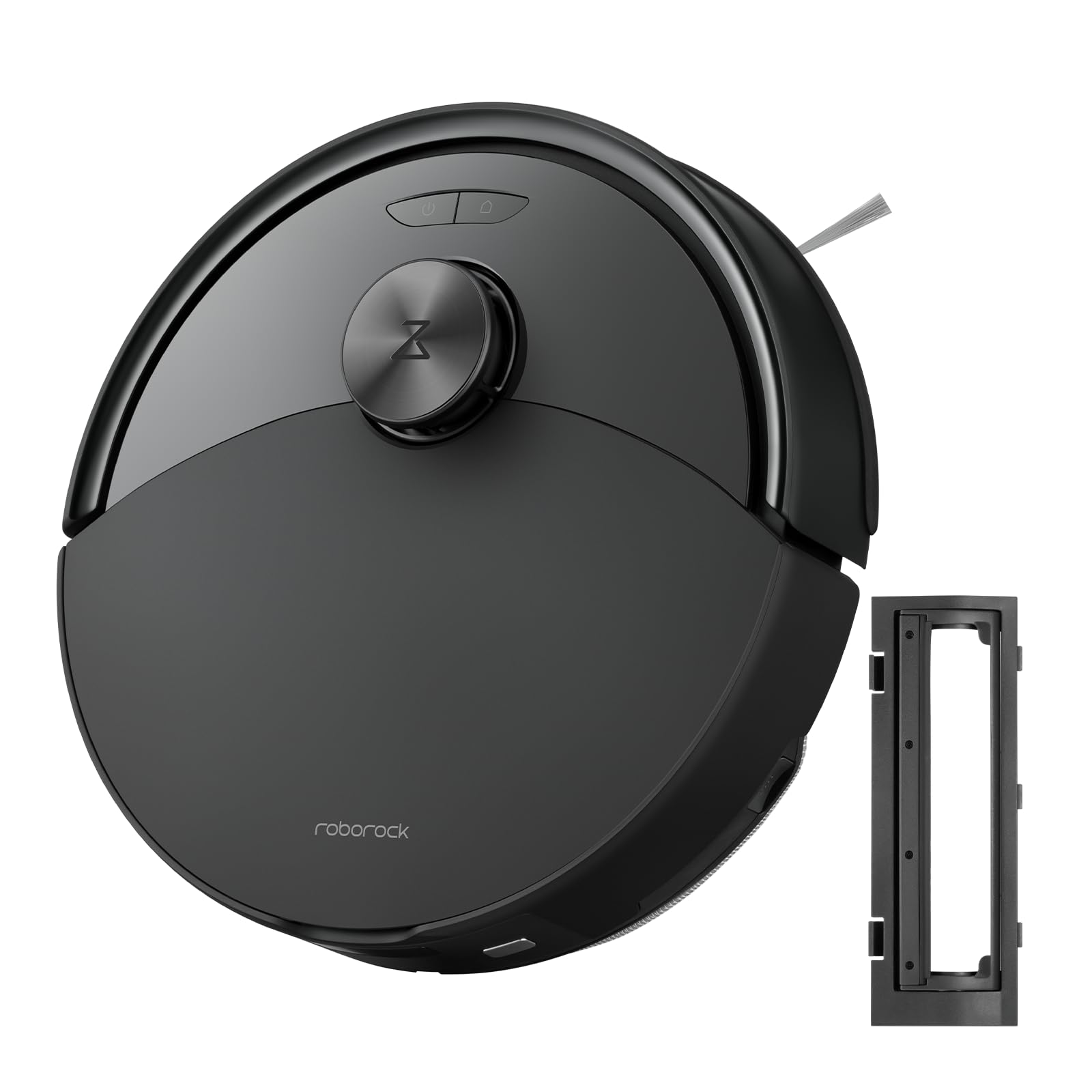
Figur 1: The roborock Q10 S5 Robot Vacuum and Mop Cleaner. This image shows the top view of the robot, highlighting its sleek black design and main control buttons.
Robotkomponenter:
- Låg: Lifts to reveal the dustbin and Wi-Fi indicator.
- Tænd/sluk-knap: Press to start/pause cleaning, hold to turn on/off.
- Dock/Spot Clean Button: Press to send the robot back to the dock, hold for spot cleaning.
- LDS Sensor: Til navigation og kortlægning.
- Kofanger: Registrerer forhindringer.
- Sidebørste: Fejer snavs væk fra kanter og hjørner.
- Hovedbørste: Collects dirt and debris from floors. Features a floating design for better contact.
- Omnidirektionelt hjul: For movement.
- Opladningskontakter: Forbindes med opladningsdokken.
- Klippesensorer: Forhindrer robotten i at falde ned ad trapper.
- Vandtank og moppepude: Til moppefunktion.
Opladningsdock:
- Dock Location Beacon: Helps the robot locate the dock.
- Opladningskontakter: Overfører strøm til robotten.
- Strømkabelport: Tilslutter strømadapteren.
4. Opsætning
- Pak robotten ud: Tag forsigtigt robotten og alt tilbehør ud af emballagen. Fjern eventuelle beskyttelsesfilm eller forsendelsesmaterialer.
- Install the Side Brush: Press the side brush onto its post until it clicks into place.
- Placer opladningsdokken:
- Placer opladningsdokken på en hård, plan overflade mod en væg.
- Sørg for, at der er mindst 0.5 meter (1.6 fod) fri plads på begge sider og 1.5 meter (4.9 fod) foran docken.
- Connect the power cable to the charging dock and plug it into a wall outlet.
- Indledende opkrævning: Place the robot on the charging dock. The robot will automatically turn on and begin charging. For first-time use, fully charge the robot before operation (approximately 4-6 hours). The power indicator light will breathe white during charging and turn solid white when fully charged.
- Download appen: Søg efter "Roborock" in the App Store or Google Play Store, or scan the QR code on the packaging to download and install the app.
- Opret forbindelse til Wi-Fi:
- Open the Roborock app and follow the on-screen instructions to add your device.
- Sørg for, at din telefon er tilsluttet et 2.4 GHz Wi-Fi-netværk.
- Tryk og hold på Dok og Magt buttons simultaneously for 3 seconds until you hear the "Resetting Wi-Fi" voice alert.
- Follow the app's instructions to complete the connection.
5. Betjeningsvejledning
Start af en rengøring:
- Fra robotten: Tryk på Magt button once. The robot will start cleaning.
- Fra appen: Open the Roborock app and tap the "Clean" button.
Pausing/Resuming/Stopping:
- Pause: Tryk på en vilkårlig knap på robotten, eller tryk på "Pause" i appen.
- Genoptage: Tryk på Magt button or tap "Resume" in the app.
- Stop: To stop a cleaning cycle, press the Dok button to send the robot back to the charging dock, or tap "Stop" in the app.
Moppefunktion:
- Fyld vandtank: Open the water tank cover, fill with clean water, and close securely.
- Fastgør moppepude: Wet the mop pad and wring it out. Slide it into the mop pad slot until it is securely attached.
- Start Mopping: The robot will automatically detect the mop module and switch to mopping mode. You can adjust water flow levels in the app.
App funktioner:
- Korthåndtering: Create and save maps, set no-go zones, virtual walls, and invisible barriers.
- Selektiv rengøring af værelser: Choose specific rooms to clean.
- Planlagt rengøring: Indstil rengøringsplaner for forskellige tidspunkter og dage.
- Brugerdefinerede rengøringstilstande: Juster sugekraft og vandgennemstrømningsniveauer.
- Fjernbetjening: Styr robottens bevægelse manuelt.
6. Vedligeholdelse
Regular maintenance ensures your roborock Q10 S5 operates efficiently. Always turn off the robot and unplug the charging dock before performing any maintenance.
Dustbin and Filter (Weekly):
- Lift the top cover of the robot.
- Fjern skraldespanden.
- Åbn låget til skraldespanden, og tøm indholdet i en skraldespand.
- Remove the filter. Tap it gently to remove dust. The filter can be rinsed with water; ensure it is completely dry before reinstallation (allow 24 hours).
- Rinse the dustbin with water if necessary and allow it to dry completely.
- Reinstall the dry filter and dustbin.
Main Brush (Weekly):
- Vend robotten om.
- Tryk på tappene for at fjerne hovedbørstedækslet.
- Løft hovedbørsten ud.
- Brug rengøringsværktøjet (hvis det medfølger) eller en saks til at klippe og fjerne hår eller snavs, der har viklet sig ind omkring børsten.
- Reinstall the main brush and cover, ensuring it clicks into place.
Side Brush (Monthly):
- Skru sidebørsten af.
- Fjern eventuelt hår eller snavs.
- Reattach and tighten the screw.
Sensors and Charging Contacts (Monthly):
- Wipe all sensors (cliff sensors, wall sensor, LDS sensor window) and the charging contacts on both the robot and the dock with a soft, dry cloth.
Mop Pad (After Each Use):
- Fjern moppepuden fra vandtanken.
- Rinse thoroughly with water and allow it to air dry completely before next use.
7. Fejlfinding
If you encounter issues with your robot, please refer to the following table before contacting support.
| Problem | Mulig årsag | Løsning |
|---|---|---|
| Robotten tænder ikke. | Lavt batteri eller ikke opladet. | Placer robotten på opladningsstationen, og sørg for, at den oplader. |
| Robotten kan ikke oprette forbindelse til Wi-Fi. | Forkert Wi-Fi-adgangskode, 5 GHz-netværk eller dårligt signal. | Ensure correct 2.4GHz Wi-Fi, reset Wi-Fi on robot, move closer to router. |
| Robotten sidder ofte fast. | Obstacles, tangled cables, or dirty sensors. | Clear floor, clean sensors, use no-go zones in app. |
| Dårlig rengøringsevne. | Full dustbin, dirty filter, tangled brushes. | Empty dustbin, clean/replace filter, clean main/side brushes. |
| Robotten laver usædvanlig lyd. | Debris in main brush, side brush, or wheels. | Inspect and clean all brushes and wheels for obstructions. |
If the problem persists, please refer to the Roborock app for more detailed error messages or contact customer support.
8. Specifikationer
| Feature | Detalje |
|---|---|
| Model | Q10 S5 |
| Dimensioner | Ca. 353 x 350 x 96.5 mm (13.9 x 13.8 x 3.8 tommer) |
| Vægt | Ca. 3.7 kg (8.16 lbs) |
| Batteri | Lithium-Ion (Capacity not specified, typical for robot vacuums) |
| Nominel effekt | Approx. 60W (Typical for robot vacuums) |
| Skraldespandskapacitet | Approx. 470 ml (Typical for robot vacuums) |
| Vandtankkapacitet | Approx. 300 ml (Typical for robot vacuums) |
| Sugekraft | Up to 10,000 Pa (HyperForce Suction Power from feature bullets) |
| Wi-Fi-forbindelse | 2.4 GHz |
Bemærk: Specifikationerne kan ændres uden varsel.
9. Garanti og support
roborock products are manufactured to the highest quality standards. For detailed warranty information, please refer to the warranty card included in your product packaging or visit the official roborock website. For technical support, troubleshooting assistance, or to purchase replacement parts, please contact roborock customer service through the app or their official webwebsted.
Officiel Webwebsted: www.roborock.com