
Vigtige bemærkninger
This Naifay Android car radio is specifically designed for Toyota RAV4 models from 2013 to 2018. It is crucial to select the correct model for your vehicle's configuration.
- Model A (This Product): Suitable for Toyota RAV4 vehicles that GØR IKKE have a large screen or a J.B.L amplifier sound system.
- Model B: Required if your car GØR support a large screen or a J.B.L amplifier sound system.
Before installation, please verify your car's model, year, and provide a picture of your car dashboard to the seller via Amazon chat if you are unsure about compatibility. Online assistance, user manuals, and installation videos are available.

Image: Comparison of the Toyota RAV4 dashboard before and after installing the Naifay 10.1-inch Android Car Radio. The 'Before' image shows the original factory radio, while the 'After' image displays the new, larger touch screen unit seamlessly integrated.
Opsætning og installation
The Naifay Android car stereo comes with all necessary cables for a direct fit, eliminating the need to cut existing vehicle wiring. Basic automotive wiring knowledge is recommended for installation. For detailed visual guidance, refer to the installation videos provided by the seller.
Tilslutning af ledningsnet
Connect the provided wiring harnesses to the corresponding ports on the car radio and your vehicle's existing wiring. The harnesses are designed to connect only where intended, simplifying the process.

Image: Detailed diagram illustrating the various connections on the back of the Naifay car radio, including ports for power, RCA cables, USB, reverse input, GPS, and radio cable. Each port is numbered for easy identification.
Installation af backup kamera
A free AHD backup reversing camera is included. Follow these steps to connect it:
- Connect the pink or brown wire from the power cable to the rear camera.
- Connect the video output cable from the camera to the 'Reverse Input' port on the car radio.
- Connect the camera's power wires: one to the car's reversing light positive (+) and the other to the car's reversing light negative (-).

Image: Step-by-step diagram showing how to connect the AHD backup camera, including wiring the camera to the car's reverse lights and connecting the video signal to the head unit. Icons indicate HD, Night Vision, Wide Angle, and Waterproof features.
Betjeningsvejledning
Trådløs CarPlay og Android Auto
This unit supports wireless Apple CarPlay and Android Auto. Connect your smartphone via Bluetooth and Wi-Fi to access phone contacts, emails, notifications, map navigation, music, and videos directly on the car radio's screen. Use voice assistants like Siri or Google Assistant for hands-free operation.

Image: A visual representation of the car radio's screen displaying the interfaces for Wireless CarPlay and Android Auto, along with icons for Bluetooth and Wi-Fi connectivity. A user is shown interacting with a voice assistant.
Wired/Wireless MirrorLink
The unit supports both wireless and wired MirrorLink for iOS and Android devices. Connect via Bluetooth and USB cable to mirror your phone's screen onto the car radio display.

Image: A graphic demonstrating the MirrorLink feature, showing an iPhone and an Android phone wirelessly and wired connected to the car radio, mirroring their screens. An astronaut figure symbolizes seamless connectivity.
GPS Navigation & Wi-Fi Connection
After connecting to Wi-Fi or a mobile hotspot, you can download offline maps or use online navigation applications. The unit is equipped with North American maps. Connect the GPS antenna (included) for optimal navigation performance. You can also download other applications from the app store.

Image: The car radio display showing a GPS navigation map with route information, alongside icons representing various apps and a Wi-Fi signal tower, indicating internet connectivity for online navigation and app downloads.
Bluetooth & FM Radio
The built-in Bluetooth allows for hands-free calling, phonebook download, and audio streaming. The FM radio supports full-automatic, semi-automatic, and accurate adjustment ways to search for channels, offering stable reception and unlimited preset stations.

Image: The car radio screen displaying a phone call interface with a dial pad and contact information, demonstrating the Bluetooth hands-free calling feature. A smartphone is also shown with a call in progress.

Image: The car radio screen showing the FM radio interface with a frequency display (e.g., 94.60 FM) and options for station presets. The background features a DJ setup, symbolizing music playback.
Ratbetjening (SWC)
The unit retains the original steering wheel control functionality of your vehicle. This allows for convenient one-click operation for tasks such as adjusting music volume, changing tracks, and answering calls, enhancing driving safety.
Opdelt skærmfunktionalitet
The split-screen feature allows you to run two applications simultaneously on the 10.1-inch display. For example, you can use navigation on one side while playing music or a video on the other.

Image: The car radio screen demonstrating the split-screen feature, with YouTube playing on one side and a music player interface on the other, showcasing simultaneous application usage.
Opretholdelse
To ensure the longevity and optimal performance of your Naifay Android Car Radio, follow these maintenance guidelines:
- Rensning: Brug en blød, tør klud til at rengøre skærmen og ydersiden. Undgå slibende rengøringsmidler eller opløsningsmidler, der kan beskadige skærmen eller overfladen.
- Temperatur: Undgå at udsætte enheden for ekstreme temperaturer, både varme og kolde, i længere perioder.
- Softwareopdateringer: Periodically check for and install any available software updates to ensure system stability and access to new features.
- Strømstyring: Sørg for, at dit køretøjs elektriske system er i god stand for at forhindre strømsvingninger, der kan påvirke enheden.
Fejlfinding
If you encounter issues with your Naifay Android Car Radio, refer to the following common problems and solutions:
| Problem | Mulig årsag/løsning |
|---|---|
| Enheden tænder ikke | Check power cable connections. Verify vehicle fuses are intact (a faulty connection can blow fuses). Ensure the car's ignition is on. |
| Backup camera not working | Confirm the camera's power and video signal cables are correctly connected to the reverse light and the unit's 'Reverse Input'. Ensure the car is in reverse gear. |
| System freezes or runs slowly | The unit has 2GB RAM. It is recommended to limit the number of simultaneously running applications to 1-2 to prevent performance issues. Close unused apps. Restart the unit. |
| Poor sound quality / Washed out display | Check audio settings and equalizer. While the display is bright, some glare or color washing can occur in direct sunlight. Adjust screen brightness or angle if possible. |
| Bluetooth or Wi-Fi connectivity issues | Ensure Bluetooth/Wi-Fi is enabled on both the unit and your device. Restart both devices. Check for interference. |
| Steering Wheel Controls not responding | Verify SWC wiring connections. Access the unit's settings to re-map or calibrate the steering wheel controls if necessary. |
Specifikationer
Below are the key specifications for the Naifay 10.1-inch Android Car Radio (Model A):
- Skærmstørrelse: 10.1 tommer
- Operativsystem: Android
- Processor: 4-kerne
- Hukommelse: 2 GB RAM + 32 GB ROM
- Skærmtype: 2.5D IPS Touch Screen (Capacitive)
- Forbindelse: Trådløs, Bluetooth, USB, Wi-Fi
- Særlige funktioner: Wireless CarPlay, Android Auto, MirrorLink, GPS Navigation, FM Radio, AHD Backup Camera Input, Steering Wheel Control (SWC), Split Screen
- Lydudgangstilstand: Stereoanlæg
- Korttype: Worldwide (North American maps included)
- Monteringstype: Dashboard montering
- Kompatibel køretøjstype: Toyota RAV4 2013-2018 (Non J.B.L & Non-Large Screen)
- Varens vægt: 1.5 kilo
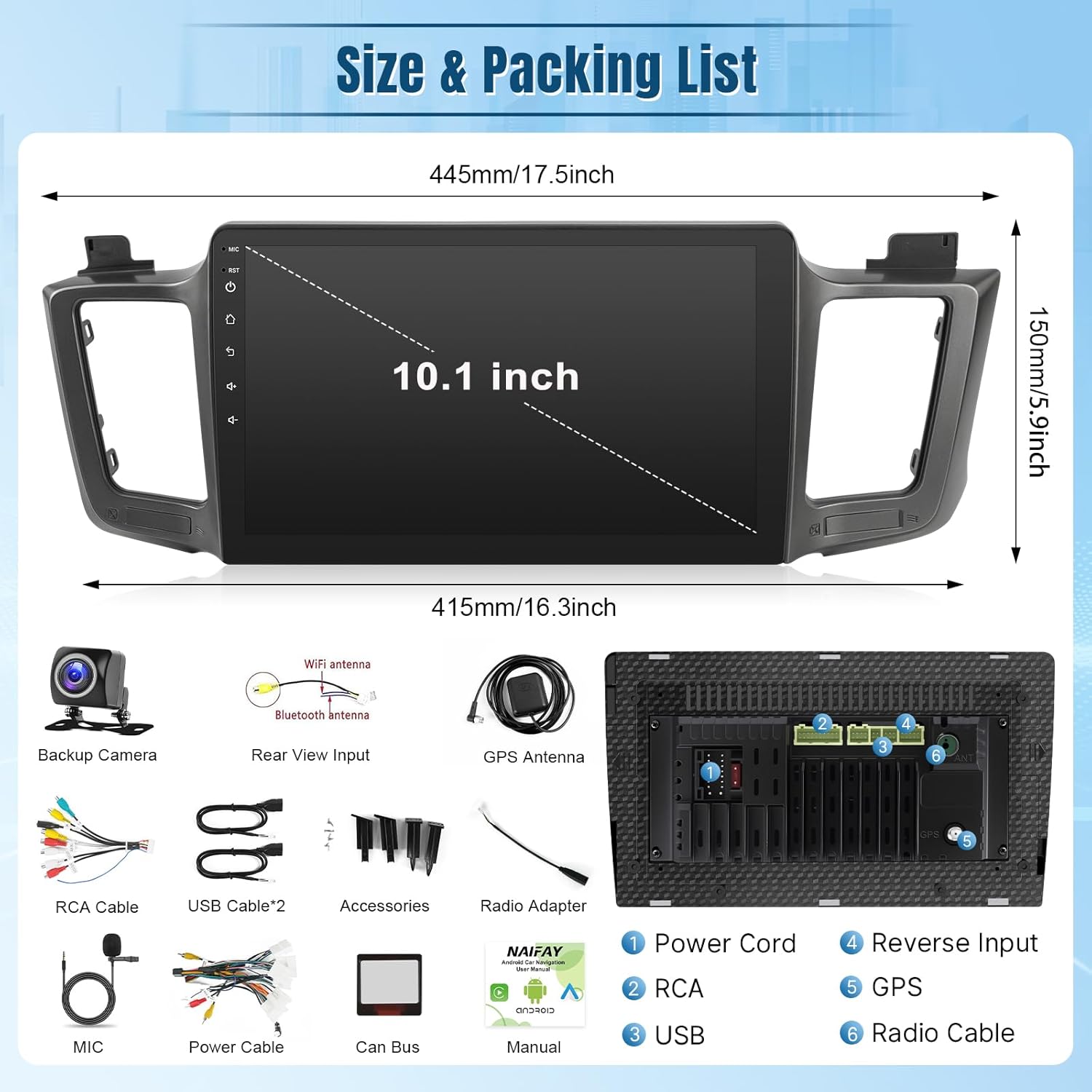
Image: A visual representation of the Naifay 10.1-inch car radio unit with its dimensions (445mm/17.5inch width, 150mm/5.9inch height) and a list of included accessories such as backup camera, WiFi antenna, Bluetooth antenna, RCA cables, USB cables, GPS antenna, MIC, power cable, Can Bus, and user manual.
Garanti og support
For any questions, technical assistance, or warranty inquiries, please contact Naifay customer support. Online help, user manuals, and installation videos are available to assist you.
You can typically find support by visiting the seller's store page on Amazon and using the 'Ask a question' feature.

Image: A screenshot illustrating how to navigate to the Naifay seller page on Amazon and locate the 'Ask a question' button for customer support.
Specific warranty details are not provided in this document. Please refer to the product packaging or contact the seller directly for warranty information.