
1. Introduktion
The Flashpoint Zoom Li-Ion V480C is a high-performance on-camera flash designed for Canon cameras, offering advanced features for professional and enthusiast photographers. This flash integrates with the Flashpoint R2 wireless system, providing versatile lighting control. Key features include a Guide Number of GN50, rapid 1.7-second recycle time, TTL auto flash, manual flash modes, and 2.4GHz wireless control.

Image 1.1: Flashpoint Zoom Li-Ion V480C with an overview of its main features.
2. Inkluderede komponenter
Bekræft, at alle følgende varer er inkluderet i din pakke:
- Flashpoint Zoom Li-on Compact V480 Flash
- VB22 7.2 V / 2200 mAh Rechargeable Li-ion Battery Pack
- Batterioplader
- Mini stativ
- Beskyttende etui
3. Produktet er slutview
Familiarize yourself with the various parts of your Flashpoint V480C flash unit.

Billede 3.1: Forside og side view of the Flashpoint V480C with numbered components.
- Catchlight Panel (White)
- Built-in Wide Angle Diffuser
- Flash hoved
- LED modellering Lamp
- Fotocellsensor
- Lås Ring
- Hot Shoe
- Synkroniseringsledning
- Berøringsskærm
- USB-C Firmware Upgrade Port
- Afbryderknap
- Indstil knap
- Vælg Ring op
- Testknap/genbrugsindikator
- Hot Shoe fikseringsspænde
4. Opsætning
4.1. Batteriinstallation og opladning
The Flashpoint V480C uses a VB22 7.2V / 2200mAh rechargeable Li-ion battery pack. Ensure the battery is fully charged before first use.
- To install the battery, slide open the battery compartment cover located on the side of the flash unit.
- Insert the VB22 Li-ion battery pack, ensuring the contacts align correctly.
- Luk batteridækslet, indtil det klikker sikkert på plads.
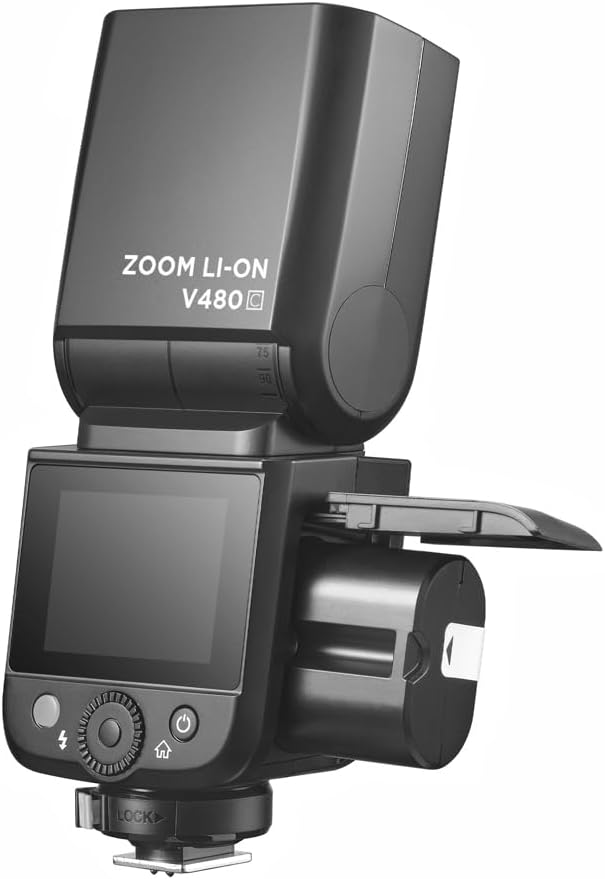
Image 4.1: Battery compartment open for installation.
To charge the battery, use the provided battery charger. Connect the battery to the charger and plug the charger into a power outlet. The indicator light on the charger will show the charging status.
4.2. Montering af blitzen på dit kamera
The V480C is designed to mount onto a camera's hot shoe.
- Sørg for, at dit kamera er slukket.
- Slide the flash's hot shoe (7) into your camera's hot shoe mount.
- Rotate the Hot Shoe Fixing Buckle (15) clockwise to secure the flash firmly in place. Do not overtighten.
5. Betjening af blitzen
5.1. Powering On/Off and Basic Controls
To power on the flash, press and hold the Power Switch Button (11) until the screen illuminates. To power off, press and hold the same button.
The V480C features a crisp color touchscreen (9) and tactile buttons for intuitive control.

Image 5.1: Touchscreen and button interface for adjusting flash settings.
- Set Button (12): Bruges til at bekræfte valg eller indtaste menupunkter.
- Select Dial (13): Rotate to navigate menus and adjust values.
- Test Button / Recycle Indicator (14): Press to fire a test flash. The indicator light shows when the flash is ready to fire.
5.2. Blitztilstande
The V480C supports various flash modes:
- TTL automatisk blitz: Justerer automatisk blitzudladningen for korrekt eksponering.
- Manuel blitz: Allows manual control over flash power output (1/1 to 1/256 in 1/3 stop increments).
- Multiblitz (stroboskopisk): Fires a series of rapid flashes during a single exposure to capture multiple movements.
5.3. Wireless Operation (R2 System)
The V480C features built-in 2.4GHz R2 wireless functionality, allowing it to act as a master or slave unit within the Flashpoint R2 system. It supports 4 groups and 32 channels with a transmission range of up to 100m.

Billede 5.2: Eks.ample of 2.4GHz R2 wireless integration in a studio environment.
Refer to the on-screen menu for setting master/slave modes, group assignments, and channel selection.
5.4. Højhastighedssynkronisering (HSS)
High-Speed Sync allows the flash to synchronize with shutter speeds up to 1/8000s, enabling you to use flash with wide apertures in bright conditions or to freeze fast motion.

Image 5.3: Demonstration of High-Speed Sync (HSS) capability.
Activate HSS through the flash's menu or your camera's flash control settings.
5.5. LED -modellering Lamp
The built-in LED Modeling Lamp (4) provides continuous light for focusing in low-light conditions or for previewing lighting effects. Adjust its brightness through the flash's menu.
5.6. Firmwareopdatering
The Flashpoint V480C supports firmware updates via its USB-C Firmware Upgrade Port (10). Visit the Flashpoint webwebsted for den nyeste firmware og instruktioner.
6. Vedligeholdelse
6.1. Rensning
To clean the flash unit, use a soft, dry cloth. For stubborn dirt, a slightly damp cloth can be used, followed by a dry cloth. Do not use strong detergents or solvents.
6.2. Opbevaring
When not in use for extended periods, remove the battery from the flash unit. Store the flash in a cool, dry place, away from direct sunlight and extreme temperatures. Use the provided protective case for storage and transport.
7. Fejlfinding
If you encounter issues with your Flashpoint V480C, refer to the following common problems and solutions:
- Blitzen går ikke af:
- Ensure the flash is powered on and securely mounted to the camera's hot shoe.
- Kontroller batteriniveauet; genoplad om nødvendigt.
- Verify camera and flash settings are compatible (e.g., flash enabled in camera menu).
- If using wireless, ensure master and slave units are on the same channel and group.
- Incorrect exposure (too dark/too bright):
- In TTL mode, check for Flash Exposure Compensation (FEC) settings on both flash and camera.
- I manuel tilstand justeres blitzstyrken.
- Ensure flash head zoom matches lens focal length or is set to auto.
- Flash recycle time is slow:
- Battery may be low; recharge or replace.
- High power settings naturally result in longer recycle times.
- Problemer med trådløs forbindelse:
- Ensure all units are within range (100m).
- Kontroller for interferens fra andre 2.4 GHz-enheder.
- Verify channel and group settings are identical on all units.
If problems persist, consult the Flashpoint support webwebsted eller kontakt kundeservice.
8. Specifikationer
| Model | V480C |
| Vejledende nummer | GN50 (ISO 100, i meter) |
| Genbrugstid | Ca. 1.7 sekunder |
| Flash-tilstande | TTL, Manuel, Multifunktion |
| Trådløs funktion | Master, Slave, Off |
| Wireless Range | Ca.. 100m |
| Kanaler | 32 (1-32) |
| Grupper | 4 (A, B, C, D) |
| Højhastighedssynkronisering | Op til 1/8000s |
| Strømkilde | VB22 Li-ion Battery (7.2V / 2200mAh) |
| Dimensioner | 16.6 x 7.1 x 4.9 cm (6.54 x 2.8 x 1.93) |
| Vægt (med batteri) | 12.7 oz (360g) |
| Kompatible monteringer | Canon |
9. Garanti og support
For warranty information, technical support, or service inquiries, please refer to the documentation provided with your purchase or visit the official Flashpoint webwebsted. Gem din købsbevis til garantikrav.