
1. Introduktion
The Quntis 32.5" Architect Desk Lamp (Model HT8885) is designed to provide versatile and eye-friendly illumination for various workspaces. Featuring a 3-stage adjustable light bar, ambient backlight, radar sensing technology, and dual control options, this lamp enhances productivity and visual comfort for tasks such as working, drafting, reading, and video conferencing.

Image: The Quntis 32.5" Architect Desk Lamp providing wide illumination over a multi-monitor workstation.
2. Hvad er der i æsken
- Skrivebord L.amp
- Fjernbetjening
- Brugermanual
- Adapter
- Stationære stativ
3. Opsætning og installation
Follow these steps to set up your Quntis Architect Desk Lamp:
- Fastgør Clamp: Securely attach the desk clamp to your desk. The clamp is compatible with desks up to 2.8 inches thick.
- Tilslut Lamp Stolpe: Indsæt lamp post ind i clamp. Ensure it is firmly seated.
- Assemble the Light Bar: Connect the adjustable light bar sections to the lamp post. The modular design allows for flexible positioning.
- Tilslut strøm: Plug the supplied AC adapter into the lamp's power port, then plug the adapter into a power socket.
- Isæt batterier i fjernbetjeningen: Open the remote control's battery compartment and insert the provided AAA batteries.
- Juster position: Adjust the light bars and pivot points to your desired angle and height for optimal illumination.

Image: Step-by-step visual guide for clamping the desk lamp til en overflade.
Video: A demonstration of the Quntis Desk Lamp's wide front and back lighting capabilities, highlighting its adjustable features for relaxed vision.
4. Betjeningsvejledning
The Quntis Architect Desk Lamp offers both touch controls on the lamp itself and a wireless remote for convenient operation.
4.1. Touch Panel Controls (on lamp)
- ON/OFF & 2H Timer: Press briefly to turn the light on/off. Long press for 3 seconds to activate the 2-hour auto-off timer.
- Sectional Lighting Switch: Press to cycle through lighting modes: all sections on, both end sections on, or middle section on.
- Lysstyrkeknap: Short press to cycle through 5 brightness levels (5%, 15%, 40%, 70%, 100%). Long press for continuous dimming.
- Farvetemperaturknap: Short press to switch between preset color temperatures (3000K/4000K/5000K/6500K). Long press to adjust smoothly.
- Baggrundslyskontakt: Short press to turn the ambient backlight on/off. Long press to continuously adjust backlight brightness.
- Radar Indicator: A blue indicator light shows when the radar sensing function is active.
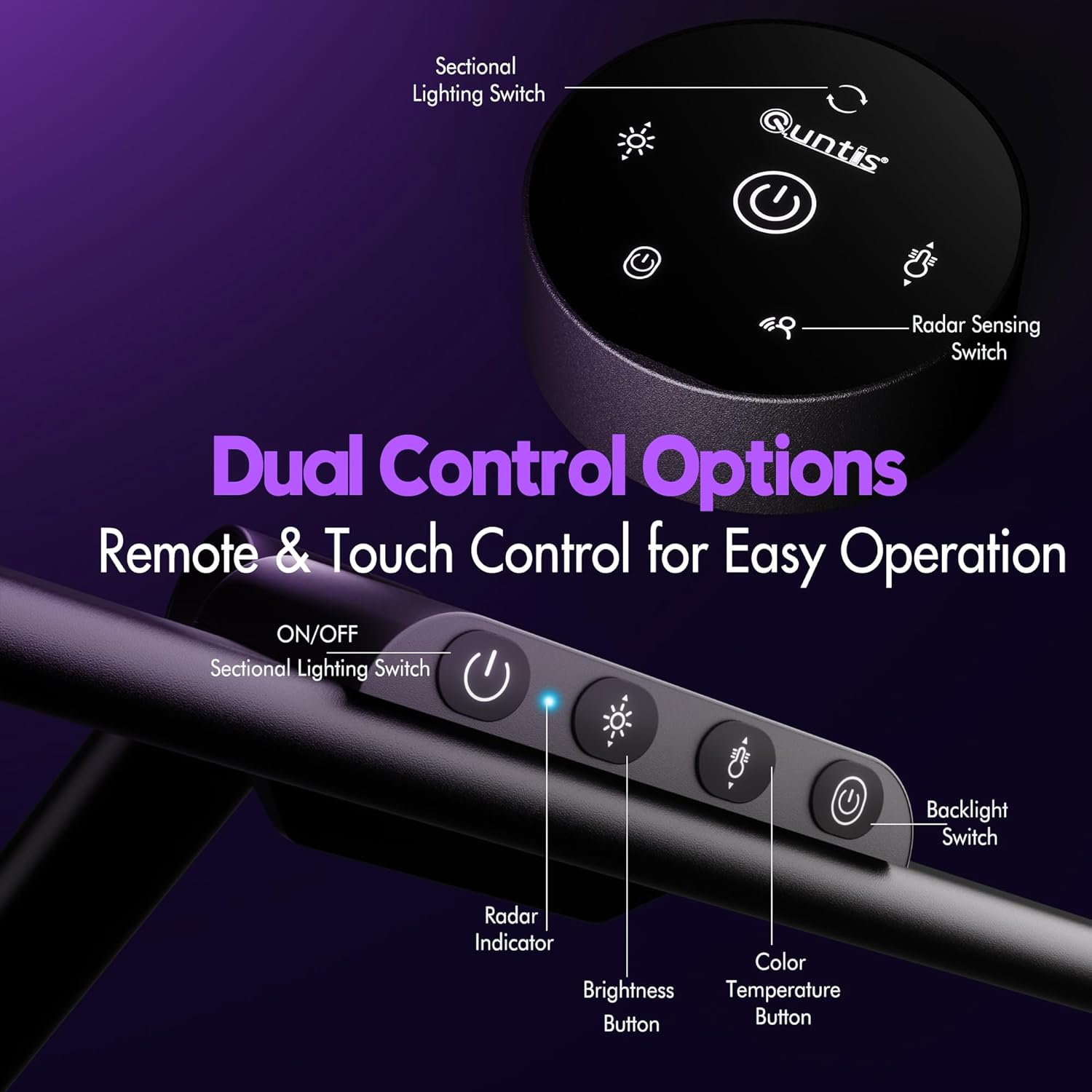
Billede: Detaljeret view of the touch control panel located on the lamp's main bar.
4.2. Fjernbetjening
The wireless remote control provides all the functionalities of the touch panel from a distance.
- Power knap: Drejer l'enamp on/off. Long press for 2-hour auto-off timer.
- Lysstyrkekontrol: Adjusts the front light brightness.
- Farvetemperaturkontrol: Changes the color temperature of the front light.
- Baggrundslys kontrol: Turns the ambient backlight on/off and adjusts its brightness.
- Sectional Lighting: Cycles through different lighting configurations (all, ends, middle).
- Radar Sensing Switch: Activates or deactivates the radar motion sensor.

Image: The wireless remote control for the Quntis desk lamp, showing buttons for brightness, color temperature, and other functions.
Video: A full demonstration of the Quntis Desk Lamp's features and controls in action, including brightness, color temperature, and adjustability.
4.3. Radar Sensing Function
The sensitive radar sensor detects motion within 29.5 ± 3.9 inches. The lamp automatically turns on when you sit down and turns off after 5 minutes of no detected motion, promoting energy efficiency.

Image: Visual representation of the radar sensing feature, showing automatic light activation upon user presence and deactivation after absence.
Video: An in-depth look at the radar sensor functionality of the Quntis Desk Lamp, demonstrating its automatic on/off capabilities.
5. Nøglefunktioner
- Versatile Precision Lighting: 3-stage adjustable light bar with five pivot points for vertical and horizontal rotation. Dual side bars extend to 32.5" for uniform lighting of large workspaces (39.37" × 70.87") or pivot inward for concentrated 1100 LM task lighting.
- Ambient baggrundslys: Wide, dimmable ambient backlight reduces screen-to-surroundings contrast, enhancing visual comfort and reducing eye strain.
- Smart Radar Sensing: Automatically turns the light on when motion is detected within 29.5 ± 3.9 inches and off after 5 minutes of inactivity.
- Dobbelt kontrolmuligheder: Intuitivt berøringspanel på lamp and a wireless remote control for adjusting brightness, color temperature (3000K–6500K), and lighting modes.
- Eye-Care, Glare-Free Front Light: 182 precision LEDs with a 45° anti-glare design and PC diffusion cover deliver soft, shadow-free light without screen reflection or direct eye glare. High CRI of 95 ensures accurate color rendering.
- 2-timers timer: A built-in timer gently reminds users to rest their eyes.
- Pladsbesparende design: Clamps to most desks up to 2.8 inches thick, freeing up valuable desk space.

Image: The Quntis desk lamp demonstrating its 3-way foldable design, allowing for adjustable angles to direct light precisely where needed.
Video: En genudgivelseview of the Quntis 32.5" Desk Lamp, highlighting its backlight feature and overall design.
6. Specifikationer
| Feature | Specifikation |
|---|---|
| Modelnummer | HT8885 |
| Mærke | Quntis |
| Produktdimensioner | 32.5" D x 1.1" B x 30.7" H |
| Wattage | 24 watt |
| Lyskildetype | LED (182 sources) |
| Lysstyrke | 1100 LM (Max) |
| Farvetemperatur | 3000K–6500K (Adjustable) |
| Kontrolmetode | Touch, Remote Control, Radar Sensor |
| Monteringstype | Clip On (up to 2.8" thick desks) |
| Materiale Type | Acrylonitril Butadien Styren, Aluminium |
| Finish Type | Blank |
| Værelsestype | Office Home, Workspace, Dorm Room, Study Room, Bedroom, Dim Room, Living Room |
| Anbefalede anvendelser | Working, Drafting, Reading, Video Calls, Streaming, Gaming, Movie, Programming, Studying, Drawing, Painting |
7. Vedligeholdelse
To ensure the longevity and optimal performance of your Quntis Desk Lampfølg disse vedligeholdelsesretningslinjer:
- Rensning: Brug en blød, tør klud til at tørre lamp's surface. Avoid abrasive cleaners or solvents that may damage the finish.
- Fjernelse af støv: Regularly dust the light bars and control panel to prevent accumulation that could affect performance.
- Strømledning: Undersøg strømkablet regelmæssigt for tegn på skader. Hvis det er beskadiget, skal du stoppe med at bruge det og kontakte kundesupport.
- Opbevaring: Hvis du opbevarer lamp for an extended period, ensure it is clean, dry, and stored in a safe place to prevent damage.
8. Fejlfinding
If you encounter any issues with your Quntis Desk Lamp, se følgende almindelige fejlfindingstrin:
- Lyset tænder ikke:
- Sørg for, at strømadapteren er sat ordentligt i både lamp and a working power outlet.
- Kontroller om stikkontakten fungerer ved at tilslutte en anden enhed.
- Kontroller, at batterierne i fjernbetjeningen er isat korrekt og ikke er opbrugt.
- Fjernbetjeningen reagerer ikke:
- Udskift fjernbetjeningens batterier.
- Sørg for, at der ikke er nogen forhindringer mellem fjernbetjeningen og lamp's sensor.
- Radar Sensor Malfunction:
- Ensure the radar sensing function is activated via the remote or touch panel.
- Clear any obstructions around the sensor area on the lamp.
- Flimrende lys:
- Check the power connection for stability.
- Hvis flimren fortsætter, skal du kontakte kundesupport.
For yderligere assistance henvises til garanti- og supportoplysningerne.
9. Garanti og support
The Quntis 32.5" Architect Desk Lamp is covered by a manufacturer's warranty. Please refer to the warranty card included in your packaging for specific terms and conditions.
For technical support, product inquiries, or warranty claims, please contact Quntis customer service through their official webwebstedet eller kontaktoplysningerne i din produktdokumentation.
Gem venligst din købsbevis til eventuelle garantirelaterede tjenester.