
Audiolab 9000A
Audiolab 9000A Flagskib Integreret Amphøjttaler/DAC/Phono Preamp
Brugermanual
1. Introduktion
Audiolab 9000A er et højtydende integreret ampLifier designet til at være den centrale komponent i ethvert avanceret lydsystem. Den kombinerer en kraftfuld ampen digital-til-analog-konverter (DAC) med høj opløsning og en dedikeret phono-forforstærkeramplifier, der tilbyder omfattende tilslutningsmuligheder og avancerede funktioner til audiofile.
Denne manual indeholder vigtige oplysninger om opsætning, betjening og vedligeholdelse af din Audiolab 9000A for at sikre optimal ydeevne og levetid.
2. Sikkerhedsoplysninger
Læs venligst alle sikkerhedsinstruktioner omhyggeligt, inden du bruger enheden. Gem denne manual til senere brug.
- Strømforsyning: Tilslut kun enheden til en strømforsyning af den type, der er markeret på bagpanelet.
- Ventilation: Sørg for tilstrækkelig ventilation. Bloker ikke ventilationsåbningerne.
- Vand og fugt: Udsæt ikke enheden for regn eller fugt. Placer ikke genstande fyldt med væsker oven på enheden.
- Varme: Placer ikke enheden i nærheden af varmekilder såsom radiatorer, varmeregistre, komfurer eller andre apparater, der producerer varme.
- Rensning: Rengør kun med en tør klud. Brug ikke flydende rengøringsmidler eller aerosolrens.
- Service: Forsøg ikke selv at udføre service på denne enhed. Overlad al service til kvalificeret servicepersonale.
3. Hvad er der i æsken
Pak forsigtigt indholdet af kassen ud. Du bør finde følgende:
- Audiolab 9000A Integreret Amplivligere
- Strømledning
- Fjernbetjening
- Brugervejledning (dette dokument)
- Antenner (til Bluetooth-forbindelse)
4. Produktet er slutview
Frontpanel
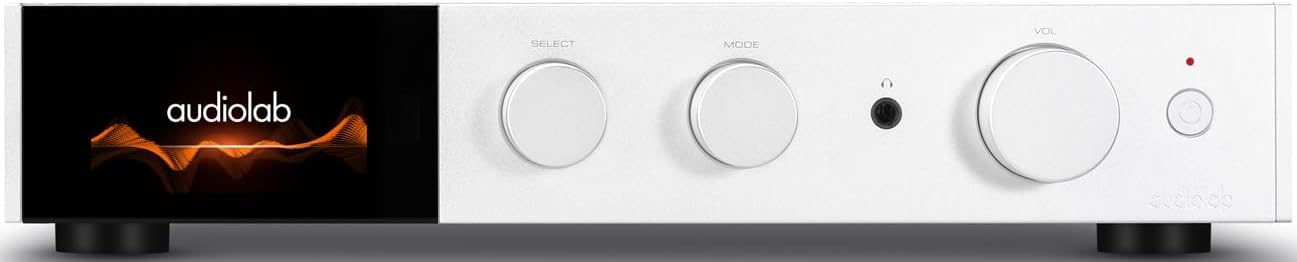
Figur 4.1: Forside view af Audiolab 9000A, der viser Audiolab-logoet på dens IPS LCD-skærm i fuld farve. Frontpanelet har tre drejeknapper til valg, tilstand og lydstyrke, sammen med et hovedtelefonstik og en tænd/sluk-knap.

Figur 4.2: Forside view af Audiolab 9000A, vistasinIPS LCD-skærmen i fuld farve, der viser VU-målere. Denne visuelle funktion giver feedback om lydniveauet i realtid.
9000A har en 4.3-tommer (800 x 480 mm) IPS LCD-skærm i fuld farve, der giver klar og informativ afspilning, kilde og file information. Den tilbyder også forskellige visningsmuligheder, herunder to VU-målerstile, der giver mulighed for visuel feedback eller et diskret udseende.
Bagpaneltilslutninger

Figur 4.3: Bagpanelet på Audiolab 9000A, der viser et omfattende udvalg af input- og output-tilslutninger. Disse omfatter analog, XLR, phono (MM), strømforsyning ampLifier-indgang, SPDIF (koaksial og optisk), PC USB, Bluetooth-antenne, pre-amphøjttalerudgang, stereohøjttalerterminaler og 12V triggertilslutninger.
Bagpanelet tilbyder en bred vifte af tilslutningsmuligheder, herunder flere analoge og digitale indgange, en dedikeret phono-indgang, balanceret XLR-indgang og forskellige udgange til højttalere og eksterne komponenter. Bluetooth-antenner er også placeret her til trådløs streaming.
Nøglefunktioner
- Ampliifikation: Diskret klasse AB-strøm ampLydforstærker, der leverer 100 W pr. kanal i 8 ohm (160 W i 4 ohm). Har Audiolabs CFB (Complementary Feedback) topologi for overlegen linearitet.
- Digital-til-analog-konverter (DAC): Udstyret med ESS 9038PRO flagskibs 32-bit DAC-chip, der understøtter PCM op til 32-bit/768kHz og DSD op til DSD512.
- MQA-afkodning: Fuld MQA-afkodningsfunktion til streaming i høj opløsning.
- Phono Stage: Dedikerede højtydende, støjsvage Moving Magnet (MM) phono-højttaleretage med JFET-baseret kredsløb og præcis RIAA-equalisering.
- Hovedtelefoner Amplivligere: Dedikerede hovedtelefoner med strømfeedback ampLifier med bred båndbredde og høj slew rate.
- Forbindelse: Flere analoge indgange (3 x AUX, 1 x XLR), digitale indgange (2 x koaksial, 2 x optisk, 1 x PC USB), Bluetooth 5.1 med aptX HD/AAC/LDAC-understøttelse.
- Driftstilstande: Integrerede, Pre-Power og Pre Only-tilstande til alsidig systemintegration.
5. Opsætning
5.1 Placering
Placer Audiolab 9000A på en stabil, plan overflade væk fra direkte sollys, varmekilder og overdreven fugtighed. Sørg for tilstrækkelig plads omkring enheden til ventilation.
5.2 Tilslutning af højttalere
- Sørg for, at 9000A er slukket og frakoblet strømnettet.
- Tilslut dine højttalere til højttalerterminalerne på bagpanelet (se figur 4.3). Sørg for korrekt polaritet: rød (+) til rød (+) og sort (-) til sort (-).
- Spænd bindingsstolperne godt fast, men overspænd dem ikke.
5.3 Tilslutning af lydkilder
9000A tilbyder en række forskellige inputmuligheder:
- Analoge indgange (AUX1, AUX2, AUX3): Brug RCA-kabler til at tilslutte analoge kilder som cd-afspillere, tunere eller kassettebåndoptagere.
- Balanceret XLR-indgang: Til analoge kilder af høj kvalitet med XLR-udgange.
- Phono (MM) input: Tilslut din pladespiller direkte til denne indgang. Sørg for, at din pladespiller har en Moving Magnet (MM) pickup.
- Digitale indgange (COAX1, COAX2, OPT1, OPT2): Tilslut digitale kilder såsom cd-transportører, mediestreamere eller tv'er ved hjælp af koaksiale eller optiske kabler.
- PC-USB (USB B): Tilslut din computer for at afspille lyd i høj opløsning.
- Bluetooth: Fastgør de medfølgende antenner til bagpanelet for optimal Bluetooth-signalmodtagelse.
5.4 Strømtilslutning
Når alle lydtilslutninger er foretaget, skal du tilslutte det medfølgende netkabel til IEC-indgangen på bagpanelet og derefter til en passende stikkontakt.
6. Betjeningsvejledning
6.1 Tænd/sluk
Tryk på tænd/sluk-knappen på frontpanelet eller fjernbetjeningen for at tænde eller slukke enheden. Displayet lyser, når den tændes.
6.2 Kildevalg
Brug "SELECT"-drejeknappen på frontpanelet eller kildeknapperne på fjernbetjeningen til at skifte mellem de tilgængelige indgangskilder (AUX1, AUX2, AUX3, XLR, Phono, COAX1, COAX2, OPT1, OPT2, PC USB, Bluetooth).
6.3 Lydstyrkekontrol
Juster lyttevolumen ved hjælp af "VOL"-drejeknappen på frontpanelet eller lydstyrke op/ned-knapperne på fjernbetjeningen.
6.4 driftstilstande
9000A tilbyder tre forskellige driftstilstande, der kan vælges via menuen:
- Integreret tilstand: Dette er standardtilstanden, hvor præ-amplifier og kraft amplivligere stager kombineret. Brug dette til at tilslutte digitale og analoge kilder direkte til 9000A og drive et par højttalere.
- Forstrømstilstand: Denne tilstand afbryder for-amplifier og kraft amplivligere stages. 9000A kan derefter udelukkende bruges som strømforsyning ampen AV-processor) eller til at indsætte ekstern signalbehandling mellem pre-out- og power-in-forbindelserne.
- Kun forhåndstilstand: I denne tilstand fungerer 9000A udelukkende som en forud-amplifier, der udsender det behandlede signal via sin pre-ampstrømforsyningsudgange til en ekstern strømforsyning amplivligere.
6.5 Digitale filtre
For digitale indgange tilbyder 9000A brugerdefinerede digitale filtre, der optimerer responsen, så den passer til kilden. file og partnerudstyr. Få adgang til disse muligheder via enhedens menusystem.
6.6 Bluetooth-forbindelse
- Sørg for, at Bluetooth-antennerne er tilsluttet bagpanelet.
- Vælg "Bluetooth" som inputkilde på 9000A.
- Aktiver Bluetooth på din mobile enhed (smartphone, tablet, bærbar computer), og søg efter tilgængelige enheder.
- Vælg "Audiolab 9000A" fra listen for at parre. Når parringen er fuldført, streames lyd fra din enhed trådløst til amplivligere.
- 9000A understøtter aptX HD-, AAC- og LDAC-protokoller for trådløs lyd i høj kvalitet.
6.7 Hovedtelefonudgang
Tilslut dine hovedtelefoner til 6.35 mm (1/4 tomme) hovedtelefonstikket på frontpanelet. Tilslutning af hovedtelefoner vil automatisk slå hovedhøjttalerudgangene fra.
7. Vedligeholdelse
- Rensning: Brug en blød, tør og fnugfri klud til at rengøre enheden. Brug ikke slibende rengøringsmidler, voks eller opløsningsmidler.
- Ventilation: Kontrollér regelmæssigt, at ventilationsåbningerne er fri for støv og snavs.
- Forbindelser: Sørg for, at alle kabler er korrekt tilsluttet. Løse forbindelser kan påvirke lydkvaliteten.
- Opbevaring: Hvis enheden skal opbevares i længere tid, skal den afbrydes fra strømforsyningen og opbevares et køligt og tørt sted.
8. Fejlfinding
| Problem | Mulig årsag | Løsning |
|---|---|---|
| Ingen strøm | Netledning ikke tilsluttet; Strømudtag defekt; Enhed i standbytilstand. | Kontroller netledningens tilslutning; Prøv en anden stikkontakt; Tryk på tænd/sluk-knappen på enheden eller fjernbetjeningen. |
| Ingen lyd fra højttalerne | Forkert indgang valgt; Højttalerkabler løse eller forkert tilsluttede; Lydstyrke for lav; Mute-funktion aktiv; Hovedtelefoner tilsluttet. | Vælg korrekt input; Kontroller højttalertilslutninger og polaritet; Øg lydstyrken; Deaktiver mute; Frakobl hovedtelefonerne. |
| Ingen lyd fra én kanal | Højttalerkabel løst eller defekt; Kildekabel defekt; Højttaler defekt. | Kontroller højttaler- og kildekabelforbindelserne; Test med en anden højttaler eller kilde. |
| Brummende eller summende lyd | Jordsløjfe; Elektrisk interferens i nærheden; Defekt kabel. | Sørg for, at alle komponenter er korrekt jordforbundet; Flyt enheden væk fra anden elektronik; Prøv andre kabler. |
| Problemer med Bluetooth-parring | Antenner ikke tilsluttet; Enheden er for langt væk; Enheden er allerede parret med en anden enhed. | Tilslut Bluetooth-antenner; Flyt enheden tættere på; Afbryd forbindelsen til andre enheder, og prøv at parre igen. |
9. Specifikationer
| Kategori | Detalje |
|---|---|
| Generel beskrivelse | Integreret Amplivligere |
| Nominel strømudgang | 2 x 100 W (8 ohm, THD <1 %); 2 x 160 W (4 ohm, THD <1 %) Klasse AB |
| DAC-chip | ES9038Pro 32-bit DAC |
| Vise | 4.3" (800 x 480 mm) Fuld View IPS LCD |
| MQA afkodning | Indbygget certificeret MQA fuld dekoder (PC USB, koaksial/optisk) |
| Bluetooth | Bluetooth 5.1 (aptX/aptX HD/AAC/LDAC) understøttelse |
| Phono Stage | Dedikeret højtydende, støjsvag MM Phono Stage |
| Hovedtelefoner AMP | Dedikeret Current-Feedback-hovedtelefon AMP |
| Driftstilstande | Integrerede / PRE-POWER / Kun PRE-tilstande |
| Understøttelse af USB-opgradering | Ja |
| Indgange | 3 x analog, 1 x XLR, 1 x Phono (MM), 1 x strømforsyning AmpForstærker, 2 x SPDIF (koaksial), 2 x SPDIF (optisk), 1 x PC USB (USB B), 1 x Bluetooth, 1 x 12V trigger |
| Udgange | 1 x PRE Amplifier, 1 x stereohøjttaler, 1 x hovedtelefon, 1 x 12V trigger |
| SampLingfrekvens (optisk/koaksial) | 44.1kHz-192kHz |
| SampLingfrekvens (PC USB) | 44.1 kHz-768 kHz (PCM) / DSD64, DSD128, DSD256, DSD512 |
| PreampForstærkning (maks.) | +6dB (Line), +53dB (Phono MM) |
| PreampTHD-forstærker | <0.0004% (1 kHz @ 2V, lydstyrke = 0 dB) |
| DAC THD | <0.001% (1 kHz @ 0 dBFS) |
| Magt AmpTHD-forstærker | <0.002 % (1kHz @ 50W / 8 ohm) |
| Hovedtelefoner AmpTHD-forstærker | <0.01% (1 kHz, 50 mW) |
| Nettovægt | 9.4 kg |
| Dimensioner (B x H x D) | 444 x 342 x 89 mm |
| Afslut muligheder | Sort / Sølv |
| Strømkrav | 100-120V ~ 50/60Hz |
10. Garanti og support
Audiolab-produkter er fremstillet efter de højeste standarder og gennemgår streng kvalitetskontrol. Dette produkt er dækket af en producentgaranti, hvis vilkår kan variere fra region til region. Se venligst garantikortet, der følger med dit produkt, eller besøg den officielle Audiolab-side. webwebstedet for detaljerede garantioplysninger.
For teknisk support, service eller forespørgsler vedrørende din Audiolab 9000A, bedes du kontakte din autoriserede Audiolab-forhandler eller -distributør. Du kan også finde supportressourcer, ofte stillede spørgsmål og kontaktoplysninger på den officielle Audiolab-side. webwebsted: www.audiolab.co.uk
Ask a question about this manual
Ask about setup, troubleshooting, compatibility, parts, safety, or missing instructions. Manuals+ will review the question and use this page’s manual context to help answer it.