
Indledning
The Retroid Pocket Classic is a portable retro handheld game console designed for an immersive gaming experience. Featuring a 3.92-inch OLED touchscreen and running on Android 14, this device offers versatile connectivity and expansive storage options. This manual provides essential information for setting up, operating, maintaining, and troubleshooting your Retroid Pocket Classic.
Hvad er der i æsken
- Spillekonsol
- Ladekabel
- Brugermanual
Produktegenskaber

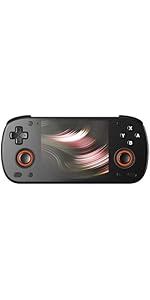
The Retroid Pocket Classic handheld game console, showcasing its design and available color options.

En detaljeret view of the 3.92-inch OLED touchscreen, highlighting its size and clarity.

This image illustrates the superior display characteristics of the OLED screen, including a 100,000:1 contrast ratio, 107% sRGB color gamut, low power consumption, and 500 Nits brightness.
The device features a curved and contoured back for enhanced grip and comfort, along with easily accessible R1, R2, L1, and L2 trigger buttons.

An illustration of the integrated active cooling system, designed for optimal performance and efficient heat management during gameplay.

The Retroid Pocket Classic offers different button configurations, including a 6-button layout (A, B, X, Y, C, Z) and a 4-button layout (A, B, X, Y) to suit various gaming preferences.
Opsætningsvejledning
1. Første opladning
Before first use, fully charge your Retroid Pocket Classic using the provided charging cable. The device supports 27W charging.
2. Tænder
Tryk og hold tænd/sluk-knappen på siden af enheden nede, indtil skærmen lyser.
3. Android 14 Setup
Follow the on-screen prompts to complete the initial Android 14 setup. This includes connecting to a Wi-Fi network (Wi-Fi 5 supported) and logging into your Google account to access the Google Play Store.
4. Udvidelse af lagerplads
The device comes with 128GB EMMC5.1 internal storage. To expand storage, insert a Micro SD card into the designated TF Card Slot.
5. Game Installation (Important Note)
Please note that the Retroid Pocket Classic does not come with preloaded games.
To play games, you will need to acquire game ROMs and BIOS files legally. The Android 14 operating system allows for the installation of various emulation applications from the Google Play Store. Online communities and resources can provide guidance on setting up emulation software and acquiring necessary files.
Betjeningsvejledning
Grundlæggende navigation
- Touchskærm: The 3.92-inch OLED touchscreen allows for intuitive navigation of the Android interface.
- D-Pad and Buttons: Use the D-pad for directional input and the face buttons (A, B, X, Y, and additional C/Z buttons on Classic 6 models) for in-game actions and menu selections.
- Skulder-/aftrækkerknapper: L1, L2, R1, R2 buttons are located on the top rear of the device for additional control inputs.
Spil
Launch your preferred emulation application or Android game from the home screen. Configure controls within each application as needed. The device is capable of running a wide range of retro games, including those from PS1 and below, and some GameCube titles.
Forbindelse
- Wi-Fi 5: Connect to wireless networks for online gaming, app downloads, and system updates.
- Bluetooth 5.1: Pair with compatible Bluetooth accessories such as headphones or external controllers.
- USB-C udgang: The USB-C port can be used for charging and data transfer. Note: This model does not support video output to a TV or monitor.
Batteristyring
The 5000mAh battery provides extended gameplay. Monitor battery levels through the Android system interface. For optimal battery life, avoid extreme temperatures and use the provided charging cable.
Opretholdelse
Rensning
Use a soft, dry, lint-free cloth to clean the screen and exterior of the device. Avoid using harsh chemicals or abrasive materials.
Softwareopdateringer
The Retroid Pocket Classic supports official Over-The-Air (OTA) updates. Regularly check for and install system updates to ensure optimal performance and access to new features. You can usually find this option in the device's settings menu under "System" or "About device".
Lagerstyring
Periodisk vedrview and manage your installed applications and game files to free up storage space. Uninstall unused apps and transfer large files to an external Micro SD card if necessary.
Fejlfinding
Enheden tænder ikke
- Sørg for, at enheden er fuldt opladet. Tilslut den til en strømkilde, og vent et par minutter, før du forsøger at tænde den igen.
- Hvis batteriet er helt afladet, kan det tage et par minutter at oplade, før enheden reagerer.
Application Compatibility Issues
- Some Android applications may experience display issues due to the device's unique screen aspect ratio. Check for app updates or alternative versions that may offer better compatibility.
- For emulation software, ensure you are using the latest version and that your ROMs and BIOS files er korrekt konfigureret.
Præstationsproblemer
- If games or applications are running slowly, close any background applications.
- Sørg for, at enheden har tilstrækkelig ledig lagerplads.
- The active cooling system helps manage heat; ensure the vents are not obstructed.
Emulation Setup Difficulties
Setting up emulation can be complex. Numerous online guides and video tutorials are available from the community to assist with the initial setup of emulators and game files. Søg efter "Retroid Pocket Classic emulation guide" for detailed instructions.
Specifikationer
| Feature | Detalje |
|---|---|
| Processor | G1 Gen2 CPU: 8-Core Kryo CPU (2 Performance Cores, 6 Efficiency Cores) |
| GPU | Adreno A12 |
| VÆDDER | 6GB LPDDR4x@2133MHz |
| Opbevaring | 128GB EMMC5.1 + TF Card Slot |
| Operativsystem | Android 14 |
| Skærm | 3.92 inch AMOLED, 1240*1080@60fps |
| Varmeafledning | Active-cooling |
| Batteri | 5000mAh |
| Opladningshastighed | 27W |
| Wi-Fi | Wi-Fi 5 |
| Bluetooth | BT 5.1 |
| Interface | USB-C / 3.5mm Audio Jack / TF Card |
| Dimensioner | 5.43 x 3.53 x 1 tommer (138 x 89.8 x 26 mm) |
| Vægt | 7.9 ounce (223 g) |
Garanti og support
Garantioplysninger
This product typically comes with a manufacturer's warranty. Please refer to the warranty card included in your product packaging for specific terms and conditions. Optional extended protection plans may be available for purchase separately.
Returpolitik
Standard return policies apply, typically allowing returns within 30 days of purchase. Please consult your retailer's return policy for detailed information.
Kundesupport
For technical assistance, troubleshooting beyond this manual, or warranty claims, please contact Retroid Pocket customer support through their official webwebstedet eller forhandleren, hvor produktet blev købt.