
1. Introduktion
This manual provides instructions for the setup, operation, and maintenance of your Retroid Pocket Classic handheld gaming console. The Retroid Pocket Classic is a portable Android-based gaming device featuring a 3.92-inch OLED touchscreen, designed for a versatile gaming experience.

Image 1.1: Retroid Pocket Classic consoles in white and yellow.
2. Hvad er der i æsken
Bekræft at alle varer er til stede i pakken:
- Retroid Pocket Classic Gaming Console
- Opladningskabel (USB-C)
- Brugervejledning (dette dokument)
3. Enhed overview
Familiarize yourself with the physical components and controls of your Retroid Pocket Classic.
3.1 Foran View

Billede 3.1: Forside view of the Retroid Pocket Classic.
- 3.92-tommer OLED-berøringsskærm: The primary display for all operations and gaming.
- D-Pad: Directional input for navigation and gameplay.
- Handlingsknapper: (A, B, X, Y or similar layout) for in-game actions.
- Start/vælg-knapper: For game and system functions.
- Højttalergitter: Lydudgang.
3.2 Top and Back View

Billede 3.2: Top view showing shoulder buttons and ports.
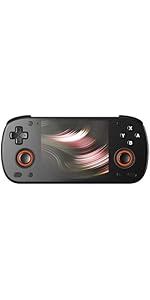
Image 3.3: Curved back design and trigger buttons.
- Skulderknapper (L1, R1): Placeret på den øverste kant.
- Udløserknapper (L2, R2): Located on the back, below the shoulder buttons.
- USB-C-port: Til opladning og dataoverførsel.
- 3.5 mm lydstik: Til tilslutning af hovedtelefoner.
- Micro SD -kortplads: Til udvidelse af lagerplads.
- Power knap: For at tænde/slukke enheden eller sætte den i dvaletilstand.
- Lydstyrkeknapper: To adjust audio output.
3.3 Internal Components (Cooling)

Image 3.4: Integrated active cooling system.
The Retroid Pocket Classic features an integrated active cooling system designed to maintain optimal performance and manage heat during extended use.
4. Opsætning
4.1 Indledende opladning
Before first use, fully charge the device. Connect the provided USB-C charging cable to the console's USB-C port and the other end to a compatible USB power adapter (not included). The device has a 5000mAh battery.
4.2 Tænd/sluk
- For at tænde: Tryk og hold tænd/sluk-knappen nede, indtil skærmen lyser.
- For at slukke: Press and hold the Power button, then select "Power Off" from the on-screen options.
- At sove/vågne: Tryk kort på Power-knappen.
4.3 Wi-Fi-forbindelse
To access online features and download applications, connect to a Wi-Fi network:
- Gå til Indstillinger.
- Vælge Netværk og internet.
- Tryk på Wi-Fi og tænd den.
- Vælg det ønskede netværk fra listen, og indtast adgangskoden, hvis du bliver bedt om det.
4.4 Opsætning af Google-konto
The Retroid Pocket Classic runs Android 14 and supports the Google Play Store. To download apps and games, you will need to sign in with a Google account during the initial setup process or later via the Settings menu.
4.5 Installation af Micro SD-kort
To expand the device's storage (128GB internal), insert a Micro SD card into the designated slot. Ensure the card is inserted correctly until it clicks into place. The device supports various Micro SD card capacities.
5. Betjeningsvejledning
5.1 Navigering i Android-grænsefladen
The device operates on Android 14. Use the touchscreen for navigation, tapping icons to open applications, swiping to scroll, and using gestures for system controls. The D-pad and action buttons can also be used for navigation within compatible applications and games.
5.2 Downloading and Installing Applications
Applications and games can be downloaded from the Google Play Store. Open the Play Store app, search for your desired content, and follow the on-screen prompts to download and install.
Note: The Retroid Pocket Classic does not come with preloaded games. Users are responsible for acquiring and installing their own game content.
5.3 Administration af lagerplads
Til view and manage internal and external storage, go to Indstillinger > Lager. Here you can see storage usage and manage files. For optimal performance, ensure sufficient free space is available.
5.4 Bluetooth-forbindelse
The device supports Bluetooth 5.1 for connecting wireless accessories such as headphones or external controllers.
- Gå til Indstillinger.
- Vælge Tilsluttede enheder.
- Tryk på Par ny enhed og vælg dit tilbehør fra listen.
6. Vedligeholdelse
6.1 Rengøring af enheden
Use a soft, dry, lint-free cloth to clean the device's exterior. For the screen, a screen cleaner specifically designed for electronics can be used. Avoid using harsh chemicals or abrasive materials.
6.2 Pleje af batterier
For at forlænge batterilevetiden:
- Undgå ekstreme temperaturer.
- Undgå at aflade batteriet helt ofte.
- Store the device with a partial charge if not used for extended periods.
6.3 Softwareopdateringer
Søg regelmæssigt efter og installer systemopdateringer for at sikre optimal ydeevne og sikkerhed. Gå til Indstillinger > System > Systemopdatering for at tjekke for tilgængelige opdateringer.
7. Fejlfinding
7.1 Enheden tændes ikke
- Sørg for, at enheden er tilstrækkeligt opladet. Tilslut den til en strømkilde i mindst 30 minutter.
- Prøv at holde tænd/sluk-knappen nede i 10-15 sekunder for at fremtvinge en genstart.
7.2 Problemer med Wi-Fi-forbindelse
- Bekræft, at Wi-Fi er aktiveret i Indstillinger.
- Genstart din Wi-Fi-router.
- Forget the network and reconnect, ensuring the password is correct.
7.3 Applikationer der går ned eller fryser
- Luk og genåbn applikationen.
- Ryd appens cache og data via Indstillinger > Apps > [Appnavn] > Lagerplads og cache.
- Ensure the application is updated to its latest version.
- Genstart enheden.
7.4 Skærmen reagerer ikke
- Restart the device by holding the Power button.
- Sørg for, at skærmen er ren og fri for snavs.
8. Specifikationer

Image 8.1: Retroid Pocket Classic detailed specifications.
| Feature | Detalje |
|---|---|
| Modelnavn | RP CLASSIC |
| Processor | G1 Gen2 (8-Core Kryo CPU, 2 Performance Cores, 6 Efficiency Cores) |
| GPU | Adreno A12 |
| VÆDDER | 6GB LPDDR4x @2133M |
| Opbevaring | 128GB EMMC 5.1 (expandable via Micro SD card) |
| Skærm | 3.92-inch AMOLED, 1240x1080 @60fps |
| Operativsystem | Android 14 |
| Wi-Fi | Wi-Fi 5 |
| Bluetooth | Bluetooth 5.1 |
| Interface | USB-C / 3.5mm Audio Jack / TF Card Slot |
| Video output | N/A |
| Batteri | 5000mAh |
| Opladningshastighed | 27 watt |
| Dimensioner | 138 x 89.8 x 26 mm (5.43 x 3.53 x 1 tommer) |
| Vægt | 223 g (7.9 ounce) |
9. Garanti og support
For warranty information and technical support, please refer to the official Retroid Pocket webwebstedet eller kontakt deres kundeservice. Gem din købsbevis til garantikrav.
Online resources and community forums may also provide helpful information and troubleshooting tips.