
QYT KT-9900
QYT KT-9900 Dual Band Mobil Amateur Radio Brugsanvisning
Model: KT-9900
1. Introduktion
The QYT KT-9900 is a compact and powerful dual-band mobile ham radio designed for reliable communication. It operates on both VHF (136-174MHz) and UHF (400-480MHz) frequencies, offering 25 watts of power on VHF and 20 watts on UHF in high output mode. This radio features 200 customizable channels, CTCSS and DCS privacy codes, DTMF technology, and includes a hand microphone with an integrated display and controls. It is suitable for various applications, including off-road adventures, ranch operations, and overlanding.
This manual provides detailed instructions for the proper setup, operation, and maintenance of your QYT KT-9900 radio.
2. Pakkens indhold
Kontroller venligst, at alle varer er til stede i din pakke:
- QYT KT-9900 Mobile Radio Unit
- Hand Microphone with Display and Keypad
- Programmeringskabel
- Power Cable (for cigarette lighter connection)
- Monteringsbeslag og skruer
- Brugervejledning (dette dokument)

Image: Contents of the QYT KT-9900 package, showing the main radio unit, hand microphone, power cable, programming cable, mounting bracket, and screws.
3. Produktet er slutview
The QYT KT-9900 mobile radio consists of a main unit and a hand microphone, which serves as the primary control interface.
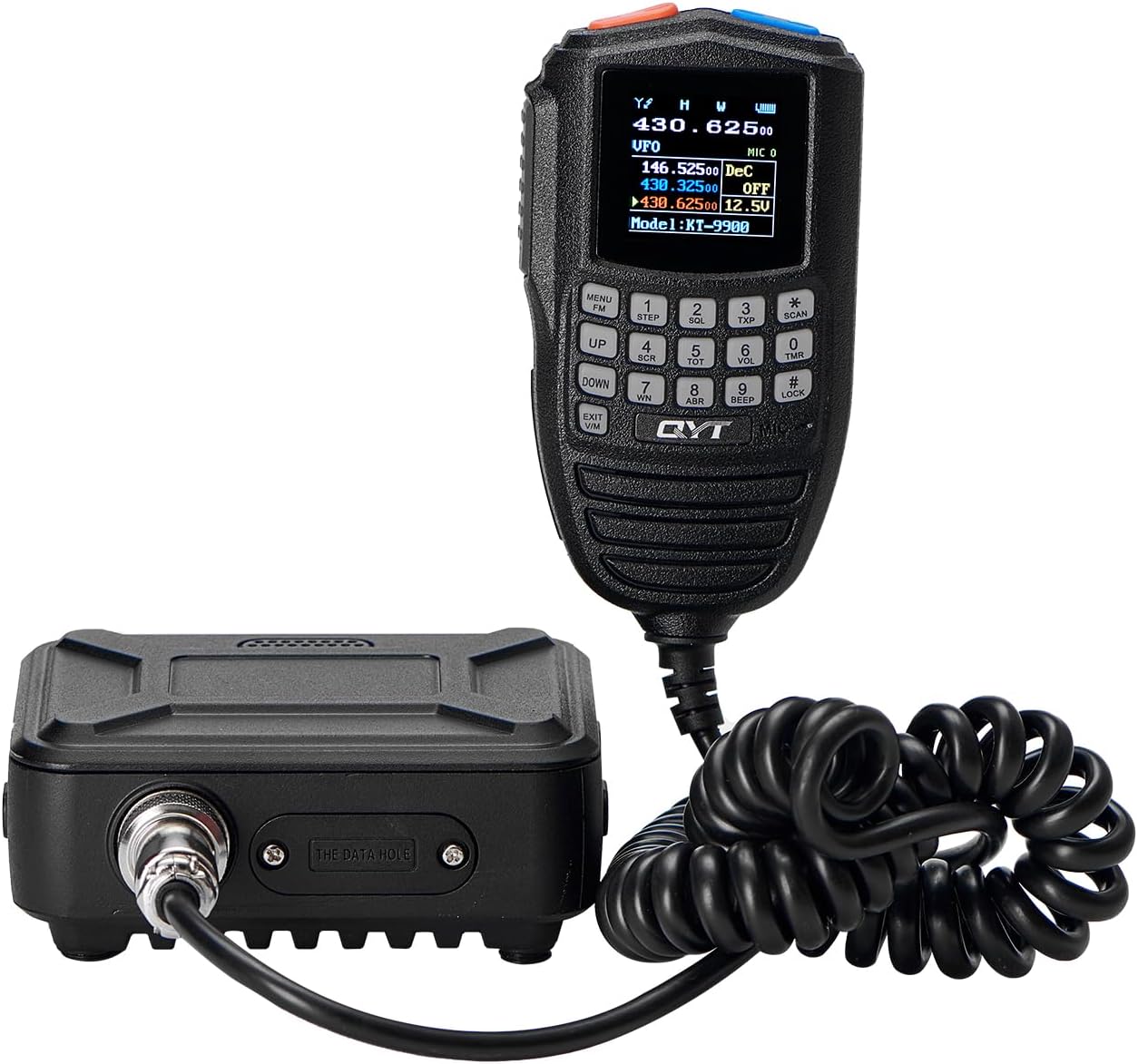
Image: The QYT KT-9900 mobile radio unit connected to its hand microphone, displaying the screen on the microphone.
Hand Microphone Key Analysis

Image: A detailed diagram illustrating the various buttons and ports on the QYT KT-9900 hand microphone and the main radio unit. Key functions include PTT, menu, step, squelch, volume, and lock buttons on the microphone, and external speaker and data ports on the radio unit.
- MOMI Button: Short press for menu, long press to start.
- OPKALD-knap: Short press for call, long press for alarm.
- PTT (Push-To-Talk): Tryk for at sende, slip for at modtage.
- Funktionstast: Activates secondary functions of other keys.
- Frequency Stepping Up Adjustment: Increases frequency or navigates up in menus.
- Frequency Stepping Down Adjustment: Decreases frequency or navigates down in menus.
- Exit A/B Channel Switching and Alarm Function: Exits current menu or switches between A/B channels.
- Frequency Inversion Function, Scanning, Number "*": Activates frequency inversion, initiates scanning, or inputs the '*' character.
- Keyboard Lock Function, Number "#": Locks/unlocks the keypad or inputs the '#' character.
- Højttaler: Integrated speaker on the microphone.
- Mikrofonstik: Connects the hand microphone to the main unit.
- Ekstern højttalerport: Til tilslutning af en ekstern højttaler.
- Dataport: For programming the radio via a computer.
4. Opsætning
4.1 Strømtilslutning
The KT-9900 operates on 13.8V DC. It is typically powered via a vehicle's 12V or 13.8V system using the provided cigarette lighter power cable.
- Voltage Determination: Conventional vehicle radios operate at 12V or 13.8V. For 24V large vehicles, a voltage regulator must be equipped; otherwise, the device may be damaged.
- Korrekt betjening: When using, connect the voltage regulator first (if applicable), and then connect the vehicle radio.

Image: The QYT KT-9900 mobile radio receiving power through a cigarette lighter adapter in a vehicle, indicating an operating voltage på 13.8V ± 15%.
4.2 Antenneforbindelse
An external antenna is required for proper operation. The radio cannot be used without an antenna connected, as this may cause damage to the machine.
- Antennekonfiguration: The mobile radio must be equipped with an antenna kit to be used normally. The antenna should be positioned perpendicular to the horizontal line for optimal performance.
- Ensure the antenna is securely connected to the antenna port on the main radio unit before powering on.
4.3 Programmering
The KT-9900 can be programmed using the provided programming cable and compatible software.

Image: The QYT KT-9900 radio unit connected to a laptop using the external programming cable, illustrating the data port connection.
- Softwarekompatibilitet: This radio is only compatible with QYT's official programming software. Using other software may cause machine damage.
- Connect the programming cable to the radio's data port and your computer's USB port.
- Install the necessary drivers and programming software on your computer.
- Follow the software instructions to program channels, frequencies, and other settings.
5. Betjeningsvejledning
5.1 Tænd/sluk
- To power on, long press the MOMI button on the hand microphone.
- To power off, long press the MOMI button again.
5.2 Channel Selection and Programming
The KT-9900 features 200 fully customizable channels. These channels can be programmed for ham radio frequencies, ham radio repeaters, and UHF channels.
- Use the UP/DOWN buttons on the hand microphone to navigate through channels or frequencies.
- Refer to the programming software for detailed instructions on customizing and saving channels.
5.3 GMRS Repeater Functionality
The KT-9900 includes 15 GMRS channels and 8 repeater channels, compatible with all FRS and GMRS radios. This feature allows for optimized repeater connections, especially for long-distance communication.
- Switching between different CTCSS/DCS codes for the same frequency can enhance the efficiency of hitting a repeater.
- Consult the programming software or the radio's menu for specific GMRS and repeater settings.
5.4 Privatlivskoder (CTCSS/DCS)
The CTCSS/DCS privacy codes allow you to select a specific code to use with a particular channel. This helps prevent unwanted transmissions from being heard on the same channel, ensuring clearer communication.
- Access the menu via the MOMI button to set CTCSS/DCS codes for your desired channels.
5.5 Lydstyrkekontrol
While the volume control can be accessed through the menu, a quicker method is available:
- Tryk på Squelch (SQL) button (often orange) on the top of the hand microphone.
- Immediately after pressing SQL, use the OP/NED knapper for at justere lydstyrken.
5.6 VOX-funktion
The radio supports VOX (Voice Operated Exchange) functionality, allowing for hands-free transmission.
- Activate and adjust VOX sensitivity through the radio's menu system using the hand microphone.
6. Specifikationer
| Feature | Specifikation |
|---|---|
| Mærke | QYT |
| Modelnummer | KT-9900 |
| Frekvensområde | VHF: 136-174MHz, UHF: 400-480MHz |
| Udgangseffekt | VHF: 25 Watts, UHF: 20 Watts (High Output) |
| Antal kanaler | 200 |
| Speciel funktion | Dual Band |
| Maksimal talerækkevidde | 18 Miles (approximate, depends on terrain and conditions) |
| Voltage | 13.8 volt (DC) |
| Vandmodstandsniveau | Ikke vandafvisende |
| Varens vægt | 2 pund |
| Pakkedimensioner | 10.63 x 6.1 x 2.17 tommer |
| Inkluderede komponenter | Hand microphone, programming cable |
| Kompatible enheder | Two-way radios |
7. Fejlfinding
- Radioen tænder ikke:
- Ensure the power cable is securely connected to both the radio and the power source.
- Verify the vehicle's power source (e.g., cigarette lighter) is functional.
- Tjek for korrekt voltage (13.8V DC). If using in a 24V vehicle, confirm the voltage regulator is correctly installed and functioning.
- Ingen transmission eller modtagelse:
- Confirm an external antenna is properly connected to the radio. Operating without an antenna can damage the unit.
- Check that the selected frequency or channel is active and within the radio's operating range.
- Verify CTCSS/DCS settings match the receiving station.
- Ensure the PTT button is functioning correctly.
- Programmeringsproblemer:
- Ensure you are using QYT's official programming software. Incompatible software can cause issues or damage.
- Verify the programming cable is correctly connected to the radio's data port and your computer.
- Check for proper driver installation on your computer.
- Lav effekt:
- Confirm the radio is set to high power mode (if applicable) in the settings.
- Ensure the power supply is providing stable 13.8V DC.
- Check antenna SWR (Standing Wave Ratio) for optimal performance. A poorly tuned antenna can reduce output.
- Poor audio quality from microphone speaker:
- Ensure the microphone cable is securely connected.
- Tjek lydstyrkeindstillingerne.
- If issues persist, consider connecting an external speaker to the dedicated port.
8. Vigtige bemærkninger og advarsler
- Antennekrav: The radio requires an external antenna for operation. Using the radio without an antenna connected can cause permanent damage to the unit.
- Softwarekompatibilitet: Only use QYT's official programming software with this radio. Use of third-party or incompatible software may lead to malfunction or damage.
- Voltage: Ensure the power supply is within the specified 13.8V ± 15% range. For 24V vehicle systems, a voltage regulator is mandatory to prevent damage.
- Vandtæthed: This device is not water resistant. Avoid exposure to moisture or liquids.
- FCC ID: The device carries FCC ID: 2AV62KT-9900. Ensure compliance with local regulations for radio operation.
9. Anvendelsesscenarier
The QYT KT-9900 mobile radio is versatile and suitable for a range of communication needs:

Image: A visual representation of diverse environments where the QYT KT-9900 radio can be effectively used, such as outdoor tourism, emergency services, logistics, and construction sites.
- Outdoor Tourism & Off-Roading: Maintain communication in remote areas.
- Fire Protection Deployment: Essential for coordination in emergency situations.
- Rental Services: Facilitate communication for vehicle fleets.
- Freight Logistics: Improve coordination for transportation and delivery.
- Property Community Security: Enhance security team communication.
- Construction Engineering: Reliable communication on job sites.
10. Support og kontaktoplysninger
For technical support, warranty inquiries, or further assistance with your QYT KT-9900 radio, please contact QYT customer service through their official channels. Refer to the product packaging or the QYT brand store on Amazon for the most current contact information.
Online ressourcer:
- Besøg QYT Store on Amazon for produktinformation og opdateringer.