1. Produktet er slutview
The PINDOWS Digital Sport Watch PDS-8021 is designed for active individuals, offering a clear digital display, robust 5ATM water resistance, and multiple functions including a stopwatch, alarm, and dual time. Its transparent case and bright LED backlight enhance usability and style.
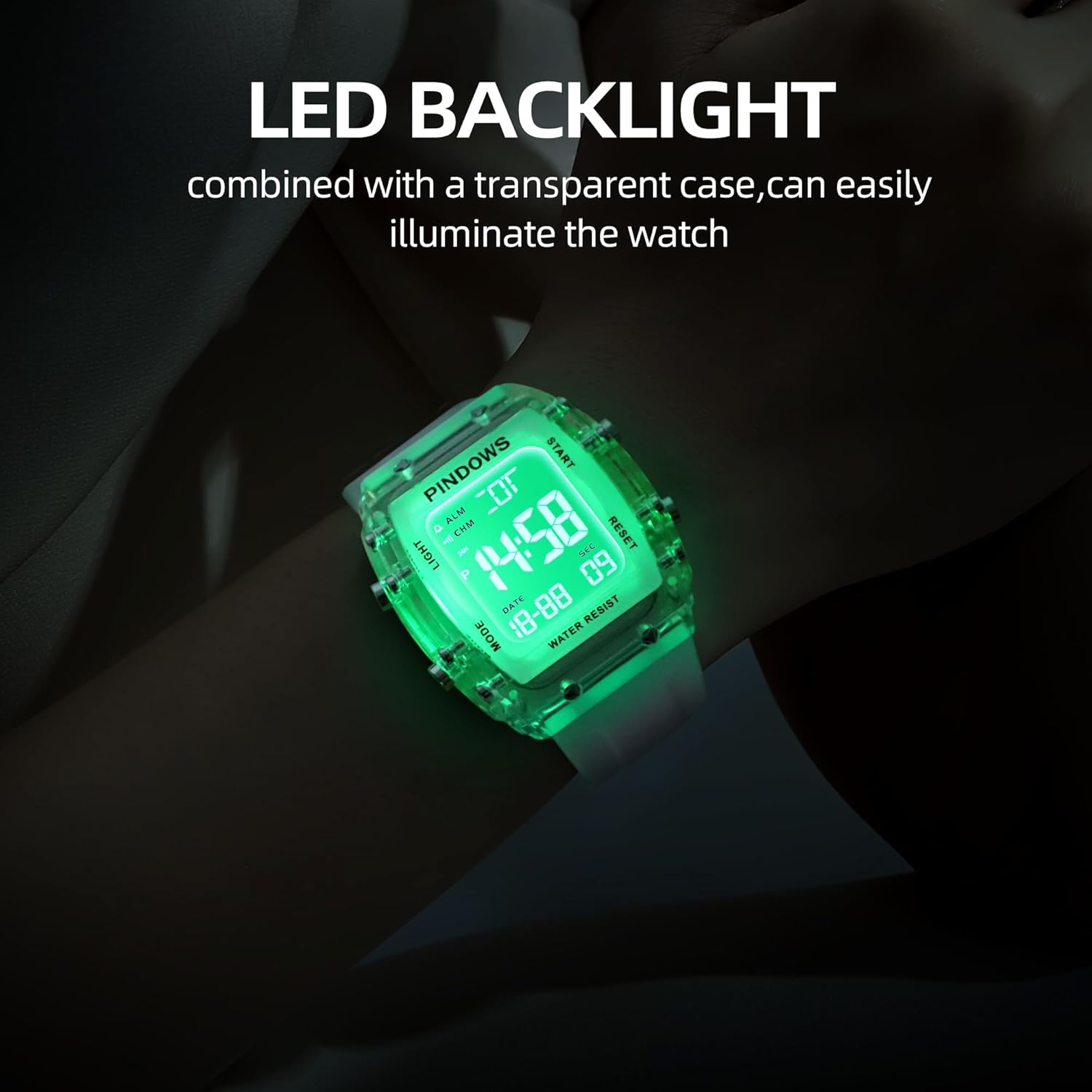
Figure 1: PINDOWS Digital Sport Watch PDS-8021
Nøglefunktioner:
- Digital Time Display (12/24-hour format)
- Visning af dato
- Stopur funktion
- Daglig Alarm
- Hourly Klokke
- Dobbelt tidszone
- Bright LED Backlight
- 5ATM Vandresistens

Figur 2: Funktionel overview og knaplayout
Knap funktioner:
- LYS-knap (øverst til venstre): Aktiverer LED-baggrundsbelysningen
- MODE-knap (nederst til venstre): Skifter mellem visningstilstande (tid, stopur, alarm, dobbelt tid).
- START/PAUSE-knap (øverst til højre): Starts/pauses stopwatch, adjusts values in setting mode.
- NULSTIL/JUSTERING-knap (nederst til højre): Resets stopwatch, selects items to adjust in setting mode.
2. Indledende opsætning
Your watch comes with the battery pre-installed and active. Follow these steps to set the time and other functions.
2.1 Indstilling af tid og dato:
- Fra den normale tidsvisning skal du trykke på MODE button three times to enter Time Setting mode. The seconds will flash.
- Tryk på NULSTIL/JUSTERING knappen for at gennemgå indstillingerne: Sekunder → Time → Minut → Måned → Dato → Ugedag.
- Mens en værdi blinker, skal du bruge START/PAUSE button to increase the value. Hold the button to increase rapidly.
- To switch between 12-hour and 24-hour (military) format, press the NULSTIL/JUSTERING button until the hour is flashing. Then, press the START/PAUSE button to toggle between 'A' (AM), 'P' (PM) for 12-hour format, or 'H' for 24-hour format.
- Når alle indstillinger er korrekte, skal du trykke på MODE button to exit Time Setting mode and return to the normal time display.
2.2 Indstilling af alarmen:
- Fra den normale tidsvisning skal du trykke på MODE Tryk to gange på knappen for at gå ind i alarmindstillingstilstanden. Timecifrene blinker.
- Tryk på START/PAUSE knappen for at indstille den ønskede alarmtime.
- Tryk på NULSTIL/JUSTERING button to select the minute digits. The minute digits will flash.
- Tryk på START/PAUSE knappen for at indstille det ønskede alarmminut.
- Tryk på MODE knappen for at afslutte alarmindstillingstilstand.
- For at aktivere/deaktivere alarmen skal du trykke på og holde START/PAUSE knappen, og tryk derefter på NULSTIL/JUSTERING knappen. Et alarmikon vil vises/forsvinde.
2.3 Setting Dual Time:
- Fra den normale tidsvisning skal du trykke på MODE button four times to enter Dual Time Setting mode. The hour digits will flash.
- Tryk på START/PAUSE knappen for at indstille den ønskede time for den anden tidszone.
- Tryk på NULSTIL/JUSTERING button to select the minute digits. The minute digits will flash.
- Tryk på START/PAUSE button to set the desired minute for the second time zone.
- Tryk på MODE button to exit Dual Time Setting mode.
2.4 Hourlog klokkespil:
For at aktivere eller deaktivere hourly chime, press and hold the MODE knappen, og tryk derefter på NULSTIL/JUSTERING button. A chime icon will appear/disappear on the display.
3. Betjeningsvejledning
3.1 Brug af stopuret:
- Fra den normale tidsvisning skal du trykke på MODE Tryk én gang på knappen for at gå i stopurstilstand. Displayet viser '00:00:00'.
- Tryk på START/PAUSE knappen for at starte stopuret.
- Tryk på START/PAUSE knappen igen for at sætte stopuret på pause.
- For at genoptage, tryk på START/PAUSE knap.
- For at nulstille stopuret skal du sørge for, at det er sat på pause, og derefter trykke på NULSTIL/JUSTERING knap.
- Tryk på MODE knappen for at afslutte stopurstilstand.
3.2 Activating the LED Backlight:
Tryk på LYS knappen (øverst til venstre) for at oplyse displayet. Baggrundsbelysningen forbliver tændt i et par sekunder.

Figur 3: LED-baggrundsbelysning i aktion
3.3 Water Resistance (5ATM):
The watch is rated 5ATM (50 meters) water resistant. This means it is suitable for:
- Skyl koldt vand
- Vask af hænder
- Svømning
- Svedende
Vigtig: Do not press any buttons while the watch is submerged in water. Avoid hot water, steam, or diving, as this can compromise the water resistance seals.

Figure 4: Watch demonstrating 50m water resistance
4. Vedligeholdelse
4.1 Rengøring:
Tør urkassen og remmen af med en blød kludamp klud. Til genstridigt snavs kan en mild sæbeopløsning anvendes, efterfulgt af skylning med rent vand og grundig tørring. Undgå skrappe kemikalier eller slibende materialer.
4.2 Batteriudskiftning:
When the display dims or functions become erratic, the battery may need replacement. This watch uses a standard watch battery. It is recommended to have the battery replaced by a qualified watch technician to ensure proper sealing and maintain water resistance.
4.3 Opbevaring:
Opbevar dit ur et køligt, tørt sted væk fra direkte sollys, ekstreme temperaturer og stærke magnetfelter, når det ikke er i brug.
5. Fejlfinding
Almindelige problemer og løsninger:
- Difficulty Setting Time/Date: Ensure you are in the correct setting mode (press MODE three times for time/date). Use the NULSTIL/JUSTERING button to select the flashing item and the START/PAUSE button to change its value. If the watch appears unresponsive, try pressing the LYS button to ensure it's not in a locked state, then re-attempt the setting process.
- Watch Stuck in Military Time (24-hour format): When setting the hour, repeatedly press the START/PAUSE button. The display should cycle through AM/PM indicators (for 12-hour format) and then to the 24-hour format. If it only shows 24-hour format, ensure you are pressing the START/PAUSE button when the hour is flashing, and continue cycling through until AM/PM appears if desired.
- Knapper reagerer ikke: Check if the watch is wet, as buttons should not be pressed underwater. If dry and still unresponsive, a soft reset might be needed (remove and reinsert battery, recommended by a professional).
- Skærmen er svag eller blank: This usually indicates a low battery. Refer to section 4.2 for battery replacement.
- Unøjagtig tid: If the time is consistently inaccurate, the battery may be low, or the watch may require servicing.
6. Specifikationer

Figur 5: Produktmål og materialer
| Feature | Specifikation |
|---|---|
| Modelnavn | PDS-8021 |
| Display Type | Digital |
| Ur Bevægelsestype | Japansk kvarts |
| Vandmodstandsdybde | 50 meter (5 ATM) |
| Båndmaterialetype | Silikone |
| Etuimaterialetype | Acrylonitril Butadien Styren (ABS) |
| Æske diameter | 42 millimeter |
| Båndbredde | 22 millimeter |
| Sags tykkelse | 13 millimeter |
| Varens vægt | 0.12 kilo (120 g) |
| Strømkildetype | Batteridrevet |
7. Garanti og support
7.1 Producentens garanti:
This PINDOWS Digital Sport Watch PDS-8021 comes with a 1 års fabriksgaranti fra købsdatoen. Denne garanti dækker fabrikationsfejl ved normal brug. Den dækker ikke skader forårsaget af misbrug, ulykker, uautoriserede reparationer eller normal slitage.
7.2 Kontaktoplysninger:
Ved garantikrav eller teknisk support bedes du kontakte producenten:
Fabrikant: Guangzhou Zhangbeila Maoyi Youxian Zeren Gongsi
Adresse: Room 202, 2F, Building A, No. 17 Jiangshi East Road, Jianggao Town, Baiyun District, Guangzhou, Guangdong, China, 51000
Telefon: 19587493862