
Indledning
The ROYY 16" 2.5K QHD Laptop Screen Extender (Model S7 PRO) is designed to enhance your productivity by providing additional display space for your laptop. This portable monitor features a high-resolution display, flexible rotation, and broad compatibility, making it suitable for various professional and personal uses.
- 16" 2.5K QHD Display: Experience vibrant visuals with a 2560x1600P resolution, 100% sRGB color gamut, 350 nits brightness, and IPS technology. Features low-blue light, anti-glare, and flicker-free functions for eye protection.
- Forbedret fleksibilitet: The multi-functional stand allows for 90° vertical and 235° horizontal rotation, supporting portrait, landscape, and stacked folding screen modes. Screens are detachable for individual use.
- Øget effektivitet: Supports mirrored and extended display modes, enabling multitasking across multiple screens and potentially boosting productivity by up to 300%.
- Bred kompatibilitet: Compatible with Intel, AMD, ARM, Windows, Chrome, Linux, Dex, PS4/PS5, Xbox, Switch, and Mac M1/M2/M3 chip laptops.
Opsætning
Follow these steps to set up your ROYY 16" 2.5K QHD Laptop Screen Extender.
Udpakning og komponenter
The package includes the laptop screen extender, various connection cables, a single screen stand, a sleeve stand, a user manual, a quick start guide, and a carrying case.

Billede: Detaljeret view of the ROYY S7 PRO screen extender's packing list, showing all included accessories.
Installation
The screen extender is designed for easy installation on laptops ranging from 13 to 17.3 inches. The screens are detachable and can be used individually.
Billede: Illustration of various setup configurations for the ROYY S7 PRO screen extender, highlighting its versatility.
Tilslutningsmetoder
Ensure your laptop has the necessary ports for connection. The extender supports multiple connection types.
- USB-C til USB-C: If your laptop has two full-featured USB-C ports, connect one screen to a USB-C port on either side of the extender using the USB-C to USB-C cable.
- USB-A to USB-C & HDMI to USB-C: If your laptop has only one full-featured USB-C port, connect one screen using the USB-C to USB-C cable. For the other screen, connect its HDMI port to your laptop's HDMI port with an HDMI to USB-C cable, and its USB-C port to your laptop's USB-A port with a USB-A to USB-C cable.
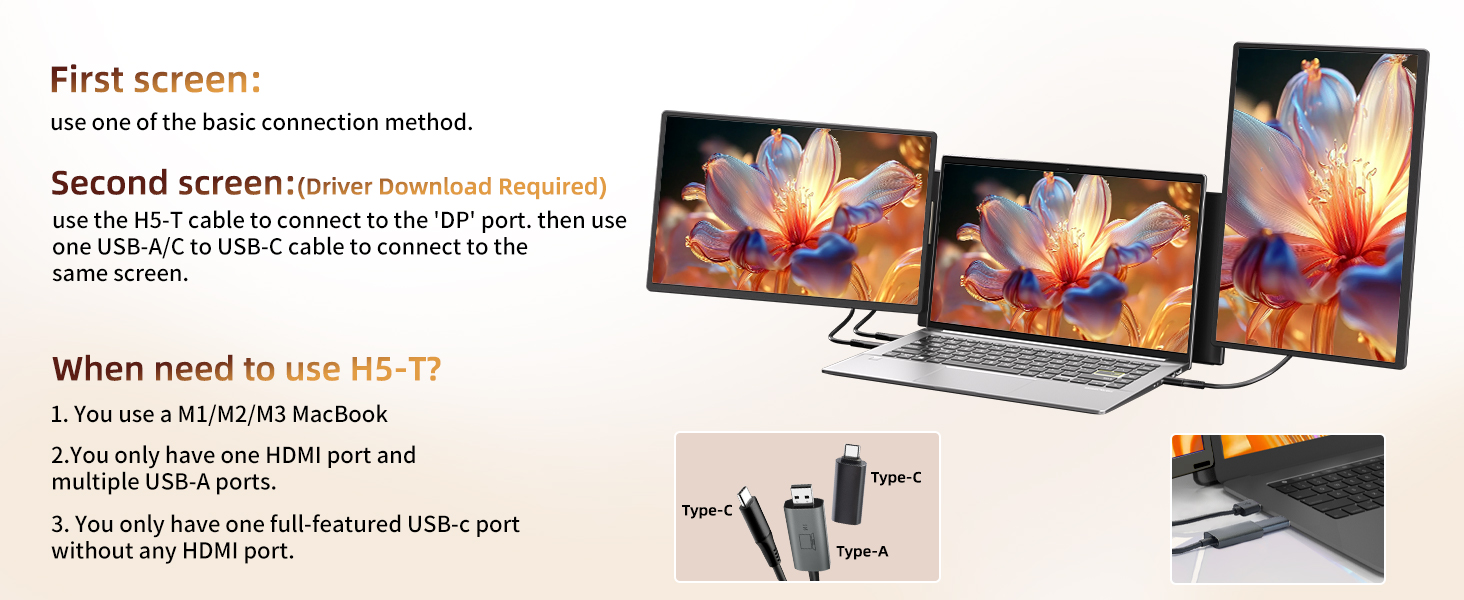
- H5-T Cable for MacBooks: For MacBooks with M1/M2/M3 chips, use the H5 cable to connect to the 'DP' port on the second screen, and a USB cable to the 'Type C2' port on this screen for power.
- H4 Hub Connection: If your laptop lacks sufficient ports, an H4 hub may be required (sold separately).

Billede: Diagram illustrating the USB-C to USB-C connection method for the screen extender.

Billede: Diagram illustrating the USB-A to USB-C and HDMI to USB-C connection method for the screen extender.

Billede: Visual guide for connecting the first and second screens, specifically detailing the H5-T cable use for MacBooks.
Driver installation
For optimal performance, driver installation may be required. Refer to the included USB flash drive for specific drivers for your operating system (Windows, Mac, Android).
Video: A demonstration of the ease of use and driver installation process for the ROYY screen extender, highlighting its plug-and-play capabilities.
Operating the Screen Extender
The ROYY S7 PRO offers versatile display modes and physical adjustments to suit your workflow.
Display Modes and Rotation
Adjust the screen's orientation and angle for optimal viewing. The flexible design allows for various setups.

Billede: Visual representation of the screen extender's rotatable and view angle adjustable features, demonstrating its flexibility.

Billede: Examples of various custom modes, including conference, live streaming, data analysis, and business travel, showcasing how the extender adapts to different needs.
Detachable Screens and Portability
The screens can be detached for individual use or folded for easy transport.

Billede: Close-up of the detachable and upgraded screen design, highlighting the two install slots for versatility.
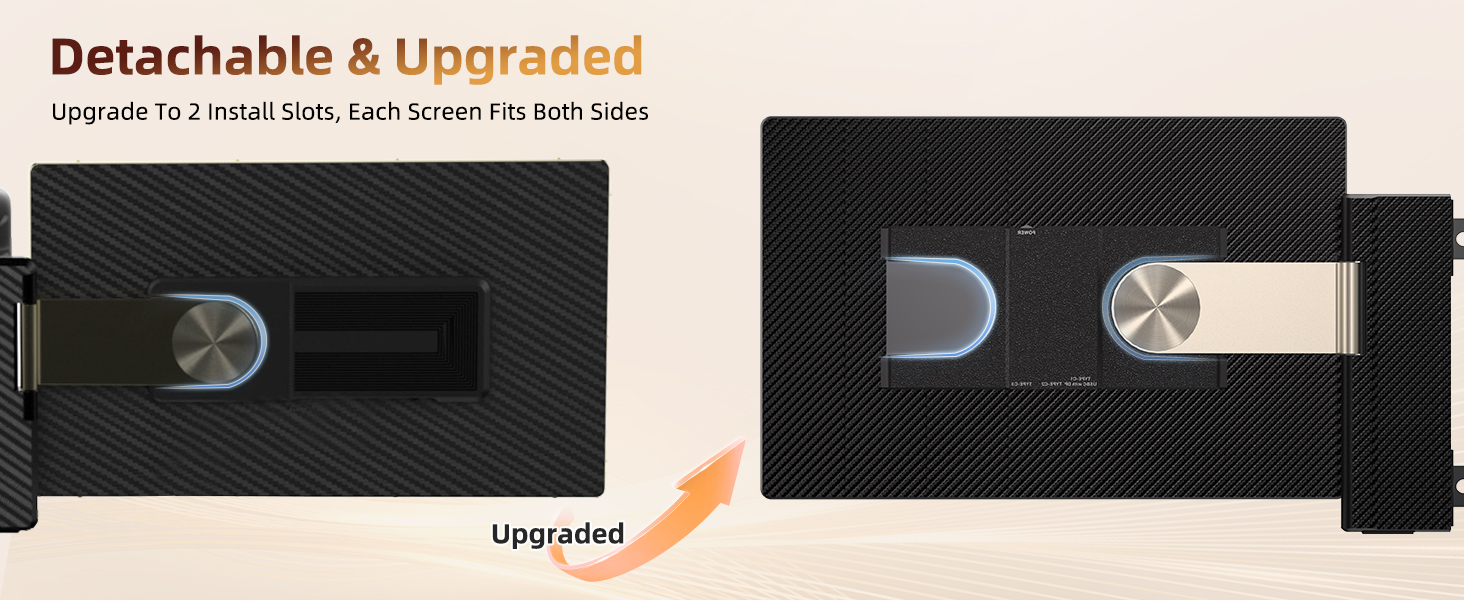
Billede: Instructions for installing the single screen stand, demonstrating its 360° rotation capability.

Billede: The screen extender in folding mode, illustrating its compact design for easy carrying and mobile workstation setup.
Video: En overview of the ROYY S7 PRO screen extender, demonstrating its easy installation, plug-and-play functionality, reverse charging support, and various transformation modes for increased office efficiency.
Fejlfinding
Refer to the following common questions and solutions for troubleshooting your screen extender.

Billede: A question and answer section addressing common issues such as 'No Signal', compatibility checks, and power-on problems.
- Q: Why does the screen extender show 'No Signal'?
A: This usually occurs if your laptop lacks a USB-C or HDMI port that supports video output. Contact support if issues persist. - Q: How do I know if my laptop is compatible?
A: Your laptop needs one full-functioning USB-C port (supports video output) or one USB-A/USB-C port plus one HDMI port (supports video output). - Q: The screen extender does not light up after connecting?
A: Your computer may not provide enough power. Charge the monitor using an external power source that provides 5V/2A power. - Q: What are the laptop size requirements?
A: The screen extender is suitable for 13.3-17 inch laptops with a 16:9 aspect ratio. Please measure your laptop before purchase.
Inkompatible enheder
Certain laptop models may not be compatible. Please review listen nedenfor.

Billede: A table listing specific laptop models from brands like MacBook, HP, Dell, Samsung, HUAWEI, Lenovo, and Microsoft that are incompatible with the screen extender.
Specifikationer
Detailed technical specifications for the ROYY 16" 2.5K QHD Laptop Screen Extender.
| Feature | Detalje |
|---|---|
| Mærke | ROYY |
| Modelnummer | S7 PRO |
| Skærmstørrelse | 16 tommer |
| Opløsning | QHD 2560x1600 |
| Aspektforhold | 16:10 |
| Beskrivelse af skærmoverfladen | Mat |
| Opdateringshastighed | 60 Hz |
| Displayteknologi | LCD, IPS technology |
| Lysstyrke | 300 Candela (350 nits) |
| Farveskala | 100 % sRGB |
| Viewi vinkel | 178 grader |
| Kontrastforhold | 1000:1 |
| Svartid | 1 millisekunder |
| Forbindelsesteknologi | HDMI, USB, USB Type A, DisplayPort |
| Emnemål D x B x H | 1.8" D x 8.85" B x 15.85" H |
| Varens vægt | 2 kilo |
| Yderligere funktioner | Eye Care, Lightweight, Portable, Travel |
| Kompatible enheder | Camera, Desktop, Gaming Console, Laptop, Smartphone |
Garanti og support
Your ROYY 16" 2.5K QHD Laptop Screen Extender comes with a manufacturer's warranty and support.
- Garantitype: 1 års fabriksgaranti
- Garantibeskrivelse: 1 year Manufacturer
For further assistance or inquiries, please refer to the contact information provided in your product packaging or visit the official ROYY webwebsted.