
Indledning
This manual provides essential information for setting up, operating, maintaining, and troubleshooting your NIMO 15.6-inch FHD Gaming Laptop, model Nimo N153. Please read this manual thoroughly before using your device to ensure proper function and longevity.

Image: The NIMO 15.6-inch FHD Gaming Laptop, showcasing dens elegante design.
Hvad er der i æsken
Ved udpakning skal du kontrollere, at alle nedenstående varer er til stede:
- 1 x Nimo N153 bærbar computer
- 1 x Type-C 100W PD hurtigoplader
- 1 x Brugermanual (dette dokument)
- Windows 11 Home (forinstalleret)
- Oplysninger om garanti og retur
Opsætning
1. Første opstart og opladning
Before first use, connect the laptop to the power adapter and a wall outlet. The Type-C 100W PD Fast Charger is designed for efficient charging. Allow the battery to charge sufficiently before disconnecting.

Image: The compact Type-C 100W PD Fast Charger included with the laptop.
2. Opsætning af operativsystem (Windows 11)
Upon first boot, follow the on-screen instructions to complete the Windows 11 Home setup. This includes selecting your region, language, connecting to a Wi-Fi network, and creating a user account.
3. Opsætning af fingeraftrykslæser
For enhanced security, set up the integrated fingerprint reader. Navigate to Windows Settings > Accounts > Sign-in options and follow the prompts to register your fingerprint.

Image: Close-up of the laptop's keyboard, highlighting the fingerprint reader and backlit keys.
4. Tilslutning af eksterne enheder
Den bærbare computer har forskellige porte til tilslutning af eksterne enheder:
- USB-porte: Connect USB devices such as mice, keyboards, and external storage.
- HDMI-port: Tilslut til en ekstern skærm eller et tv for udvidet visning.
- Type-C-porte: For data transfer, charging, and connecting compatible Type-C accessories.
- Micro SD -kortplads: Insert Micro SD cards for additional storage or data transfer.
- Hovedtelefonstik: Tilslut hovedtelefoner eller eksterne højttalere.
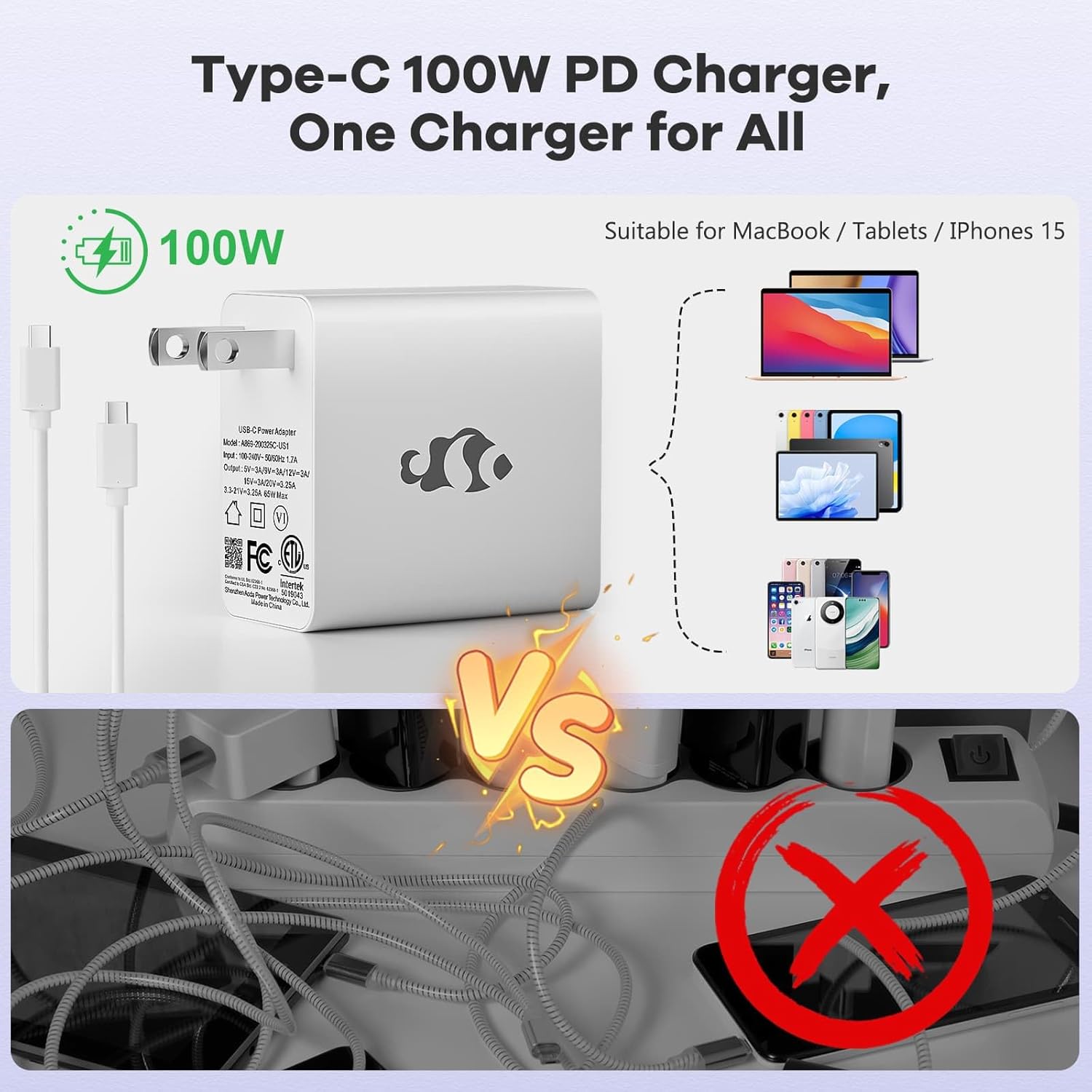
Image: Diagram illustrating the various ports available on the NIMO laptop, including USB, HDMI, Type-C, Micro SD, and headphone jack.
Betjeningsvejledning
1. Tænd/sluk og dvaletilstand
- Tænd: Tryk på tænd/sluk-knappen på tastaturet.
- Sluk: Klik på Start-knappen i Windows, og vælg derefter Strøm > Luk ned.
- Sove mode: Luk låget på den bærbare computer, eller klik på Start-knappen, og vælg derefter Strøm > Slumretilstand.
2. Keyboard and Touchpad Functions
- Baggrundsbelyst tastatur: The keyboard features backlighting for use in low-light conditions. Use the dedicated function key (Fn + F key combination, typically) to adjust brightness or toggle it on/off.
- Numerisk tastatur: The full-size keyboard includes a numeric keypad for convenient data entry.
- Multi-touch-touchpad: Supports various gestures for navigation and control within Windows. Refer to Windows settings for touchpad gesture customization.
3. Trådløs forbindelse
- Wi-Fi: For at oprette forbindelse til et trådløst netværk skal du klikke på Wi-Fi-ikonet på proceslinjen, vælge det ønskede netværk og indtaste adgangskoden, hvis det er nødvendigt.
- Bluetooth: For at parre Bluetooth-enheder skal du gå til Windows-indstillinger > Bluetooth og enheder og følge instruktionerne for at tilføje en ny enhed.
4. Webcam skjold
The laptop is equipped with a physical webcam shield for privacy. Slide the shield to cover or uncover the webcam efter behov.
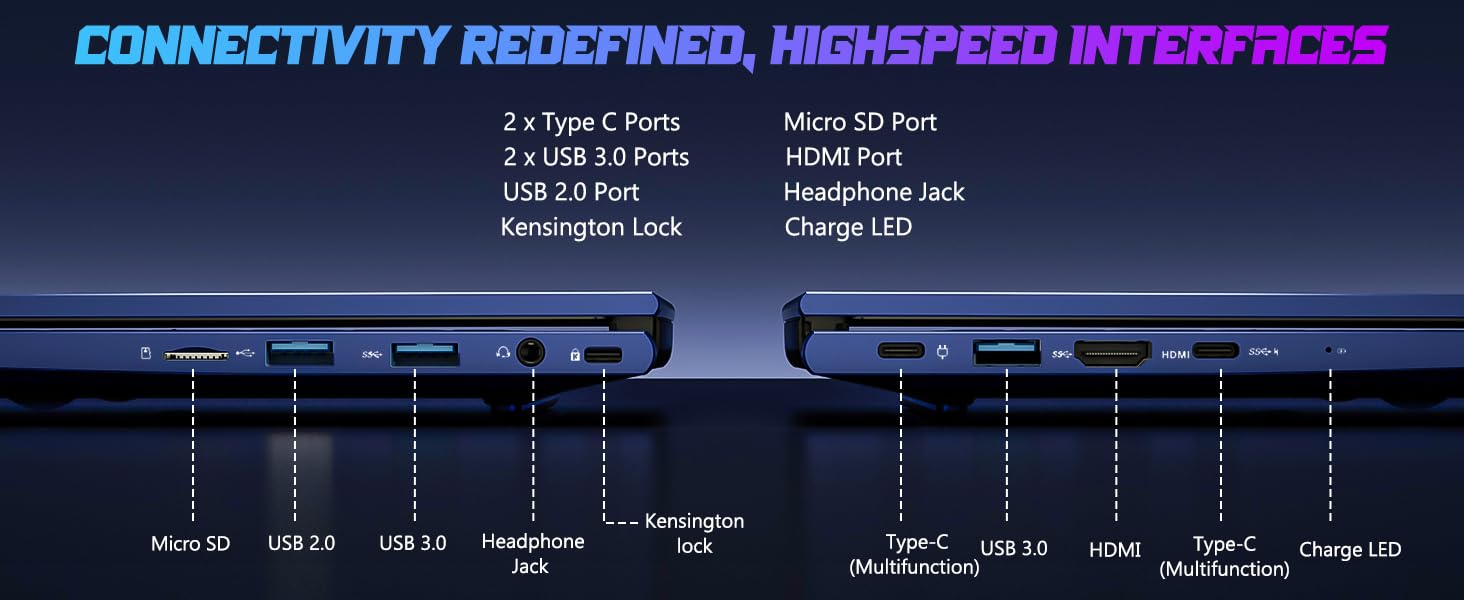
Image: Illustration of the laptop's webcam with a privacy shield feature.
5. Skærmfunktioner
The 15.6-inch FHD IPS anti-glare display (1920x1080 resolution) provides clear visuals. Adjust display settings such as brightness and resolution through Windows Display Settings.

Image: The NIMO laptop displaying a vibrant image on its 15.6-inch FHD IPS screen.
Opretholdelse
1. Rengøring af den bærbare computer
- Skærm: Brug let en blød, fnugfri klud damprengøres med vand eller et skærmrensemiddel. Sprøjt ikke væske direkte på skærmen.
- Tastatur og kabinet: Brug en blød, tør klud. Til genstridigt snavs, en let tør klud.amp En klud kan bruges, så det sikres, at der ikke trænger væske ind i åbningerne.
- Porte: Hold portene fri for støv og snavs. Brug trykluft om nødvendigt, og hold dåsen oprejst.
2. Softwareopdateringer
Regularly check for and install Windows updates to ensure system stability, security, and optimal performance. Go to Windows Settings > Windows Update.
3. Opgraderingsmuligheder
The Nimo N153 laptop supports upgradable dual-channel memory and detachable RAM/SSD. If you plan to upgrade components, it is recommended to consult a qualified technician or refer to NIMO's official support resources to avoid voiding your warranty or damaging the device.
Fejlfinding
If you encounter issues with your NIMO laptop, try the following basic troubleshooting steps:
- Ingen strøm: Ensure the charger is securely connected to both the laptop and a working power outlet. Check the charge LED indicator.
- Visningsproblemer: If the screen is blank, try connecting an external monitor via HDMI to check if the issue is with the laptop's internal display. Ensure display drivers are up to date.
- Forbindelsesproblemer (Wi-Fi/Bluetooth): Restart the laptop and your router/Bluetooth device. Check Windows network settings to ensure Wi-Fi and Bluetooth are enabled.
- Langsom ydeevne: Close unnecessary applications, check for malware, and ensure sufficient free storage space on the SSD.
- Systemet fryser: Tryk og hold tænd/sluk-knappen nede i 10-15 sekunder for at gennemtvinge en nedlukning, og genstart derefter den bærbare computer.
Ved mere komplekse problemer, eller hvis problemet fortsætter, bedes du kontakte NIMOs kundesupport.
Specifikationer
| Feature | Detalje |
|---|---|
| Mærke | NIMO |
| Modelnavn | Nimo N153 |
| Skærmstørrelse | 15.6 tommer |
| Opløsning | 1920x1080 Pixels (FHD IPS Anti-glare) |
| CPU model | AMD Ryzen 5 6600H (6 kerner, 12 tråde, op til 4.5 GHz) |
| Grafik coprocessor | AMD Radeon 660M (integreret grafikkort) |
| Installeret RAM-hukommelsesstørrelse | 16 GB DDR5 (4800 MHz) |
| Harddisk størrelse | 1 TB SSD (PCIe 4.0) |
| Operativsystem | Windows 11 Home |
| Særlige funktioner | Backlit Keyboard, Fingerprint Reader, HD Audio, Numeric Keypad, Webcam skjold |
| Forbindelsesteknologi | Wi-Fi (802.11a/b/g/n/ac), Bluetooth |
| Havne | 2x Type-C, 2x USB 3.0, 1x USB 2.0, 1x HDMI, 1x Micro SD, 1x Headphone Jack, Kensington Lock |
| Batterilevetid | Up to 5 Hours (Usage), Up to 7 Hours (Standby) |
| Batterikapacitet | 53.58 wattimer |
| Oplader | 100W GaN Type-C PD hurtigoplader |
| Varens vægt | 3.8 pund |
| Dimensioner (L x B x T) | 14.07 cm x 8.98 cm x 0.76 cm |
Bemærk: Specifikationerne kan ændres uden forudgående varsel.
Garanti og support
1. Producentens garanti
Your NIMO N153 laptop is covered by a 2 års producentgaranti from Nimo Direct Inc. This warranty covers defects in materials and workmanship under normal use. Please retain your proof of purchase for warranty claims.
2. Returpolitik
NIMO tilbyder en 90-dages problemfri returpolitik. If you are not satisfied with your purchase, you may return the product within 90 days of purchase. Refer to your purchase documentation for specific return procedures.
3. Kundesupport
For technical assistance, warranty claims, or any product-related inquiries, please contact NIMO customer support:
- E-mail: service@nimopc.com
- Online: Besøg den officielle NIMO webwebsted for supportressourcer og kontaktmuligheder.
Vores dedikerede supportteam står til rådighed for at hjælpe dig.

Image: NIMO customer service representatives ready to assist.