
1. Produktet er slutview
The DELLA Serena 18000 BTU 22 SEER2 Smart WiFi Mini Split Heat Pump is an advanced climate control system designed for efficient heating and cooling of spaces up to 1000 sq.ft. This inverter-driven unit offers smart connectivity, allowing control via a dedicated app or voice commands through Alexa and Google Home. It features a high 22 SEER2 rating for energy efficiency and operates quietly.

Image 1.1: The DELLA Serena Mini Split Heat Pump system, including the indoor unit, outdoor unit, remote control, and a representation of the mobile app interface.
Nøglefunktioner
- Smart kontrol: Integrated WiFi for control via the DELLA app, Alexa, or Google Home. Includes a geo-location function for automated temperature adjustments.
- Energieffektivitet: 18000 BTU/h capacity with a 22 SEER2 rating, offering up to 57% power savings through inverter technology.
- Stille drift: Operates at an ultra-silent 22 dBa in mute mode.
- Avanceret luftstrøm: Features 4D airflow (up-down, left-right) for even temperature distribution.
- Flere tilstande: Includes I Feel mode, 24-hour timer, sleep mode, eco energy-saving mode, multiple fan speeds, turbo function, heating, cooling, auto, and dry (dehumidifying) modes.
- PureClean-teknologi: Prevents dust buildup and defrosts the indoor unit for cleaner air.
- Vinterpræstation: Equipped with a bottom heating element in the outdoor unit to prevent ice buildup and ensure reliable operation down to 5°F (-15°C).
- Installationssæt: Comes with a 16.4ft installation kit, including standard 1/4" & 1/2" outer dimension copper pipes.
2. Sikkerhedsretningslinjer
Read all safety warnings and instructions carefully before installing, operating, or performing maintenance on this appliance. Failure to follow these instructions may result in electric shock, fire, property damage, or personal injury.
Generel sikkerhed
- Dette apparat er ikke beregnet til brug af personer (inklusive børn) med nedsatte fysiske, sensoriske eller mentale evner, eller mangel på erfaring og viden, medmindre de er blevet under opsyn eller instruktion i brugen af apparatet af en person, der er ansvarlig for deres sikkerhed. .
- Børn skal være under opsyn for at sikre, at de ikke leger med apparatet.
- Stik ikke fingre eller fremmedlegemer ind i luftindtaget eller -udtaget.
- Betjen ikke enheden med våde hænder.
- Sprøjt ikke vand direkte på enheden.
- Ensure the unit is installed on a stable, level surface to prevent vibration and noise.
Elektrisk sikkerhed
- The unit requires a 208V-230V, 60Hz power supply with a maximum fuse size of 20A.
- Always ensure the power supply is disconnected before performing any maintenance or repairs.
- Do not use extension cords or multi-outlet adapters with this unit.
- Sørg for korrekt jording for at forhindre elektrisk stød.
- Hvis netledningen er beskadiget, skal den udskiftes af producenten, dennes serviceagent eller lignende kvalificerede personer for at undgå en fare.
3. Pakkens indhold
Verify that all components listed below are included in your package before beginning installation.

Billede 3.1: En eksploderet view diagram illustrating the various components included with the DELLA Serena Mini Split Heat Pump.
- 1 x Indendørsenhed
- 1 x Udendørsenhed
- 1 x fjernbetjening
- 1 x Refrigerant Pipe (16.4ft)
- 1 x Drain Lines
- 1 x vægkappe
- 1 x monteringsplade
- 2 x AAA-batterier (til fjernbetjening)
- 1 x Plasticine Putty
- Strømkabler
- Kommunikationskabel
- Beslagskabelon
- Brugermanual
4. Installationsvejledning
Vigtig: This DELLA Mini Split AC system mandates professional installation. It is not designed for DIY installation. Improper installation can lead to refrigerant leaks, electrical hazards, and void the product warranty. Line-set vacuuming is required during installation. Any alteration of line-set length requires adjusting freon levels by a qualified technician.
Tjekliste før installation
- Ensure the installation area is suitable for both indoor and outdoor units, considering space, airflow, and structural integrity.
- Confirm availability of a dedicated 208V-230V, 60Hz power supply with a 20A circuit breaker.
- Verify that the included 16.4ft copper pipes (1/4" & 1/2" outer dimension) are sufficient for your desired unit placement.
- Have all necessary tools and safety equipment ready for professional installation.
Installation Kit Details
The provided 16.4ft installation kit includes pre-charged R32 refrigerant for the specified line-set length. The drain pipe length is 78.7 inches. Ensure these lengths are adequate for your installation plan. Professional technicians will handle the connection of refrigerant lines, electrical wiring, and proper vacuuming of the system.
5. Operating Your Mini Split System
Your DELLA Serena Mini Split Heat Pump can be operated using the included remote control, the DELLA mobile application, or voice commands.
Fjernbetjeningsfunktioner

Image 5.1: The remote control for the DELLA Serena Mini Split system, showing various buttons and their functions.
- Til/fra: Tænder eller slukker for enheden.
- Skift tilstande: Cycles through Auto, Cool, Heat, Dry, and Fan modes.
- Temperatur op/ned: Justerer den ønskede temperatur.
- Blæserhastighed: Selects fan speed (Quiet, Low, Mid, High, Turbo).
- Lodret sving: Controls vertical louver movement.
- Vandret sving: Styrer den vandrette lamelbevægelse.
- Turbo On/Off: Activates or deactivates rapid cooling/heating.
- ØKO -tilstand: Engages energy-saving operation.
- Sove mode: Adjusts temperature for comfortable sleep and quiet operation.
- Timerindstilling: Sets a timed on/off schedule.
- Display lys: Turns the unit's display light on or off.
- PureClean: Aktiverer selvrensningsfunktionen.
- Vicinity Sensor: Activates the 'I Feel' function, sensing temperature around the remote.
Smart Features (Wi-Fi App & Voice Control)
The DELLA Serena system offers advanced control options through its dedicated mobile application and compatibility with smart home assistants.

Image 5.2: Various screens of the DELLA mobile application, demonstrating control over modes, fan speed, timer, and scheduling.
- DELLA App: Download the DELLA app to your smartphone or tablet. Connect your mini split unit to your home WiFi network following the in-app instructions. The app allows for remote control, scheduling, mode selection, and monitoring from anywhere.
- Geo-Location Function: Utilize the app's exclusive geo-location feature to automatically adjust the unit's operation based on your proximity to home, optimizing energy use.
- Stemmestyring: Integrate your DELLA Serena unit with Amazon Alexa or Google Home for hands-free operation. Use simple voice commands to turn the unit on/off, adjust temperature, or change modes.
Driftstilstande
- Cool tilstand: Giver køling for at sænke rumtemperaturen.
- Varmetilstand: Giver varme for at hæve rumtemperaturen.
- Automatisk tilstand: Automatically selects cooling or heating based on the set temperature and current room temperature.
- Tørretilstand (affugtning): Reducerer luftfugtigheden i rummet uden væsentlige temperaturændringer.
- Kun blæsertilstand: Cirkulerer luft uden afkøling eller opvarmning.
- ØKO -tilstand: Optimizes operation for maximum energy savings.
- Sove mode: Justerer temperatur og ventilatorhastighed for en rolig og behagelig søvn.
6. Vedligeholdelse og pleje
Regular maintenance ensures optimal performance and longevity of your DELLA Serena Mini Split Heat Pump.
Filterrensning
- The unit is equipped with reusable filters.
- Clean the air filters seasonally, or more frequently depending on usage and air quality.
- To clean, open the front panel of the indoor unit, remove the filters, and wash them with lukewarm water and mild detergent.
- Rinse thoroughly and allow them to air dry completely before reinserting.
PureClean Technology

Billede 6.1: En intern view of the indoor unit highlighting the PureClean technology, which helps prevent dust buildup and defrosts the coil.
The PureClean technology actively prevents dust buildup and defrosts the indoor unit's coil, contributing to cleaner air and healthier living. This feature helps maintain the unit's efficiency and reduces the need for manual deep cleaning of the internal components.
Vedligeholdelse af udendørsenhed
- Hold området omkring udendørsenheden fri for snavs, blade og sne for at sikre korrekt luftgennemstrømning.
- The outdoor unit is equipped with a bottom heating element to prevent ice buildup during winter operation, ensuring efficient defrosting and reliable performance.
- Periodically inspect the outdoor unit for any obstructions or damage.
7. Fejlfindingsvejledning
Refer to this guide for common issues and their potential solutions. If the problem persists, contact customer support.
| Problem | Mulig årsag | Løsning |
|---|---|---|
| Enheden tænder ikke | Ingen strøm; Fjernbetjeningens batterier er lave; Afbryderen er udløst. | Kontroller strømforsyningen; Udskift fjernbetjeningens batterier; Nulstil afbryderen. |
| Utilstrækkelig køling/opvarmning | Dirty air filters; Obstruction in airflow; Incorrect mode setting; Room size exceeds capacity. | Clean air filters; Remove obstructions; Select appropriate mode; Ensure unit matches room size. |
| Usædvanlig støj | Løse dele; Enhed ikke i vater; Blokering i ventilator. | Check for loose parts; Ensure unit is level; Remove fan obstruction. |
| Vandlækage fra indendørsenhed | Tilstoppet afløbsrør; Forkert installation. | Rengør afløbsrøret; kontakt en fagmand for inspektion. |
| Problemer med WiFi-forbindelse | Weak WiFi signal; Incorrect network settings. | Ensure strong WiFi signal; Reconfigure network settings in app. |
8. Tekniske specifikationer
Detailed specifications for the DELLA Serena 18000 BTU Mini Split Heat Pump.
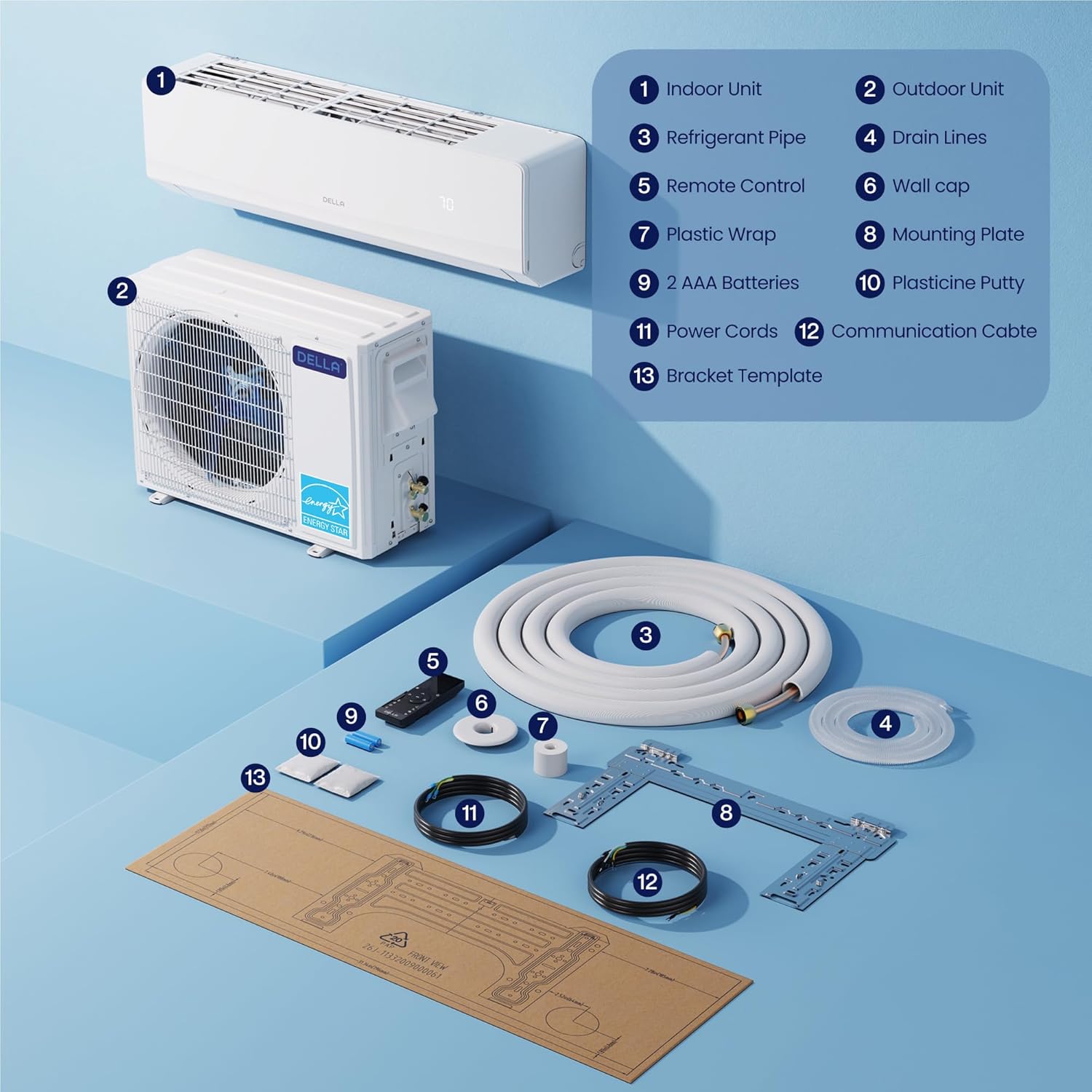
Image 8.1: A visual representation of the indoor and outdoor unit dimensions, along with key performance specifications.
| Specifikation | Værdi |
|---|---|
| Modelnummer | 18K2VR-22S-M-I+O |
| Kølekapacitet | 18000 BTU/t |
| Varmekapacitet | 18000 BTU/t |
| SEER2-vurdering | 22 |
| Strømforsyning | 208V-230V/60Hz |
| Max indgangseffekt | 1450 Watts (Cooling), 1450 Watts (Heating) |
| Max sikringsstørrelse | 20A |
| Kølevæsketype | R32 |
| Indendørsenheds dimensioner (D x B x H) | 9.02 cm x 44.88 cm x 13.15 cm |
| Udendørsenheds dimensioner (D x B x H) | 11.81 cm x 30.91 cm x 21.85 cm |
| Varens vægt | 28.7 pounds (Indoor Unit) |
| Kontrolmetode | App, fjernbetjening |
| Særlige funktioner | Dehumidifier, WiFi Enabled, PureClean Tech, Inverter System |
9. Garanti og kundesupport
DELLA is committed to providing reliable products and support.
Garantioplysninger

Image 9.1: A visual representation of the product's lifetime coverage, emphasizing best-in-class support and no additional costs.
The DELLA Serena Mini Split Heat Pump comes with a lifetime warranty, ensuring unmatched coverage and peace of mind. This warranty covers manufacturing defects and significant operational failures under normal use conditions. Please refer to the warranty card included in your package for full terms and conditions.
Kundesupport

Image 9.2: A graphic detailing the available customer support channels, including phone support and 24/7 live chat.
For any questions, technical assistance, or warranty claims, DELLA provides comprehensive customer support:
- Live chat: Tilgængelig døgnet rundt for øjeblikkelig assistance.
- Telefonsupport: Available Monday-Friday, 6 AM - 4 PM PST.
Please have your model number (18K2VR-22S-M-I+O) and purchase information ready when contacting support.