
Della 048-OPAC-9HB
DELLA 14,000 BTU bærbar klimaanlæg brugervejledning
Model: 048-OPAC-9HB | Brand: Della
1. Introduktion og sikkerhedsoplysninger
Thank you for choosing the DELLA 14,000 BTU Portable Air Conditioner. This manual provides important information for the proper installation, operation, and maintenance of your unit. Please read it thoroughly before use and keep it for future reference.
Vigtige sikkerhedsinstruktioner:
- Always connect the unit to a grounded 115 Volt, 60 Hz power outlet.
- Betjen ikke enheden med en beskadiget ledning eller stik.
- Sørg for, at enheden er placeret på en flad, stabil overflade for at forhindre, at den vælter.
- Maintain adequate clearance around the unit for proper airflow.
- Bloker ikke luftindtag eller -udtag.
- Tag stikket ud af enheden, før du rengør eller udfører vedligeholdelse.
- Hold børn og kæledyr væk fra enheden under drift.
2. Produktet er slutview
The DELLA 14,000 BTU Portable Air Conditioner is a versatile 4-in-1 unit offering cooling, heating, fan, and dehumidification functions. It is designed to provide comfort in rooms up to 400 square feet.

Figure 2.1: The DELLA 14,000 BTU Portable Air Conditioner, shown with its remote control and a smartphone displaying the Della+ app interface.
Nøglefunktioner:
- Kølekapacitet: 14,000 BTU ASHRAE (9,800 BTU SACC) for effective cooling.
- Varmekapacitet: 11,669 BTU for supplemental heating.
- Dækningsområde: Cools or heats rooms up to 400 sq.ft.
- Affugter: Fjerner op til 68 pints fugt om dagen.
- Stille drift: Operates at a low noise level of 49 dB(A).
- Smart kontrol: Compatible with Alexa and WiFi via the Della+ app for remote control and Geo Fencing.
- Blæserhastigheder: Three adjustable fan speeds.
- Autosving: Automatic air swing for even distribution.
- Portabilitet: Equipped with casters and side handles for easy movement.
- Filter: Removable and washable double-layer filter.
3. Opsætning
3.1 Udpakning
Carefully remove the air conditioner from its packaging. Retain the original packaging materials for future storage or transport. Ensure all components are present: the portable air conditioner unit, remote control, and window kit.
3.2 Montering af vinduessæt
The adjustable 3-section sealing board adapts to both horizontal and vertical windows, ensuring a snug fit and maximum efficiency.
- Connect the exhaust hose to the back of the air conditioner unit.
- Remove the cap from the window vent kit and connect it to the exhaust hose.
- Install the sealing board into your window frame, adjusting its length to fit securely.

Figure 3.1: Damage-free installation steps for the exhaust hose and window kit. Step 1: Slide hose into the back of the AC unit. Step 2: Attach exhaust hose to sealing board port. Step 3: Install sealing board to window frame.
3.3 Enhedsplacering
Place the unit near a window for exhaust hose ventilation. Ensure there is at least 20 inches of space around the unit for proper air circulation. The unit's compact size (17.3 x 13.2 x 26.2 inches) and casters allow for flexible placement.
4. Betjeningsvejledning
4.1 Kontrolpanel
The unit features a top-mounted LED display control panel with soft-touch controls for easy operation.
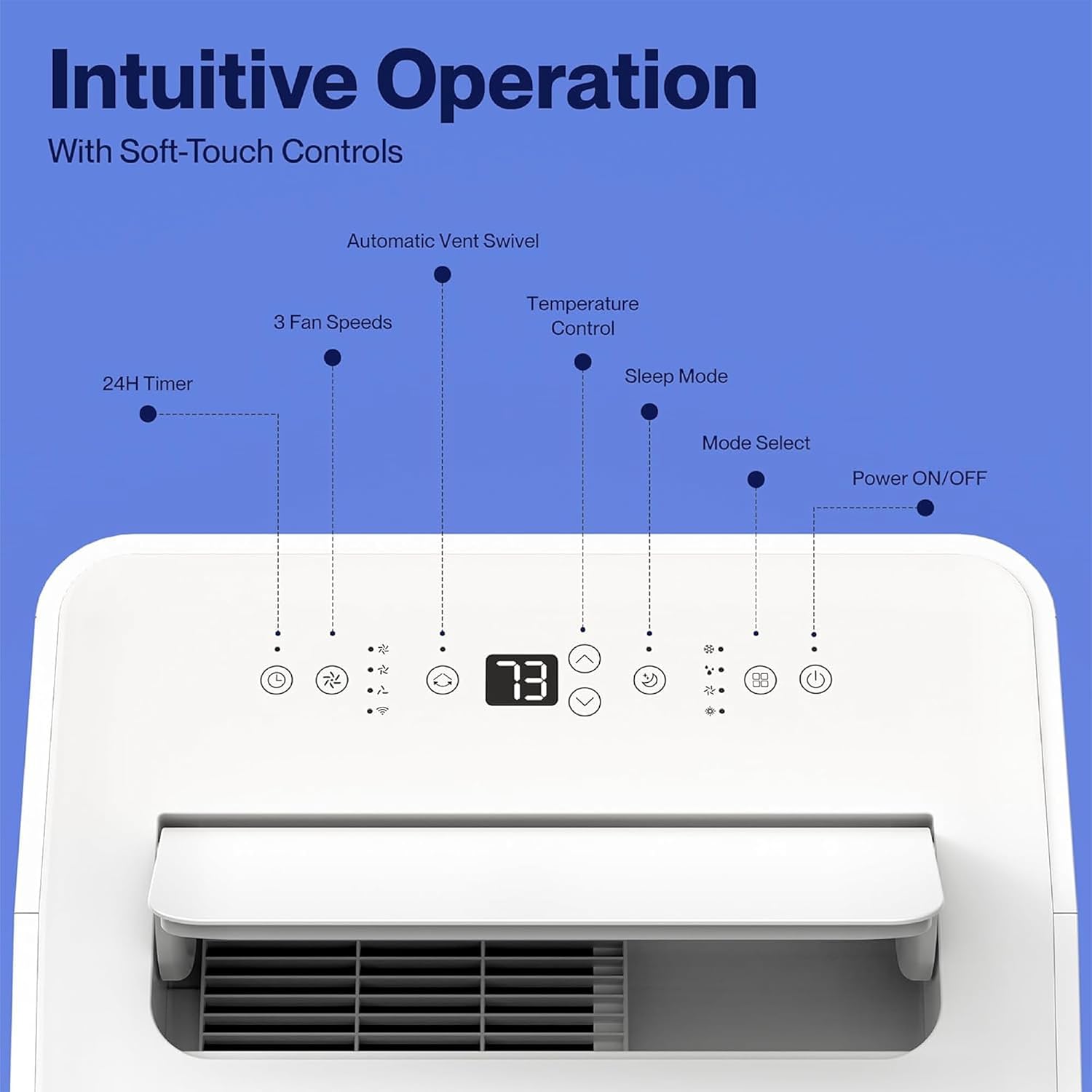
Figure 4.1: The control panel features buttons for Power ON/OFF, Mode Select, Sleep Mode, Temperature Control, 3 Fan Speeds, 24H Timer, and Automatic Vent Swivel.
4.2 Fjernbetjening
A remote control is included for convenient operation from a distance.
4.3 Della+ App & WiFi Connectivity
Control your unit from anywhere using the free Della+ app on your smartphone. The unit is compatible with Alexa and Google Assistant.
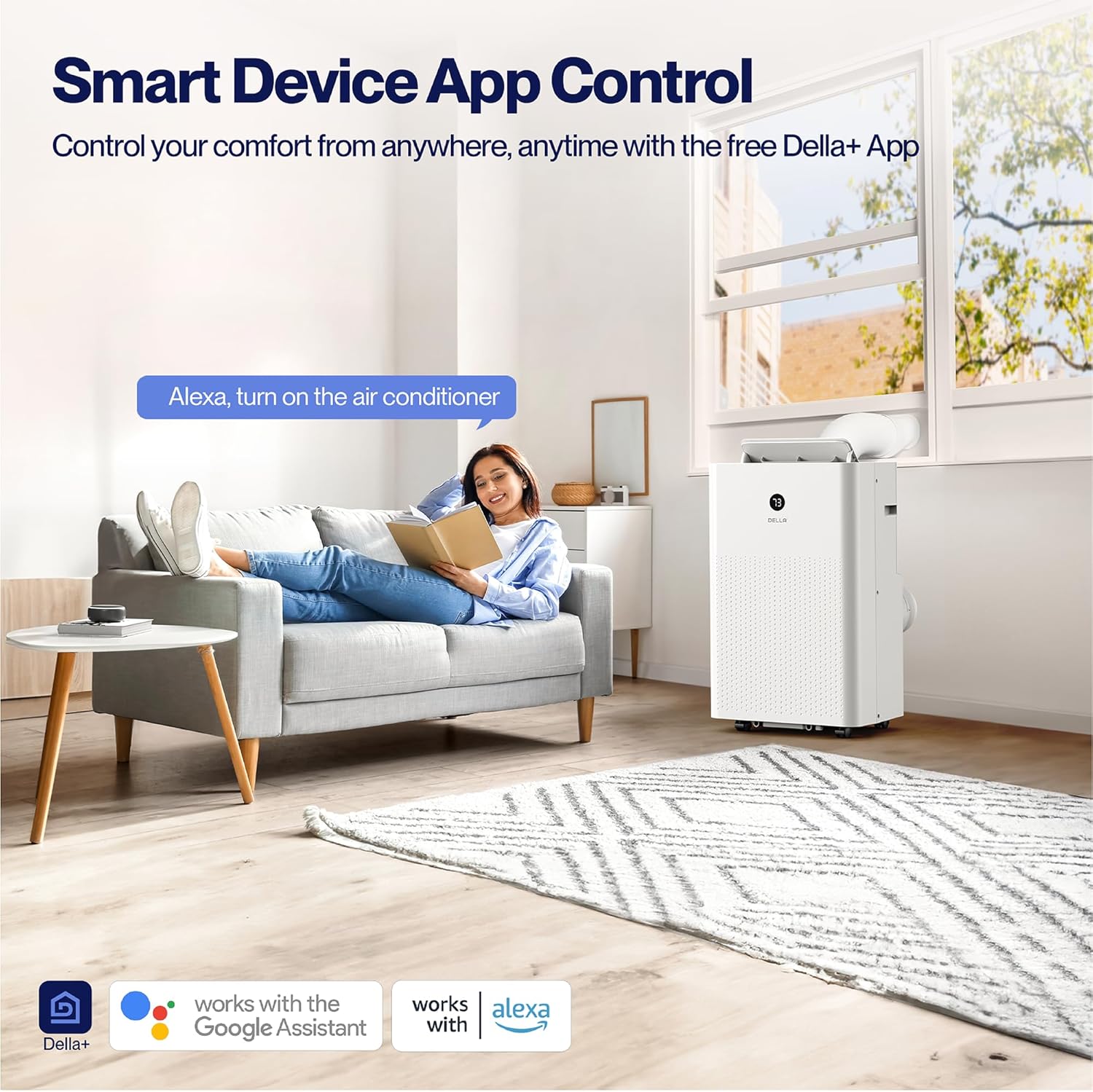
Figure 4.2: Smart Device App Control allows you to manage your unit's settings remotely.
Geo Fencing Function:
Utilize the Geo Fencing feature to automatically activate or deactivate the unit based on your mobile device's location. This allows the AC to turn on as you approach home, ensuring a comfortable environment upon arrival.
Video 4.1: This video demonstrates how to set up and customize the Geo Location function using the Della+ app, allowing the unit to activate based on your proximity to a preset location.
4.4 driftstilstande
The unit offers four primary operating modes:
- Cool tilstand: Provides cooling with an adjustable temperature range of 61°F (16°C) to 90°F (32°C).
- Varmetilstand: Utilizes a built-in heat pump to warm your space quickly and efficiently.
- Ventilatortilstand: Circulates air with three adjustable fan speeds.
- Tørretilstand (affugter): Removes excess moisture from the air, up to 68 pints/day.
4.5 Timer og dvaletilstand
- 24-timers timer: Programmer enheden til at tænde eller slukke automatisk inden for en 24-timers periode.
- Sove mode: Optimizes settings for quiet and energy-efficient operation during sleep.
5. Vedligeholdelse
5.1 Filterrensning
The unit features a removable and washable double-layer filter. Regular cleaning is essential for optimal performance and air quality.
- Tag klimaanlæggets stik ud af stikkontakten.
- Locate and remove the filter from the unit.
- Vask filteret med varmt sæbevand. Skyl grundigt.
- Lad filteret lufttørre helt, før du sætter det i enheden igen.
5.2 Water Disposal
The unit is designed with a self-evaporate system, which minimizes the need for frequent drainage. However, manual drainage may be required, especially in high humidity conditions.

Figure 5.1: Easy water disposal options include the self-evaporate system, a water full indicator, and manual drainage ports.
- When the water full indicator illuminates, the unit will stop operating.
- Find drænåbningen i bunden af enheden.
- Place a shallow pan or connect a drain hose (not included) to the port.
- Fjern aftapningsproppen, så vandet kan løbe ud.
- Sæt aftapningsproppen forsvarligt i igen, når tømningen er færdig.
5.3 Opbevaring
Før enheden opbevares i længere tid, skal du sørge for, at den er helt tømt for vand, og at filteret er rent og tørt. Opbevares køligt og tørt, helst i originalemballagen.
6. Fejlfinding
If you encounter issues with your DELLA portable air conditioner, refer to the table below for common problems and solutions.
| Problem | Mulig årsag | Løsning |
|---|---|---|
| Enheden tænder ikke | No power supply; Power cord unplugged; Water tank full. | Check power connection; Plug in securely; Drain water tank. |
| Unit does not cool/heat effectively | Luftfilter snavset; Udstødningsslange blokeret/afbrudt; Rum for stort; Døre/vinduer åbne. | Clean air filter; Check hose connection/clearance; Ensure room size is within capacity; Close doors/windows. |
| Enheden er støjende | Unit not on a flat surface; Air filter dirty; Obstruction in fan. | Placer på en plan overflade; Rengør luftfilteret; Kontroller for blokeringer. |
| Vandlækage | Drain plug loose; Unit tilted; Drain hose not properly connected. | Secure drain plug; Ensure unit is level; Check drain hose connection. |
7. Specifikationer
| Attribut | Detalje |
|---|---|
| Modelnummer | 048-OPAC-9HB |
| Kølekapacitet (ASHRAE) | 14,000 BTU |
| Kølekapacitet (SACC) | 9,800 BTU |
| Varmekapacitet | 11,669 BTU |
| Dækningsområde | Op til 400 sq.ft. |
| Affugterkapacitet | 68 pints / dag |
| Støjniveau | 49 dB(A) |
| Dimensioner (L x B x H) | 17.3 x 13.2 x 26.2 tommer |
| Vægt | 63.9 pund |
| Voltage | 115 volt |
| Strømkabellængde | 70.8 tommer |
| Udstødningsslangelængde | 47 tommer |
8. Garanti og support
Garantioplysninger:
This DELLA Portable Air Conditioner comes with a 1-års garanti fra købsdatoen. Gem venligst din købsbevis i tilfælde af garantikrav.
Kundesupport:
For any questions, technical assistance, or warranty inquiries, please contact Della Customer Support. 24/7 kundesupport er tilgængelig for at hjælpe dig.
Besøg Della Store for yderligere information og produktressourcer.
Ask a question about this manual
Ask about setup, troubleshooting, compatibility, parts, safety, or missing instructions. Manuals+ will review the question and use this page’s manual context to help answer it.