
1. Introduktion
Tak for købetasing the BESTISAN Wave Base Soundbar. This soundbar is designed to enhance your audio experience for televisions, home theater systems, gaming consoles, and projectors. It features multiple connectivity options including Bluetooth, HDMI-ARC, Optical, AUX, and USB, providing versatile audio playback. This manual provides detailed instructions for proper setup, operation, and maintenance of your soundbar.
2. Pakkens indhold
Kontroller venligst pakken omhyggeligt for at sikre, at alle varer er til stede og i god stand.
- BESTISAN Wave Base Soundbar
- Fjernbetjening
- Strømadapter
- Optisk kabel
- 3.5mm to 3.5mm Audio Cable (AUX Cable)
- Brugermanual (Hurtigstartguide)

Figure 2.1: Soundbar and Included Accessories
3. Produktet er slutview
3.1 Soundbar-kontroller
The soundbar features intuitive controls located on the side panel for easy access.
- Power knap: Tryk for at tænde eller slukke for soundbaren.
- Skrue ned for lyden (-): Reducer lydstyrken.
- Lydstyrke op (+): Øg lydstyrken.
- Input/Tilstandsknap: Press to cycle through input sources (Bluetooth, AUX, Optical, HDMI-ARC, USB).
3.2 Bagpaneltilslutninger
The rear panel provides various ports for connecting to your audio sources.
- DC IN: Tilslut strømadapteren her.
- SUB UD: Output for an external subwoofer (if applicable).
- AUX IN: 3.5mm audio input for connecting devices with an AUX cable.
- USB: Til afspilning fra USB-drev.
- OPTISK: Optical audio input for digital audio connection.
- HDMI (ARC): HDMI Audio Return Channel input for connecting to compatible TVs.

Figur 3.1: Tilslutninger på bagpanelet
3.3 Fjernbetjeningsfunktioner
The included remote control provides full functionality for your soundbar.
- Power knap: Turns the soundbar On/Off.
- Mute-knap: Slår lyden fra eller til.
- Lydstyrke op/ned: Justerer masterlydstyrken.
- Play/Pause/Next/Previous: Media playback controls (for Bluetooth/USB modes).
- Input Mode Buttons (BT, AUX, OPT, HDMI ARC, USB): Directly select input sources.
- Sound Mode Buttons (MUSIC, MOVIE, DIALOG): Select preset equalizer modes.
- TREB+/TREB-: Juster diskantniveau.
- BAS+/BAS-: Juster basniveauet.
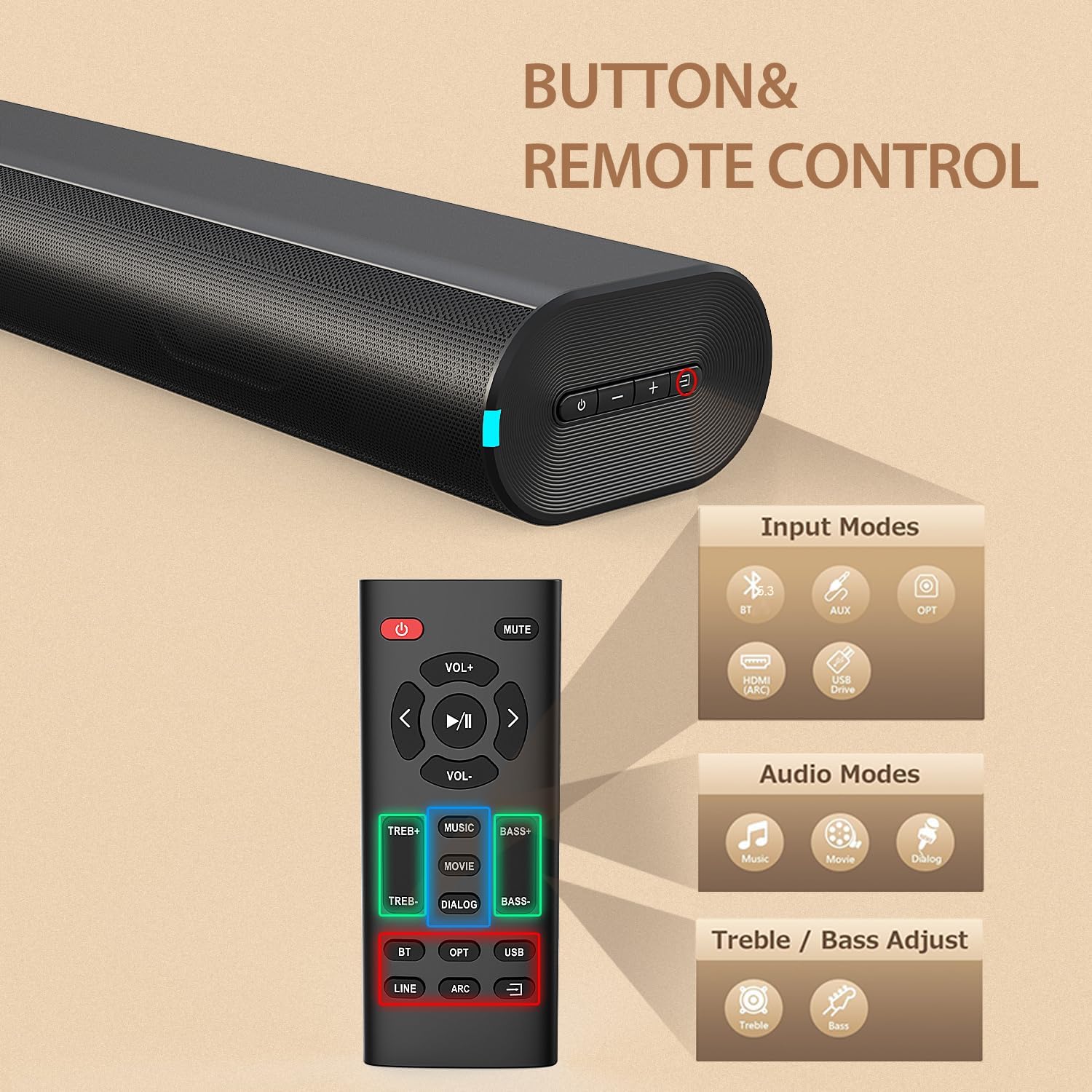
Figure 3.2: Soundbar Controls and Remote Control
4. Opsætning
4.1 Strømtilslutning
- Tilslut strømadapteren til DC IN-porten på bagsiden af soundbaren.
- Plug the other end of the power adapter into a wall outlet (AC 110V).
- The soundbar will enter standby mode, indicated by an LED light.
4.2 Tilslutning til dit tv eller din enhed
Choose one of the following connection methods based on your device's available ports:
HDMI ARC-forbindelse
- Connect one end of an HDMI cable (not included) to the HDMI (ARC) port on the soundbar.
- Connect the other end to the HDMI ARC port on your television.
- Sørg for, at dit tv's HDMI ARC-funktion er aktiveret i dets indstillinger.
- Select HDMI ARC input on the soundbar using the remote or the soundbar's input button.
Optisk forbindelse
- Connect the included optical cable to the OPTICAL port on the soundbar.
- Connect the other end to the Optical Digital Audio Out port on your television or device.
- Select OPTICAL input on the soundbar using the remote or the soundbar's input button.
AUX tilslutning
- Connect the included 3.5mm audio cable to the AUX IN port on the soundbar.
- Connect the other end to the 3.5mm headphone jack or audio output on your device.
- Select AUX input on the soundbar using the remote or the soundbar's input button.
Bluetooth-parring
- Tænd for soundbaren.
- Press the 'BT' button on the remote or the input button on the soundbar until the Bluetooth indicator light flashes.
- Aktiver Bluetooth på din mobilenhed, og søg efter tilgængelige enheder.
- Select "BESTISAN SE12-01" from the list.
- Når parringen er afsluttet, holder Bluetooth-indikatorlampen op med at blinke og forbliver konstant.
USB-afspilning
- Insert a USB drive (FAT32 format) containing audio files i USB-porten på soundbaren.
- Press the 'USB' button on the remote or cycle through inputs on the soundbar until USB mode is selected.
- Soundbaren begynder automatisk at afspille lyd files fra USB-drevet.
5. Betjeningsvejledning
5.1 Tænd/sluk
Tryk på tænd/sluk-knappen på soundbaren eller fjernbetjeningen for at tænde eller slukke enheden.
5.2 Indgangsvalg
Press the Input/Mode button on the soundbar or the corresponding input button (BT, AUX, OPT, HDMI ARC, USB) on the remote control to switch between audio sources.
5.3 Lydstyrkejustering
Use the Volume Up (+) or Volume Down (-) buttons on the soundbar or remote control to adjust the audio volume.
5.4 Lydtilstande (EQ)
The soundbar offers three preset equalizer modes to optimize audio for different content types. Press the corresponding button on the remote control to select:
- MUSIK-tilstand: Ideel til at lytte til musik, der giver afbalanceret lyd.
- FILM-tilstand: Enhances cinematic sound effects and dialogue for movies.
- DIALOG Mode (News Mode): Optimizes vocal clarity, suitable for news, podcasts, or TV shows with heavy dialogue.

Figure 5.1: Sound Modes
5.5 Justering af diskant og bas
Use the TREB+/TREB- and BASS+/BASS- buttons on the remote control to fine-tune the treble and bass levels according to your preference.
6. Vedligeholdelse
For at sikre din soundbars levetid og optimale ydeevne skal du følge disse vedligeholdelsesretningslinjer:
- Rensning: Use a soft, dry cloth to wipe the surface of the soundbar. Do not use liquid cleaners, abrasive cleaners, or sprays, as they may damage the finish or internal components.
- Placering: Placer soundbaren på en stabil, plan overflade. Undgå at placere den i direkte sollys, i nærheden af varmekilder eller i områder med høj luftfugtighed eller støv.
- Ventilation: Sørg for tilstrækkelig ventilation omkring soundbaren for at forhindre overophedning. Bloker ikke ventilationsåbninger.
- Strømledning: Undersøg regelmæssigt netledningen for skader. Hvis den er beskadiget, skal du ophøre med at bruge den og kontakte kundesupport.
7. Fejlfinding
Hvis du støder på problemer med din soundbar, kan du se følgende tabel for almindelige problemer og løsninger.
| Problem | Mulig årsag | Løsning |
|---|---|---|
| Ingen strøm | Netledning ikke tilsluttet; Strømudtag ikke aktivt | Ensure power cord is securely connected to the soundbar and a working power outlet. |
| Ingen lyd | Forkert indgang valgt; Lydstyrke for lav; Kabler ikke tilsluttet korrekt | Select the correct input source. Increase volume. Check all audio cables are securely connected. Ensure TV audio output is set correctly. |
| Bluetooth-parring mislykkes | Soundbaren er ikke i parringstilstand; Enheden er for langt væk; Interferens | Ensure soundbar is in Bluetooth pairing mode (flashing LED). Move device closer to soundbar. Turn off other Bluetooth devices. |
| Lydforvrængning | Lydstyrken er for høj; Dårlig lydkildekvalitet | Reduce volume. Try a different audio source or cable. |
| Fjernbetjening virker ikke | Batterierne er opbrugt; Blokering mellem fjernbetjening og soundbar | Replace remote control batteries. Ensure no obstructions are blocking the remote's signal to the soundbar. |
8. Specifikationer
Technical specifications for the BESTISAN Wave Base Soundbar (Model SE12-01).
| Feature | Detalje |
|---|---|
| Modelnummer | SE12-01 |
| Mærke | BYL |
| Højttaler type | Soundbar |
| Forbindelsesteknologi | Bluetooth, HDMI (ARC), Optisk, AUX, USB |
| Bluetooth version | V5.3 |
| Bluetooth rækkevidde | Op til 30 fod (10 meter) |
| Lydudgangstilstand | Stereo (2.0 kanal) |
| Højttaler Maksimal udgangseffekt | 60 watt |
| Frekvensrespons | 20 KHz (Upper limit, typical for soundbars) |
| Signal-støjforhold | 80 dB |
| Input bindtage | 110 volt |
| Produktmål (D x B x H) | 3.74 cm x 21.85 cm x 2.36 cm |
| Varens vægt | 2.64 pund |
| Materiale | Acrylonitril Butadien Styren (ABS), Metal |
| Monteringstype | Bordplademontering |
| Kontrolmetode | Trykknap, fjernbetjening |
9. Garanti og support
9.1 Produktgaranti
This BESTISAN Wave Base Soundbar is covered by a Limited Manufacturer Warranty. Please refer to the warranty card included in your package or contact the manufacturer for specific terms and conditions regarding warranty coverage.
9.2 Kundesupport
For technical assistance, troubleshooting beyond this manual, or warranty inquiries, please contact BESTISAN customer support. Contact information can typically be found on the manufacturer's official webwebstedet eller på emballagen til dit produkt.