
1. Introduktion
Welcome to the user manual for your PTHTECHUS 4G Kids Smartwatch Model A22. This guide provides essential information for setting up, operating, and maintaining your smartwatch. Please read it carefully to ensure proper use and to fully utilize all available features.
2. Produktet er slutview
The PTHTECHUS 4G Kids Smartwatch is designed to keep children connected and safe. It features 4G connectivity for calls and video calls, GPS tracking, an SOS function, and various educational and entertainment features. The watch is compatible with both iOS and Android devices via the 'Junicare' application.
Nøglefunktioner:
- 4G-forbindelse: Supports voice and video calls.
- GPS-sporing: Real-time location and safety zone alerts.
- SOS funktion: One-button emergency dialing to pre-set contacts.
- Klassetilstand: Disables distractions during school hours.
- Meddelelse: Voice chat, SMS, and video calls.
- Multimedier: Built-in camera, games.
- Health & Time Management: Pedometer, alarm clock, stopwatch.
- Vise: 2 tommer berøringsskærm.
- Holdbarhed: Water-resistant design.
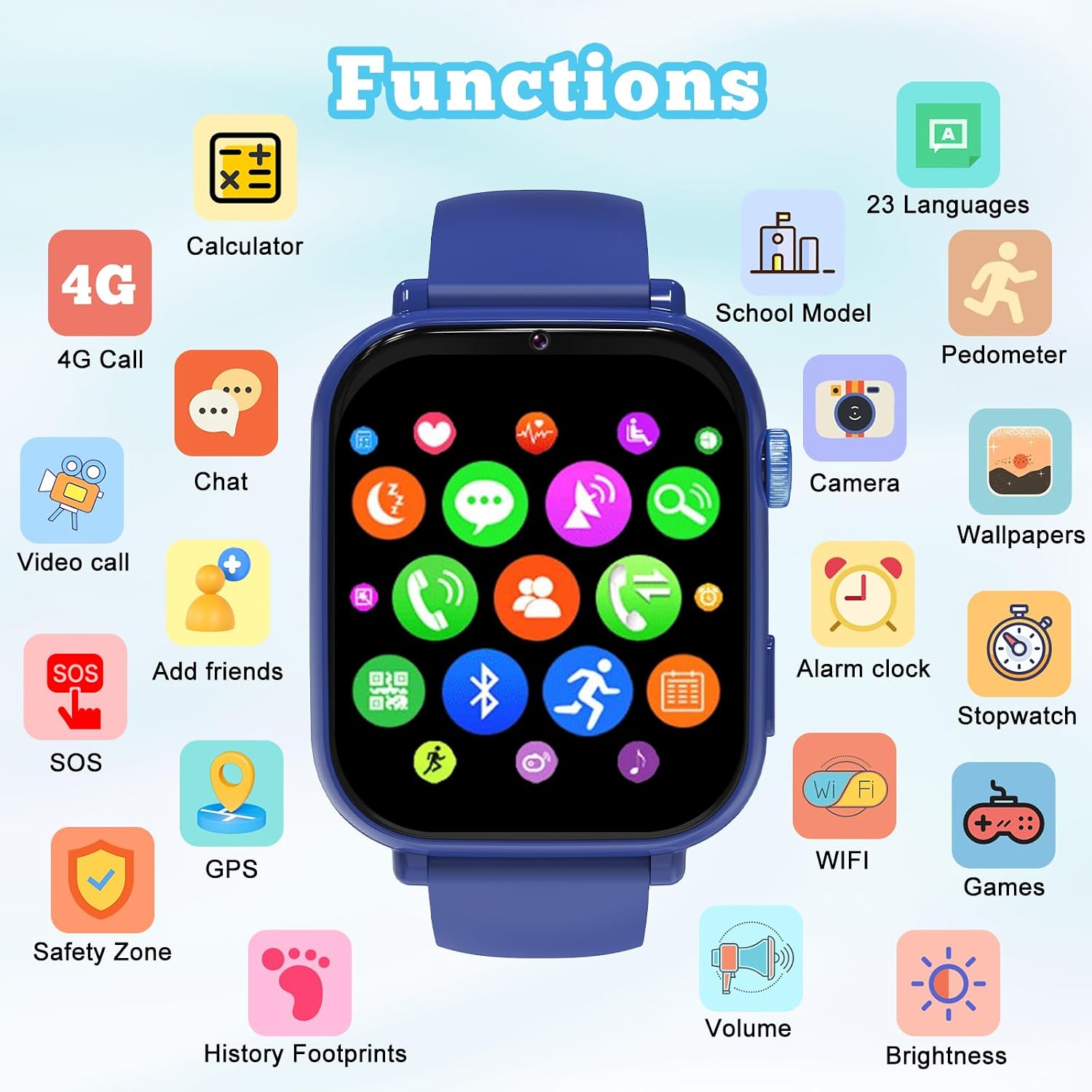
Image: The smartwatch interface showing icons for various functions like calls, chat, SOS, GPS, camera, games, and more.
3. Opsætning
3.1 Installation af SIM -kort
The smartwatch requires a Nano SIM card for 4G connectivity, calls, and GPS features. Ensure the watch is powered off before inserting the SIM card.
- Sluk smartwatchet helt.
- Find SIM-kortstikket på siden af uret.
- Carefully insert a Nano SIM card into the slot with the chip facing up, ensuring it clicks into place.
- Power on the watch. The signal icon should appear on the screen once the SIM card is recognized.

Image: Illustration demonstrating the correct Nano SIM card type and insertion method for the smartwatch.
3.2 App Connection (Junicare)
To manage the smartwatch and access advanced features, download and install the 'Junicare' application on your smartphone.
- Scan the QR code provided in the watch packaging or search for 'Junicare' in your smartphone's app store (iOS or Android).
- Installer applikationen og opret en konto.
- Follow the in-app instructions to bind the smartwatch to your account. This typically involves scanning a QR code displayed on the watch screen.
- Once connected, you can manage contacts, set safety zones, view location history, and configure other watch settings.
4. Betjeningsvejledning
4.1 Grundlæggende navigation
The smartwatch features a touch screen for navigation. Swipe left/right to browse applications, swipe up/down for notifications or quick settings, and tap to select.
4.2 Foretage og modtage opkald
With a Nano SIM card inserted, the smartwatch supports 4G voice and video calls. You can make calls to contacts saved in the 'Junicare' app and receive calls from approved numbers.
- Sådan foretager du et opkald: Tap the "Phone" icon, select a contact, and tap the call button.
- Sådan modtager du et opkald: Tap the green answer button on the screen.
- Videoopkald: Tap the "Video Call" icon and select a contact for a video conversation.

Image: The smartwatch supports 4G video calls, allowing parents and children to communicate visually.
4.3 SOS-nødfunktion
In an emergency, the SOS function allows the child to quickly alert pre-selected contacts.
- Aktivering: Press and hold the dedicated SOS button on the watch.
- Behandle: The watch will automatically dial three emergency contacts in sequence until a connection is made. It will also send location alerts to these contacts.

Image: The SOS feature allows the child to quickly contact emergency numbers by pressing a dedicated button.
4.4 GPS Tracking and Safety Zones
Monitor your child's location and set up virtual boundaries using the 'Junicare' app.
- Placering i realtid: View the watch's current location on a map within the app.
- Placeringshistorik: Review past movements of the watch.
- Sikkerhedszoner (Geofencing): Define safe areas (e.g., home, school) on the map. You will receive alerts if the watch enters or exits these zones.

Image: The smartwatch's GPS function allows for real-time tracking and setting up safety zones via the companion app.
4.5 Klassetilstand
To minimize distractions during school or study times, activate Class Mode.
- Aktivering: Configure Class Mode schedules through the 'Junicare' app.
- Funktionalitet: During active Class Mode, games and incoming calls (except SOS) are automatically blocked, allowing the child to focus.
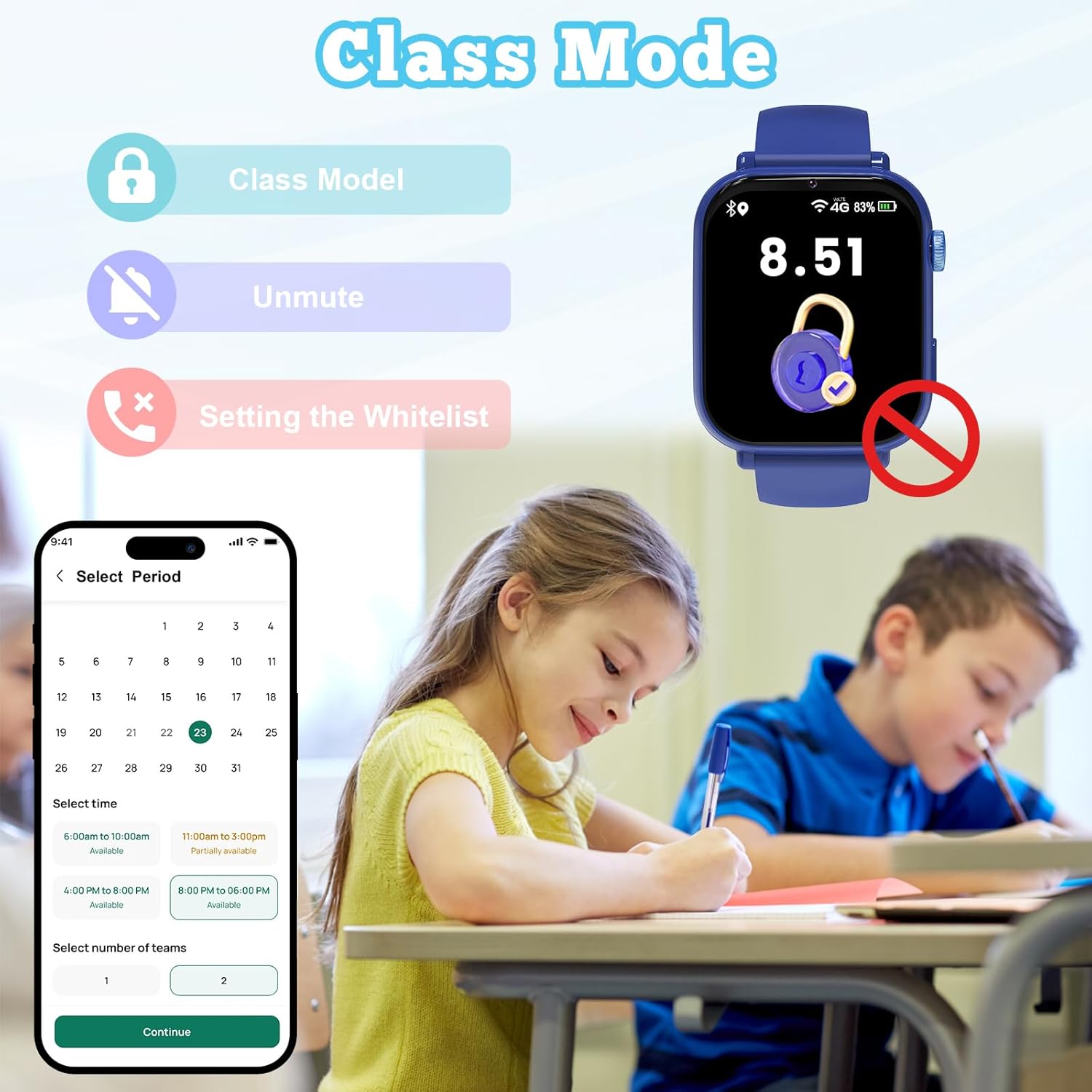
Image: Class Mode helps children focus by disabling games and calls during set school hours.
4.6 Camera and Entertainment
The smartwatch includes a built-in camera for capturing photos and videos, along with pre-installed games.
- Kamera: Tap the "Camera" icon to take photos or record short videos.
- Spil: Access various age-appropriate puzzle games from the main menu.

Image: The smartwatch features a camera for photos and videos, and includes various games for entertainment.
4.7 Pedometer and Time Management
Encourage healthy habits and time awareness with the integrated pedometer, alarm, and stopwatch.
- Skridttæller: Sporer daglige skridt og aktivitetsniveauer.
- Vækkeur: Set alarms for reminders or waking up.
- Stopur: Bruges til timingaktiviteter.

Image: The smartwatch includes a pedometer to track activity, along with games, camera, alarm, stopwatch, and calculator functions.
5. Vedligeholdelse
5.1 Rengøring
To clean the smartwatch, use a soft, dry, lint-free cloth. Avoid using harsh chemicals, abrasive materials, or excessive moisture, as these can damage the device.
5.2 Vandtæthed
The smartwatch is water-resistant, suitable for daily activities like hand washing or light rain. It is not recommended for swimming, showering, or submersion in water. Avoid exposure to hot water or steam.
5.3 Opladning
Charge the smartwatch using the provided charging cable. Connect the cable to a standard USB power adapter (not included). Ensure the charging contacts on the watch and cable are clean and dry before charging. Do not use damaged cables or chargers.
5.4 Opbevaring
Når smartwatchet ikke er i brug i længere perioder, skal det opbevares køligt og tørt, væk fra direkte sollys og ekstreme temperaturer. Sørg for, at batteriet er opladet for at forhindre dyb afladning.
6. Fejlfinding
| Problem | Mulig årsag | Løsning |
|---|---|---|
| Watch does not detect SIM card. | Incorrect SIM card size or improper insertion. Watch not powered off during insertion. | Ensure it is a Nano SIM card. Power off the watch, re-insert the SIM card correctly, and restart. |
| Kort batterilevetid. | Frequent use of power-intensive features (video calls, GPS). Background app activity. | Reduce usage of video calls. Ensure Class Mode is active during school hours. Fully charge the watch before use. |
| Cannot make calls or use app functions. | Watch not properly linked to administrator in 'Junicare' app. Incorrect contact numbers. No network signal. | Verify the watch is correctly bound to the 'Junicare' app. Check if contact numbers are saved correctly. Ensure the watch has a stable 4G signal. |
| GPS-placeringen er unøjagtig. | Environmental factors (indoors, dense urban areas, poor satellite signal). | GPS accuracy can vary. For best results, ensure clear sky visibility. Location services may be less precise indoors. |
| SOS button triggers accidentally. | Button pressed unintentionally due to activity or watch position. | Educate the child on proper use. Ensure the watch is worn securely to prevent accidental presses. |
7. Specifikationer
| Feature | Detalje |
|---|---|
| Mærke | PTHTECHUS |
| Modelnavn | A22 |
| Operativsystem | Android- og iOS-kompatibel |
| Hukommelseslagringskapacitet | 512 MB |
| Batterikapacitet | 700 mAh (litium-ion) |
| Forbindelsesteknologi | Wi-Fi, 4G mobilnetværk |
| Standard for trådløs kommunikation | 802.11ac |
| GPS | Integreret GPS |
| Skærmstørrelse | 2 tommer |
| Display Type | LCD |
| Opløsning | 240 x 240 |
| Indtastningsmetode | Berøringsskærm |
| Båndmaterialetype | Silikone |
| Vandmodstandsniveau | Vandafvisende |
| SIM-kortstørrelse | Nano |
| Målgruppe | Children (4-12 years) |
| Kassens indhold | Smartwatch x1, User Manual x1, Charging Cable x1 |
8. Garanti og support
8.1 Garantioplysninger
This PTHTECHUS 4G Kids Smartwatch Model A22 comes with a 2 års begrænset garanti fra købsdatoen. Denne garanti dækker fabrikationsfejl og funktionsfejl ved normal brug. Den dækker ikke skader forårsaget af misbrug, ulykker, uautoriserede ændringer eller normal slitage.
8.2 Kundesupport
If you encounter any issues or have questions not addressed in this manual, please contact PTHTECHUS customer support. Refer to your purchase documentation for specific contact details or visit the official PTHTECHUS webwebsted for hjælp.