1. Introduktion
This manual provides detailed instructions for the ATK VXE Dragonfly R1 Pro Wireless Gaming Mouse. It covers product features, setup procedures, operational guidelines, maintenance tips, troubleshooting, and technical specifications. Please read this manual thoroughly to ensure proper use and optimal performance of your device.

Billede 1.1: Top-down view of the ATK VXE Dragonfly R1 Pro Wireless Gaming Mouse in white. This image displays the ergonomic shape, scroll wheel, and primary buttons.
2. Nøglefunktioner
The ATK VXE Dragonfly R1 Pro is designed for high-performance gaming, incorporating advanced technology for precision and comfort.
- Letvægtsdesign: Weighing approximately 48 grams, the mouse offers effortless movement and reduced fatigue during extended use.
- Advanced MCU: Features a Nordic /BEKEN(compx)/Hisilicon Nearlink flagship-level chip for powerful performance, low power consumption, and enhanced interference resistance.
- Smart Speed X Latency: Utilizes VXE's proprietary transmission technology, optimized for low latency and extended endurance, crucial for competitive gaming.
- PAW3395/SE Sensor: Equipped with an esports flagship sensor, providing powerful optical tracking performance for precise and accurate movements.
- Smooth Ice-Feeling Coating: A dirt-resistant and easy-to-clean surface that provides a smooth glide and comfortable grip.
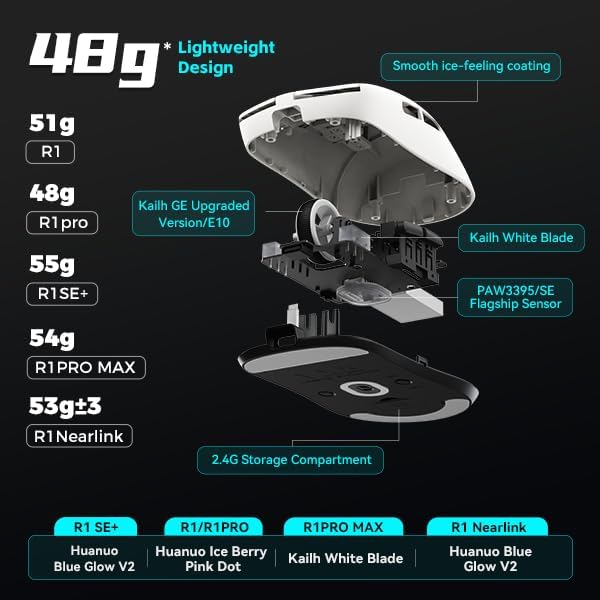
Billede 2.1: Intern view highlighting the lightweight design and key components like the Kailh White Blade switches and PAW3395/SE sensor. Different R1 series models and their weights are also shown.

Image 2.2: Illustration of the advanced MCU and its support for up to 4K polling rate, indicating high efficiency for both office and gaming use.

Image 2.3: Visual representation of the Smart Speed X wireless transmission technology, emphasizing its low latency and smooth operation even in environments with strong signal interference.
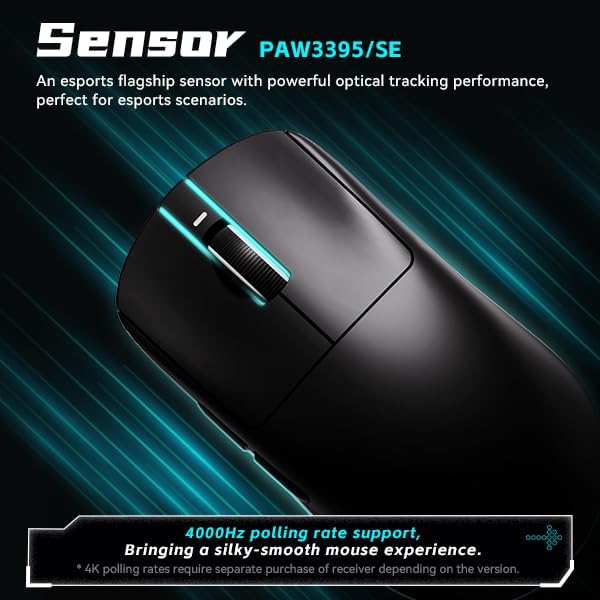
Image 2.4: Focus on the PAW3395/SE esports flagship sensor, capable of 4000Hz polling rate for a silky-smooth mouse experience. Note that 4K polling rates may require a separate receiver depending on the version.

Image 2.5: Depiction of the 'Smooth Ice-Feeling' coating, highlighting its dirt-resistant and easy-to-clean properties. It also shows the distinction between smooth texture (R1 Pro / R1 Pro Max) and matte texture (R1 / R1 SE+ / R1 Nearlink) models.

Image 2.6: Comparison of Kailh White Blade (100 Million Click Lifespan, balanced feel) and Ice Berry Pink Dot (90 Million Click Lifespan, soft bounce feel) micro switches, emphasizing their suitability for prolonged use.

Image 2.7: Illustration of the Tri-Mode connectivity, supporting Bluetooth 5.4, 2.4GHz wireless (Nearlink), and wired USB-C. It notes that R1 Pro and R1 Pro Max models support Dual-Mode, while R1 SE+, R1, and R1 Nearlink support Tri-Mode.
3. Pakkens indhold
Bekræft at alle varer er til stede i pakken:
- ATK VXE Dragonfly R1 Pro Wireless Gaming Mouse
- USB 2.4 GHz trådløs modtager
- USB-C til USB-A opladnings-/datakabel
- Brugervejledning (dette dokument)
4. Opsætningsvejledning
4.1. Wireless 2.4GHz Connection
- Locate the USB 2.4GHz wireless receiver, typically stored in a compartment on the underside of the mouse.
- Sæt USB-modtageren i en ledig USB-port på din computer.
- Tænd for musen ved hjælp af strømafbryderen på undersiden.
- The mouse should automatically connect to the receiver. If not, press the pairing button (if available) on the mouse and ensure the receiver is properly inserted.
4.2. Bluetooth Connection (for Tri-Mode models)
- Ensure your mouse is a Tri-Mode model (R1 SE+, R1, R1 Nearlink).
- Turn on the mouse and switch it to Bluetooth mode using the mode switch on the underside.
- Gå til Bluetooth-indstillinger på din computer, og aktiver Bluetooth.
- Søg efter new devices and select "ATK VXE Dragonfly R1 Pro" (or similar name) from the list.
- Følg eventuelle anvisninger på skærmen for at fuldføre parringsprocessen.
4.3. Kablet forbindelse
- Tilslut USB-C-enden af det medfølgende kabel til musen.
- Tilslut USB-A-enden af kablet til en ledig USB-port på din computer.
- The mouse will function as a wired device and will charge simultaneously.
5. Betjeningsvejledning
5.1. DPI-justering
The mouse features adjustable DPI (Dots Per Inch) settings to control cursor sensitivity. Typically, a dedicated DPI button is located on the top or underside of the mouse. Press this button to cycle through preset DPI levels. The current DPI level may be indicated by an LED color or pattern.
5.2. Knapfunktioner
- Venstre klik: Primær handling.
- Højreklik: Sekundær handling/kontekstmenu.
- Scrollhjul: Scrolls content vertically. Can also be clicked for a middle-mouse button function.
- Sideknapper: Often configured for forward/back navigation in web browsers or customizable functions in gaming software.
5.3. Opladning
To charge the mouse, connect it to your computer using the provided USB-C cable. An indicator light on the mouse will typically show charging status (e.g., solid light for charging, off or different color for fully charged).
5.4. Softwaretilpasning
For advanced customization, including programmable macro keys, DPI settings, polling rate adjustments, and lighting effects, download the official ATK VXE software from the manufacturer's website. Refer to the software's help documentation for detailed instructions.
6. Vedligeholdelse
6.1. Rensning
- Frakobl musen fra computeren, før du rengør den.
- Brug let en blød, fnugfri klud dampskylles med vand eller en mild rengøringsopløsning til at tørre overfladen af.
- Undgå at bruge skrappe kemikalier, slibende materialer eller for meget fugt.
- Brug trykluft til at fjerne støv og snavs fra sprækker og omkring knapper.
6.2. Batteripleje
- Undgå at aflade batteriet helt ofte for at forlænge dets levetid.
- Opbevar musen et køligt og tørt sted, når den ikke er i brug i længere perioder.
- Brug kun det medfølgende opladningskabel eller et tilsvarende certificeret kabel.
7. Fejlfinding
- Musen svarer ikke: Ensure the mouse is powered on and fully charged. Check the connection (USB receiver, Bluetooth pairing, or wired cable). Try a different USB port.
- Forsinket eller intermitterende forbindelse: Ensure the USB receiver is not obstructed and is close to the mouse. Avoid placing the receiver near other wireless devices that may cause interference. For Bluetooth, ensure no other devices are interfering.
- Unøjagtig sporing: Rengør den optiske sensor på undersiden af musen. Sørg for at bruge musen på en passende overflade (en musemåtte anbefales).
- Knapper virker ikke: Check for any physical obstructions. If using customization software, ensure buttons are not unbound or assigned to conflicting functions.
- Batteri oplades ikke: Ensure the USB-C cable is securely connected to both the mouse and the computer/charger. Try a different USB port or cable.
8. Tekniske specifikationer
| Feature | Specifikation |
|---|---|
| Model | R1 Pro |
| Varens vægt | 7 ounces (approx. 48g for R1 Pro) |
| Pakkedimensioner | 6.3 x 4.72 x 2.36 tommer |
| Sensor | PAW3395/SE Optical |
| Forbindelsesteknologi | Bluetooth, USB (Wired), 2.4GHz Wireless (Wi-Fi) |
| Afstemningsfrekvens | 125-4000Hz (R1 Pro) |
| Mikroswitch | Kailh White Blade (100 Million Clicks) |
| Batteri | Ikke-standard batteri (inkluderet) |
| Continuous Operating Battery Life | 75h (1000Hz) for R1 Pro |
| Belægning | Smooth Ice-Feeling |
| Speciel funktion | Ergonomisk design |

Image 8.1: Comprehensive table outlining the specifications for various models within the VXE Dragonfly R1 series, including dimensions, coating, sensor, chip, polling rate, battery life, weight, microswitch, scroll wheel, and connection methods.
9. Garanti og support
This product comes with a standard manufacturer's warranty. For specific warranty terms, duration, and conditions, please refer to the warranty card included in your product packaging or visit the official ATKGEAR website. For technical support, troubleshooting assistance, or service inquiries, please contact ATKGEAR customer support through their official channels.