
1. Introduktion
This manual provides detailed instructions for the installation, operation, and maintenance of your GNCC 2K 3MP Indoor WiFi Surveillance Camera, model P5W. Please read this manual thoroughly before using the product to ensure proper functionality and safety.
2. Produktet er slutview
2.1 Pakkens indhold
Bekræft at alle varer er til stede i din pakke:
- GNCC 2K 3MP Indoor WiFi Surveillance Camera (P5W)
- Strømadapter
- 2-meter Power Cable
- Monteringsbase
- Skruer til montering
- Brugervejledning (dette dokument)
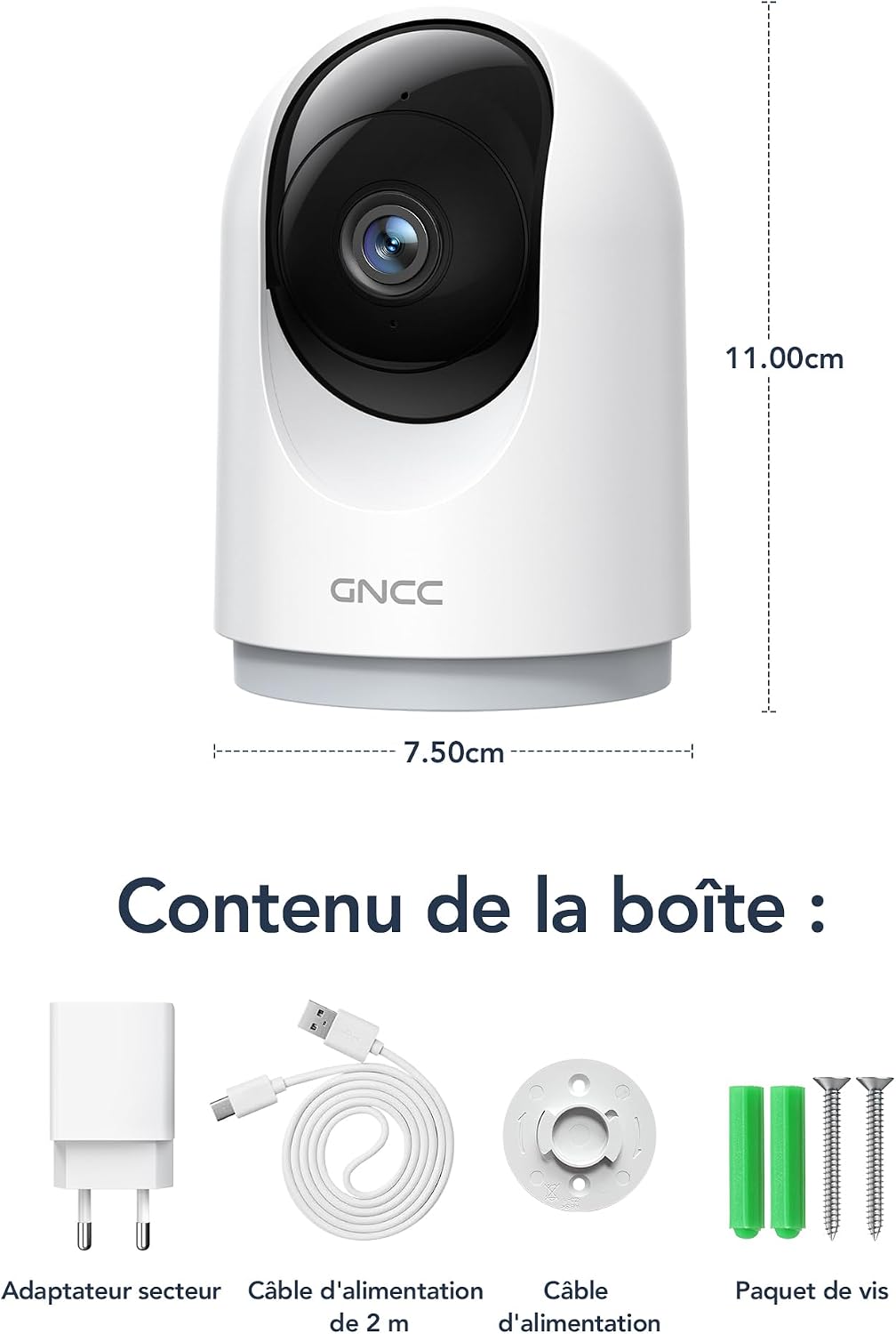
Figure 2.1: Package Contents and Camera Dimensions. The image displays the camera, power adapter, USB cable, mounting base, and screws. Dimensions are indicated as 7.50cm width and 11.00cm height.
2.2 Kamerafunktioner
- 2K 3MP opløsning: Giver klar og detaljeret videofootage.
- 360° dækning: Features 355° horizontal pan and 60° vertical tilt for comprehensive monitoring.
- 2.4 GHz WiFi-forbindelse: Connects to your home network for remote access.
- Infrarødt nattesyn: Automatically activates in low light, providing clear visibility up to 15 meters.
- Tovejs lyd: Muliggør kommunikation i realtid via kameraet.
- AI Motion Detection & Tracking: Detects movement, human shapes, pets, and abnormal sounds, sending instant alerts to your phone.
- Multi-enhed View: Monitor up to four cameras simultaneously on your mobile device.
- Smart Home Integration: Kompatibel med Amazon Alexa og Google Assistant til stemmestyring.
- Privatlivstilstand: Remotely disable recording and live view via appen.
- Fleksibel opbevaring: Supports Cloud storage (subscription required) and local storage via MicroSD card (up to 128GB, not included).

Figure 2.2: Key Features of the GNCC P5W Camera.
3. Opsætningsvejledning
3.1 Tænding af kameraet
- Connect the 2-meter power cable to the camera's power input port.
- Sæt strømadapteren i en almindelig stikkontakt.
- The camera will power on, and its indicator light will begin to flash, indicating it is ready for setup.
3.2 Appinstallation og kontooprettelse
- Download the official GNCC app from your smartphone's app store (iOS App Store or Google Play Store).
- Åbn appen, og følg instruktionerne på skærmen for at oprette en ny konto eller logge ind, hvis du allerede har en.
3.3 Tilslutning af kameraet til Wi-Fi
Sørg for, at din smartphone er forbundet til et 2.4 GHz Wi-Fi-netværk. Kameraet understøtter ikke 5 GHz Wi-Fi.
- In the GNCC app, tap the "+" icon to add a new device.
- Select your camera model (P5W) from the list of devices.
- Follow the app's prompts to connect the camera to your 2.4GHz Wi-Fi network. This typically involves scanning a QR code displayed on your phone with the camera lens.
- Når der er oprettet forbindelse, lyser kameraets indikatorlampe konstant, og du hører en bekræftelseslyd.
3.4 Montering af kameraet
The camera can be placed on a flat surface or mounted to a wall/ceiling using the provided mounting base and screws.
- Bordmontering: Place the camera on a stable, flat surface. Ensure it has a clear view af det område, du ønsker at overvåge.
- Screw-in Installation:
- Vælg et passende sted til montering.
- Use the mounting base as a template to mark the screw positions on the wall or ceiling.
- Bor forhuller, og isæt vægankre, hvis det er nødvendigt.
- Secure the mounting base with the provided screws.
- Attach the camera to the mounting base by twisting it until it locks securely.
4. Betjeningsvejledning
4.1 Live View og panorering/tilt-kontrol
Open the GNCC app and select your camera to access the live view. Use the on-screen controls to pan (355° horizontal) and tilt (60° vertical) the camera lens to adjust the viewvinkel.

Figure 4.1: 360° Coverage of the GNCC P5W Camera.
4.2 Tovejslyd
Fra live view screen, tap the microphone icon to enable two-way audio. You can speak into your phone, and your voice will be transmitted through the camera's speaker. Similarly, you can hear audio from the camera's environment.

Figure 4.2: Two-Way Audio Functionality.
4.3 Bevægelsesdetektion og advarsler
The camera is equipped with AI-powered motion detection, human shape detection, pet detection, and abnormal sound detection. When an event is detected, the camera will automatically record and send an instant notification to your smartphone.
- Enabling/Disabling Alerts: Navigate to the camera settings in the app to customize alert preferences, including sensitivity levels and detection zones.
- Motion Tracking: Når der registreres bevægelse, kan kameraet automatisk spore det bevægelige objekt inden for sit synsfelt. view.

Figure 4.3: Motion Detection and Instant Notifications.
4.4 Nattesyn
The camera automatically switches to infrared night vision mode in low-light conditions, providing clear black-and-white video up to 15 meters. No manual intervention is required.

Figure 4.4: Night Vision in operation, showing a baby in a crib.
4.5 Lagringsmuligheder
- MicroSD-kortlagring: Insert a MicroSD card (up to 128GB, not included) into the camera's designated slot for local recording. The camera will continuously record or record upon motion detection, depending on your settings.
- Cloud Storage: Optional cloud storage is available via subscription, offering 24/7 unlimited recording and access to past footage. A 14-day free trial for smart AI detection features may be available.

Figure 4.5: Cloud and Local Storage Options.
4.6 Smart Home Integration (Alexa & Google Assistant)
The GNCC P5W camera can be integrated with Amazon Alexa and Google Assistant for convenient voice control. Follow the instructions in your Alexa or Google Home app to link your GNCC account and devices.
- ExampStemmekommando: "Alexa, vis mig kameraet fra stuen."

Figure 4.6: Smart Home Integration and Advanced Features.
4.7 Privatlivstilstand
To ensure privacy, you can remotely disable the camera's recording and live view functions through the GNCC app. This feature allows you to turn off surveillance when not needed.
5. Vedligeholdelse
- Rensning: Brug en blød, tør klud til at rengøre kameralinsen og huset. Undgå at bruge skrappe kemikalier eller slibende materialer.
- Firmwareopdateringer: Regularly check the GNCC app for available firmware updates. Keeping your camera's firmware up-to-date ensures optimal performance and security.
- Power Cycle: Hvis kameraet oplever problemer, kan du prøve at tage stikket ud af strømkilden i 10 sekunder og derefter sætte det i igen.
- MicroSD-kortstyring: If using a MicroSD card, periodically check its status in the app and format it if necessary to maintain recording quality and prevent errors.
6. Fejlfinding
| Problem | Mulig årsag | Løsning |
|---|---|---|
| Kameraet kan ikke oprette forbindelse til Wi-Fi. | Forkert Wi-Fi-adgangskode; Kamera for langt fra routeren; 5 GHz Wi-Fi-netværk anvendt; Routerens firewallindstillinger. |
|
| Nej live view eller offline-status. | No internet connection; Camera powered off; Weak Wi-Fi signal. |
|
| Bevægelsesdetektionsadvarsler modtages ikke. | Alerts disabled in app; Incorrect detection zone/sensitivity; App notifications blocked by phone settings. |
|
| Tovejslyd virker ikke. | Mikrofon/højttaler slået fra i appen; Telefonlydstyrke for lav; Netværksforsinkelse. |
|
7. Specifikationer
| Feature | Detalje |
|---|---|
| Modelnavn | P5W |
| Opløsning | 2K (1296 Pixels effective capture, 1440p screen capture resolution) |
| Pan/tilt rækkevidde | Vandret 355°, Lodret 60° |
| Forbindelse | 2.4GHz Wi-Fi (Wireless) |
| Night Vision Range | Op til 15 meter |
| Lyd | To-vejs lyd |
| Bevægelsesdetektion | AI Motion, Human, Pet, Abnormal Sound Detection |
| Opbevaringsmuligheder | MicroSD Card (up to 128GB), Cloud Storage (subscription) |
| Strømkilde | Wired Electric Cable (5 Volts, 3 Watts) |
| Dimensioner (L x B x H) | 7.5 x 7.5 x 14.9 cm |
| Vægt | 330 gram |
| Driftsmiljø | Kun indendørs brug |
| Kompatible enheder | Smartphone (iOS/Android), Amazon Alexa, Google Assistant |
| GTIN / UPC | 850070296489 |
8. Garanti og support
8.1 Garantioplysninger
GNCC products are designed and manufactured to the highest quality standards. For specific warranty details, please refer to the warranty card included in your product packaging or visit the official GNCC webwebsted. Behold din købskvittering som købsbevis i tilfælde af garantikrav.
The product has a return policy duration of 30 days for refund/replacement, as per Amazon's policy.
8.2 Kundesupport
If you encounter any issues or have questions regarding your GNCC P5W camera, please contact GNCC customer support through the following channels:
- Officiel Webwebsted: Visit the GNCC official webwebsted med ofte stillede spørgsmål, supportartikler og kontaktoplysninger.
- Support i appen: The GNCC app may offer a support section or direct contact options.
- E-mail support: Se produktemballagen eller den officielle webwebsted for kundesupportens e-mailadresse.
When contacting support, please have your product model (P5W) and purchase information ready.