
1. Introduktion
The ATTACK SHARK X11SE is a high-performance wireless gaming mouse designed for precision and comfort. It features a lightweight design, advanced sensor technology, and versatile connectivity options to enhance your gaming and productivity experience.

Billede: Overview of the ATTACK SHARK X11SE's key features including PAW3311 sensor, 63g lightweight design, 22000 DPI, HUANO switches, tri-mode switch, BK52820 chip, TTC encoders, and 65 hours of battery life.
Nøglefunktioner:
- PAW3311 Gaming Sensor: Equipped with the flagship PixArt PAW3311 sensor, offering up to 22,000 DPI with 6 adjustable levels, 400 IPS tracking speed, 35G acceleration, and a 1000Hz/1ms polling rate.
- Ultralight 63g Design: Weighing only 63 ± 3g, this mouse features a minimalist, full-casing design optimized for reduced weight without compromising build quality.
- Tri-mode-tilslutning: Supports 2.4 GHz wireless, USB-C wired, and Bluetooth connections for versatile use across various devices.
- Durable Switches & Encoder: Features HUANO switches with a lifespan of 20 million clicks and an optimized TTC encoder for precise scroll wheel feedback.
- Ergonomisk design: Dimensions (128 x 64 x 40 mm) suitable for medium to large hands, accommodating palm, claw, and fingertip grip styles for extended comfort.
- Dual Driver Support: Kompatibel med Web Driver and proprietary ATTACK SHARK driver for advanced customization of buttons, DPI, polling rate, and macros.
2. Opsætning
Pakkeindhold:
- ATTACK SHARK X11SE Wireless Gaming Mouse
- USB-C kabel
- USB-modtager (2.4 GHz)
- Grip Tape
- Brugermanual
Opladning af musen:
Connect the mouse to your computer using the provided USB-C cable. The mouse has a 300mAh battery, providing up to 65 hours of uninterrupted use on a full charge (2-3 hours charging time).

Image: The ATTACK SHARK X11SE mouse illustrating its efficient battery management, offering up to 65 hours of use from a 300mAh battery, fully charged in 2-3 hours.
Tilslutningstilstande:
The X11SE mouse supports three connection modes: 2.4GHz Wireless, Bluetooth, and USB-C Wired.

Image: The ATTACK SHARK X11SE mouse highlighting its lightning-fast 2.4G wireless connection, wired mode via USB-C, and Bluetooth 5.2 capabilities.
- 2.4 GHz trådløs tilstand:
- Find USB-modtageren, som normalt opbevares i et rum på undersiden af musen.
- Sæt USB-modtageren i en ledig USB-port på din computer.
- Turn on the mouse using the switch on the bottom. Select the 2.4G mode.
- Musen burde oprette forbindelse automatisk.
- Bluetooth-tilstand:
- Turn on the mouse and select the Bluetooth mode using the switch on the bottom.
- Press and hold the Bluetooth toggle button (often located near the mode switch) for 3 seconds to enter pairing mode. The indicator light will flash.
- Gå til Bluetooth-indstillingerne på din computer eller enhed, og søg efter nye enheder.
- Select "ATTACK SHARK X11SE" from the list to pair.
- USB-C kablet tilstand:
- Connect the USB-C cable to the front port of the mouse and the other end to a USB port on your computer.
- Musen skifter automatisk til kablet tilstand og begynder at oplade.
3. Betjening
Knap funktioner:
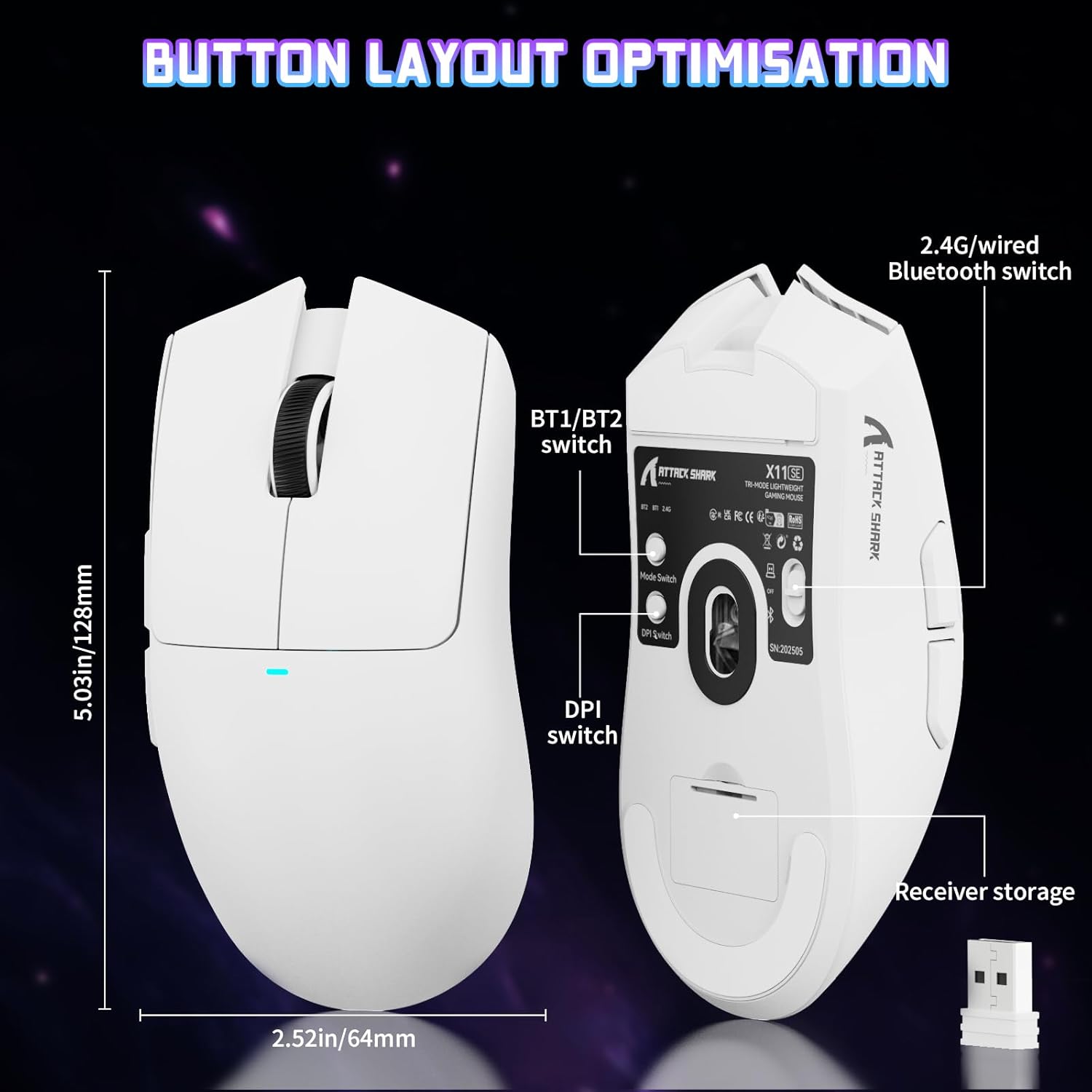
Image: The ATTACK SHARK X11SE mouse displaying its button layout, including the BT1/BT2 switch, DPI switch, and receiver storage, along with its dimensions (128mm length, 64mm width).
- Venstre klik: Primær handlingsknap.
- Højreklik: Sekundær handlingsknap, typisk til kontekstmenuer.
- Scrollhjul: Scrolls up/down. Can also be pressed for a middle-click function.
- Sideknapper (frem/bagud): Used for navigation in web browsere eller handlinger i spillet.
- DPI switch: Located on the underside of the mouse, this button cycles through preset DPI levels.
- Mode Switch: Located on the underside, this switch allows you to select between 2.4G wireless, Bluetooth, and Off modes.
DPI-justering:
The X11SE features a PixArt PAW3311 sensor with up to 22,000 DPI. You can adjust the DPI sensitivity using the dedicated DPI switch on the bottom of the mouse. For more precise control and custom DPI levels, use the official software.
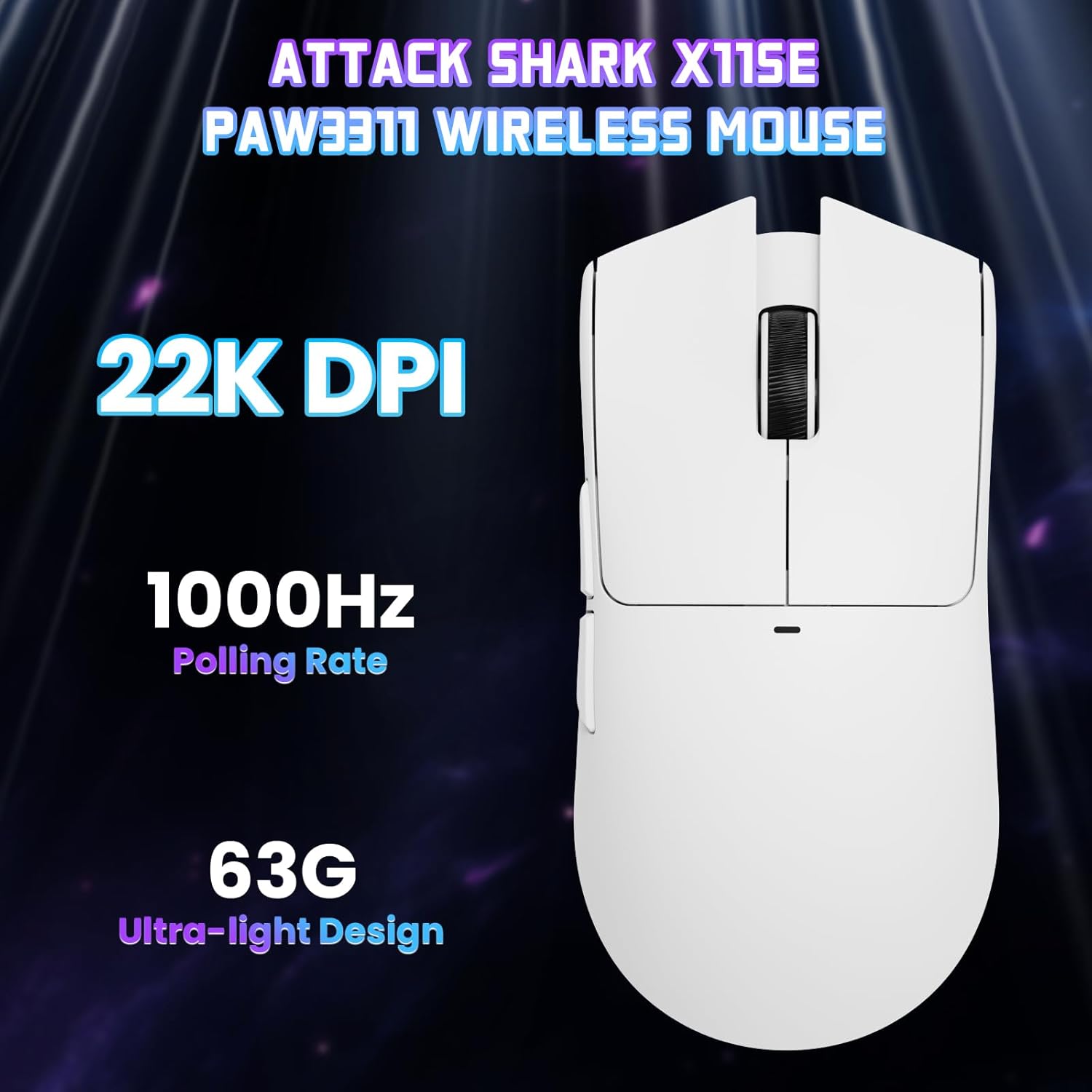
Billede: En top-down view of the ATTACK SHARK X11SE mouse, emphasizing its 22,000 DPI capability and 1000Hz polling rate for high-performance gaming.
4. Tilpasning
The ATTACK SHARK X11SE mouse offers extensive customization options through its dedicated software. This allows you to personalize button assignments, DPI settings, polling rate, and create macros.
Driver installation:
The mouse supports two drivers:
- Web Chauffør: Adgang via http://szslxd-tech.com/#/
- ATTACK SHARK Proprietary Driver: Download fra https://attackshark.com/pages/dirver-download
Download and install the preferred driver software on your Windows, macOS, or Linux system.
Software funktioner:

Image: The ATTACK SHARK X11SE software interface, demonstrating options for mouse settings, DPI adjustments, parameter settings, macro editing, and personal profiles.
- Knap programmering: Reassign functions to any of the 5 buttons.
- DPI-indstillinger: Create custom DPI profiles and adjust sensitivity levels.
- Afstemningsfrekvens: Adjust the polling rate for optimal responsiveness.
- Makro Editor: Record and assign complex sequences of commands to a single button.
- Profile Ledelse: Save and switch between different profiles til forskellige spil eller applikationer.
5. Vedligeholdelse
Rensning:
- Brug en blød, tør klud til at tørre musens overflade af.
- Til genstridigt snavs, let dampRengør kluden med vand eller en mild rengøringsopløsning. Undgå skrappe kemikalier.
- Clean the optical sensor area on the bottom of the mouse with a cotton swab to ensure accurate tracking.
Batteripleje:
- Undgå at aflade batteriet helt ofte for at forlænge dets levetid.
- Opbevar musen et køligt og tørt sted, når den ikke er i brug i længere perioder.
6. Fejlfinding
Almindelige problemer og løsninger:
- Musen svarer ikke:
- Sørg for, at musen er opladet.
- Check the mode switch on the bottom of the mouse to ensure it's in the correct mode (2.4G, BT, or Wired).
- For 2.4GHz mode, ensure the USB receiver is securely plugged in. Try a different USB port.
- For Bluetooth mode, ensure Bluetooth is enabled on your device and the mouse is paired correctly. Try re-pairing.
- Sørg for, at USB-C-kablet er korrekt tilsluttet, hvis det er forbundet med kabel.
- DPI ændrer sig ikke:
- Press the DPI switch on the bottom of the mouse.
- If using custom DPI settings, ensure the driver software is running and the correct profile er aktiv.
- Forsinket eller intermitterende forbindelse:
- Ensure the mouse is close to the USB receiver (for 2.4GHz) or your device (for Bluetooth).
- Undgå interferens fra andre trådløse enheder.
- Sørg for, at musens batteri er tilstrækkeligt opladet.
- Opdater musedrivere, hvis tilgængelige.
7. Specifikationer
| Feature | Specifikation |
|---|---|
| Mærke | ANGREDE HAJ |
| Modelnavn | X11SE |
| Farve | Hvid |
| Forbindelsesteknologi | 2.4 GHz Wireless/USB-C Wired/Bluetooth |
| Særlige funktioner | 63g ultralight, BK52820 Chip, TTC Encoder, Dual Driver |
| Bevægelsesdetektionsteknologi | Optical (PixArt PAW3311) |
| Antal knapper | 5 |
| Håndorientering | Ambidekstrøs |
| Anbefalet produktbrug | Computer spil |
| Kompatible enheder | Desktop Computer, MAC |
| Operativsystem | Windows, macOS, Linux |
| Antal batterier | 1 Lithium Polymer (inkluderet) |
| Strømkilde | Batteridrevet |
| Maximum Mouse Sensitivity | 22000 DPI |
| Rækkevidde | 300 centimeter |
| Stil | Ergonomisk |
| Materiale | Plast |
| Oprindelsesland | Kina |
| Inkluderede komponenter | USB-C Cable, Manual, Grip Tape |
| UPC | 752010613663 |
8. Garanti og support
Garantioplysninger:
The ATTACK SHARK X11SE Wireless Gaming Mouse comes with a six-month warranty from the date of purchase. Please retain your proof of purchase for warranty claims.
Driverdownloads:
For the latest drivers and software updates, please visit:
- Web Chauffør: http://szslxd-tech.com/#/
- ATTACK SHARK Driver: https://attackshark.com/pages/dirver-download
Related Product Video:
Video: En officiel videopræsentation fra sælgereasing the ATTACK SHARK X11 Mouse, demonstrating its features and functionality. While specifically for the X11, it provides relevant insights into the X11SE's design and operation.