
1. Introduktion
This manual provides essential information for the safe and efficient operation of your LEENON 25L/24h Electric Dehumidifier. Please read it thoroughly before using the appliance and retain it for future reference. This dehumidifier is designed to remove excess moisture from the air, helping to prevent mold, mildew, and unpleasant odors, creating a more comfortable and healthy indoor environment.
2. Sikkerhedsinstruktioner
- Sørg for, at strømforsyningen matcher voltage angivet på mærkatet.
- Betjen ikke enheden med en beskadiget strømledning eller stik.
- Keep the dehumidifier upright during operation and transport.
- Bloker ikke luftindtaget eller -udtaget. Hold mindst 20 cm afstand omkring enheden.
- Indsæt ikke genstande i enhedens åbninger.
- Tag stikket ud af enheden, før du rengør eller udfører vedligeholdelse.
- Dette apparat er ikke beregnet til brug af personer (inklusive børn) med nedsatte fysiske, sensoriske eller mentale evner, eller mangel på erfaring og viden, medmindre de har fået opsyn eller instruktion i brugen af apparatet af en person, der er ansvarlig for deres sikkerhed.
- Børn skal være under opsyn for at sikre, at de ikke leger med apparatet.
3. Produktet er slutview
3.1 Komponenter
The LEENON dehumidifier efficiently removes moisture from your environment. It features a high-efficiency compressor and a digital display for easy monitoring and control.

Image: The LEENON dehumidifier highlighting its high efficiency in moisture removal and coverage area of 125m³/50m².
3.2 Vandtank
The unit includes a 2.5-liter water tank for collecting condensed moisture. The tank is removable and visible for easy monitoring of the water level.

Billede: Intern view of the dehumidifier, illustrating the 2.5-liter water tank and the dehumidification process.
3.3 Kontrolpanel
The easy-to-control touch panel allows you to manage all functions of the dehumidifier, including power, mode selection, speed, timer, and child lock.

Image: Close-up of the dehumidifier's control panel, showing the digital display and various function buttons.
4. Opsætning
- Udpakning: Tag forsigtigt affugteren ud af emballagen. Gem emballagen til senere opbevaring eller transport.
- Placering: Place the unit on a firm, level surface in an area where humidity control is desired. Ensure there is at least 20 cm of space around the air inlet and outlet for proper airflow. Avoid placing it near heat sources or in direct sunlight.
- Strømtilslutning: Sæt netledningen i en jordet stikkontakt. Sørg for, at stikkontaktens lydstyrketage matcher enhedens krav.
- Indledende drift: Allow the unit to stand upright for at least 2 hours before first use if it has been tilted during transport.
5. Betjeningsvejledning
5.1 Tænd/sluk
Tryk på Magt knappen på kontrolpanelet for at tænde eller slukke enheden.
5.2 Indstilling af fugtighedsniveau
In Dehumidification (DEHU) mode, you can set the desired humidity level between 30% and 80% relative humidity. The unit will automatically operate to maintain this level, turning off when the target is reached and restarting if humidity rises.
5.3 driftstilstande
Tryk på Mode knap til at gennemgå de tilgængelige driftstilstande:
- DEHU (Dehumidification) Mode: The unit operates to reach and maintain your set humidity level.
- DRY (Clothes Drying) Mode: This mode is designed for quickly drying laundry. The unit operates continuously at high fan speed to remove moisture from clothes.
- CONT (Continuous) Mode: The unit operates continuously regardless of the ambient humidity level. This is useful for severe humidity conditions.

Image: The dehumidifier operating in Dry Mode, effectively drying clothes on a rack.
5.4 blæserhastighed
Tryk på Hastighed button to adjust the fan speed (Low, High). This option may not be available in all operating modes.
5.5 Timer funktion
The 24-hour timer allows you to set a specific time for the unit to turn on or off automatically. Press the Timer button and use the adjustment buttons to set the desired duration.
5.6 Børnelås
Activate the child lock feature by pressing and holding the Låse button for a few seconds. This prevents accidental changes to settings.
6. Dræningsmuligheder
Din affugter tilbyder to metoder til vanddræning:
6.1 Manuel tømning (vandtank)
Condensed water collects in the removable 2.5-liter water tank. When the tank is full, the unit will automatically shut off, an alarm will sound, and a full water icon will flash on the display, indicating that the tank needs to be emptied.
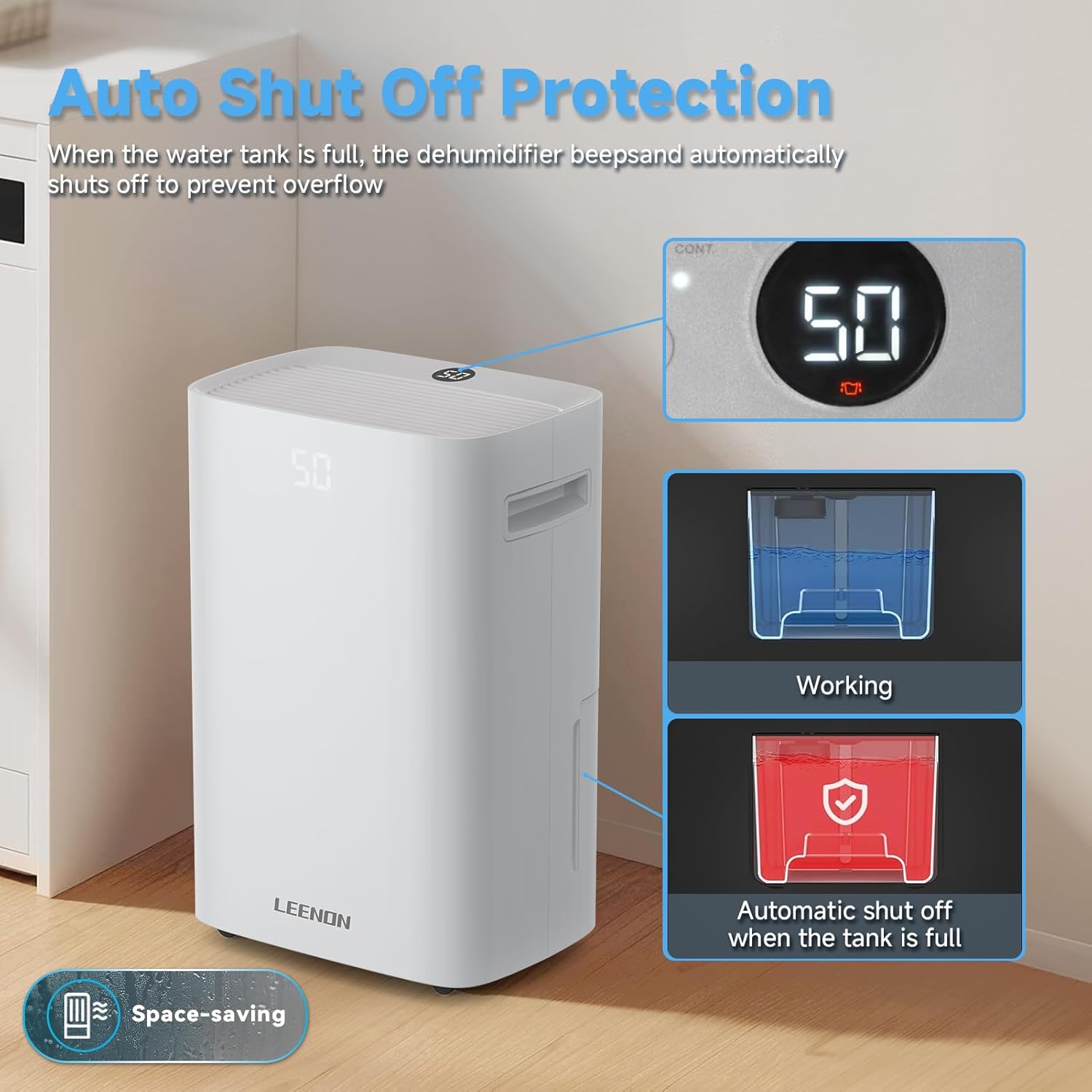
Image: The dehumidifier demonstrating its auto shut-off protection when the water tank is full, showing the display and tank status.
6.2 Kontinuerlig dræning
For continuous, hands-free operation, you can connect a drain hose (included) to the continuous drainage outlet. This allows water to drain directly to a floor drain or suitable receptacle, eliminating the need to manually empty the water tank.
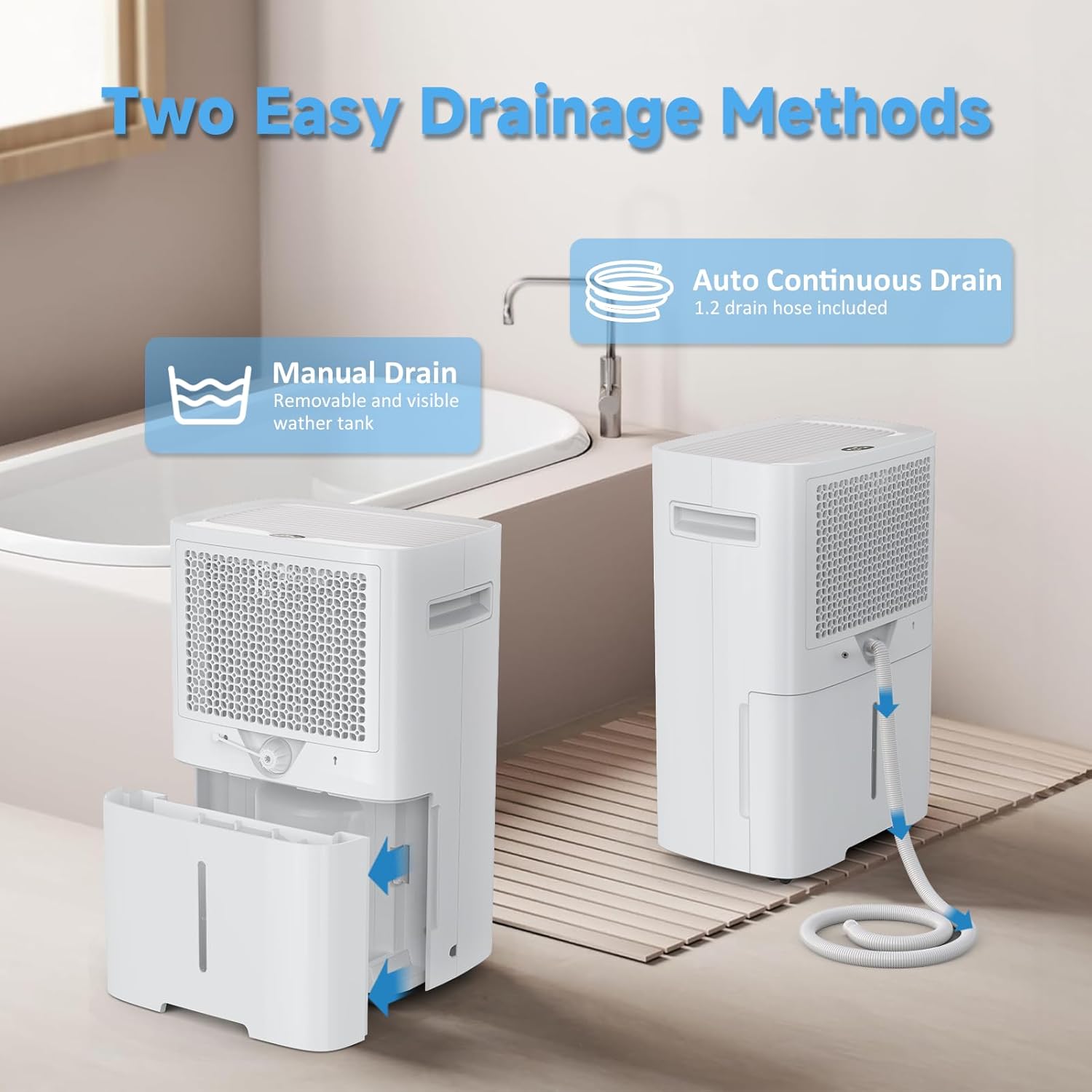
Image: Illustration of the two easy drainage methods: manual removal of the water tank and continuous drainage via a hose.
7. Vedligeholdelse
7.1 Rengøring af luftfilteret
Regularly clean the air filter to ensure optimal performance. A dirty filter can reduce efficiency and airflow.
- Sluk for enheden, og tag stikket ud af stikkontakten.
- Remove the air filter (refer to the product diagram for location).
- Clean the filter with a vacuum cleaner or wash it with warm, soapy water. Rinse thoroughly and allow it to air dry completely before reinserting.
7.2 Rengøring af enhedens yderside
Tør ydersiden af affugteren af med en blød, damp klæde. Brug ikke skrappe kemikalier eller slibende rengøringsmidler.
7.3 Opbevaring
If storing the unit for an extended period, ensure the water tank is empty and clean. Clean the air filter and store the unit in an upright position in a cool, dry place, away from direct sunlight.
8. Fejlfinding
| Problem | Mulig årsag | Løsning |
|---|---|---|
| Enheden tænder ikke | No power supply; Power cord not plugged in; Water tank full or incorrectly placed. | Kontroller strømtilslutningen; Tøm vandtanken og sæt den korrekt i igen. |
| Intet vand opsamlet | Ambient humidity too low; Temperature too low; Air filter clogged; Unit in fan-only mode. | Ensure humidity is above 30%; Clean air filter; Select appropriate dehumidification mode. |
| Enheden er støjende | Enheden står ikke på en plan overflade; Luftfilteret er tilstoppet; Blokering i ventilatoren. | Place on a flat surface; Clean air filter; Check for obstructions. |
| Dårlig affugtning | Doors/windows open; Room size too large; Air filter clogged; Temperature too low. | Close doors/windows; Ensure unit is suitable for room size; Clean air filter. |
Hvis problemet fortsætter efter at have forsøgt disse løsninger, bedes du kontakte kundesupport.
9. Specifikationer
| Feature | Specifikation |
|---|---|
| Mærke | LEENON |
| Modelnavn | PD08A-20 |
| Farve | Hvid |
| Produktmål (D x B x H) | 32 x 22.5 x 49 cm |
| Varens vægt | 13.03 kg |
| Affugtningskapacitet | 25 Liters/24h (at 35°C/90% RH) |
| Vandbeholdervolumen | 2.5 liter |
| Anbefalet gulvareal | Op til 50 m² (125 m³) |
| Materiale | Plast |
| Antal hastigheder | 3 |
| Særlige funktioner | Automatic Humidity Control, 3 Operating Modes, Dual Drainage, Digital Display with Timer, Child Lock |
10. Garanti og support
For warranty information or technical support, please refer to the warranty card included with your product or contact the retailer where the product was purchased. Keep your purchase receipt as proof of purchase.