
EDJO K399
EDJO K399 Ergonomic Wireless Keyboard User Manual
Model: K399
1. Introduktion
The EDJO K399 Ergonomic Wireless Keyboard is designed to provide a comfortable and efficient typing experience. Its wave-shaped key layout and integrated wrist rest aim to reduce strain during extended use. This keyboard features 2.4GHz wireless connectivity and is compatible with both Mac and Windows operating systems.

Image 1.1: The EDJO K399 Ergonomic Wireless Keyboard, showcasing its curved design and integrated wrist rest.
2. Pakkens indhold
Kontroller venligst, at alle varer er til stede i din pakke:
- 1 x EDJO K399 Wireless Keyboard
- 1 x USB-modtager
3. Opsætningsvejledning
Follow these steps to set up your EDJO K399 Wireless Keyboard:
- Installer batterier: Open the battery compartment on the underside of the keyboard. Insert the required batteries (not included, typically AA or AAA) according to the polarity indicators.
- Find USB-modtager: The USB receiver is stored in a dedicated slot within the keyboard's battery compartment for safekeeping. Carefully remove it.
- Tilslut USB-modtager: Plug the USB receiver into an available USB-A port on your computer, laptop, or compatible device.
- Tænd tastaturet: Locate the power switch on the keyboard (usually on the top right or underside) and slide it to the 'ON' position. The keyboard should automatically connect to your device.

Image 3.1: Illustration showing the USB receiver stored in the battery compartment and icons for 2.4G connection, 33ft wireless range, and compatibility with Windows, Mac OS, Linux, and Chrome OS.
4. Betjeningsvejledning
4.1 Basic Typing and Ergonomic Design
The EDJO K399 features a wave-shaped key layout and an integrated palm rest to promote a natural typing posture and reduce wrist and hand strain. The keys are designed with a crater mechanism for accurate and responsive feedback.

Image 4.1: A user demonstrating natural typing posture on the EDJO K399 keyboard, highlighting its curved ergonomic structure.
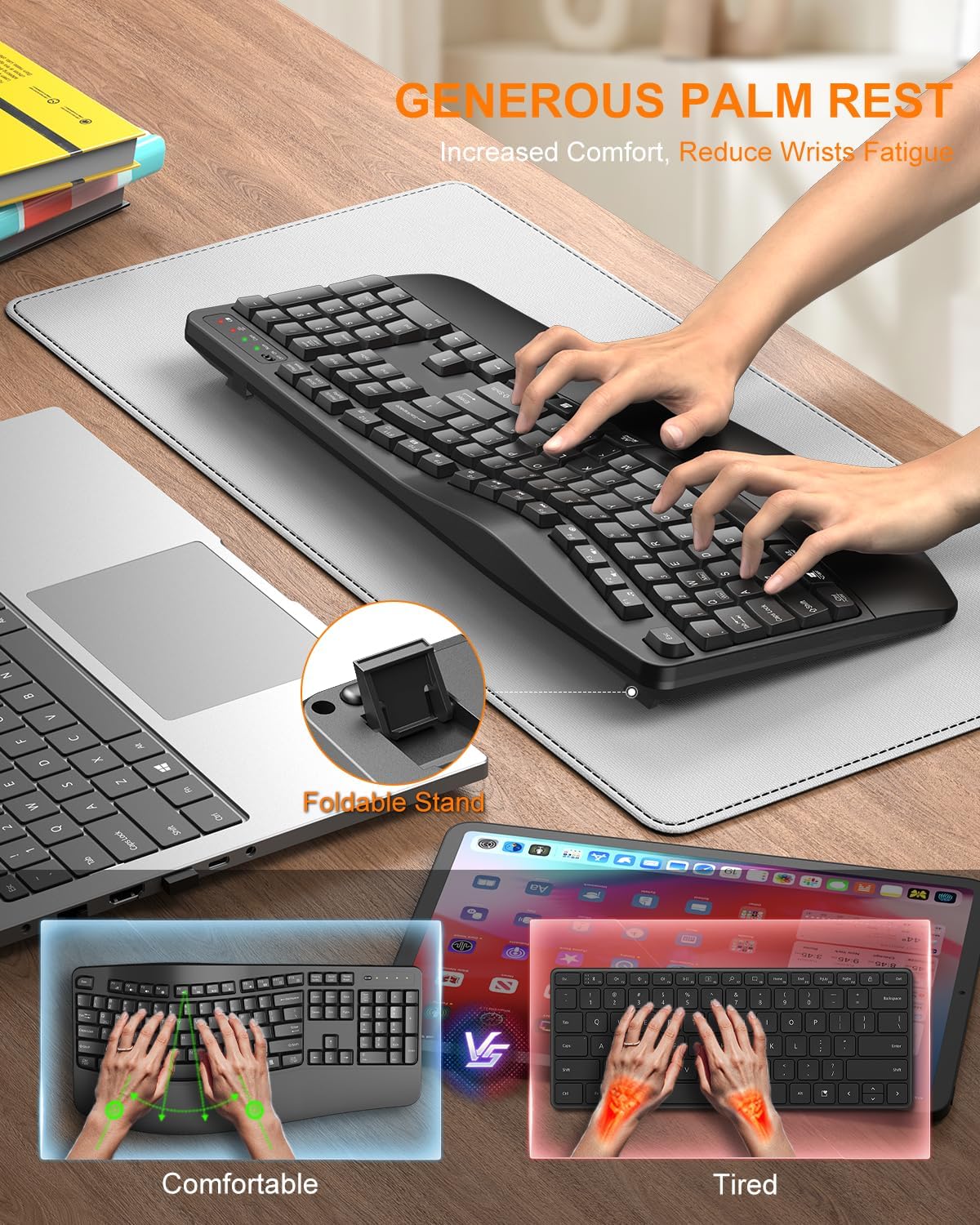
Image 4.2: The wide palm rest and foldable stand of the EDJO K399 keyboard, designed for increased comfort and reduced wrist fatigue. The foldable stand allows for adjustable tilt angles (8° and 12°).
4.2 Multimediegenvejstaster
The keyboard includes 12 combined multimedia keys for quick access to various functions:
- F1: Music
- F2: Lydstyrke ned
- F3: Lydstyrke op
- F4: Lydløs
- F5: Forrige spor
- F6: Næste spor
- F7: Afspil/pause
- F8: Stop
- F9: Browser
- F10: Email
- F11: My Computer
- F12: Lommeregner

Image 4.3: Visual representation of the 12 combined multimedia keys and their functions.
4.3 System Layout Switching (Mac/Windows)
The EDJO K399 keyboard supports dual system layouts for Mac and Windows. You can switch between them with a single touch:
- Til Windows: Tryk på Fn + Q keys simultaneously. The Win/Mac indicator light will turn red.
- Til Mac OS: Tryk på Fn + W keys simultaneously. The Win/Mac indicator light will turn green.

Image 4.4: Instructions for switching between Windows (Fn+Q, red light) and Mac OS (Fn+W, green light) layouts.
4.4 Indikatorlys
The keyboard features several LED indicator lights:
- Lavstrømsindikator: Lyser, når batteriniveauet er lavt.
- Mac OS & Windows Indicator: Shows current operating system layout (Red for Windows, Green for Mac).
- Caps Lock-indikator: Lyser, når Caps Lock er aktiv.
- Num Lock-indikator: Lyser, når Num Lock er aktiv.

Billede 4.5: Nærbillede view of the keyboard's indicator lights, including Low Power, Mac OS & Windows, Caps Lock, and Num Lock.
5. Vedligeholdelse
5.1 Rengøring
For at rengøre dit tastatur skal du bruge en blød, fnugfri klud, der er let fugtetampened with water or a mild cleaning solution. Avoid excessive moisture. Do not immerse the keyboard in liquid. The keyboard is designed to be spill-resistant, but it is not waterproof.

Image 5.1: The EDJO K399 keyboard demonstrating its spill-resistant properties, made from scratch-resistant ABS material with a stable double-sided PCB board and non-fading keycap letters.
5.2 Udskiftning af batteri
When the low power indicator light illuminates, replace the batteries promptly to ensure uninterrupted operation.
6. Fejlfinding
- Tastaturet reagerer ikke:
- Sørg for, at tastaturet er tændt.
- Kontroller batteriniveauer og udskift om nødvendigt.
- Kontroller, at USB-modtageren er korrekt tilsluttet en fungerende USB-port.
- Prøv at sætte USB-modtageren i en anden USB-port.
- Genstart din computer.
- Forsinket eller intermitterende forbindelse:
- Ensure the keyboard is within the 33ft wireless range of the USB receiver.
- Minimér forhindringer mellem tastaturet og modtageren.
- Avoid placing the receiver near other wireless devices that may cause interference.
- Keys not typing correctly (e.g., 'Z' types 'Y'):
- Ensure the correct system layout (Mac or Windows) is selected using Fn+Q or Fn+W.
7. Specifikationer
| Feature | Detalje |
|---|---|
| Modelnummer | K399 |
| Mærke | EDJO |
| Forbindelsesteknologi | 2.4 GHz trådløs (USB-A-modtager) |
| Wireless Range | Op til 33 fod (10 meter) |
| Tastaturbeskrivelse | Membran |
| Kompatible enheder | Laptop, PC, Smart TV (Windows, Mac OS, Linux, Chrome OS) |
| Særlige funktioner | Ergonomic Design, Wave Keys, Integrated Wrist Rest, Adjustable Tilt, 12 Multimedia Keys, Spill-Resistant |
| Produktdimensioner | 17.6 x 8.7 x 1.4 tommer (44.7 x 22.1 x 3.6 cm) |
| Varens vægt | 1.65 pund (0.75 kg) |
| Materiale | Plast (ABS) |
| Farve | Sort |
8. Garanti og support
EDJO is committed to providing quality products and customer satisfaction. For any inquiries, issues, or technical assistance, please contact our dedicated support team.
- Kundeservice: Our team is available to provide expert assistance.
- Svartid: Forvent svar inden for 24 timer.
- Udskiftningspolitik: 365-day replacement for eligible issues.
- Teknisk support: Livstids teknisk support ydes.
To contact support, please refer to your purchase platform or the EDJO official webwebsted for kontaktoplysninger.

Image 8.1: EDJO customer support information, highlighting various support services available.