
Bagotte A21
Bagotte Robot Vacuum and Mop Model A21 User Manual
Din guide til opsætning, drift og vedligeholdelse
1. Vigtige sikkerhedsinstruktioner
Please read this user manual carefully before using the Bagotte Robot Vacuum and Mop Model A21. Keep this manual for future reference.
- Dette apparat kan bruges af børn i alderen 8 år og derover og personer med nedsatte fysiske, sensoriske eller mentale evner eller mangel på erfaring og viden, hvis de har fået opsyn eller instruktion i brugen af apparatet på en sikker måde og forstår de involverede farer. .
- Børn må ikke lege med apparatet. Rengøring og brugervedligeholdelse må ikke udføres af børn uden opsyn.
- Brug kun den originale strømadapter, der er leveret af producenten.
- Brug ikke robotten i omgivelser med åben ild eller skrøbelige genstande.
- Ensure the charging station is placed on a level surface against a wall, with no obstacles within 1 meter on either side and 2 meters in front.
- Before cleaning, remove power cords, small objects, and any items that could entangle the robot.
- Nedsænk ikke robotten eller dens elektroniske komponenter i vand.
- Sluk robotten og tag stikket ud af ladestationen, før du udfører vedligeholdelse eller rengøring.
2. Pakkens indhold
Kontroller, at alle komponenter er til stede og i god stand ved udpakning.

Image: All items included in the Bagotte Robot Vacuum A21 package.
- A21 Robot Vacuum Cleaner * 1
- Charging Station * 1
- Remote Control (2 AAA batteries included) * 1
- Strømadapter * 1
- 2-in-1 Water Tank * 1
- Sidebørster * 2
- Mop Holder * 1
- Mop Cloth * 2
- Hepa Filters * 1
- Rengøringsbørste * 1
- Brugervejledning * 1
3. Produktet er slutview
The Bagotte A21 is a 3-in-1 robot vacuum designed for vacuuming, sweeping, and mopping. It features a slim design, powerful suction, and multiple control options.

Image: Bagotte Robot Vacuum A21 main unit and accessories.
Hovedenhedens komponenter
- Låg: Power button, Wi-Fi indicator.
- Forreste kofanger: Kollisionssensorer.
- Sidebørster: Til fejning af kanter og hjørner.
- Drivhjul: For movement.
- Skraldespand/vandtank: Integrated unit for dry and wet cleaning.
- Opladningskontakter: Til automatisk genopladning.
- Bottom Sensors: Cliff sensors to prevent falls.
4. Opsætning
4.1 Placering af ladestation
Place the charging station against a wall on a hard, level surface. Ensure there are no obstacles within 1 meter (3.3 feet) to the left and right, and 2 meters (6.6 feet) in front of the charging station. This allows the robot to return for charging without obstruction.

Image: Robot vacuum returning to its charging station.
4.2 Indledende opladning
Connect the power adapter to the charging station and plug it into a wall outlet. Place the robot onto the charging station, ensuring the charging contacts align. For first-time use, charge the robot for at least 6 hours to ensure the battery is fully conditioned.
4.3 Montering af sidebørster
Attach the side brushes to the corresponding posts on the bottom of the robot until they click into place. Ensure the brushes are securely fastened.
4.4 Installing the 2-in-1 Water Tank/Dustbin
To use the mopping function, fill the water tank with clean water. Attach the mop cloth to the mop holder, then slide the mop holder onto the water tank. Insert the combined 2-in-1 water tank/dustbin unit into the back of the robot until it clicks securely.

Image: Components for 3-in-1 cleaning functionality.
5. Betjeningsvejledning
5.1 Tænd/sluk
- Tænd: Press and hold the power button on the robot for a few seconds until the indicator light turns on.
- Sluk: Press and hold the power button for a few seconds until the indicator light turns off.
5.2 Rengøringstilstande
The robot offers four cleaning modes to suit different needs:

Image: Illustration of different cleaning modes.
- Auto rengøring: The robot automatically cleans in a systematic pattern.
- Rengøring af pletter: The robot cleans a specific area in a spiral pattern for concentrated cleaning.
- Kantrensning: Robotten rengør langs vægge og møbelkanter.
- Manuel rengøring: Control the robot's direction using the remote control or app.
5.3 App kontrol (Tuya Smart App)
Download the Tuya Smart app from your smartphone's app store. Follow the in-app instructions to connect your robot to your home's 2.4GHz Wi-Fi network. The app allows for advanced control and scheduling.
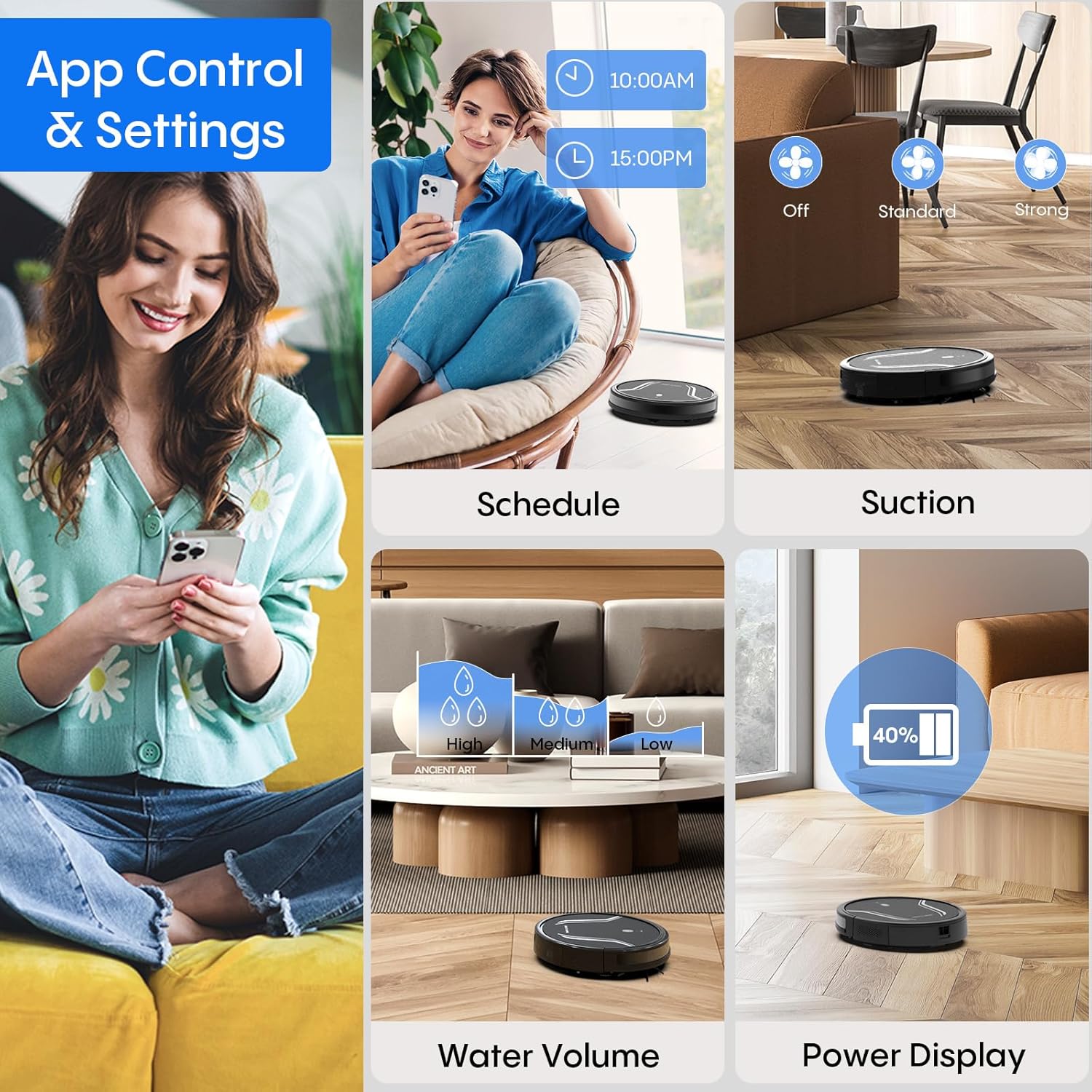
Image: App control interface for the robot vacuum.
- Planlægning: Indstil specifikke tidspunkter for robottens automatiske rengøring.
- Rengøringsmåder: Select desired cleaning modes.
- Sugekraft: Adjust suction levels (e.g., Standard, Strong).
- Vandvolumen: Control water flow for mopping (e.g., Low, Medium, High).
- Batteristatus: Monitor the robot's battery level.
- Find My Robot: Locate the robot if it gets stuck or lost.
5.4 Fjernbetjening
Use the included remote control to manually direct the robot, start/pause cleaning, select cleaning modes, and send it back to the charging station.
5.5 Stemmestyring (Alexa/Google Assistant)
Once connected to the Tuya Smart app, you can link your robot to Amazon Alexa or Google Assistant for voice commands. For example, say "Alexa, turn on the robot."

Image: Robot vacuum controlled via voice command.
5.6 Automatisk genopladning
When the battery level is low, the robot will automatically return to its charging station to recharge. You can also manually send it back using the app or remote control.
6. Vedligeholdelse
Regelmæssig vedligeholdelse sikrer optimal ydeevne og forlænger levetiden på din robotstøvsuger.
6.1 Tømning af skraldespanden
Press the release button to remove the 2-in-1 water tank/dustbin unit. Open the dustbin cover and empty its contents into a trash bin. It is recommended to empty the dustbin after each cleaning cycle.
6.2 Rengøring af filtre
Remove the HEPA filter and sponge filter from the dustbin. Tap them gently to remove dust. The filters are not washable and should be replaced every 3-6 months, depending on usage.
6.3 Rengøring af sidebørster
Periodically check the side brushes for tangled hair or debris. Carefully remove any obstructions. If brushes are worn or damaged, replace them with new ones.
6.4 Rengøring af sensorer
Wipe the cliff sensors (located on the bottom of the robot) and the charging contacts (on both the robot and charging station) with a clean, dry cloth. This ensures proper navigation and charging.
6.5 Cleaning Mop Cloth and Water Tank
After each mopping session, remove the mop cloth and wash it thoroughly. Allow it to air dry completely before reattaching. Empty any remaining water from the water tank and rinse it out. Ensure the water tank is dry before storage.
7. Fejlfinding
Hvis du støder på problemer med din robotstøvsuger, kan du se følgende almindelige problemer og løsninger:
| Problem | Mulig årsag | Løsning |
|---|---|---|
| Robotten tænder ikke | Lavt batteri; Tænd/sluk-knappen er ikke trykket korrekt ind | Charge the robot; Press and hold the power button until the indicator lights up. |
| Robotten oplader ikke | Charging contacts are dirty; Charging station not powered | Clean charging contacts on both robot and station; Ensure power adapter is plugged in. |
| Robotten sidder ofte fast | Too many obstacles; Cliff sensors are dirty | Clear the cleaning area of loose cables and small objects; Clean cliff sensors. |
| Dårlig rengøringsydelse | Støvbeholder fuld; Filtre tilstoppede; Sidebørster slidte | Empty dustbin; Clean or replace filters; Clean or replace side brushes. |
| Moppefunktionen virker ikke | Water tank empty; Mop cloth not attached; Water flow setting too low | Fill water tank; Attach mop cloth correctly; Adjust water flow setting in the app. |
| Kan ikke oprette forbindelse til Wi-Fi | Incorrect Wi-Fi password; Not 2.4GHz network; Robot too far from router | Verify password; Ensure router is 2.4GHz; Move robot closer to router during setup. |
8. Specifikationer
| Feature | Detalje |
|---|---|
| Modelnummer | A21 |
| Produktdimensioner | 15 x 12.5 x 4 tommer |
| Varens vægt | 7.24 pund |
| Sugekraft | Op til 5000 Pa |
| Støvkasse Kapacitet | 250mL (integrated with water tank) |
| Vandtankkapacitet | 200mL (integrated with dust box) |
| Kontrolmetoder | App, Remote Control, Voice Control (Alexa/Google Assistant) |
| Wi-Fi-kompatibilitet | Kun 2.4 GHz |
| Automatiske funktioner | Auto-recharge, Obstacle avoidance, Fall prevention |
9. Garanti og support
Bagotte provides a 12-month service warranty for the Robot Vacuum and Mop Model A21. For technical support, warranty claims, or any questions regarding your product, please contact Bagotte customer service through the official webwebsted eller din købsplatform.
Please have your model number (A21) and purchase information ready when contacting support.
Ask a question about this manual
Ask about setup, troubleshooting, compatibility, parts, safety, or missing instructions. Manuals+ will review the question and use this page’s manual context to help answer it.