
GOLREX T59
GOLREX T59 Aktiv støjreducerende trådløse øretelefoner Brugermanual
Model: T59
Indledning
Thank you for choosing GOLREX T59 Active Noise Cancelling Wireless Earbuds. This manual provides detailed instructions for setup, operation, maintenance, and troubleshooting to ensure optimal performance and longevity of your device. Please read this manual thoroughly before use.
Hvad er der i æsken
- GOLREX T59 Earbuds (Left and Right)
- Trådløs opladningsetui
- USB-C ladekabel
- Ørepropper (størrelser S, M, L)
- Brugermanual
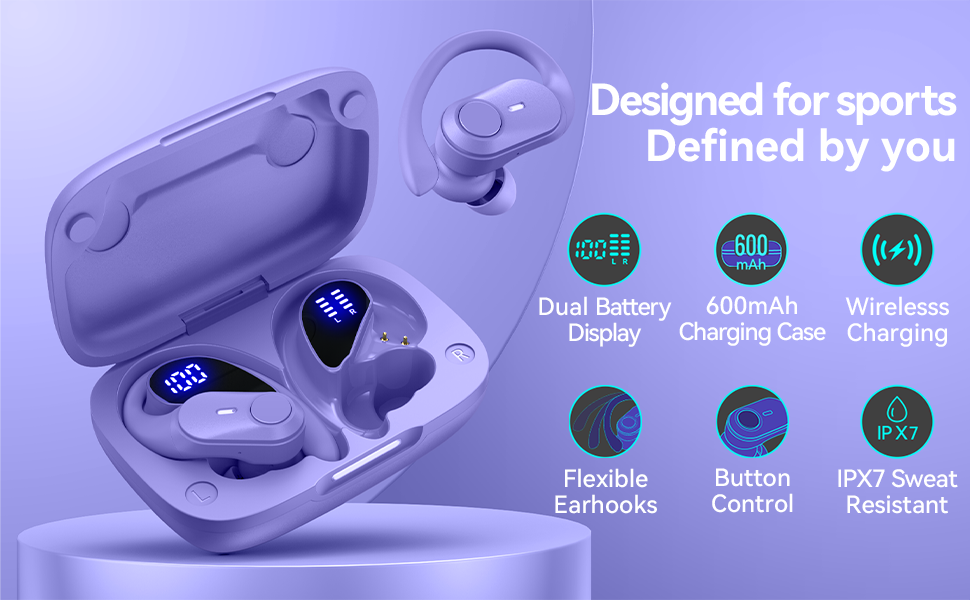
Image: Contents of the GOLREX T59 Earbuds package. This includes the two earbuds, the charging case, a USB-C charging cable, three sizes of eartips (small, medium, large), and the user manual.
Produkt overview
Familiarize yourself with the main components of your GOLREX T59 earbuds and charging case.
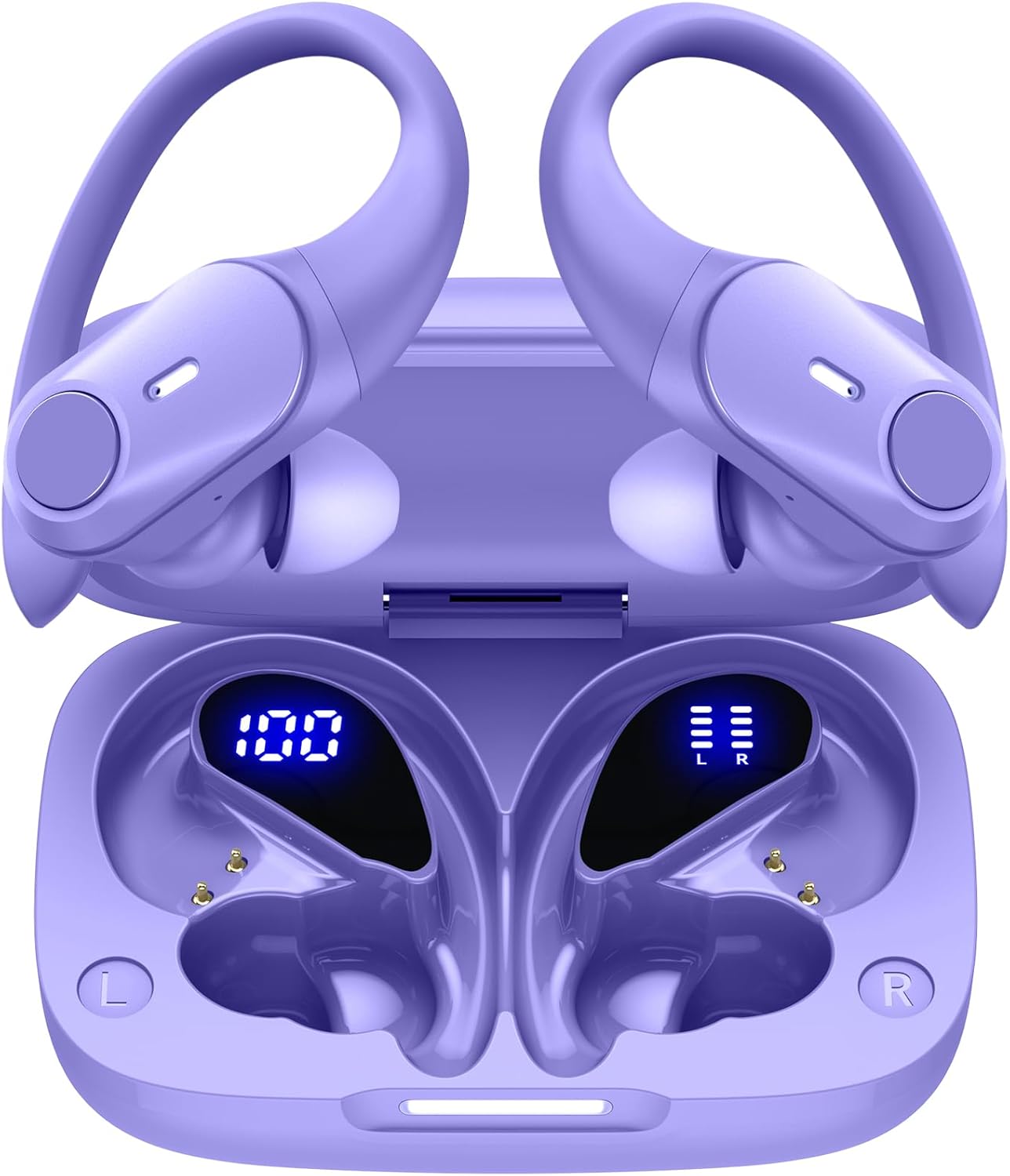
Image: The GOLREX T59 wireless earbuds are shown inside their open charging case. The case features a digital LED display indicating its battery percentage, while each earbud also has a separate LED indicator for its charging status. The earbuds are purple with flexible over-ear hooks.
Nøglefunktioner
- Hybrid aktiv støjreduktion (ANC): Reduces ambient noise by up to 30dB for focused audio.
- Forlænget spilletid: Up to 80 hours total with the charging case (8 hours per earbud charge).
- Dobbelt LED-strømdisplay: Shows case battery percentage og individuelle øreproppers opladningsstatus.
- Wireless & USB-C Fast Charging: Flexible charging options for convenience.
- Smart Touch Control: Intuitive controls for music, calls, and voice assistants.
- Instant Auto Pairing: Automatic connection upon removal from case.
- Secure Fit Over-Ear Hooks: Designed for stability during active use.
- IPX7 vandtæt: Protection against sweat and light rain.
Opsætning og førstegangsbrug
1. Opladning af øretelefoner og etuiet
Oplad ørepropperne og opladningsetuiet helt inden første brug.
- Via USB-C-kabel: Connect the provided USB-C cable to the charging port on the case and to a power source. The LED display on the case will show the charging progress.
- Via Wireless Charging: Place the charging case on a compatible wireless charging pad (not included). The LED indicator bar on the case will blink slowly during charging and remain solid when fully charged.
A 15-minute quick charge provides approximately 1 hour of playtime.

Image: The GOLREX T59 charging case demonstrating both wireless charging on a charging pad and wired charging via a USB-C cable. The case shows an LED indicator for charging status.

Billede: En detaljeret view of the GOLREX T59 charging case's LED display. It clearly shows the battery percentage of the charging case (e.g., "100") and separate bar indicators for the power status of the left (L) and right (R) earbuds.
2. Parring med din enhed
- Åbn opladningsetuiet. Ørepropperne tændes automatisk og går i parringstilstand.
- Aktiver Bluetooth på din enhed (smartphone, tablet, bærbar computer).
- Søg efter Bluetooth devices and select "T59" from the list.
- Når der er forbindelse, hører du en bekræftelsestone, og ørepropperne er klar til brug.
The earbuds feature Bluetooth 5.3 for a stable connection up to 30 feet.
Note: Efter den første parring opretter ørepropperne automatisk forbindelse til den sidst parrede enhed, når de tages ud af etuiet.
Betjeningsvejledning
Iført øretelefoner
The GOLREX T59 earbuds are designed with flexible over-ear hooks for a secure and comfortable fit, especially during physical activity.
- Identificér venstre (V) og højre (H) ørepropper.
- Placer forsigtigt øreproppen i din øregang.
- Adjust the flexible over-ear hook to fit snugly and comfortably around your ear.
- Experiment with the included eartip sizes (S, M, L) to find the best seal for optimal sound quality and noise cancellation.

Image: A person wearing the GOLREX T59 earbuds during exercise, highlighting the secure fit provided by the flexible over-ear hooks. The image also illustrates the availability of small, medium, and large eartip sizes for personalized comfort.
Tryk på kontrolelementer
Ørepropperne har intuitive berøringsknapper til forskellige funktioner:
| Fungere | Handling |
|---|---|
| Afspil/pause musik | Et enkelt tryk på begge øretelefoner |
| Næste spor | Dobbelttryk på den højre øreprop |
| Forrige spor | Dobbelttryk på den venstre øreprop |
| Besvar/afslut opkald | Et enkelt tryk på begge øretelefoner |
| Afvis opkald | Tryk på en af øretelefonerne, og hold den nede i 2 sekunder |
| Aktivér stemmeassistent (Siri, Google Assistant) | Tryk tre gange på begge øretelefoner |
| Skift ANC/Transparenstilstand | Tryk på en af øretelefonerne, og hold den nede i 3 sekunder |
Aktiv støjafbrydelse (ANC)
The GOLREX T59 earbuds feature Hybrid Active Noise Cancellation, reducing ambient noise by up to 30dB. This allows for a more immersive listening experience.

Image: A cutaway diagram of an earbud illustrating the Hybrid Active Noise Cancellation mechanism. It shows how external sound waves are detected and counteracted by anti-noise signals, resulting in a quieter listening environment.
To toggle between ANC mode and Transparency mode (which allows you to hear your surroundings), press and hold either earbud for 3 seconds.
Brug af enkelt ørepropper
Both earbuds can be used independently. Simply take one earbud out of the case, and it will automatically connect to your device. The other earbud can remain in the case or be used by another person (if paired separately).
Vedligeholdelse og pleje
- Rensning: Rengør regelmæssigt ørepropperne og opladningsetuiet med en blød, tør og fnugfri klud. Brug ikke skrappe kemikalier eller slibende materialer.
- Ørespidser: Fjern ørepropperne, og rengør dem med vand og mild sæbe, hvis det er nødvendigt. Sørg for, at de er helt tørre, før du sætter dem på igen.
- Opbevaring: Når ørepropperne ikke er i brug, skal de opbevares i deres opladningsetui for at beskytte dem mod støv og skader.
- Vandtæthed: The earbuds are IPX7 water-resistant, meaning they can withstand sweat and light rain. Do not submerge them in water or expose them to strong jets of water. Ensure the charging port is dry before charging.
- Temperatur: Undgå at udsætte ørepropperne for ekstreme temperaturer (varme eller kolde) eller høj luftfugtighed.
Fejlfinding
| Spørgsmål | Mulig løsning |
|---|---|
| Øretelefoner parrer ikke med enheden |
|
| Kun én øretelefon virker |
|
| Dårlig lydkvalitet eller lav lydstyrke |
|
| Ladeetui oplader ikke |
|
Specifikationer
| Feature | Detalje |
|---|---|
| Modelnavn | T59 |
| Mærke | GOLREX |
| Forbindelsesteknologi | Trådløs (Bluetooth 5.3) |
| Støjkontrol | Hybrid Active Noise Cancelling (up to 30dB) |
| Audio driver type | Dynamisk driver (10 mm) |
| Samlet spilletid | Op til 80 timer med opladningsetui |
| Spilletid for øretelefoner (enkelt opladning) | Op til 8 timer |
| Opladningstype | USB-C, trådløs opladning |
| Vandmodstandsniveau | IPX7 |
| Kontrolmetode | Røre |
| Kompatible enheder | Cellphones, Desktops, Laptops, Gaming Consoles, Music Production Equipment, Tablets, Telephones |
| Produktdimensioner | 3.5 x 2.36 x 1.5 cm (opladeretui) |
| Varens vægt | 3.53 ounce |
Sikkerhedsoplysninger
- Produktet må ikke skilles ad eller modificeres.
- Holdes væk fra ekstreme temperaturer, direkte sollys og åben ild.
- Undgå at lytte ved høj lydstyrke i længere perioder for at forhindre høreskader.
- Opbevares utilgængeligt for børn og kæledyr.
- Bortskaf produktet ansvarligt i henhold til lokale regler.
Garanti og support
GOLREX provides a warranty for its products. For specific warranty terms and conditions, please refer to the warranty card included in your package or visit the official GOLREX webwebsted.
Some customer reviews indicate that registering your purchase may provide a lifetime warranty. Please check the official GOLREX website or contact customer support for details on product registration and warranty benefits.
For technical support, troubleshooting assistance, or any inquiries, please contact GOLREX customer service through their official channels.
GOLREX Official Store: Visit GOLREX Store on Amazon
Ask a question about this manual
Ask about setup, troubleshooting, compatibility, parts, safety, or missing instructions. Manuals+ will review the question and use this page’s manual context to help answer it.