
1. Introduktion
The Swann DVR8-4685 2K Security System is designed to provide comprehensive surveillance for your home or business. This system features crystal-clear 2K video recording, advanced True Detect™ motion and heat detection, and color night vision for enhanced visibility in low-light conditions. With reliable wired connections and local storage options, your property remains protected without reliance on monthly fees.
Video: En overview of the Swann AdvancedX Security System, highlighting features like 4K resolution, reliable Ethernet connection, real-time alerts, and smart video analytics.
Nøglefunktioner:
- Crystal-Clear 2K Video: Capture every detail with 2K Full HD resolution.
- Farve nattesyn: See clearly in color, even in low-light conditions.
- Powerful Deterrents: Integrated spotlights deter intruders.
- TrueDetect Motion Detection: Advanced sensors provide accurate alerts, minimizing false alarms.
- Lydovervågning: Cameras include microphones to capture audio for identifying key details.
- Reliable Wired Connection: Ensures uninterrupted security with stable wired connections.
- Free Local Storage: Retain weeks of footage on the included 256GB MicroSD Card and back up to the cloud.
2. Hvad er der i æsken
Your Swann DVR8-4685 2K Security System package includes the following components:
- 1 x 8 Channel DVR with 256GB MicroSD Card
- 4 x 2KMQB Bullet Cameras with Lights
- 4 x Extension Cables (60ft/18m)
- 1 x strømadaptere
- 1 x Ethernet-kabel
- 1 x Splitter
- 1 x Mounting Screws & Plugs
- 1 x Brugsanvisning (denne manual)
- 1 x Theft Deterrent Sticker
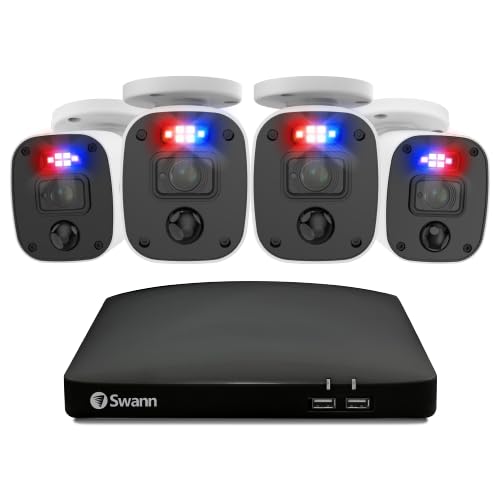
Billede: Overview of the Swann DVR8-4685 2K Security System components, including the DVR, four bullet cameras, and various cables and accessories.
3. Opsætning
Before permanent installation, it is recommended to set up and test the system to ensure all components are functioning correctly.
3.1 Første systemtilslutning
- Tilslut kameraer til DVR: Connect each 2KMQB Bullet Camera to an available PoE port on the DVR using the provided Ethernet cables.
- Connect DVR to Router: Connect the DVR's WAN port to a spare port on your internet router using the supplied Ethernet cable.
- Connect DVR to Display: Plug one end of an HDMI cable into the HDMI port on the back of the DVR and the other end into an HDMI input on your TV or monitor.
- Tilslut mus: Plug the USB mouse into an available USB port on the rear of the DVR.
- Tænd: Connect the power adapter to the DVR and then plug the power cable into a power outlet. The system should power on and display the setup wizard on your connected screen.
Video: A quick start guide demonstrating the hardware connections for a Swann NVR security system, including connecting cameras, display, mouse, and power.
3.2 Opsætning af mobilapp
Download the Swann Security app from your device's app store (Android or iOS) to access live viewing, playback, and system controls remotely.
- Download and install the "Swann Security" app on your smartphone or tablet.
- Follow the in-app instructions to add your DVR system. This typically involves scanning a QR code on the DVR or manually entering device details.
- Når du er tilsluttet, kan du view live feeds, access recordings, and configure settings from anywhere.
4. Betjening af dit system
4.1 Live View og afspilning
Få adgang til live kamerafeeds og genindlæsview optaget footage through the connected monitor or the Swann Security mobile app. The system allows for customizable layouts to prioritize important areas.
Video: Demonstrates live viewing and playback features of a Swann security system, including customizable layouts and remote access via mobile app.
4.2 True Detect™ Motion Detection
The True Detect™ technology uses heat and motion sensors to accurately detect activity, reducing false alarms. You can adjust the motion sensitivity for each camera to suit specific areas, ensuring you receive alerts only when it truly matters.
4.3 Farve nattesyn
The 2KMQB Bullet Cameras feature color night vision, allowing you to see detailed, full-color footage even in low-light conditions, providing clearer identification than traditional black and white night vision.
4.4 Lydoptagelse
Each camera is equipped with a microphone to record audio, adding another layer of detail to your surveillance footage. This can be crucial for capturing conversations or identifying sounds associated with events.
4.5 Storage and Backup
The DVR includes a 256GB MicroSD card for local storage, capable of retaining weeks of footage. You can also configure cloud backup options for added security and accessibility of your incident videos.
5. Vedligeholdelse
- Regelmæssig rengøring: Rengør kameralinser regelmæssigt med en blød, tør kludamp klud for at sikre en klar billedkvalitet.
- Firmwareopdateringer: Check the Swann Security app or website for available firmware updates for your DVR and cameras to ensure optimal performance and security.
- Kabelinspektion: Regularly inspect all wired connections for any signs of wear or damage, especially for outdoor cameras.
- Lagerstyring: Monitor your storage usage and ensure regular backups to prevent loss of important footage.

Image: A Swann camera being sprayed with water, demonstrating its sturdy weatherproof design suitable for outdoor use.
6. Fejlfinding
- Ingen videovisning: Ensure all HDMI/VGA cables are securely connected and the display input is set correctly. Check power connections for both the DVR and cameras.
- Ingen internetforbindelse: Verify the Ethernet cable from the DVR to your router is connected. Check your router's internet status.
- Falske bevægelsesadvarsler: Adjust the motion sensitivity settings for individual cameras via the DVR interface or mobile app. Ensure detection zones are configured to avoid irrelevant areas.
- Dårlig billedkvalitet: Clean camera lenses. Check cable connections for any damage or loose fittings. Ensure cameras are positioned correctly for optimal lighting.
- Problemer med fjernadgang: Confirm your mobile device has a stable internet connection. Verify the DVR is connected to the internet and the Swann Security app is updated to the latest version.
7. Specifikationer
| Feature | Detalje |
|---|---|
| Mærke | Swann |
| Modelnummer | DVK-8468542KMQB |
| Videooptagelsesopløsning | 1440p (2K) |
| Forbindelsesteknologi | Kablet |
| Strømkilde | Elektrisk med ledning |
| Kompatible enheder | Personlig computer, smartphone, tablet |
| Alert Type | Motion Only (True Detect™) |
| Kontrolmetode | Stemme |
| Opbevaring | 256 GB MicroSD-kort (inkluderet) |
| Varedimensioner (L x B x H) | 2.5 x 9.06 x 9.06 tommer |
| Installationsmetode | Indskruning |
8. Garanti og support
For warranty information and technical support, please refer to the official Swann webwebstedet eller kontakt deres kundeservice. Gem din købsbevis til eventuelle garantikrav.
Online support: Besøg www.swann.com for ofte stillede spørgsmål, fejlfindingsvejledninger og softwaredownloads.