
Indledning
This manual provides detailed instructions for the Reshow Portable Cassette Player and USB MP3 Converter, Model 235002. Designed for both nostalgia and practicality, this device allows you to play classic stereo cassettes, record audio, and convert your old tapes into digital MP3 format. Please read this manual thoroughly to ensure proper use and maintenance of your device.
Opsætning
Hvad er der i æsken
Kontroller venligst pakkens indhold for at sikre, at alle varer er til stede:
- Reshow Portable Cassette Player (Model 235002)
- USB-C Power/Data Cable
- Høretelefoner
- Brugermanual

Image showing the Reshow Portable Cassette Player, USB-C cable, earphones, and user manual included in the package.
Enhed overview og kontroller

Detaljeret view of the Reshow Portable Cassette Player, highlighting its various controls such as Play, Stop, Fast Forward, Rewind, Record, and ports including headphone jack, microphone input, AUX input, and USB-C port.
Tænd for enheden
Your Reshow Cassette Player can be powered in two ways:
- Batteristrøm: Insert two (2) AA batteries (not included) into the battery compartment located on the back of the device. Ensure correct polarity.
- USB Strøm: Connect the included USB-C cable to the device's USB-C port and to a 5V USB power adapter (not included) or a computer's USB port. USB power is recommended for stable performance, especially during MP3 conversion.

Tilbage view of the Reshow Portable Cassette Player, illustrating the battery compartment for two AA batteries.

Side view of the Reshow Portable Cassette Player, highlighting the USB-C port for power and data transfer, and the 3.5mm headphone jack.
Betjeningsvejledning
1. Kassetteafspilning
- Open the cassette compartment and insert a cassette tape. Close the compartment securely.
- Tryk på SPIL knappen for at starte afspilning.
- Juster lydstyrken ved hjælp af lydstyrkeknappen.
- To listen privately, connect the included headphones or any standard 3.5mm headphones to the headphone jack. The built-in speakers will automatically mute.
- Brug HURTIG FREM og SPOLE TILBAGE knapper til at navigere gennem båndet.
- Tryk på STOP knappen for at afslutte afspilningen.
A person enjoying music through the Reshow Portable Cassette Player using headphones, demonstrating private listening.
2. Lydoptagelse
The device supports recording from its built-in microphone or an external AUX source onto a blank cassette tape.
- Insert a blank cassette tape into the compartment.
- For Microphone Recording: Ensure no external AUX cable is connected. The built-in microphone will automatically activate.
- For External AUX Recording: Connect an external audio source (e.g., smartphone, CD player) to the AUX input port using an appropriate audio cable (not included).
- Tryk på OPTAGE button. The device will start recording onto the cassette.
- Tryk på STOP knappen for at afslutte optagelsen.
Note: Recording on pre-recorded cassettes will overwrite the original content. For important recordings, use new, blank cassettes.
3. Cassette to MP3 Conversion
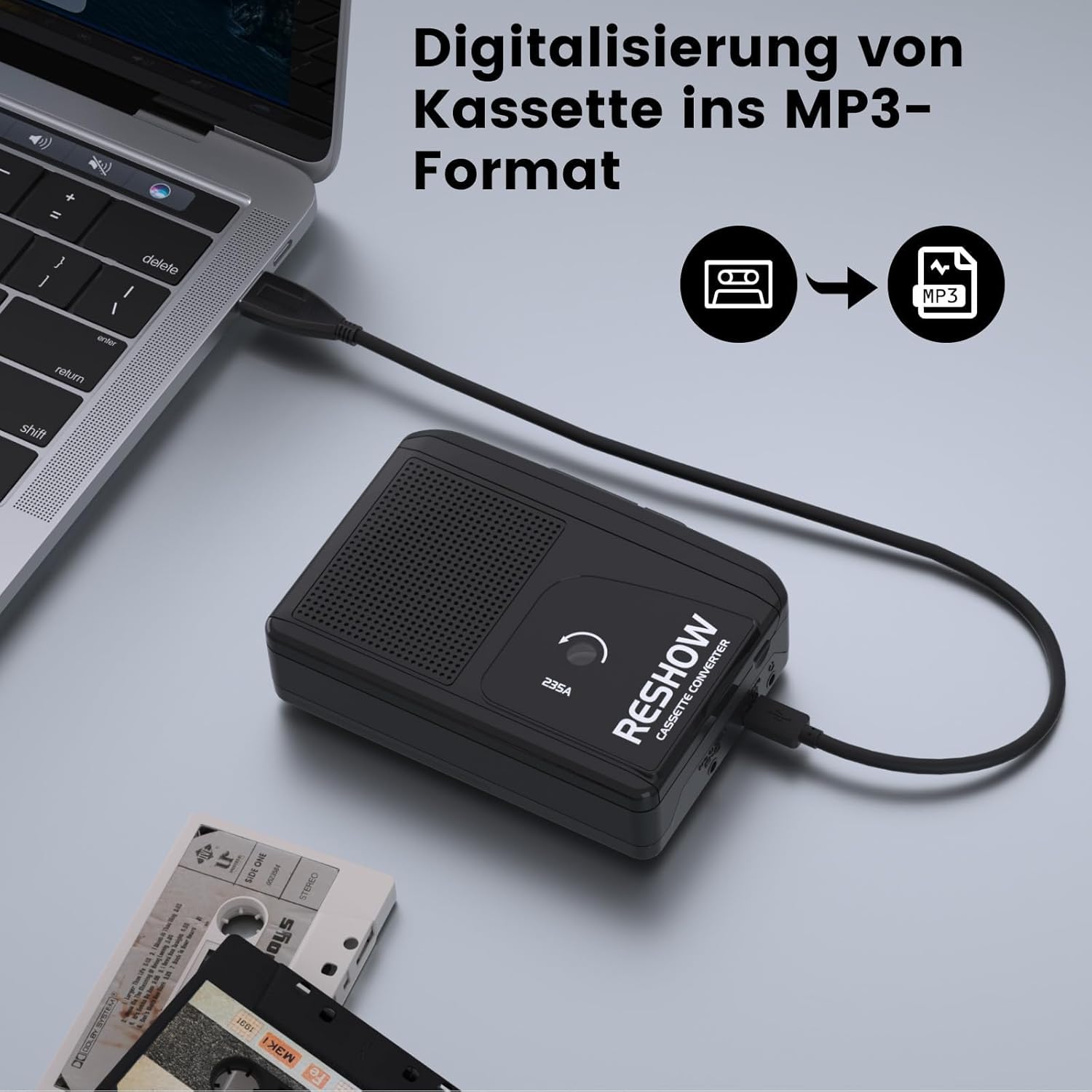
Convert your cassette tapes to digital MP3 files på din computer.
- Ensure the device is powered via the USB-C cable connected to your computer.
- Indsæt det kassettebånd, du vil konvertere.
- Connect the Reshow Cassette Player to your computer using the provided USB-C cable. The device acts as an audio input for your computer.
- Open an audio recording software on your computer (e.g., Audacity, available for free online).
- In the software, select the Reshow Cassette Player as the audio input device.
- Start recording in the software, then press the SPIL button on the cassette player.
- Once the tape has finished playing, stop the recording in the software.
- Gem den optagede lyd som en MP3 file.

The Reshow Cassette Player connected to a laptop via USB-C cable, demonstrating the setup for converting cassette audio to MP3 format.
Opretholdelse
To ensure the longevity and optimal performance of your Reshow Cassette Player, follow these maintenance guidelines:
- Rengøring af hovedet: Regularly clean the tape head and pinch rollers using a specialized cassette head cleaner. This prevents audio degradation and tape jamming.
- Tape Condition: Always use clean, undamaged cassette tapes. Worn or dirty tapes can damage the player's internal mechanisms.
- Opbevaring: Opbevar afspilleren et køligt, tørt sted væk fra direkte sollys og ekstreme temperaturer.
- Fjernelse af batteri: If the device will not be used for an extended period, remove the AA batteries to prevent leakage.
Image of a Reshow Audio Tape Head Cleaner kit, essential for maintaining the cassette player's performance and preventing tape damage.
Fejlfinding
| Problem | Mulig årsag | Løsning |
|---|---|---|
| Ingen lyd under afspilning. | Volume too low; headphones connected; tape not inserted correctly; damaged tape. | Increase volume; disconnect headphones if using speakers; re-insert tape correctly; try a different tape. |
| Forvrænget eller dårlig lydkvalitet. | Dirty tape head; worn-out tape; low battery power. | Clean the tape head; try a different tape; replace batteries or use USB power. |
| Tape jams or gets stuck. | Damaged or tangled tape; dirty pinch rollers. | Remove and inspect the tape; clean pinch rollers; avoid using damaged tapes. |
| MP3 conversion fails or is unstable. | Insufficient power; incorrect software settings. | Ensure device is powered via USB (not batteries) during conversion; verify audio input settings in your recording software. |
| Optagelsen virker ikke. | No blank tape; tape write-protect tab engaged; incorrect input source. | Insert a blank tape; ensure write-protect tab is not engaged; check microphone or AUX input connection. |
Specifikationer
- Model: 235002
- Dimensioner: 9.20 cm (længde) x 3.5 cm (bredde)
- Vægt: 330 g
- Strømindstillinger: 2 x AA batteries (not included) or 5V USB-C power (cable included)
- Porte: 3.5mm Headphone Jack, Microphone Input, AUX Input, USB-C Port
- Funktioner: Play, Stop, Fast Forward, Rewind, Record, Cassette-to-MP3 Conversion
- Indbyggede funktioner: Microphone, Speakers
Garanti og support
For any issues or questions regarding your Reshow Portable Cassette Player, please refer to the official Reshow support channels. While specific warranty details are not provided in this manual, Reshow is committed to product quality and customer satisfaction.
Besøg venligst Reshow Brand Store on Amazon for yderligere information og support.