
Indledning
This manual provides detailed instructions for the installation, operation, and maintenance of your RONGJI 13 Inch QLED Touch Screen Car Stereo. Please read this manual thoroughly before using the product to ensure proper function and safety. Keep this manual for future reference.
Sikkerhedsoplysninger
- Kontakt altid en professionel til installation for at undgå skader på enheden eller dit køretøj.
- Brug ikke enheden på en måde, der distraherer dig fra kørslen. Prioritér altid trafiksikkerhed.
- Undgå at udsætte enheden for ekstreme temperaturer, direkte sollys i længere perioder eller for høj fugtighed.
- Forsøg ikke at skille enheden ad eller ændre den. Dette kan forårsage skade og ugyldiggøre garantien.
- Sørg for, at alle ledningsforbindelser er sikre og korrekt isolerede for at forhindre kortslutninger.
Pakkens indhold
Bekræft at alle varer er til stede i pakken:
- RONGJI 13 Inch QLED Touch Screen Car Stereo Unit
- Strømkabel
- RCA-kabel
- Omvendt kabel
- USB-kabler (x2)
- 4G-antenne
- GPS antenne
- Mikrofon (MIC)
Produkt overview
The RONGJI 13 Inch QLED Touch Screen Car Stereo features an Android operating system, an 8-Core CPU, 4GB RAM, and 64GB ROM, providing a responsive and clear visual experience with its 1280*720 resolution capacitive touch screen.
Bagpaneltilslutninger
The following diagram illustrates the various ports and connections on the rear panel of the car stereo unit. Refer to this diagram for proper wiring during installation.

Image: Rear panel connections of the RONGJI car stereo. This image displays the various input and output ports on the back of the unit, including power, RCA, USB, GPS, and antenna connections.
- A: Strømkabel: Tilsluttes køretøjets strømforsyning.
- B: RCA-kabel og 4G-kortslot: For audio/video input/output and 4G SIM card insertion.
- C: 360° Panoramic Device: Connection for a 360-degree camera system.
- D: Digitalt TV KAN: For digital TV tuner connection. Use this port if your car requires a CANbus connection.
- E: 4-pin USB Cable*1: One of two USB ports for external devices.
- F: 6-pin USB Cable*1: The second USB port for external devices.
- G: Omvendt videokabel: Connects to a rear-view camera for automatic display when reversing.
- H: Radio: Antenna input for FM/AM radio reception.
- I: 5G WIFI: Internal 5G WiFi module.
- J: GPS Interface: Connects to the external GPS antenna for navigation.
- K: 4G+ Wireless Network Interface: For enhanced 4G connectivity.
- L: Cooling Fan: Integrated fan for thermal management.
- M: COAXIAL Interface: (Note: Supported only by M500-M700 models)
- N: OPTICAL Interface: (Note: Supported only by M500-M700 models)
Opsætning og installation
Køretøjskompatibilitet
Before installation, compare your vehicle's dashboard with the product images to ensure compatibility. If you are uncertain, provide a photo of your dashboard and the back of your original equipment manufacturer (OEM) radio to the seller for verification.
Ledningsforbindelser
- Strømtilslutning: Connect the power cable (A) to your vehicle's power harness. Ensure correct polarity.
- Antenneforbindelser: Connect the GPS antenna to the GPS interface (J) and the 4G antenna to the 4G+ wireless network interface (K). Connect the radio antenna to port H.
- USB-enheder: Connect any USB devices (e.g., USB drives) to the 4-pin (E) or 6-pin (F) USB cables.
- Bag View Kamera: Hvis der installeres en bag-view camera, connect its video output to the reverse video cable (G).
- RCA-forbindelser: Use the RCA cable (B) for additional audio/video input or output as needed.
- CANbus (Optional): If your vehicle requires CANbus for steering wheel controls or other functions, connect the Digital TV CAN port (D) as instructed by your vehicle's wiring diagram.
Montering af enheden
Securely mount the car stereo unit into your vehicle's dashboard opening. Ensure all cables are routed safely and do not interfere with vehicle operation.
Første gang tændt
After all connections are made and the unit is securely mounted, turn on your vehicle's ignition. The unit should power on automatically. Follow any on-screen prompts for initial setup.
Betjeningsvejledning
User Interface (UI) Display
The unit features a customizable user interface with various display options. Navigate through different screens and applications using the capacitive touch screen.

Image: UI Display Collection. This image showcases multiple user interface layouts and themes available on the car stereo, demonstrating different arrangements of apps, widgets, and navigation elements.
CarPlay og Android Auto
The car stereo supports both wireless and wired CarPlay and Android Auto. This feature allows seamless integration with your smartphone, providing access to navigation, music, calls, and messages directly from the car's display.

Image: Built-in Car-play Android Auto. This image illustrates the user interfaces of both wireless/wired CarPlay and Android Auto as displayed on the car stereo screen, showing app icons for phone, music, maps, and messages.
Bluetooth 5.0-funktion
The unit features Bluetooth 5.0 for stable and fast wireless connections. It supports hands-free calling, phone book synchronization, and audio streaming from your mobile device. The built-in microphone ensures clear call quality.

Image: Support BT 5.0 Function. This image displays the Bluetooth interface on the car stereo, showing options for phone calls, phone book access, and music streaming, along with a visual of an incoming call notification.
FM/AM radio
Access FM and AM radio stations with high-quality stereo reception. The unit supports full-automatic, semi-automatic, and manual tuning methods to find your preferred channels.
DSP Equalizer Adjustments
Utilize the built-in Digital Signal Processor (DSP) to fine-tune your audio experience. Adjust various frequency bands and sound effects to achieve optimal sound quality and a multi-dimensional surround sound experience.
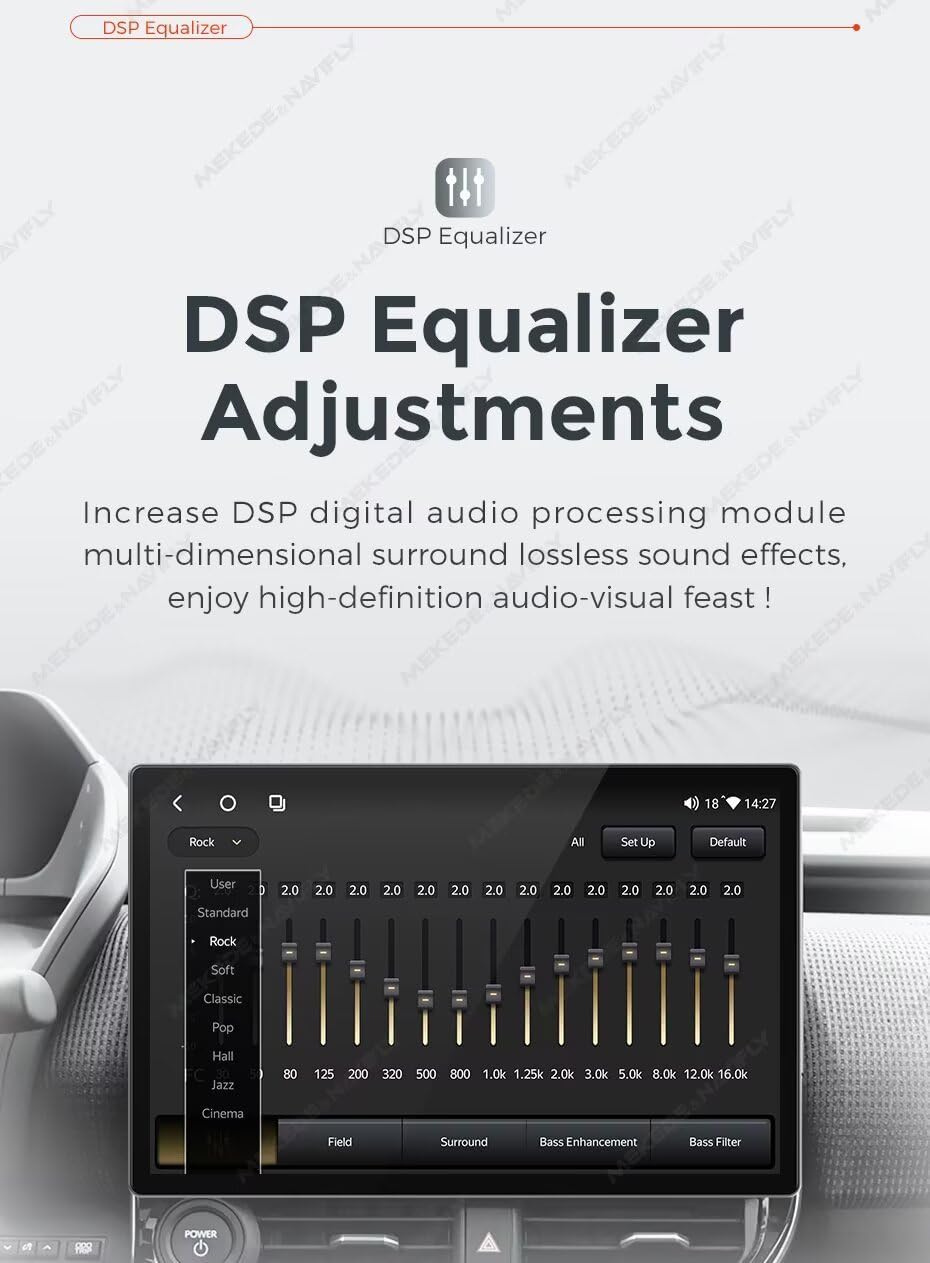
Image: DSP Equalizer Adjustments. This image shows the graphical interface of the DSP equalizer on the car stereo, with sliders for various frequency bands and preset options like Rock, Pop, Jazz, and Cinema.
GPS-navigation
The car stereo includes a built-in GPS module and an external GPS antenna for accurate navigation. You can use online maps or download offline maps for worldwide coverage, ensuring guidance even without mobile data.
Ratbetjening (SWC)
Connect your vehicle's steering wheel controls to the unit for convenient and safe operation. This allows you to manage music playback, answer calls, and adjust volume without taking your hands off the steering wheel.

Image: Steering Wheel Control. This image illustrates a hand interacting with steering wheel buttons to control music playback on the car stereo, highlighting the integration of vehicle controls with the unit.
Split Screen and Picture-in-Picture (PIP)
The split-screen function allows you to display two applications simultaneously, such as navigation and music, for enhanced multitasking. Picture-in-Picture (PIP) provides a similar capability for certain applications.

Image: Split Screen and PIP. This image demonstrates the split-screen feature on the car stereo, showing a navigation map on one side and a radio interface on the other, allowing simultaneous use of two applications.
WiFi-forbindelse
Connect the car stereo to your home WiFi network or a mobile hotspot to access online features, download applications from the app store, and receive software updates.
Opretholdelse
- Rensning: Brug en blød, tør klud til at rengøre skærmen og enhedens yderside. Undgå slibende rengøringsmidler eller opløsningsmidler.
- Softwareopdateringer: Periodically check for software updates via the WiFi connection to ensure optimal performance and access to new features.
- Temperatur: Do not leave the unit in direct sunlight or extreme temperatures for extended periods, as this can affect its lifespan.
Fejlfinding
| Problem | Mulig årsag | Løsning |
|---|---|---|
| Enheden tænder ikke | Forkert ledningsføring; Sprunget sikring; Problem med bilens strømforsyning | Kontroller strømkabelforbindelser; Undersøg køretøjets sikringer; Kontakt en professionel installatør. |
| Ingen lydudgang | Højttalerledningerne er frakoblet; Lydstyrken er for lav; Mute aktiveret | Verify speaker connections; Increase volume; Check if mute is active. |
| GPS-signal mistet eller unøjagtigt | GPS antenna obstructed or disconnected; Poor satellite reception | Sørg for, at GPS-antennen har en fri view af himlen; Kontroller antenneforbindelsen. |
| Problemer med Bluetooth-forbindelse | Device not in pairing mode; Interference; Unit's Bluetooth off | Ensure phone's Bluetooth is on and in pairing mode; Restart both devices; Clear previous pairings. |
| Berøringsskærm reagerer ikke | Softwarefejl; Skærmskade | Restart the unit; If issue persists, contact customer support. |
Specifikationer
- Mærke: RONGJI
- Model: MS-8Core 4+64GB
- Skærmstørrelse: 13 tommer
- Operativsystem: Android
- CPU: Octa Core
- Hukommelse (RAM): 4 GB
- Lager (ROM): 64 GB
- Skærmopløsning: 1280*720
- Touch Screen Type: Kapacitiv
- Skærmtype: LCD (QLED)
- Særlige funktioner: Bluetooth, Touchscreen, Wireless Android Auto, Wireless CarPlay, DSP, FM/AM Radio, GPS Navigation, Steering Wheel Control
- Forbindelse teknologi: Wireless (BT, Wi-Fi)
- Korttype: På verdensplan
- Human Interface Input: Knapper, tastatur, mus, berøringsskærm
- Kontrolmetode: Røre
- Forbindelsesprotokol: BT, Ethernet, Wi-Fi
- Fabrikant: Shenzhen Rongji Electronics Co., Ltd
Garanti og support
For garantioplysninger, teknisk support eller serviceforespørgsler henvises til garantikortet, der følger med dit produkt, eller kontakt sælgeren direkte. Behold din købskvittering som købsbevis.