
1. Introduktion
This manual provides detailed instructions for the operation and maintenance of your Bewinner Solar Powered DAB+ Radio. This versatile device combines DAB/DAB+ and FM radio reception with Bluetooth 5.0 connectivity, a 3W stereo speaker, and playback capabilities from USB drives and SD cards. Its integrated solar panel and 1200mAh battery make it suitable for home use, travel, and emergency preparedness.
2. Sikkerhedsoplysninger
- Udsæt ikke enheden for ekstreme temperaturer, direkte sollys i længere perioder (ud over opladning) eller høj luftfugtighed.
- Undgå at tabe radioen eller udsætte den for kraftige stød.
- Du må ikke selv adskille eller forsøge at reparere enheden. Overlad al service til kvalificeret personale.
- Hold enheden væk fra vand og andre væsker.
- Use only the specified charging cable and power adapter (if applicable) to prevent damage.
- Sørg for tilstrækkelig ventilation under opladning eller betjening af enheden.
3. Pakkens indhold
Tjek venligst pakken for følgende varer:
- Bewinner Solar Powered DAB+ Radio
- USB opladningskabel
- Brugervejledning (dette dokument)

Image: The Bewinner Solar Powered DAB+ Radio shown with its included USB charging cable.
4. Produktet er slutview
Familiarize yourself with the various components and controls of your radio.

Billede: Bagside view of the radio highlighting the large solar charging panel, which allows for power replenishment using sunlight.

Billede: Forside view of the radio, emphasizing the speaker grille and display. The internal strong magnetic speaker is designed to produce clear audio.
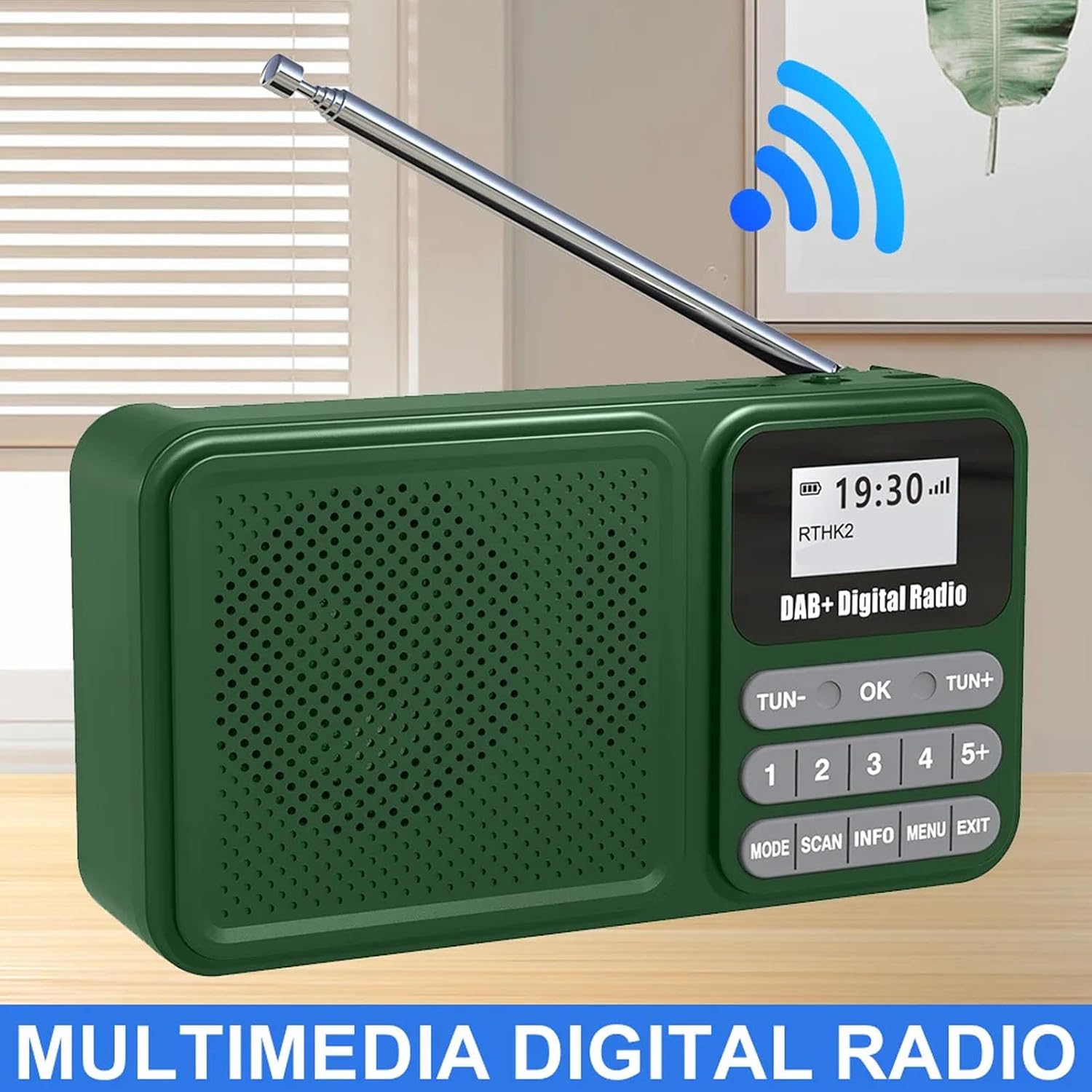
Image: A general front view of the radio with its antenna extended, showcasindens digitale display og kontrolknapper.

Image: The radio shown wirelessly connected to a smartphone via Bluetooth, demonstrating its capability as a Bluetooth speaker.

Billede: Et nærbillede view of the radio's telescopic antenna, illustrating its 360-degree rotation for optimal signal reception.

Billede: Side view of the radio, pointing out the audio jack, USB port for playback, and the Type-C interface for charging.
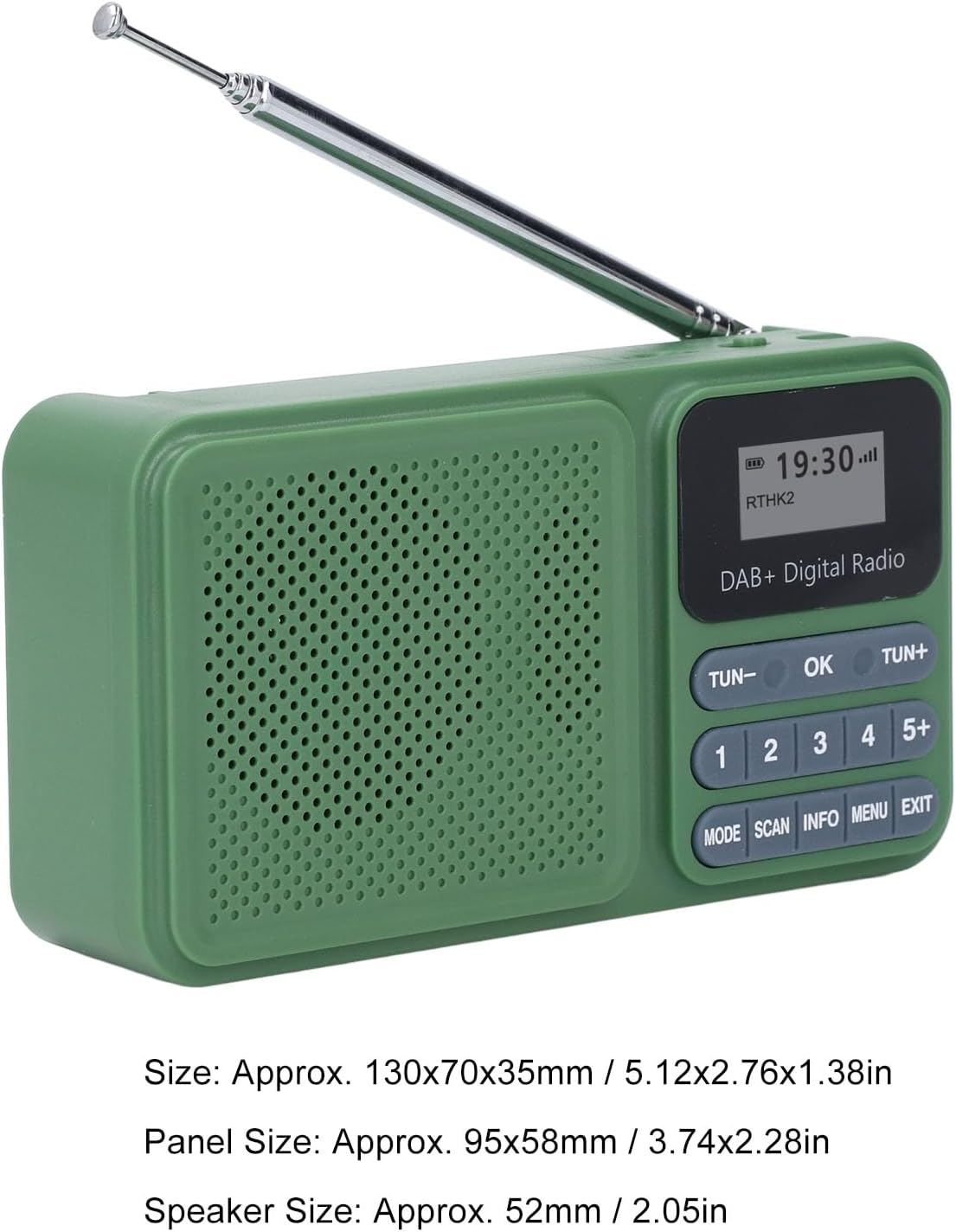
Image: The radio displayed with its approximate dimensions: 130x70x35mm (5.12x2.76x1.38 inches).
5. Opsætning
5.1 Indledende opladning
Before first use, fully charge the radio's internal 1200mAh battery. Connect the provided USB Type-C cable to the radio's Type-C port and the other end to a standard USB power adapter (not included) or a computer's USB port. The charging indicator will show the charging status. A full charge typically takes several hours.
5.2 Solopladning
For solar charging, place the radio with its solar panel facing direct sunlight. Ensure no obstructions block the panel. Solar charging is slower than USB charging and is ideal for maintaining battery life or for emergency power in outdoor settings.
Video: A short clip demonstrating the radio's solar charging capability in an outdoor environment, highlighting its portability and suitability for adventures.
5.3 Justering af antenne
Extend the telescopic antenna fully for optimal radio reception. Adjust its angle and direction for the best signal clarity, especially in DAB and FM modes.
6. Betjeningsvejledning
6.1 Tænd/sluk
To power on the radio, slide the ON/OFF skifte til ON position. The display will illuminate. To power off, slide the switch to the SLUKKET position.
6.2 Valg af tilstand
Tryk på MODE button repeatedly to cycle through available modes: DAB Radio, FM Radio, Bluetooth, USB Playback, and SD Card Playback.
6.3 DAB/DAB+ radiobetjening
- Skift til DAB-tilstand ved hjælp af MODE knap.
- Tryk på SCAN button to perform an automatic scan for available DAB/DAB+ stations. The radio will store all found stations.
- Brug TUN- or TUN+ knapperne til at navigere gennem listen over tilgængelige stationer.
- To save a station as a preset, tune to the desired station, then press and hold one of the numbered preset buttons (1-5+). The display will confirm the preset has been saved. To recall a preset, simply press the corresponding numbered button.
- Trykke INFO til view stationsoplysninger (f.eks. programtype, signalstyrke).
6.4 FM-radiofunktion
- Skift til FM-tilstand ved hjælp af MODE knap.
- Tryk og hold på SCAN button to auto-scan and save FM stations. Alternatively, short press TUN- or TUN+ for manual tuning, or press and hold for auto-scan to the next strong station.
- Saving and recalling presets works similarly to DAB mode.
6.5 Bluetooth -parring
- Skift til Bluetooth-tilstand ved hjælp af MODE button. The radio will enter pairing mode, indicated by a flashing Bluetooth icon on the display.
- Aktiver Bluetooth på din smartphone eller anden Bluetooth-enhed, og søg efter tilgængelige enheder.
- Select "Bewinner Radio" (or similar name) from the list to pair. Once paired, the radio will emit a confirmation sound, and the Bluetooth icon will stop flashing.
- Du kan nu afspille lyd fra din tilsluttede enhed via radioen.
6.6 USB/SD-kortafspilning
- Indsæt et USB-drev i USB-porten eller et SD-kort i SD-kortstikket.
- Switch to USB or SD mode using the MODE button. The radio will automatically detect and begin playing compatible audio files.
- Brug TUN- og TUN+ knapper til at springe spor over.
6.7 Lydstyrkekontrol
Adjust the volume using the rotary volume knob located on the side of the radio. Rotate clockwise to increase volume (V+) and counter-clockwise to decrease volume (V-).
7. Vedligeholdelse
- Rengør radioen med en blød, tør klud. Brug ikke slibende rengøringsmidler eller opløsningsmidler.
- Hold solpanelet rent for at sikre effektiv opladning.
- When not in use for extended periods, store the radio in a cool, dry place and charge it periodically to maintain battery health.
8. Fejlfinding
| Problem | Mulig årsag | Løsning |
|---|---|---|
| Radioen tænder ikke. | Batteriet er afladet. | Charge the radio using the USB Type-C cable or place it in direct sunlight for solar charging. |
| Dårlig radiomodtagelse. | Antennen er ikke strakt ud, eller signalet er dårligt i området. | Fully extend and adjust the telescopic antenna. Try moving to a different location with better signal. |
| Bluetooth-enheden kan ikke parres. | Radioen er ikke i parringstilstand, eller enheden er for langt væk. | Ensure the radio is in Bluetooth mode and the Bluetooth icon is flashing. Move your device closer to the radio. Restart both devices. |
| USB/SD playback not working. | Uforenelig file formatering eller kort/drev er ikke isat korrekt. | Sørg for lyd files are in a compatible format (e.g., MP3). Reinsert the USB drive or SD card. Check if the radio is in the correct playback mode. |
9. Specifikationer
| Feature | Detalje |
|---|---|
| Modelnummer | Bewinner24no1gx983 |
| Radiotilstande | DAB, DAB+, FM |
| Bluetooth version | 5.0 |
| Højttaler output | 3W stereo |
| Afspilningsmuligheder | USB Drive, SD Card |
| Forudindstillede stationer | 30 (DAB/FM combined) |
| Batterikapacitet | 1200mAh |
| Batterilevetid | Op til 8 timers kontinuerlig afspilning |
| Opladning | USB Type-C, Solar Panel |
| Produktdimensioner | 5.51 x 3.14 x 1.96 tommer (130 x 70 x 35 mm) |
| Varens vægt | 10.6 ounce |
10. Garanti og support
For warranty information and technical support, please refer to the documentation provided at the time of purchase or contact Bewinner customer service through the retailer where the product was purchased. Keep your proof of purchase for warranty claims.