
CEM DT-8807S
CEM DT-8807S Digitalt Infrarødt Termometer Brugermanual
Mærke: CEM | Model: DT-8807S
1. Introduktion og overview
The CEM DT-8807S is a versatile non-contact infrared thermometer designed for quick and accurate temperature readings. It is suitable for measuring body temperature (forehead mode) as well as surface temperatures of objects and liquids. Its intelligent features, including a multi-color LCD backlight and memory function, make it a reliable tool for various applications.
This manual provides essential information for the safe and effective use of your DT-8807S thermometer. Please read it thoroughly before operation and retain it for future reference.
2. Sikkerhedsoplysninger
- This device is intended for non-contact temperature measurement. Do not use it for purposes other than those described in this manual.
- Nedsænk ikke termometeret i vand eller andre væsker.
- Hold enheden utilgængeligt for børn og kæledyr.
- Avoid direct eye contact with the infrared sensor.
- Do not expose the thermometer to direct sunlight, extreme temperatures, or high humidity.
- Hvis enheden er beskadiget, må du ikke forsøge at reparere den selv. Kontakt kundesupport.
- Temperature readings from this device are for reference only and should not replace a medical diagnosis. Consult a healthcare professional if you have concerns about your temperature.
3. Produktfunktioner
- Ikke-kontakt måling: Reads temperature from the forehead without physical contact, reducing cross-infection risk.
- Hurtig og præcis: Equipped with advanced infrared technology for instant readings in approximately 1 second, with an accuracy of ±0.1°C (±0.5°F).
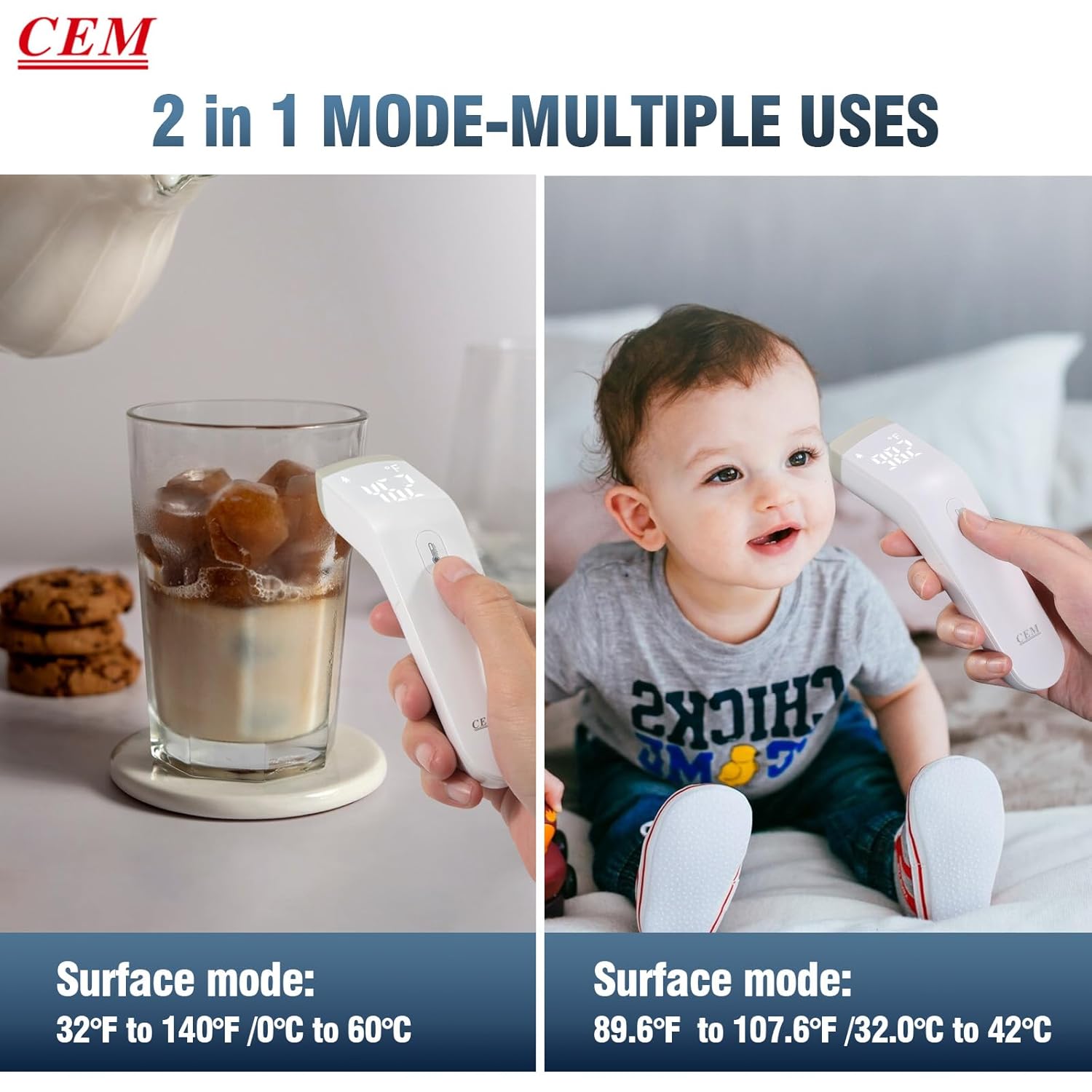
- Multifunctional 2-in-1 Mode: Designed for all ages, including adults, babies, and elders. Can measure forehead temperature (89.6°F to 107.6°F / 32.0°C to 42.0°C) and surface temperature of objects/liquids (32.0°F to 140.0°F / 0°C to 60°C).
- Intelligent Display & Alarm: Features a large, clear LCD backlight with 3 different colors indicating temperature status (normal, elevated, fever). Abnormal temperatures are accompanied by a warning sound.
- Hukommelsesfunktion: Automatically stores up to 32 sets of measurements for easy tracking of temperature changes.
- Lydløs: Option to mute the buzzer for quiet operation, ideal for sleeping infants.
- Auto-sluk: Automatically shuts off after 7 seconds of inactivity to conserve battery life.
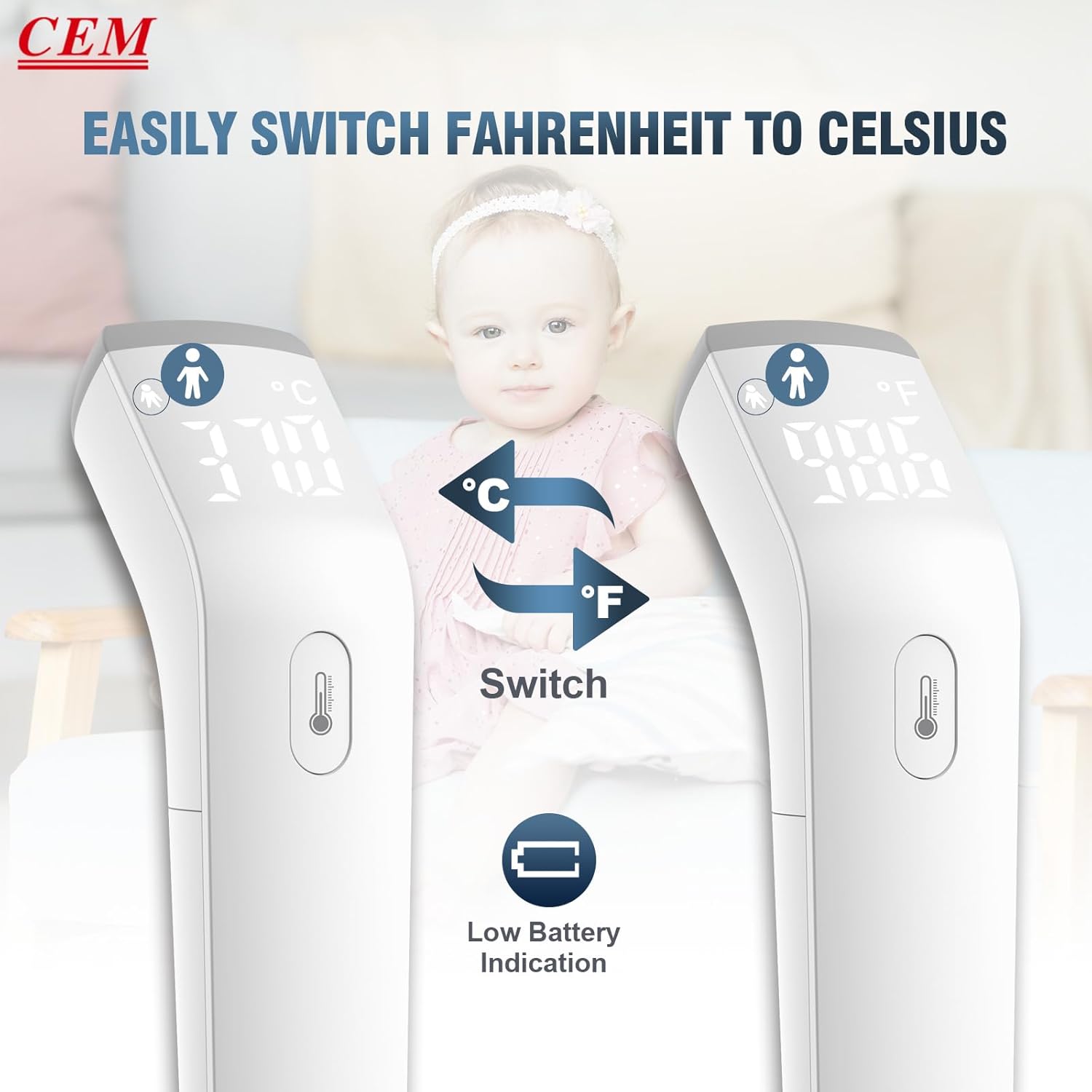
- °C/°F Kan skiftes: Skift nemt mellem enhederne Celsius og Fahrenheit.
- Ergonomisk design: 15° arc design for comfortable holding and easier measurement.
4. Komponenter og dele
Your CEM DT-8807S package includes the following items:
- CEM DT-8807S Digital Infrared Thermometer
- Instruktionsmanual
- Hurtig brugervejledning
- To 1.5V AAA batterier
- Bæretaske (kan variere afhængigt af pakken)
- Gaveæske (emballage)

Thermometer Parts Overview
- IR -sensor: Located at the front, used for detecting infrared radiation.
- Måleknap: Press to take a reading.
- LED display: Shows temperature readings, mode, and indicators.
- Batteridæksel: Placeret i bunden til isætning af batteri.

5. Opsætning
5.1 Batteriinstallation
- Locate the battery cover at the bottom of the thermometer.
- Skub batteridækslet åbent.
- Isæt to 1.5V AAA-batterier, og sørg for at polerne vender korrekt (+/-).
- Luk batteridækslet forsvarligt.
5.2 Tænd/sluk
To power on the device, simply press the measurement button. The thermometer will perform a self-test and display the last reading. The device will automatically power off after 7 seconds of inactivity.
5.3 Skift af temperaturenheder (°C/°F)
Sådan skifter du mellem Celsius (°C) og Fahrenheit (°F):
- Sørg for, at termometret er tændt.
- Locate the small button inside the battery compartment or a dedicated mode button (refer to the quick user guide for exact location if not obvious).
- Press this button to toggle between °C and °F. The display will update to show the selected unit.
6. Betjeningsvejledning
6.1 Måling af pandetemperatur (kropstilstand)
- Ensure the thermometer is in Body Mode (indicated by a person icon on the display). If not, switch modes as per the quick user guide.
- Aim the thermometer probe at the center of the forehead from a distance of less than 1.18 inches (3 cm).
- Tryk én gang på måleknappen.
- Wait for the thermometer to beep (if silent mode is off) and display the reading. The reading will appear in approximately 0.5 seconds.
- The LCD backlight color will indicate the temperature status: green for normal, orange for elevated, and red for fever (with an audible alarm).

6.2 Taking Object/Surface Temperature (Surface Mode)
- Ensure the thermometer is in Surface Mode (indicated by a house icon on the display). If not, switch modes as per the quick user guide.
- Aim the thermometer probe at the surface of the object or liquid you wish to measure.
- Tryk én gang på måleknappen.
- Aflæsningen vil blive vist på skærmen.
6.3 Forståelse af displayindikatorer
- "Lo" or "Hi": Indicates the measured temperature is outside the device's operating range for the selected mode. For body temperature, "Lo" means below 95°F (35.0°C) and "Hi" means above 107.6°F (42.0°C).
- Symbol for lavt batteri: A battery icon will appear on the display when the battery level is low, indicating it's time to replace the batteries.


6.4 Hukommelsesfunktion
The thermometer automatically stores the last 32 temperature readings. To access the memory, refer to the specific instructions in your Quick User Guide, as the method may vary slightly.

6.5 Officiel produktvideo
Video 6.1: This official video from CEM Instrument demonstrates the features and usage of the DT-8807S No-Touch Forehead Thermometer, including body and surface temperature measurement.
7. Vedligeholdelse og pleje
- Rensning: Wipe the thermometer clean with a soft, dry cloth. For disinfection, use an alcohol swab (70% isopropyl alcohol) and gently wipe the surface, especially the sensor area. Do not use abrasive cleaners or immerse the device in water.
- Opbevaring: Store the thermometer in a cool, dry place away from direct sunlight, extreme temperatures, and high humidity. Keep it in its carrying case when not in use to protect the sensor.
- Udskiftning af batteri: Replace batteries promptly when the low battery indicator appears to ensure accurate readings and proper device function. Dispose of used batteries according to local regulations.
8. Fejlfinding
| Problem | Mulig årsag | Løsning |
|---|---|---|
| No power / Device does not turn on | Døde eller forkert installerede batterier. | Kontroller batteripolariteten. Udskift med nye AAA-batterier. |
| "Lo" eller "Hi" vises | Temperature is outside the measurement range for the selected mode. | Ensure you are measuring within the specified range for body (89.6-107.6°F) or surface (32-140°F) modes. Ensure proper distance and aim. |
| Unøjagtige aflæsninger | Improper measurement distance or angle; environmental factors (drafts, direct sunlight); dirty sensor; recent activity (exercise, bathing). | Ensure correct distance (less than 3 cm) and aim. Measure in a stable environment. Clean the sensor. Wait 15-30 minutes after activity before measuring body temperature. |
| No sound / Buzzer not working | Lydløs tilstand er aktiveret. | Refer to the Quick User Guide to deactivate silent mode. |
9. Specifikationer
- Model: DT-8807S
- Skærmtype: Digital LCD med baggrundsbelysning
- Forbindelse teknologi: Infrarød
- Body Temperature Range: 89.6°F til 107.6°F (32.0°C til 42.0°C)
- Surface Temperature Range: 32.0°F til 140.0°F (0°C til 60°C)
- Nøjagtighed: ±0.1°C / ±0.5°F (Basic accuracy)
- Måletid: Cirka 0.5 sekunder
- Hukommelseslagring: 32 sæt målinger
- Strømkilde: 2 x 1.5V AAA batterier
- Auto-sluk: Ja, efter 7 sekunders inaktivitet
- Materiale: Plast
- Dimensioner (pakke): 7.68 x 3.54 x 2.64 tommer
- Vægt (pakke): 5.61 ounce
- Fabrikant: SHENZHEN EVERBEST MACHINERY INDUSTRY CO.,LTD
- Oprindelsesland: Kina
- Certificeringer: FDA, CE (as per product title)
10. Garanti og support
For warranty information and customer support, please refer to the documentation included with your product or visit the official CEM webwebsted. Gem din købskvittering som købsbevis i tilfælde af garantikrav.
If you encounter any issues not covered in this manual, please contact CEM customer service for assistance.