
Indledning
This manual provides essential instructions for the safe and efficient use of your G-TiDE Smartwatch S6 PRO. Please read this manual thoroughly before using the device to ensure proper operation and to understand its features and functions. Keep this manual for future reference.
Produkt overview
The G-TiDE Smartwatch S6 PRO is designed to integrate seamlessly into your daily life, offering advanced features for communication, health monitoring, and personal assistance. It features a vibrant AMOLED display and a durable design.
Pakkens indhold
- G-TiDE Smartwatch S6 PRO
- Magnetisk opladningskabel
- Interchangeable Silicone Strap (22mm)
- Additional Interchangeable Straps (Total of three straps included)
- Brugervejledning (dette dokument)
Enhedskomponenter
Familiarize yourself with the main components of your smartwatch:

Billede: Forside view of the G-TiDE Smartwatch S6 PRO, displaying the AMOLED screen with a digital watch face showing time, date, weather, heart rate, and other metrics. The watch has a silver-colored casing and a green strap.
- AMOLED Touchscreen Display: 1.95-inch, 466 x 466 pixel resolution for clear visuals and interactive control.
- Funktionelle knapper: Two physical buttons on the side for navigation and quick access to features.
- Pulssensor: Placeret på bagsiden for kontinuerlig pulsmåling.
- Opladningskontakter: Magnetiske kontakter på bagsiden til opladning.
- Højttaler og mikrofon: For calls and voice functions.
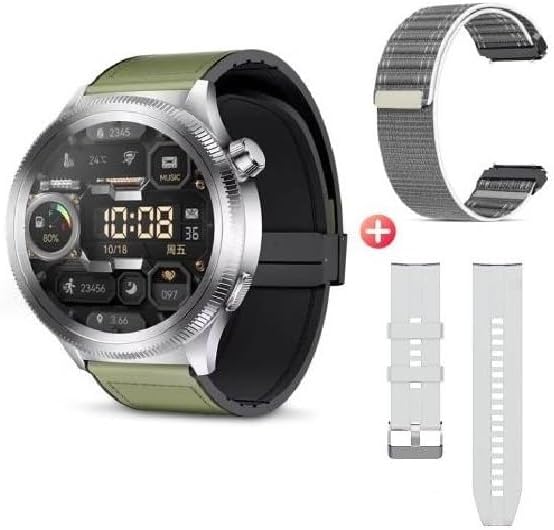
Image: The G-TiDE Smartwatch S6 PRO shown alongside two additional interchangeable straps. The watch itself has a green strap, and a grey fabric strap and a white silicone strap are displayed separately, highlighting the customization options.
Opsætning
1. Opladning af smartwatchet
Oplad dit smartwatch helt før første brug. Tilslut det magnetiske opladningskabel til opladningskontakterne på bagsiden af uret, og sæt USB-enden i en strømadapter (medfølger ikke) eller en computers USB-port.
- En fuld opladning tager typisk cirka 2 timer.
- Urets display vil vise opladningsstatus.
- Vigtig: Do not charge the watch if it is wet. Ensure the charging contacts are dry before connecting the charger.
2. App Installation (Wearfit Pro)
To unlock the full functionality of your G-TiDE Smartwatch S6 PRO, you need to install the Wearfit Pro application on your smartphone.
- Scan the QR code provided in the watch's packaging or search for "Wearfit Pro" in your smartphone's app store (Google Play Store for Android, Apple App Store for iOS).
- Download og installer applikationen.
- Ensure your smartphone meets the compatibility requirements: iOS 9.0 or higher, or Android 4.4 or higher.
3. Parring med din smartphone
After installing the Wearfit Pro app, follow these steps to pair your smartwatch:
- Aktiver Bluetooth på din smartphone.
- Open the Wearfit Pro app and create an account or log in.
- Følg instruktionerne i appen for at tilføje en ny enhed. Appen vil søge efter tilgængelige smartwatches.
- Select "S6 PRO" or the corresponding device name from the list.
- Bekræft parringsanmodningen på både din smartphone og smartwatch.
- Når den er parret, synkroniserer appen data med dit ur.
Betjeningsvejledning
Grundlæggende navigation
- Touchskærm: Stryg til venstre, højre, op eller ned for at navigere gennem menuer og funktioner. Tryk for at vælge et element.
- Funktionelle knapper: Use the physical buttons for specific actions, such as returning to the home screen or accessing the app menu.
- Vækningsskærm: Lift your hand to automatically turn on the screen (motion sensor feature).
- Menu-stilarter: The watch supports 6 fluid menu styles; customize this in settings.
Opkald og notifikationer
- Foretage/besvare opkald: Once paired, you can make and answer calls directly from your smartwatch. Ensure Bluetooth calling is enabled in the Wearfit Pro app.
- Kontaktsynkronisering: Synchronize contacts from your smartphone to the watch via the Wearfit Pro app.
- Notifikationer på sociale medier: Receive notifications from apps like Facebook, WhatsApp, and Instagram directly on your watch. Enable specific app notifications in the Wearfit Pro app settings.
Sundhedsovervågning
The G-TiDE Smartwatch S6 PRO offers comprehensive health tracking features:
- Pulsmåling (HR): Continuous 24/7 tracking of your heart rate. View real-time data on the watch or detailed history in the Wearfit Pro app.
- Overvågning af blodilt (SpO2): Mål dit iltniveau i blodet.
- Åndedrætsøvelser: Guided breathing exercises to help manage stress and improve relaxation.
- Søvnsporing: Overvåger dine søvnmønstre, herunder dyb søvn, let søvn og vågnetider.
Sportstilstande
Select from various sport modes to track your workouts accurately:
- Available modes include Walking, Running, Cycling, Mountaineering, Basketball, Football, and more.
- During a workout, the watch tracks metrics such as distance, steps, heart rate, and calories burned.
AI Features (Wearfit Pro App Dependent)
- Real-time Translator: Translate words and sentences directly from your watch.
- AI Chat (Wearfit GPT): Interact with an advanced AI assistant.
- Generering af AI-urskiver: Describe your desired watch face, and the AI can generate it.
Andre funktioner
- Musiklagring og -kontrol: Store your favorite songs on the watch and control music playback from your smartphone.
- E-book Storage: Carry electronic books on your smartwatch for convenient access.
- Stemmeoptager: Record audio directly from your watch.
- Fjernbetjening til kameraet: Styr din smartphones kamera på afstand.
- Timer & Chronograph: Indbyggede tidsfunktioner.
- Lommeregner: Udfør grundlæggende beregninger.
- Alarm: Indstil alarmer direkte på uret.
- Find telefon: Locate your smartphone by triggering an alarm from your watch.
- Spil: Includes two pre-installed games.
Opretholdelse
Rensning
- Tør urets skærm og kabinet af med en blød, fnugfri klud.
- Til genstridige pletter, let dampSkyl kluden med vand. Undgå skrappe kemikalier eller slibende materialer.
- Clean the charging contacts regularly to ensure proper connection.
Vandtæthed (IP67)
The G-TiDE Smartwatch S6 PRO has an IP67 water resistance rating. This means it is protected against dust ingress and can withstand immersion in water up to 1 meter for 30 minutes.
- It is suitable for daily use and can withstand splashes, rain, and brief immersion.
- Vigtig: It is not recommended for swimming, showering with hot water, or prolonged immersion. Do not expose to salt water or chlorinated water.
- Ensure the watch is completely dry before charging.
Batteripleje
- Undgå at aflade batteriet helt ofte.
- Charge the watch using the provided magnetic cable.
- Opbevar uret et køligt og tørt sted, når det ikke er i brug i længere perioder.
Fejlfinding
Uret tænder ikke
- Sørg for, at uret er fuldt opladet. Tilslut det til opladeren i mindst 30 minutter.
- Tryk og hold tænd/sluk-knappen nede i flere sekunder.
Kan ikke parres med smartphone
- Sørg for, at Bluetooth er aktiveret på din smartphone.
- Make sure the Wearfit Pro app is open and searching for devices.
- Bring the watch and smartphone closer together.
- Genstart både uret og din smartphone.
- Tjek om uret allerede er parret med en anden enhed. Afbryd forbindelsen om nødvendigt.
Notifikationer vises ikke
- Verify that the watch is successfully paired with your smartphone.
- Check notification settings within the Wearfit Pro app and your smartphone's system settings to ensure permissions are granted.
- Ensure the Wearfit Pro app is running in the background.
Unøjagtige sundhedsdata
- Sørg for, at uret sidder tæt på dit håndled, hverken for stramt eller for løst.
- Rengør sensoren på bagsiden af uret.
- Miljøfaktorer og individuel fysiologi kan påvirke sensorens nøjagtighed.
Specifikationer
| Model | S6 PRO |
| Vise | 1.95-inch AMOLED Touchscreen |
| Opløsning | 466 x 466 pixels |
| Lagerkapacitet | 128 MB |
| Batterikapacitet | 300 mAh |
| Gennemsnitlig batterilevetid | Op til 4.5 dage (typisk brug) |
| Forbindelse | Bluetooth |
| Vandmodstand | IP67 |
| Kompatibilitet | Android 4.4+ / iOS 9.0+ |
Garanti og support
For warranty information and customer support, please refer to the warranty card included with your product or visit the official G-TiDE website. You can also contact G-TiDE customer service through the Wearfit Pro app or the contact details provided on the brand's official channels.
Online support: Visit the G-TiDE Store on Amazon