
1. Introduktion
This manual provides comprehensive instructions for the installation, operation, and maintenance of the Black Box Emerald Single Head HD EMD-SE DP Receiver, model EMD2000SE-DP-R. This device is designed to extend DisplayPort video, USB, and audio signals over a network, facilitating remote access to computers.
Please read this manual thoroughly before operating the device to ensure proper setup and functionality. Retain this manual for future reference.
2. Sikkerhedsoplysninger
Overhold følgende sikkerhedsforanstaltninger for at forhindre skader på enheden og sikre brugerens sikkerhed:
- Strømforsyning: Use only the power adapter supplied with the unit. Ensure the power source matches the voltage krav.
- Ventilation: Bloker ikke ventilationsåbningerne. Sørg for tilstrækkelig luftgennemstrømning omkring enheden for at forhindre overophedning.
- Miljø: Avoid exposing the device to moisture, extreme temperatures, or direct sunlight. Operate in a clean, dry environment.
- Service: Forsøg ikke selv at åbne eller servicere enheden. Overlad al service til kvalificeret personale.
- Kabler: Sørg for, at alle kabler er korrekt tilsluttet og ikke er klemt eller beskadiget.
3. Produktet er slutview
The Black Box Emerald Single Head HD EMD-SE DP Receiver is a compact device designed for high-definition DisplayPort video extension, along with USB and audio. It allows users to access a remote computer with minimal latency, making it suitable for various professional applications.
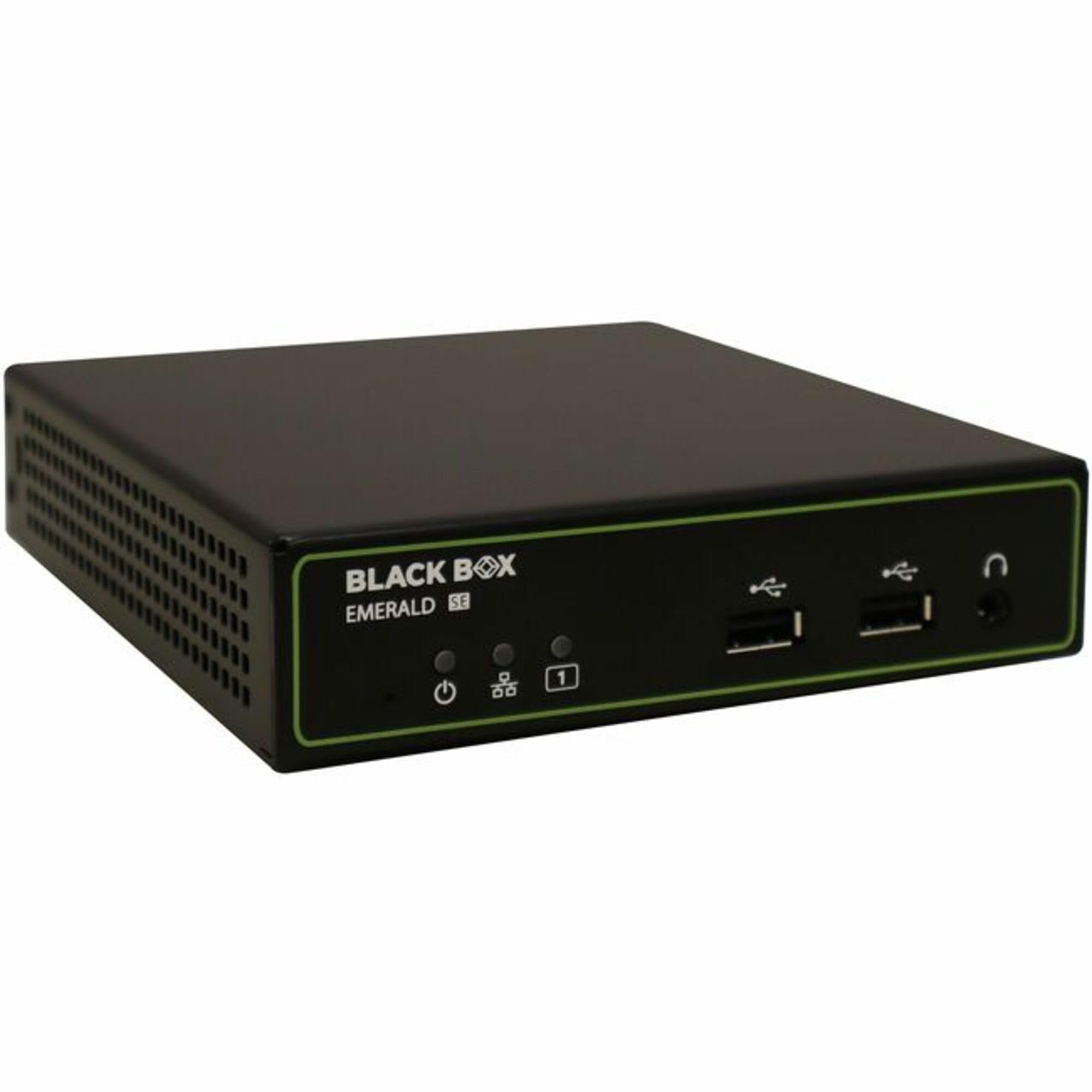
Figur 3.1: Front view of the Black Box Emerald Single Head HD EMD-SE DP Receiver. The front panel features the Black Box Emerald SE logo, power indicator, power button, two USB ports, and a headphone jack.
Nøglefunktioner omfatter:
- Single-head DisplayPort video support.
- USB connectivity for peripherals.
- Audio input/output support.
- Compact and robust design.
4. Opsætning
Follow these steps to set up your EMD2000SE-DP-R Receiver:
- Pak enheden ud: Carefully remove the receiver from its packaging. Verify that all components are present: the EMD2000SE-DP-R receiver unit, power adapter, and any included cables.
- Tilslut videokabel: Connect a DisplayPort cable from your monitor to the DisplayPort output port on the receiver.
- Tilslut USB-tilbehør: Connect your USB keyboard, mouse, or other USB devices to the USB ports on the receiver.
- Tilslut lydenheder: If using external speakers or headphones, connect them to the audio output jack on the receiver.
- Netværks forbindelse: Connect an Ethernet cable from your network switch or router to the network port on the receiver. Ensure the network is configured for Emerald system operation.
- Tilslut strøm: Connect the supplied power adapter to the receiver's power input port, then plug the adapter into a power outlet. The power indicator LED should illuminate.
- Tænd: Press the power button on the front panel to turn on the receiver.
5. Betjening
Once the receiver is set up and powered on, it will attempt to establish a connection with a compatible Emerald transmitter unit over the network. The status indicators on the front panel will provide feedback on the connection status.
- Etablering af forbindelse: The receiver will automatically detect and connect to an available Emerald transmitter. This process may take a few moments.
- Display output: Once connected, the video signal from the remote computer will be displayed on the connected monitor.
- USB kontrol: Your connected USB keyboard and mouse will control the remote computer.
- Lyd: Audio from the remote computer will be routed to the connected audio devices.
- Kontrol på frontpanelet: The front panel may include buttons or indicators for power, link status, and other functions. Refer to the specific icons for their functions.
6. Vedligeholdelse
Regular maintenance helps ensure the longevity and optimal performance of your receiver.
- Rensning: Use a soft, dry cloth to clean the exterior of the unit. Do not use liquid cleaners or aerosols, as they may damage the components.
- Ventilation: Periodically check that the ventilation openings are free from dust and obstructions.
- Kabelstyring: Ensure all cables are neatly organized and not under strain, which can lead to damage over time.
- Firmwareopdateringer: Check the Black Box website periodically for firmware updates. Follow the instructions provided with the update package for installation.
7. Fejlfinding
If you encounter issues with your EMD2000SE-DP-R Receiver, refer to the following common problems and solutions:
| Problem | Mulig årsag | Løsning |
|---|---|---|
| Ingen videoudgang |
|
|
| USB devices not responding |
|
|
| Ingen lydudgang |
|
|
If the problem persists after attempting these solutions, contact Black Box technical support for further assistance.
8. Specifikationer
The following table details the technical specifications for the Black Box Emerald Single Head HD EMD-SE DP Receiver (EMD2000SE-DP-R).
| Feature | Detalje |
|---|---|
| Modelnummer | EMD2000SE-DP-R |
| Mærke | Black Box |
| Forbindelsesteknologi | HDMI (Note: Product title indicates DisplayPort functionality. Please refer to product documentation for full compatibility details.) |
| Connector Type | HDMI |
| Total HDMI-porte | 1 |
| Controller type | Mekanisk knap |
| Kompatible enheder | Speaker, Tablet, Amplifier, Smartphone, Television, Personal Computer, Game Console |
| Lydudgangstilstand | Stereo, Surround |
| Surround Sound Kanalkonfiguration | 5.1 |
| Antal kanaler | 2 |
| Varens vægt | 1.5 pund (0.68 kg) |
| Pakkedimensioner | 10 x 7 x 3 tommer (25.4 x 17.8 x 7.6 cm) |
| Dato først tilgængelig | 17. maj 2025 |
| Fabrikant | Black Box |
9. Garanti og support
Black Box products are designed for reliability and performance. For information regarding warranty coverage, please refer to the warranty statement included with your product or visit the official Black Box webwebsted.
For technical assistance, troubleshooting, or product inquiries, please contact Black Box technical support. Contact details can typically be found on the Black Box webwebstedet eller i din produkts emballage.
Online ressourcer: www.blackbox.com